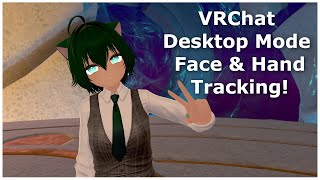

VRChat Desktop Gets Face Tracking!
45sReveals a surprising new feature that makes VRChat accessible without a VR headset, sparking curiosity and debate.
▶ Play Clip"The title accurately describes the feature—webcam tracking for desktop mode—and the video delivers exactly that."
VRChat has introduced a new feature in its Open Beta that allows desktop users to use webcam-based expression tracking. This includes head, hand, and gesture tracking, turning VRChat into a native Vtuber app. The feature works with any avatar and is available to VRChat Plus subscribers.
Desktop users can now use webcam-based expression tracking in VRChat Open Beta.
The feature works with any avatar, no special blend shapes required.
Webcam tracking is less accurate than headset-based tracking but is free and accessible.
There is noticeable latency for hand tracking, and glasses can affect accuracy.
To enable, go to menu > large settings > Tracking IK > enable stealth expression.
What is required to use the desktop expression tracking feature?
VRChat Plus subscription.
00:15
How is the expression tracking done for desktop users?
Through a webcam.
00:15
What three types of tracking does the desktop mode provide?
Head tracking, hand and gesture tracking, and expressions.
00:47
How does desktop mode face tracking differ from headset-based face tracking?
It uses default blend shapes and manipulates the face through them.
01:16
What are the main limitations of webcam-based tracking?
It is not as accurate and has noticeable latency for hand tracking.
01:41
What are the steps to enable desktop expression tracking?
Open your menu, go to large settings, then Tracking IK, and enable stealth expression.
02:36
Desktop Expression Tracking via Webcam
This is a new feature that allows desktop users to have face, head, and hand tracking without a VR headset.
00:15Works with Any Avatar
The feature does not require special blend shapes, making it universally compatible.
00:32Comparison with Headset Tracking
Webcam tracking is less accurate than dedicated face-tracking headsets but is free and accessible.
01:02How to Enable the Feature
Clear step-by-step instructions for users to activate the tracking in settings.
02:36[00:00] So, Vierchad just did something that I was not expecting. I'm currently not using a headset with face tracking. I'm also not even using a Vier headset at all. In the Open Beta for Vierchad right now, if you have Vierchad Plus, there's now an option
[00:15] for desktop users to have expression tracking, which is done through your webcam. So everything right now with the somewhat face tracking, with the head tracking and even the hand tracking that has gesture tracking is all just done on desktop mode with my webcam.
[00:32] So Vierchad pretty much just turned itself into a native Vtuber app, and this works with any avatar. So while this is still in Open Beta and anyone can go use it by just enabling Open Beta on the Steam library, this is kind of an early look of what we'll be getting of Vierchad
[00:47] very soon. So now for any avatar, it doesn't have to be one that has special blend shapes. If you're on desktop mode, then you can just enable this mode in the settings, and through your webcam, you will now have the ability to have head tracking, hand and gesture tracking,
[01:02] and expressions. And it's kind of neat to see stuff like this be added to the game. Add of course, it's not as advanced or as accurate as face tracking through a headset with face tracking, like the Quest Pro, Viproi, or a do-it-yourself system.
[01:16] As well, the avatars are still different, whereas the desktop mode face tracking is using the default blend shapes, and nippling the face through that, whereas the purpose built face tracking avatar for headset with face tracking will usually have a lot more blend shapes
[01:28] that customize certain expressions to track your face better. But then again, we are also comparing the difference between a very expensive headset with an avatar that's probably going to be expensive compared to a free option for desktop mode with avatars
[01:41] that you don't need to customize at all. Now since it is using a webcam, it isn't the most accurate, and there is some noticeable latency for things like the hand tracking. But it's a lot better than what desktop users had before. The ad tracking is also a little bit not the greatest, partially because I'm wearing glasses,
[01:56] but again, it's a webcam. So it can track your eye blinking a little bit of the mouth. And just having the head tracking is a lot for desktop users, and there is an option on there for it to automatically select the best tracking method that I found that when I had
[02:11] that enabled, it was kind of hitching whenever it would change up, whenever it would change tracking modes. So personally, just at least with this beta, I just turn that off and select whichever version seems to be the best for my system.
[02:23] So if we just like moving over here or something, so I'm not looking at the mirror, yeah. So we got our little hand tracking thing, and it seems to work.
[02:36] So you can actually now in desktop mode, finally, say hi. So yeah, it just adds a whole lot of layer to desktop mode. So to turn it on, all you have to do is open up your menu, go to the large settings option,
[02:49] and then in tracking IK down at the bottom here, at the top of that panel, then there's the option here to enable stealth expression. You just turn it on, and then it just works.
⚡ Saved you 0h 03m reading this? Transcribe any YouTube video for free — no signup needed.