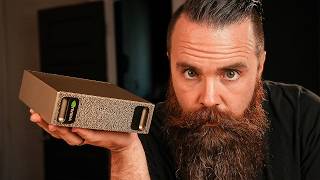

This AI Supercomputer Fits in Your Hand!
51sThe visual contrast between a massive original DGX and a palm-sized device sparks awe and curiosity.
▶ Play Clip"The title is accurate; the video delivers a thorough review of a desk-sized AI supercomputer, though it includes sponsor segments and some filler."
The video reviews the NVIDIA DGX Spark, a compact AI supercomputer designed for local AI workloads. The host compares it to his custom-built dual RTX 4090 server, 'Terry', testing inference, image generation, and training performance. He highlights the Spark's unified memory, FP4 hardware support, and developer-friendly features, concluding that while it may not beat his server in raw speed, it offers unique advantages for developers and fine-tuning tasks.
The NVIDIA DGX Spark is a palm-sized AI supercomputer that can run AI models that the host's dual 4090s cannot. It is positioned as an affordable AI server for local AI.
The Spark is compared to the original DGX1, showing a dramatic reduction in size, highlighting the progress in AI hardware.
The Spark features a GB10 Grace Blackwell superchip with a 20-core ARM processor, Blackwell GPU with 1 petaflop of AI compute, 128GB of unified LPDDR5X memory, and a 10GbE port. It can run models up to 200 billion parameters and costs around $4,000.
In a test with Qwen 38B, Terry (dual 4090 server) achieved 132 tokens per second, while the Spark (Larry) only managed 36 tokens per second, showing Terry's superiority in inference speed.
NVIDIA explained that for inference, the dual 4090s are expected to outperform the Spark. The Spark's advantages lie elsewhere, such as unified memory and FP4 support.
The Spark has 128GB of unified memory shared between CPU and GPU, allowing the GPU to use all 128GB. This enables running multiple models simultaneously, as demonstrated with a multi-agent system using 89GB.
In ComfyUI, Terry generated images at 11 iterations per second, while the Spark managed only 1 iteration per second, showing Terry's dominance in image generation speed.
For training, Terry was about 3x faster than the Spark on a small model. However, the Spark's larger memory allows it to train larger models that Terry cannot fit.
The Spark is ideal for AI developers who need to fine-tune models locally without renting cloud GPUs. Its unified memory enables training larger models.
The Spark can be used as a standalone Ubuntu machine or accessed via NVIDIA Sync, which simplifies SSH setup and integrates with tools like Cursor and VS Code.
The Spark has dedicated hardware for FP4 quantization, allowing it to run quantized models with near-FP8 quality. This enables speculative decoding, which uses a small model to draft tokens and a larger model to verify, improving speed.
The Spark costs $3,999 (Founders Edition) and draws 240W, while Terry cost over $5,000 and draws 1100W. Annual power cost for the Spark is ~$315 vs ~$1,400 for Terry.
Competitors like Beink with AMD AI chips offer similar specs but lack NVIDIA's optimized FP4 hardware and mature software ecosystem.
The host concludes that for his needs (high inference speed), the Spark is not ideal, but for developers focused on fine-tuning and multi-agent workloads, it's a compelling option that can pay for itself versus cloud GPU rentals.
The NVIDIA DGX Spark is a powerful, compact AI workstation that excels in memory capacity and FP4-optimized performance, making it a great choice for developers who need to fine-tune models locally. However, for users prioritizing raw inference speed, a dual-GPU setup like Terry remains superior.
What is the NVIDIA DGX Spark?
A palm-sized AI supercomputer with a GB10 Grace Blackwell superchip, 128GB unified memory, and 1 petaflop of AI compute.
01:06
How much unified memory does the DGX Spark have?
128GB of LPDDR5X unified memory.
01:06
What is the maximum model size the DGX Spark can run?
Up to 200 billion parameter models.
01:21
What is the cost of the DGX Spark Founders Edition?
$3,999.
15:28
What is the power consumption of the DGX Spark?
240 watts.
16:10
What is speculative decoding?
A technique that uses a small model to draft several tokens ahead, then a larger model verifies them, reducing latency.
14:23
Why is the DGX Spark better for training than Terry?
It has 128GB of unified memory, allowing it to load and train larger models that Terry's 48GB VRAM cannot fit.
08:54
What is FP4 quantization?
A method to reduce model size by using 4-bit precision, making models easier to run on smaller devices.
12:47
What is the annual power cost of running the DGX Spark 24/7?
Approximately $315.
15:56
What is the inference speed difference between Terry and the Spark on Qwen 38B?
Terry achieved 132 tokens per second, while the Spark achieved 36 tokens per second.
01:51
What is the purpose of the QSFP port on the DGX Spark?
It allows connecting another Spark for high-speed GPU-to-GPU communication using NCCL.
18:10
DGX Spark specs revealed
Provides concrete hardware details that define the device's capabilities.
01:06Unified memory advantage
Explains why unified memory is crucial for running multiple AI models simultaneously.
03:27FP4 hardware support
Highlights a key differentiator from consumer GPUs, enabling efficient quantized model inference.
12:47Speculative decoding explained
Introduces a technique that improves inference speed using two models, leveraging the Spark's memory.
14:23Cost and power comparison
Quantifies the operational cost advantage of the Spark over a dual-GPU server.
15:56[00:02] talk about it. This AI supercomputer fits in the palm of my hand and it runs AI models my dual 4D90s can't. This is a whole new category of device, an AI server you can actually afford. Now, I think this might be the device we've
[00:14] been waiting for. Powerful local AI that doesn't suck. I'm excited to try this everything. So, in this video, we're diving into the specs, seeing if it can defeat and replace my AI server, Terry, and discover what it can actually do
[00:26] with real tools like N Comfy UI, open web UI. Get your coffee ready. Let's go. intense looking box. And inside is the NVIDIA DGX Spark. Dude, I'm holding an
[00:40] AI supercomput in my hand. And here's what's kind of crazy. This is the original DGX1, the server that kickstarted the AI revolution. Jensen get chat GBT started. Now look at this. Compared to Spark, which is not much
[00:53] bigger than my coffee cup or phone. Look how far we've come. Okay, cool. It's small. What are the specs? What's it packing? For the brains, we have a GB10 Grace Blackwell superchip, a 20 core ARM processor. It has a Blackwell GPU with
[01:06] one pedal flop of AI compute. One pedlop. But the memory, it has 128 GB of unified memory. LP DDR5X. It's got a 10 gig Ethernet port. And then this fun rectangle. We'll talk more about that later. This can run up to 200 billion
[01:21] parameter models. The cost, it's about 4K. Is it worth it? We'll find out. But all these specs, what do they mean? Like, do they mean that this thing can beat Terry? My dual 4090 AI server that cost over $5,000?
[01:34] it needs a name. We're going to name him Larry. Can Larry beat Terry? Okay, we right. Let's load up our first model. We'll do a small one, the Quinn 38B. We'll do a small one, the Quinn 38B. Load it up. Prompts ready, set, go.
[01:51] Huh? Uh, Terry is awesome. And Larry, you Uh, Terry is awesome. And Larry, you good, dude? Terry won. So, he had 132 tokens per second and Larry's, the DGX Spark, had 36. I kind of expected it to
[02:07] Maybe that's where it shines. Let's try Llama 3.3 70 billion parameters. We'll load it up and let's try something more technical. Ready, set, go.
[02:20] technical. Ready, set, go. Whoa, this is kind of embarrassing. >> um, Alex interrupted me during the recording with some urgent news, so I'm going to stop here for now. Okay, so we just had a meeting with Nvidia because
[02:33] this confused me. Terry beat Larry by a long shot, which is frustrating because this AI supercomputer that defeats Terry, but that's not the case. So, me and Alex, my producer, we sat down with Nvidia and said, "What the heck, guys?
[02:47] We're running these AI models on Larry, and Terry's kicking his butt." And they asked us what models. We told them, and they were like, "Yeah, no duh. Of course, your dual 49ers are going to defeat Larry." And I'm like, "What do
[02:59] supercomput. It's supposed to be the best." And then they told me this three things that actually make this thing kind of awesome. And it's not what I never even heard of that. Now, before we get started, just know like this thing
[03:13] performs well with LM. I just cannot beat Terry, which Terry is insane. I'm learning that now. I have new respect for Terry. But one thing Larry is going running more stuff. Let's talk about Terry and Larry real quick. And I'm
[03:27] drawing on the very example we're about to talk about. Terry has two Nvidia 4090s that each have 24 GB of VRAM. So Terry's got 48 gigs of VRAM. But then we look at Larry. Larry has 128 GB of unified memory. What does that mean? It
[03:41] means that memory, that RAM is shared between the entire system, between the between the entire system, between the CPU and the GPU. Meaning the GPU can use 128 GB of RAM. Right now I have a multi LLM system running. There's all the
[03:54] containers running right now. This demo was running GBT OSS 12B, Deep See Coder was running GBT OSS 12B, Deep See Coder 6.7B, and Quinn 3 embedding 4B. Yeah, a multi- aent system, three models. Right now, it's using 89 gigs. They said it
[04:07] would use 120 gigs, the entire almost the entire system. But I point that out can't do. Terry can run fast. He's a sprinter, but he can't do a lot. Can't do long distance. When you're wanting to do multi- aent frameworks locally, Larry
[04:21] hold on, Terry. He's got system memory, right? Like, yeah, we do. Terry's got 128 gigs of RAM of system RAM. But these GPUs can't really use that. The bus they have to take too slow. When you're talking about AI, it's all about the RAM
[04:36] that's immediately available to the GPU natively. Okay, Larry has more GPU memory. He can do more things, run bigger models. Let's test image generation. They said it's actually really good at image generation, and it
[04:49] might be Terry. Let's see. We've seen Terry's pretty strong. I have my doubts. to be rigged. I'm using an example that Nvidia gave me to show off the power of this device. Let's make it happen. All right, Terry on the left, Larry on the
[05:02] right. We got Comfy UI spun up. We'll do a basic image generation pipeline. I'm going to change the image size to the recommended size they well recommended. And by they, I mean Nvidia. Make the image box bigger down here or up here.
[05:14] And we'll run that basic pipeline. So, we'll go on uh Larry first. Actually, we'll do um let's give it a lot of images like 20. Uh no, not 32. We'll give it 20 images to make. And if you've never done local AI image generation,
[05:27] never done local AI image generation, it's wicked fast, maybe. Ready? Let's go. Larry first. Go. Go. Okay, things are happening. Loading the model, creating stuff. So, Terry's already gone crazy. Larry's starting now. I can hear
[05:40] him spinning. He's getting hot, dude. A bit slower, not faster. Now, you can see it looks like Terry is only configured to use one GPU right now. Terry's done. Larry's like, "I'll get back to you." So, it looks like we have 11 iterations
[05:54] per second for Terry and roughly one iteration per second on Larry. Now, I point that comparing Larry to Terry is not apples to apples. It's apples to insanely powerful gaming machine I built specifically for AI. So, let's get real.
[06:10] This thing can fit in my backpack. It's ridiculously small and for its size, can even do what I'm doing right now, generating images is crazy. And it has okay inference. And by inference, I mean when you're chatting with it, that's
[06:24] actually getting results after you've trained it. Now, let's do a fun image. This is kind of boring. I said a pug sipping coffee. Oh, it's cute. Oh, that's cursed. These are just fun to look at. But
[06:37] what's cool is like this is still all yours. Like it's put it in your pocket can generate stuff like this nano banana wherever you go. Like that's that's you if you really dialed this in like if
[06:50] cool. This thing is actually getting I can hear the fans. Um it's uh it's getting toasty. I could overe an egg on this right now. I'm exaggerating but the steel wool they have on the sides that's actually still cool. I don't know
[07:05] what that is exactly but I know it's probably just to look cool but also help keep it cool. Either way I think the design is actually pretty neat. Oh, that actually hurt when I put my You know what? Need I say anymore? Coffee
[07:19] cup warmer. But seriously, I'm running AI and keeping my coffee hot. Nvidia, you did it. I'm not kidding. My coffee is it there for a second and generate 40 more images. So, image generation was
[07:32] more images. So, image generation was two. 2.5 is training. Training an LLM to giving it your own data and tailoring it to your very specific use case. This is where it would actually be better than Terry because training actually takes
[07:47] example where they actually gave me a training data set I could play with. I want to stop this image generation. My coffee is getting a little too hot. I'm just kidding. Terry on the left, Larry on the right. Let's run some training.
[07:59] Now, we're training on a smaller model. It looks like Terry has already loaded training and it's doing roughly one iteration per second. As soon as Larry loads his shards, we'll be able to see what he does. But dude, Terry's firing
[08:11] on all cylinders here. Okay, I can hear Larry starting to spin up and get crazy. metrics right there. Now, here a higher number is not a good thing. It's taking him 3 seconds per iteration, whereas Terry only takes 1 second for an
[08:25] iteration. So, Terry is roughly three times faster for training, which Nvidia faster than Terry. Doesn't seem like it's the case. Again, let's keep in mind Terry's only three times faster than this little bitty guy. So, grain of salt
[08:40] there. And then there's another thing we have to consider here. This is why this device will probably be the best thing for AI developers. This is really the target audience. High inference. It can happen. But this is where it shines.
[08:54] Remember, training takes more memory, more VRAM on that small model. I think it was an 8B. They could both do it. But if I wanted to train a 7dB model like a Llama 3, Terry just wouldn't be able to load the memory. Like look at this. As
[09:07] Larry is loading this model into his memory, look how much is being used. have no idea how long this is going to take. So while this is loading, let me Spark. And why I think this this might be a killer option for a lot of people,
[09:20] two ways Nvidia gives you to access your keyboard and mouse in a monitor and use this like a stinking computer. When running Ubuntu where they call it DGXO OS. Just their version of Ubuntu with
[09:34] not going to try and run a different OS on this thing. That's terrifying. I've second way, they have an application called Nvidia Sync. I want to download that right now. And what this does is simplify getting access to this and
[09:48] down here I have the option to add a device. Once I launch it, it will detect the apps I have. It can integrate with a cursor or VS Code. I have both. Then I connect to it. And what this is doing in the background is making SSH access
[10:01] super simple. Copying over your SSH key to the Spark and it just connects for you. It'll add my device. Get started. Nice little graphic they have there. I get a nice dashboard I can log into.
[10:19] make it really easy for someone just to come in with their laptop and go, I want it connects you. Now, speaking of connecting you, if you're going to have your AI local, like here on my desk, you want to be able to access it everywhere,
[10:32] necessarily have to take it with you. Leave this on your desk at home when want to be able to access this and use it, run your AI workloads all the time, opinion, the best way to do that is with Twing. Twate is a sponsor of this video
[10:45] and an amazing partner with my channel. Oh, look at that go. And this system memory is not accurate. That's not how much we have available right now. Oh, time to heat up my coffee. Twinate is a zero trust remote access solution. It's
[10:58] five users. So, unless you're running a company or have a super large family, easy to set up. Like seriously, all you got to do is go to Check the link in the description. Create your first network in the cloud
[11:10] And when we're talking about the Spark, we're just going to log in and paste in watch this. I'll launch my terminal with the sync app. Paste this command in. Twin Gigate gave me this and I'm connected. So now, no matter where I go,
[11:24] I can access securely. It's like VPN, but way better, more secure. You're not You don't have to be a network wizard to make Twin Gate work. Dude, this thing's cooking out. They have an app for pretty much every device, iPhone, Android, your
[11:39] And you're getting enterprisegrade security cuz companies pay and use for Try it out right now because they are awesome. I legit use them personally and videos like this possible. They're one of my main sponsors. They're awesome.
[11:54] Anyways, training's started and this thing's cooking. So stinking hot. Let's stop that now because I think my coffee is about to boil. Take a break, bud. You've been doing good. So again, this right here,
[12:07] training, fine-tuning, it shines there mainly because it has more VRAM and it's a great option for developers who don't want to have to rent a cloud GPU to train their stuff, which I had to do that when I was training my voice for
[12:19] Terry. I rented some cloud GPUs. They're like 30 bucks an hour. Gosh, don't this sitting on your desk, it might take a bit longer than a cloud GPU. Yeah, but it can do it. And that's the key thing. It can actually load and train the
[12:33] models. It's hardware is built to train AI models. That's awesome. And it's so tiny. And number three, FP4. With AI models, you can quantize them and make them smaller so they're easier to run on smaller devices like this guy here. If
[12:47] you're running a model at FP16, you need a lot of VRAM, but you're getting some of the best quality possible. But we can quantize the model down to FP8 or FP4. it, but it makes it possible to run on smaller devices. Now, why am I pointing
[13:02] this out? It's because this guy is built to run FP4 like a champ. In fact, they say that it can run FP4 at pretty dang close to FP8 quality with models that have been specially made for it. And they actually provide an entire tutorial
[13:16] on how to do NVMP4 quantization. So for example, this one takes the Deepseek R1 distill llama 8B and uses the model optimizer using two levels of scaling to keep accuracy while using fewer bits. So it keeps accuracy close to FP8, usually
[13:31] cool. But the biggest thing is they have hardware specifically built to run FP4. Now what does that mean? Well, think about a consumer GPU like Terry. Terry, he can run FP4, but not necessarily in hardware. You see, Terry has to convert
[13:46] FP4 in software. He has to think about it before he can actually run it. Larry, on the other hand, has special hardware programmed to run FP4. It's all happening in hardware super fast. And this makes Larry great for things like
[13:58] speculative decoding, which is a new term I got to learn during this video. It's actually kind of a cool concept. And here's what it does. So, while Larry, he's not necessarily great for fast inference, speculative decoding
[14:11] makes it to where he can be super fast. And this is also what makes him unique compared to other local AI hosting options. And here's how it does that. Speculative decoding speeds up text generation by using a small fast model
[14:23] to draft several tokens ahead, then having a larger model quickly verify or have to do all the work. The smaller the output quality is good. reducing latency. Now, to do that, we're
[14:36] essentially running two models at the same time, requiring more VRAM, which consumer GPUs just couldn't do. Let's test this out. Okay, I've got the models using 77 gigs of VRAM. Let's uh test it out with a query. Explain the benefits
[14:49] of specul that word scaling me. Speculative decoding. Let's watch it have a fit heating up. It's being used processing. So, what's happening here again? Smaller model is doing the stuff. Bigger model
[15:02] checks it. That was actually pretty stinking fast using 70B. Does it give me any token statistics? No. It fell fast though. Okay, Spark has its advantages. Okay, Larry, he's got some things going for him. He's not the fastest guy on the
[15:16] position. Shoot, he can play four positions at one time. The analogy is going off the rails. He can do a lot for how small of a guy he is. But the big question is, should you buy him? Now, the model I have here, it's got 4 TB of
[15:28] storage. It's a Founders Edition. It cost 4K or $3,999 cheaper variants from OEM partners. I think they'll have a two TBTE model for numbers out yet, but that's what I've heard. So, let's compare him to Terry.
[15:44] Terry cost over 5K. Terry's massive. Like, I had to lift him up into the other room to film some B-roll for him. I'm like, "Oh my gosh, I think I hurt my arm. Actually, I'm also getting old, but my arm hurt this weekend." Terry draws a
[15:56] lot of power. If you're to run Terry for a year, it's going to cost you $ 1,400 me. Terry, the Spark will roughly cost you $315 in a year to run. And that's running 24/7. Oh, I forgot to mention the Spark is 240 watts while Terry is,
[16:10] what do we say, 1100 watts. So, the footprint is certainly smaller. We're not running a data center here. But the thing is, I don't think Terry's the best newcomers in the market that I think are pretty interesting. I just saw one from
[16:22] Surf the Home, a YouTube channel I love, and it's a Beink device that has the new AMD AI chips in it. This Beink device also has 128 GB of unified memory. So, they're neck andneck on those specs, but they don't have the Nvidia Blackwell
[16:36] chips that are optimized for FP4. They've got AMD doing whatever AMD is doing. Looking at his performance, the inference is pretty similar to this guy here. The device itself is like a mini PC, the same size, but the cost is
[16:49] apples to apples because when you're comparing Nvidia to AMD, Nvidia is way stuff, it sounds pretty cool, but you have to have things developed for it. around that to use some fun stuff. Nvidia's already got that. They're way
[17:04] ahead. Now, disclaimer, I've not played with any of these new AMD AI things yet, technical terms when I'm describing it. I just know they exist. And because I video about this device, what I can say right now is Nvidia is the option you
[17:17] want if you want things to work and you don't want to spend so much time getting that's from getting this thing set up. I mean, like literally, I unboxed this and they have instructions to use your phone to connect to its Wi-Fi hotspot and get
[17:31] it connected to your Wi-Fi. Like it has the ease of use like buying a smart home connecting my light bulb to my home assistant than getting this set up. That's plus 10 points. 10 points to Gryffindor. The NVIDIA sync thing is
[17:44] very cool. It gives developers an easy way just to boom connect to it. They don't have to be nerds like me, although everyone should be. They don't have to have to build Terry. Terry took a lot of work. So, I can tell NVIDIA put a lot of
[17:57] work into making this simple. You're kind of getting that Apple experience. it. They're like the Apple of AI right now where Apple is not the AI of one more thing we got to think about. Actually, we got to bring up Apple here
[18:10] only one doing unified memory. Now, what the Spark has going for it is you can add another Spark to it. It has a QSFP port on the back which will give you blazing speeds to another Spark using NCCLG GPU toGPU communication. They're
[18:24] bandwidth. And while the inference speed won't be as fast as on one, you'll be able to do more with two. So, I say all that to get to here, should you buy one? And really, I'm asking the question for myself like would I buy one? Now, first
[18:37] myself like would I buy one? Now, first they said it was an AI supercomputer. supercomput. Maybe a mini supercomput. Maybe that's a better marketing term. I get the marketing thing. This doesn't quite say super to me. It's impressive
[18:51] what it does, especially for the form factor. But for me, $4,000 for a device like this, I would want higher inference speeds for myself. When I thought about this device before I saw any of the specs, I was hoping like, oh, we're
[19:04] gonna have a device built for us for high inference. So, Terry in there, great at high inference, but he's only got 48 gigs of RAM. I want a GPU with a ton of VRAM. Forget the gaming. Put the gaming to the side. I want to do AI.
[19:17] Design something for a consumer to do that. This, I don't think, is really meant for a consumer. At least not for me wanting high inference. Now, on the other hand, if you're a developer and your main job is like developing AI,
[19:31] that fun data science stuff, which I don't normally do every day, that's not for you because you don't have to rent something in the cloud. This device can pay for itself over time. If you're renting a GPU in the cloud for 30 bucks,
[19:45] performance as the cloud, but it can do the same stuff as what you can in the possible. So having this and just being able to connect it to your laptop over the network and it just is so tiny and small and just sits there, that's pretty
[19:58] would think about getting this. But if I'm running O Lama open web UI, Comfy UI, doing some crazy high inference tasks, I want more speed. Terry still wins, but I cannot wait for the day where someone, I don't care who gives it
[20:11] to us, gives us a device like this that can run the biggest and baddest models at cloud speeds. Or at least just give me half that speed. Just give me I have not tried this yet. I've not attempted this yet. I wonder how this
[20:26] will do against a Mac. Speaking of apples to apples, Macs have unified memory. Now, you saw me cluster five Macs together. I right now actually have it's attached to stuff. This is a Mac that Apple sent me. It's a Mac Studio M3
[20:40] fully maxed out. It's got 512 GB of unified memory. I wonder how this would do against this guy. I think I'll do another video on this. Anyways, that's but this is kind of like something I've been waiting for. It's been on my wish
[20:54] to me. They had no control over this video. They did not see this video said, "Hey, please look at it." They were very gracious in giving us their time to help us learn this device and what it can do. But they had no input
[21:06] this the groundbreaking device we've been waiting for, or is it like meh? And does this get you excited? Like, oh my gosh, finally I can finetune on my desk. That's That's a cool idea. Let me know below. I want to know your thoughts.
[21:20] Anyways, that's all I got. I will catch you guys next time. Hey, I was just watching the review of this video and I realized, oh my gosh, I forgot to pray that now. And if you're like, what are you talking about, Chuck? Um, I'm
[21:34] starting a new thing at the end of my videos where I just want to pray for you guys, my audience. Um, you're the reason I'm here and I want to see you succeed. here. I want you to have an amazing life. I want to pray for your families.
[21:49] Uh now, why am I doing that? I'm a believer. I believe in Jesus Christ. And um he's the reason I'm here doing what I do. So, I'm not sure where you're at and
[22:01] your belief. I'm sure I I know my audience has a wide breath of beliefs. Uh but I would love just to pray for you. Um no pressure. If you want to end
[22:13] you want to hang out and just hear a prayer, hey, I would love that. So, I'm going to pray for you right now. It is weird, I know, but I'm going to do it anyway cuz let's go. God, I uh thank you for the
[22:28] person watching this video. Um, I pray right now that through this computer screen, over the internet, through the bits and bites that I believe you control and you have power over, I pray over this person that they would be full
[22:40] over this person that they would be full of energy and excitement for technology and that um, first give them wisdom on whether or not they should buy this device, but also bless them in their career. Uh, they are
[22:54] excited about tech. And I pray that you would take these skills and this into um
[23:09] positions and and uh influence and blessing for the people in their lives. Lord, uh bless their families and be with their their friends and their co-workers. Allow them to be a light in their life. And uh I ask that just this
[23:23] video they're watching now would encourage them to do some amazing things in their life and their career. And ultimately I pray that they would find their meaning, their their identity,
[23:38] their meaning, their their identity, their stuff is super fun, of course, and we can obsess over it, but there's more to life than this. So, I pray they find that.
[23:52] It's in Jesus name I pray. Amen. All right. Thanks, guys. I'll catch y'all right. Thanks, guys. I'll catch y'all later.



⚡ Saved you 0h 23m reading this? Transcribe any YouTube video for free — no signup needed.