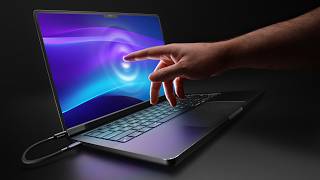

Forbidden Tech: Touchscreen MacBook Exists
45sThe reveal of a touchscreen MacBook that 'technically should not exist' creates immediate curiosity and intrigue.
▶ Play Clip"The title accurately describes the content: a real touchscreen MacBook using a third-party accessory."
A third-party accessory called Magic Screen turns a MacBook Pro into a touchscreen device, challenging Apple's long-standing stance against touchscreen laptops. The video explores the hardware, user experience, and reasons why Apple might finally release a touchscreen MacBook.
Magic Screen is a third-party accessory that adds touchscreen capability to a MacBook Pro. It's not a software hack or an iPad taped to a laptop, but a legitimate digitizer layer that attaches magnetically and connects via cable.
Using the touchscreen changes the way the user thinks about a touchscreen MacBook. It allows finger cursor control, browsing, and pen support in apps like Photoshop.
Most high-end Windows laptops (Surface, Dell XPS, Lenovo Yoga, Asus Zenbook) have touchscreens as a standard feature, though many users don't use it frequently due to ergonomic issues and fingerprints.
Apple has been adamant against touchscreen laptops since Steve Jobs called them 'ergonomically terrible' in 2010. Their stance has been: iPad for touch, Mac for mouse/trackpad.
Windows touch experience is 'just okay' despite two decades of development. Microsoft tries with adaptive UI, but it never feels purpose-built for touch.
The Magic Screen is a sheet of plastic with a digitizer that attaches magnetically to the MacBook Pro. It requires a cable connection. It supports a pressure-sensitive pen and includes a case that folds into a stand.
macOS is designed for mouse precision, with tiny touch targets. Renaming files, dragging windows, or using menus with fingers feels clunky. The software is not optimized for touch interaction.
Three reasons: 1) New hardware technology integrates touch into the display stack without compromising image quality. 2) macOS design language is becoming more touch-friendly with larger, rounder elements, and future versions may have adaptive UI. 3) Universal apps (iOS/iPadOS) on Mac would benefit from touch input.
A touchscreen MacBook could create a new high-end tier in the MacBook lineup, giving enthusiasts and professionals a reason to upgrade beyond the already powerful MacBook Air.
While the Magic Screen accessory demonstrates the technical feasibility of a touchscreen MacBook, macOS is not yet ready for touch. However, hardware advancements, software evolution, and market strategy suggest Apple may release a touchscreen MacBook with OLED display in the near future.
What is the Magic Screen?
A third-party accessory that adds touchscreen capability to a MacBook Pro via a magnetic digitizer layer.
What was Steve Jobs' famous quote about touchscreen laptops?
He called vertical screens on laptops 'ergonomically terrible' for touch.
01:30
Why does macOS currently not work well with touch?
macOS is built for mouse precision with tiny touch targets, making finger interaction clunky.
04:00
What are three reasons Apple might release a touchscreen MacBook?
1) New hardware integrates touch without quality loss. 2) macOS design is becoming more touch-friendly. 3) Universal apps benefit from touch input.
05:00
How does the Magic Screen attach to the MacBook?
It attaches magnetically and requires a cable connection.
03:00
Forbidden Touchscreen MacBook
The opening line 'This is something that technically should not exist' sets up the intrigue of a touchscreen MacBook.
Steve Jobs' Ergonomic Critique
The quote from Steve Jobs about vertical screens being 'ergonomically terrible' is a key historical stance.
01:30macOS Touch Flaws Exposed
The realization that macOS is not built for touch, making the experience worse than Windows, is a surprising insight.
04:00[00:00] This is something that technically should not exist. It's a touchscreen MacBook. It uses a piece of tech called magic screen and it's not like a software hack or like an iPad taped to a MacBook. Who would be so stupid to do something like that, right? This is legit. This is an actual touchscreen enabled MacBook. And it's like you can use your finger as mouse cursor. You can go into browsers and use it as such. And you
[00:25] can also go into Photoshop and use it with a pen. Like you get full pen support, touch support. It's a legitimate touchcreen. Now, having used this for a little bit, it's actually changed the way that I think about the concept of a touchscreen MacBook in the first place. So, if you look at the high-end laptop market right now, most Windows laptops just have touchscreens. If it's like a Surface laptop or Dell XPS product or Lenovo Yogas
[00:49] or Asus Zenbooks, they just have touchcreens. Even gaming laptops sometimes have touchcreens. It's not like a super important deal-breaking feature, but it's just a nice thing to have sometimes, but to interact with your computer with your fingers, and if you ever want to just casually browse and poke around, it's it's a thing that so many Windows laptops have that it's not really a selling point anymore. It's just a thing that exists that you occasionally use. But
[01:14] Apple's stance on this whole feature is very different. They've actually been quite adamant to not include touchcreens on any of their laptops. Like back in 2010, Steve Jobs famously called vertical screens like the ones you'd see on a laptop. Called them ergonomically terrible for touch. And this has been their stance for 15 years, right? If you want to get an Apple computer with touch, iPad. If you want a laptop, like it's mouse or touchpad. That's it.
[01:39] End of story. Now, maybe there's merit to what he was thinking because even though touchc screens on Windows laptops are so commonplace, most people who have touch enabled Windows laptops don't even use that functionality because it is a little bit tiring to poke at constantly and it smudges your screen with fingerprints. And for most laptops, the form factor just isn't built for touch. The two in one's great, but most clamshell laptops, like it's okay, but you
[02:03] got to tilt it a certain way, and it's not like a primary way to interact with computers. Now, even though Windows devices have had touchcreens for like two decades, the touch experience is just okay at best. Microsoft tries, like when you detach a keyboard or use a touchcreen, it can space out the icons and there's animations and little tweaks to make it a little bit more usable, but it's never felt purpose-built for touch because it isn't.
[02:28] which brings us back to this device here. So, this is a regular 14-inch MacBook Pro. Uh, and this is the Magic Screen. Uh, so this is when it's just not connected. It's a sheet of plastic with a digitizer on it. And it attaches to the screen magnetically. This version, at least to my understanding, needs a cable. I don't know about future iterations of it, but once you've connected it up, it is a fully functional touchcreen. That's
[02:53] all you need to do. Connect the cable and touchcreen activated. Now, the hardware itself is genuinely impressive. It's built really well, and it supports the pressure sensitive pen that it comes with. It even has a case that folds into a stand to brace the screen so it doesn't wobble when you poke at it. And you can use the digitizer separately like a Wacom tablet. And for what this is, the pricing is reasonable. But having used this
[03:17] for a little bit, it's kind of exposed this flaw that I can't overlook. If Apple themselves came out with a touchscreen MacBook today with the current version of Mac OS, I think it would just be a unpleasant experience for most people. Arguably even worse than Windows 11. So Mac OS is built entirely around the precision of a mouse cursor. Like the touch targets are tiny. Renaming a file or trying to drag a window or even interacting
[03:42] in the menus with your finger feels like clunky and not particularly precise. And obviously none of this was built for touch controls. This is Mac OS. It's not supposed to have touch. I will say though for a third party product, this is awesome. Like the technology is great. It's just the software is clearly not built for this type of interaction. But there's strong speculation that Apple themselves are working on a touchscreen MacBook that's supposed to release
[04:07] as early as this year. And the question that I think most people would have upon hearing this is why now? Like why after 20 years of just adamantly saying nope, no touchcreens on laptops, why now? So I think it comes down to a few things. The first is the available hardware now. So for years the idea of a touchscreen laptop meant that you had to add an additional digitizer layer on top of your display stack which
[04:31] makes it a little bit heavier, a little bit thicker. You cut down on brightness. Like the whole image quality is reduced by the presence of that touchscreen layer. But now there's technology that has the touch sensitive components built into the display stack itself which gives you perfect image quality while having touch capabilities. Now the second reason as to why now is Mac OS itself. So the most recent version of Mac OS with its liquid glass design
[04:56] language. All of the design elements are like bigger, rounder, and just more prominent than previous versions. And supposedly the next version of Mac OS will have dynamic UI elements that will shift around depending on how you interact with them. Like right now, if you try to tap the red, yellow, and green buttons with your fingers, it's an awful experience because your finger is just so much bigger than the hit targets. But with an adaptive UI, the
[05:21] OS could dynamically scale the hit targets and the icons the moment you reach for the screen. And it just makes that experience feel so much more fluid and usable. Now, the third reason as to why Apple would be doing this is because of universal apps. Ever since Apple moved over to their own silicon, like Apple silicon, even on M1, you could run Apple's iPhone and iPad apps on your MacBook. But the experience is usually pretty clunky
[05:45] because these apps were designed to be used with your finger, not like a mouse cursor that you click around. And so a touchscreen on a MacBook would bring a lot of usability to those games and applications. And same for developers like they would now be able to test their iPad and iPhone apps directly on their laptops by touching the screen instead of like trying to simulate those touches with a mouse click. Now there's a fourth kind
[06:10] of reason that I think as to why this whole uh touchscreen laptop is going to exist. So, I mentioned in a previous video about like the MacBook lineup that the entry-level MacBook Air has become incredibly good. Like the M4 and M5 MacBook Airs are so powerful and priced so competitively that it's just closed the gap between what a pro product is and what like their Air product is. And a new MacBook product like their top tier
[06:35] super MacBook would be like with the touchscreen and the OLED screen. It now just gives the enthusiast market and like the super professional market a reason to drop crazy money on like a new kind of MacBook. And not that this is their goal. I'm not saying that. But they'd have the opportunity cuz this would create a new higher tier price ceiling for the entire MacBook lineup. So there you have it. This magic screen technology is very
[06:59] cool. It's like a glimpse into the forbidden world of a touchscreen MacBook. You can clearly tell though that the software just isn't cut out for it right now. All signs point to a fully redesigned, revamped MacBook in the relatively near future with touchscreen capabilities and an OLED screen. So, we'll see how that shakes out. Okay, hope you guys enjoyed this video.
⚡ Saved you 0h 07m reading this? Transcribe any YouTube video for free — no signup needed.