
The #1 Fix: Turn It Off and On Again
42sEveryone can relate to the universal tech advice, and the humorous Murphy's Law setup makes it highly shareable.
▶ Play Clip"Delivers practical, actionable tips that match the title's promise, though some tips are common knowledge."
The video provides eight practical tips for troubleshooting common smart home issues, emphasizing the importance of simple fixes like rebooting devices, checking batteries, and updating software. It covers various scenarios including Wi-Fi connectivity problems, Zigbee device issues, and integration failures, offering both physical and software-based solutions.
The most common fix is turning the device off and on again. This can be done physically (unplugging) or via software (rebooting the device or its connection).
For light switches that go offline, use the air gap tab underneath to physically cut power and reboot the switch.
A sensor may show a battery percentage, but that could be the last reading before it died. Replace batteries even if the app says they're fine.
Press the button on a sensor to reconnect it to the hub. If that fails, hold the button to reset the connection. As a last resort, re-add the device as new.
When setting up Wi-Fi devices, turn off mobile data on your phone to keep the phone on the same network and avoid setup failures.
Upgrade your router or reduce interference. Devices placed in poor signal areas (like behind cabinets) may drop offline. Consider using Zigbee/Z-Wave/Thread devices.
If Zigbee devices lose connection or drain batteries fast, add repeaters (like smart outlets) between the device and hub to improve signal.
For hub integrations (Amazon, Google, SmartThings), log out and back in. In Home Assistant, simply reload the integration to fix most issues.
Updating device firmware or hub software often resolves persistent issues. Regular updates can magically fix problems.
The video emphasizes that most smart home problems can be solved with simple troubleshooting steps like rebooting, checking batteries, and updating software. If all else fails, consider upgrading your network infrastructure or adding repeaters.
What is the first thing to try when a smart home device goes offline?
Turn it off and on again (reboot).
00:17
How do you reboot a smart light switch that is offline?
Use the air gap tab underneath to cut power and reboot.
01:15
Why might a sensor show a battery percentage but still be dead?
The percentage might be the last reading before the sensor died.
01:44
What should you do if a sensor doesn't reconnect after pressing its button?
Hold the button to reset the connection, or re-add the device as new.
02:18
Why should you turn off mobile data when setting up a Wi-Fi smart device?
To keep your phone on the same network and avoid setup failures.
03:02
What can cause a Wi-Fi device to go offline even with good Wi-Fi?
Interference or poor signal due to placement (e.g., behind cabinets).
03:48
How can you fix frequent Zigbee connection issues?
Add repeaters (like smart outlets) between the device and hub.
04:44
In Home Assistant, how do you fix a broken integration?
Reload the integration.
05:26
What is the last tip before taking a hammer to your smart home device?
Update the software.
05:52
Reboot First
Emphasizes the simplest fix that solves most problems.
00:17Battery Readings Can Lie
Reveals a common misconception about sensor battery indicators.
01:44Turn Off Mobile Data During Setup
A practical tip that prevents many setup failures.
03:02Add Repeaters for Zigbee
A scalable solution for connection and battery issues.
04:44Update Software
Highlights the importance of updates in fixing persistent issues.
05:52[00:03] is offline and the fix isn't what you might think I'm going to show you eight tips that will fix almost anything in your smart home even if something isn't broken now you'll probably need these tips later on let's be real the moment
[00:17] you go out of town and your family's still at home something will of course break it's Murphy's Law starting off first with the easiest fix and definitely the thing you should try before anything else because it'll fix a
[00:29] majority of your problems turning it off and on again hello it have you tried Bond Bridge the last few times I've updated home assistant it's gone offline so I come in here unplug it plug it back in and I'm good to go but that doesn't
[00:45] always work for example I have two homepods right here in Stereo pair for the TV and one of them was going offline and not sinking correctly so I physically unplugged it and plugged it back in and that did not fix it what did
[01:00] fix it was going into the settings and rebooting the stereo pair connection so sometimes it's a software reboot will fix it and not a physical reboot but what if it's a light switch that goes offline how do you turn that off and on
[01:15] well most light switches will have an air gap right underneath that you can pull out and push back in and that will physically cut power to the light switch and essentially reboot it when in doubt turn it off and on again all right
[01:29] here's a slightly tricky one what if you have a sensor that goes offline so you pull the batteries out put them back in to kind of you know reboot it but it still doesn't work well I'm going to tell you something that's kind of sad
[01:44] tell you something that's kind of sad your smart home can lie to you that's right even if it says this sensor has like 15% battery that might be the last battery reading before the sensor died so just replace the batteries and it
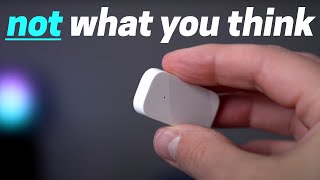
[01:59] to the contact sensor I showed at the beginning this one's even trickier so let's replace the battery with a fresh new one and see if that fixes
[02:18] the batteries did not seem to fix the issue the batteries were still fine in the sensor so there's another thing I can try which I'm going to use the press the button once and sometimes that will just reconnect it to the hub and if
[02:33] that doesn't work I'm going to hold down the button and that will reset the connection and that can also be a trick to getting it working again all right that seemed to work now there is one more trick you can do if that doesn't
[02:46] work after you reset it holding down the button try to read it in the hub like adding a new Ziggy device and then we'll find it and reconnect so yeah sometimes it off and on again again all right this next tip is something that I even
[03:02] sometimes forget to do when setting up a smart home Wi-Fi device always always turn off the mobile data on your phone that way your phone will stay connected setup process and you won't run into any issues I hate to say that yeah I forget
[03:19] to do this but yes always turn off the mobile data all right so you set up your smart home Wi-Fi device but now it's going offline well there are a few different things you can do to fix it the first and pretty obvious one is to
[03:33] upgrade your Wi-Fi maybe your router is being overrun or you don't have enough first thing I would look at but if it's a specific device like these light strips right here sometimes they can go offline and I have really good Wi-Fi
[03:48] well it can be interference because the controller for these light strips are down deep Behind these cabinets and I don't think the signal is that great for this specific device so look for interference and that could be causing
[04:01] it there are a few other settings you can do on your router to turn off or on that can improve connectivity I'll link an article down below that will give some suggestions and I highly recommend investing in good Wi-Fi so many devices
[04:16] around your house rely on Wi-Fi so investing in a good system can make a big difference to also improve your Wi-Fi you can use more zigby Z-Wave and thread devices but even those can sometimes have issues shoes I know it's
[04:30] sometimes have issues shoes I know it's like one step forward two steps back but usually if your say zigg device is losing connection frequently or the batter's draining fast well it's just a connection issue and you can solve that
[04:44] by adding a repeater in between the device and your zigby Hub so I've added a bunch of smart Outlets which usually act as repeaters it works great pretty much solved all my connection issues and I've even started using this motion
[04:58] sensor nightlight it has an RGB light on it it works as a repeater and you get a add repeaters if you're having connection or battery issues another common issue that I've seen is that an
[05:11] integration into your smart home hub can break and to fix this if you're using like Amazon Google or smart things is to just log out and log back into that integration and that usually fixes it but if you're using home assistant it's
[05:26] actually much easier all you have to do is reload the integration and that solves almost all your issues 95% of the time and believe it or not you can actually automate this and that's the video I'm making tomorrow how your smart
[05:40] home can self-heal so make sure you hit that subscribe button and Bell notifications turned on so you don't miss it all right the last tip after you've tried everything and nothing seems to be working before you take a
[05:52] hammer to your smart and Destroy Everything update the software that usually fixes all the Integrations or any issues you have every time I update I'm like oh it's magically working again so make sure you update it will save you
[06:07] hopefully they were helpful if you know of any tips that I forgot to mention then let me know down in the comments thanks for
[06:19] watching hey re I was just uh just turn it off and on again really yeah no problem at all we have this conversation like every 2 weeks
[06:32] conversation like every 2 weeks [Music]


⚡ Saved you 0h 06m reading this? Transcribe any YouTube video for free — no signup needed.