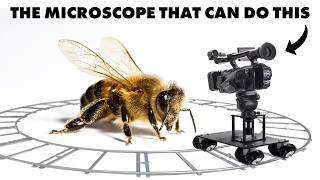

Microscope That Films Like a Drone
41sThe reveal that a microscope can mimic drone shots is visually stunning and counterintuitive, perfect for surprising viewers.
▶ Play Clip"Title accurately promises insane shots; delivers with impressive demos but includes a sponsor segment and some fluff."
This video explores the capabilities of a Hirox microscope, a high-tech device capable of 3D scanning and capturing drone-like cinematic shots using a rotating mirror attachment. Steve Mould demonstrates its use in art conservation, forensic analysis, and natural observation, highlighting its unique depth-of-field and perspective effects.
The opening shots appear to be drone footage but are actually microscopic shots of tiny figurines, achieved using a special Hirox microscope with a rotating head attachment.
Museums like the Mauritshuis use Hirox microscopes for conservation and restoration, e.g., scanning 'Girl with a Pearl Earring' to create a 100-gigapixel image and a tactile 80x scale print.
In 2012, a vandal signed a Rothko painting (Black on Maroon) at Tate Modern. Using a Hirox microscope, conservators identified a solvent that removed the vandal's ink without damaging Rothko's original pigment.
A 3D print of Edvard Munch's 'The Scream' (cardboard version) made from a Hirox scan allows tactile exploration of the cardboard fibers.
Manual tilting of the microscope keeps the subject in focus while creating depth perception via parallax, enhancing 3D visualization.
The rotating head attachment uses a 45° mirror that orbits the subject, creating smooth cinematic 'drone' shots. The resulting image rotates on the sensor, corrected in editing.
The shots have almost no perspective distortion, similar to a telephoto lens effect. Scaling up, it would be like a camera 20m away from a human-sized bee moving at 8m/s.
The solvent tested under the microscope successfully removed the vandal's ink, and the painting was restored over months and re-hung at Tate Modern.
The Hirox microscope is a powerful tool for scientific and artistic applications, with a unique rotating attachment that enables cinematic 'drone' footage at microscopic scales, blending technology and creativity.
What is the special attachment on the Hirox microscope that enables drone-like shots?
A rotating head with a 45° mirror that orbits the subject.
07:44
How did conservators remove the vandal's ink from the Rothko painting without damaging the pigment?
They used a solvent identified by testing under a Hirox microscope.
01:31
What is the perspective effect of the microscope's rotating shots similar to?
A telephoto lens used in Michael Bay films, with almost no perspective distortion.
08:54
How does the Hirox microscope create 3D depth information?
By analyzing which parts of the image are in focus at different heights (focus stacking, but the transcript mentions narrow depth of field and analyzing focus slices).
07:17
What was the resolution of the scan of Girl with a Pearl Earring?
100 gigapixels.
01:45
Drone or Microscope?
Immediately challenges perception, demonstrating the microscope's cinematic capability.
00:09100-Gigapixel Scan
Shows the extreme resolution used for art conservation.
01:45Rotating Mirror Mechanism
Explains the clever optical trick behind the drone-like footage.
07:44Isometric Shot Comparison
Connects microscopic technique to Michael Bay's cinematography, providing a relatable analogy.
08:54[00:09] This might look like drone footage, but it's not. It's a microscopic shot of tiny figurines, and we didn't shrink a drone or set up a tiny dolly rig. Instead, we used this, one of the most advanced microscopes in the world.
[00:23] haven't given me anything for free. I just heard about it and thought it was really cool. And actually, as it turns out, it's even more interesting than I to find out how a microscope can take shots that look like a drone for
[00:36] insects, and how it may or may not be able to solve a crime that I may or may not have committed. You know those smooth cinematic shots that wrap around a subject? They're usually done with a drone or a camera on a dolly, sometimes
[00:50] get this kind of shot when your subject again, I don't have a microscopic drone. Instead, we're using a special type of microscope, specifically this one from a company called Hirox. And the way it
[01:03] works, well, it's weird and brilliant. And actually, the drone-looking shots were done with an add-on to the microscope that's a patented rotary head thing. But the microscope itself is used for all sorts of things. I was surprised
[01:16] customers for this microscope is museums. Amelia here explained that they're used for conservation and restoration of priceless artworks. Take this Rothko, for example. You might know that in 2012, a man armed with a marker
[01:31] pen walked into the Tate Modern, walked up to Black on Maroon, and signed his name in the bottom right corner. It seemed like it couldn't be fixed, but felt that they could at least give it a try. That's because the Hirox isn't just
[01:45] for capturing shots of the MCU. It's also a really high-resolution 3D they scanned Girl with a Pearl Earring, they ended up with a 100-gigapixel image pigments of paint. At the Mauritshuis Museum in The Hague, they printed this
[02:01] scan 80 times larger than the original painting and let people touch it. Some of the sections were scaled up 140 times, which means you can run your fingers over the cracks that are usually invisible. If you can't get to the
[02:14] Mauritshuis Museum, you can play with the painting online in all its microscopic 3D glory. I'll leave a link to that in the description, but I really wanted to touch a priceless painting for myself. So, I was delighted when Emilian
[02:27] myself. So, I was delighted when Emilian showed me this. Wow. That's incredible. So, this is what it's It's a 3D print of The Scream. Actually, there are several The Scream paintings. This is the one that was done on
[02:39] cardboard and you can actually feel the fibers in the cardboard on this version. And I mean, I've got to tell you, I love my 3D printer, but gosh, this one's amazing. Like any 3D printer, it prints in layers, but on the final layer, you
[02:53] visit me, he brought the microscope with him, so we did some scanning of our own. This is a portable razor and if you zoom in on the blade, you can see all the tiny scratches. Look, here's a 3D render of it and you can measure the curvature
[03:08] and things like that. Here's a bullet casing. There's a ring light inside the but with this setup, you can decide which parts of the ring are turned on so angles, which has an amazing effect on the security feature of this banknote.
[03:24] See how the color changes as it's from different angles. And when you zoom in, you see that it's made up of tiny lines just a micron thick. What is that? I don't know. So strange. Can you zoom out? So strange. So strange. So strange.
[03:41] At one point, Emilian tilted the microscope manually and the effect was really cool because it's been designed so that your subject stays in focus in the center of the frame while it's tilting. Oh my god, it's so cool to see
[03:55] it moving around on the screen. So you get this sudden sense of depth because of the parallax, the background and the foreground shift relative to the subject. So we can figure out what's near and what's far. There's also an
[04:07] microscope onto surfaces. This is a leather belt, for example. And again, by tilting it around, you really get a sense of the depth. Everything's in focus. Like with my microscope, it's not like that. Yeah, well, it's one of our
[04:20] specialty. I can also zoom in. So for example, if I want to look at here this detail Oh my goodness. I can see the single fibers here. Let me see. That's a bit It's a bit more than stubble now, isn't it?
[04:35] That's some of my lunch. But really, this is just a teaser for the main event, which is that add-on to the microscope that gives you drone-like the microscope that gives you drone-like shots. Here we can look at it here
[04:47] and then rotate this adapter to look all around the object. Look at that. You can see the this little pollen balls. I'm sure it's not the proper word. I'm sorry. Pollen balls? Pollen
[05:01] balls. We we work with, you know, aerospace and with museums and with a lot of different industries, but looking at those tiny natural the wonder of nature is is amazing. Is this maybe a fungus? Could
[05:16] be. This is unbelievable. It's like um coral. Yeah. Look at that. Oh my god, what is that?
[05:30] I did find it on the floor. I'm sure it's rust. You know, I'm just going to stop talking so you can enjoy the visuals.
[05:48] it's very cool. There's a bug that burrows under the bark of trees, and then when the bark falls off, it exposes this intricate network of channels. How this intricate network of channels. How cool is that?
[07:02] like under this microscope because it links to one of my favorite images from a video I made about the GelSight touch-based microscope. But, this microscope calculates depth information differently to the GelSight microscope.
[07:17] With this microscope, the depth of field is really narrow, meaning that only a is really narrow, meaning that only a thin slice of the image is in focus. So, by analyzing which parts of the image are in focus when the microscope is at
[07:31] different heights, they can figure out the topology of the thing being scanned. So, what's actually happening in a shot like this? Well, one clue is that as you rotate around the scene, the whole frame seems to rotate as well. Like this
[07:44] microscopic figure is the right way up at the beginning, but by the time we're around the back, he's upside down. And that's because this shot is achieved that's because this shot is achieved with a little mirror mounted at 45° that
[07:57] reflects the image back up to the lens. So, it's like we're viewing it side on instead of top down. The drone effect is achieved by the mirror rotating around the subject. So, it kind of is a drone. Or it's more like a mirror that's being
[08:12] sent in to do the job of the drone and send images back to the fixed camera. And looking from above, you can see why an image would rotate on the sensor as the mirror rotates. This excellent model I made makes it very clear, I think.
[08:26] It's a bit like how the end of a bent flexible screwdriver rotates as it moves around. But we can fix that rotation in my editing software by rotating the clip the other way. And now it looks just like a camera orbiting a subject on a
[08:40] Wow, this is amazing. So, this looks exactly like a drone footage. Like Yeah. very cinematographic. I will definitely ask for for this feature to hire us. Hopefully we can
[08:54] There's one more thing that's really trippy about these shots, which is that they're almost isometric, which is to say there's almost no distortion because of perspective. It's like the difference between this cube and this cube, or the
[09:07] difference between playing Minecraft and playing Monument Valley. And weirdly, it reminds me of a certain kind of action movie. If you've ever seen anything directed by Michael Bay, you might be familiar with his signature shot. It
[09:20] uses a telephoto lens while circling a subject. Because it's a telephoto lens, he needs to get far away from the subject, and that's what removes perspective. It flattens the shot. See how perspective is added to my face as
[09:33] how perspective is added to my face as the camera gets closer in this shot. Just for fun, if we scaled up this microscopic shot to human scales, how far away would the camera need to be from the human-sized bee? Well, our
[09:46] microscope lens is about 20 cm from the bee, and the bee is about 2 cm long. So, bee, and the bee is about 2 cm long. So, scaling that up to an about 2 m tall person, the camera would need to be about 20 m away, and it would need to be
[10:01] traveling at about 8 m per second to match the rotation rate of that Bad Boys II shot. And that's great, because I was looking for an excuse to buy a gimbal. Having said that, 8 m per second isn't that much slower than Usain Bolt, so we
[10:15] might need to speed this one up in post. God, that's just cinematic, isn't it? But anyway, what about that Rothko? Well, under the microscope, conservators were able to confirm that a particular solvent was able to remove only my only
[10:30] the vandal's ink and leave Rothko's pigment behind. Armed with that painstakingly restored over several months, and is now once again hanging in the Tate Modern. Emilian also showed me this amazing software that he uses at
[10:45] problem that I've had for the last 10 months, because we recently moved to the country. You may have spotted the change of studio a few months ago. Everything's great, except the internet. Go. Yeah. I recently managed to get pretty
[11:00] good download speeds, but the upload is still pretty terrible. Here's the issue. Video editing needs to happen on this beefy desktop PC, but sometimes I want to do the editing when I'm out and about on my laptop. I've tried remote desktop
[11:14] software before, but it's never worked satisfactorily for video editing. Well, Emilian uses remote desktop software called AnyDesk to connect to microscopes when he can't be in front of them, even from mobile. And just like with video
[11:28] editing, he needs the connection to be really responsive. And that's where AnyDesk really shines because it does this clever stuff with compression where you can optimize for responsiveness even if the upload speed from the host
[11:40] machine is really bad. I can even be on a hotspot on a train and I'm scrubbing the timeline and it just works. I've even got it installed on the PCs of some of my elderly relatives so I can give them IT support without that difficult
[11:53] conversation of what do you see on your screen, etc. And the great thing is it's completely free for personal use. The way they make money is they hope that you'll fall in love with it and persuade your boss to get it for their business.
[12:07] So if you ever need to access one PC from another PC or a Mac from a Mac or one from the other or either from an Android or an iPhone, then you should try AnyDesk. Go to anydesk.com/stevemould
[12:20] also in the description so check out AnyDesk today. I hope you enjoyed this video. If you did, don't forget to hit subscribe and the algorithm thinks subscribe and the algorithm thinks you'll enjoy this video next.



⚡ Saved you 0h 12m reading this? Transcribe any YouTube video for free — no signup needed.