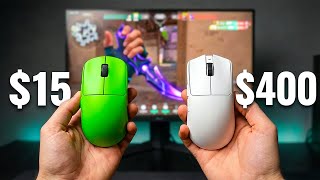
Is the Viper V4 Pro worth $159?
45sDirectly addresses the burning question of whether the new mouse is worth its high price, sparking curiosity.
▶ Play Clip"Title accurately reflects the comparison and value assessment, delivering on its promise."
The Razer Viper V4 Pro is a $159 gaming mouse with upgraded specs like 15,000 DPI, frame sync, and 180-hour battery life, but its loud switches and high lift-off distance may deter buyers. The video compares it to the Logitech Superlight, V3 Pro, and budget clones, concluding that shape and feel matter more than specs.
The Viper V4 Pro costs $159, and the video questions whether it's worth it compared to existing mice.
New sensor up to 15,000 DPI, frame sync for better sync and battery life, battery increased from 95 to 180 hours, optical scroll wheel, and a dongle with LED display.
Gen 4 switches are hollow and metallic, much louder than V3 Pro, which is disappointing at this price.
Feels floaty initially but adapts; shape identical to V3 Pro, good for claw/fingertip grip, not for palm grip.
Works well on glass pads without issues, unlike many competitors.
Some users report high lift-off distance even on low setting, which could be a problem for low-sense players.
Synapse web is pushed but firmware update requires Synapse first; still need software initially.
Logitech has adjustable actuation and haptic feedback; Razer only offers loud clicks. Logitech is better for daily use.
The release feels like a test; predicts a V4 Pro SE with adjustable switches within a year.
V3 Pro dropped to $120; ATK X1 Pro ($50), Mchose L7 Ultra Plus ($56), VXE R1 Pro ($35) offer similar performance.
Pros use Viper for reliability and support; for home gamers, budget mice are sufficient.
Long-term durability unknown; Razer had issues with older Vipers.
The gap between $50 and $159 mice is smaller than ever; feel in hand matters most.
If happy with V3 Pro or Superlight, skip. If on older mouse, get V3 Pro at $120. Budget options: VXE R1 Pro ($35), ATK X1 Pro ($50), or Pulsar.
The Viper V4 Pro offers best raw specs and battery but falls short on click experience and value. For most users, the V3 Pro or budget alternatives provide similar performance at lower cost.
What is the battery life of the Razer Viper V4 Pro?
180 hours.
0:48
What is the maximum DPI of the Viper V4 Pro?
15,000 DPI.
0:30
What is 'frame sync'?
A feature that syncs the sensor and chip to reduce wasted data, delay, and improve battery life.
0:34
How does the Viper V4 Pro's scroll wheel differ from the V3 Pro?
It is optical instead of mechanical, smoother, quieter, and should last longer.
0:59
What issue do some users report about the Viper V4 Pro's lift-off distance?
It feels too high even on the low setting.
2:14
What is the price of the VXE R1 Pro?
Around $35.
4:28
What advantage does the Logitech Superlight have over the Viper V4 Pro in terms of clicks?
It has adjustable actuation point and haptic feedback, allowing customization of click feel.
2:41
What does the reviewer predict Razer will release within a year?
A V4 Pro SE or similar with adjustable switches built in.
3:23
Battery Life Upgrade
Battery doubled from 95 to 180 hours, a significant practical improvement.
0:48Logitech's Adjustable Clicks
Logitech offers customizable actuation and haptic feedback, making Razer's approach seem outdated.
2:41Marketing Test Theory
The release feels like a test to gauge community reaction before a bigger update.
3:14Diminishing Returns
The performance gap between $50 and $159 mice is smaller than ever, emphasizing feel over specs.
5:26Shape Over Specs
Players can reach high ranks with old mice, proving shape and comfort matter most.
6:22[00:00] Now, if you have seen the Viper V3 Pro
[00:01] everywhere, this month you're probably
[00:03] wondering the same thing everyone is. Is
[00:04] this actually worth $159 or is it just a
[00:07] V3 Pro with a new number on the box? And
[00:09] the answer here matters because you
[00:11] could easily waste $159 on something
[00:13] your current mouse already does. So, in
[00:15] this video I'm going to test this mouse
[00:16] against the Superlight, against the V3
[00:18] Pro, and against clones that cost a
[00:20] third of the price. And by the end of
[00:22] this video you'll walk away knowing
[00:23] exactly what to buy. But before any
[00:25] comparison matters, you need to
[00:26] understand what Razer actually changed
[00:28] inside this thing and what they didn't.
[00:30] We have a new which goes up to 15,000
[00:33] DPI now. They also added something
[00:34] called frame sync which from what I
[00:36] understand makes the sensor and the chip
[00:37] inside the mouse sync up better before
[00:39] sending data to the PC. Basically, you
[00:41] have less wasted data, less delay, and
[00:43] it helps a lot with battery life which
[00:45] brings me to the one upgrade that
[00:46] actually matters day-to-day. Now,
[00:48] battery went from 95 hours on the V3 Pro
[00:50] to 180 on this. I charged it day one
[00:53] after three or four days it was still
[00:55] sitting like 60% and I run this at 1,000
[00:57] Hz on desktop and 4,000 Hz in games.
[00:59] Scroll wheel is new, too. Optical
[01:01] instead of mechanical, smoother,
[01:03] quieter, should last longer. The new
[01:04] dongle shows you battery, DPI, and
[01:06] polling rate through LED without opening
[01:08] any software which is kind of cool, I
[01:10] guess. Next, you have switches which are
[01:11] Gen 4 and they are super loud.
[01:14] They're all hollow, metallic, way louder
[01:15] than the V3 Pro, and definitely not what
[01:17] you want to hear for $159 to be honest.
[01:20] But how much of a problem that actually
[01:21] is depends entirely on what you compare
[01:23] it to. And what the mouse feels like
[01:25] after a week on your pad matters way
[01:27] more than any spec on the box. So, let's
[01:29] talk about how it actually feels. Now,
[01:30] first thing out of the box, my first
[01:32] impression, it feels floaty. I tested
[01:34] this on different pads, cloth pads,
[01:36] glass pads, different textures, same
[01:38] thing on all of them. Now, you get used
[01:39] to it after like a few hours, so it's
[01:41] not really something that would make you
[01:43] not want to buy this. Now, the shape is
[01:44] identical to the V3 Pro. If someone
[01:46] subbed them out on my desk without
[01:48] telling me, I'm not sure I could pick
[01:49] the right one to be honest. Now, this
[01:51] locks in my hand well for gaming better
[01:53] than Logitech as a shape for me
[01:54] personally, but that's a preference, not
[01:56] a V4 thing. And if you use like a palm
[01:58] grip and you need that hump in the back,
[02:00] this is not for you. Just get like a
[02:01] Deathadder. Now, where do I notice the
[02:03] Razer pulling ahead is on glass pads.
[02:05] With a lot of newer mice, or even like
[02:07] clones, you have problems with some
[02:09] particular surfaces, especially glass.
[02:11] With this one, I didn't saw any
[02:13] problems. One thing to flag though, some
[02:14] people are reporting lift off distance
[02:16] feels too high even on the low setting.
[02:19] Now, if you play low sense and lift your
[02:20] mouse a lot, that could be a real
[02:22] problem. Now, it might of course get
[02:23] fixed in a firmware, but it's there. We
[02:25] also have these Synapse web, which Razer
[02:27] is pushing really hard the idea that you
[02:29] don't need software anymore, but you
[02:30] still need Synapse the first time to
[02:32] update the firmware before web config
[02:34] even works with this mouse. So, yeah,
[02:35] keep that in mind. Now, the clicks, I've
[02:37] been holding off on this because it only
[02:39] really makes sense next to competition.
[02:41] And at $180, the Super Strik is doing
[02:43] something with its switches that makes
[02:45] the Razer whole approach look like
[02:47] outdated. Now, Logitech hits let you set
[02:49] actuation point wherever you want. You
[02:50] get haptic feedback, you can make the
[02:52] clicks feel however you like, quiet for
[02:54] browsing, happy for gaming, whatever. On
[02:56] the V4 Pro, you get loud clicks and
[02:58] that's all. Now, of course, more option
[02:59] is always better than one bland choice,
[03:01] and this is where Logitech is generally
[03:03] ahead on innovation. Now, for daily use
[03:05] outside of gaming, the Super Strik is
[03:07] just better to live with, and if Razer
[03:09] put that kind of click deck on this
[03:10] mouse, it would be my main easily, which
[03:12] is why I think this release is more of a
[03:14] test than a final product. As someone
[03:16] who did marketing for 10 years, this
[03:18] feels like Razer dropped it just to see
[03:20] how the community reacts before
[03:21] committing to something bigger. Now, I
[03:23] bet some money that within a year they
[03:24] announce like a V4 Pro SE or whatever
[03:26] they want to name it with some sort of
[03:28] adjustable switches built in, similar to
[03:30] Logitech. Now, bottom line on this match
[03:32] up, best raw specs and battery, V4 Pro
[03:35] wins like easily. Best daily click
[03:37] experience, Super Strik by a lot. Either
[03:39] way, shape comes first. If the Viper
[03:41] fits your hand, you're not buying a
[03:42] Logitech regardless, and the other way
[03:44] around to be honest. But, here is what
[03:45] neither brand wants you thinking about.
[03:47] What you can get for a third of this
[03:49] price. Because in 2026, the real
[03:51] competition is sitting at $40 to $60 and
[03:54] is getting uncomfortably close. So, here
[03:57] is what else your money could get you
[03:58] right now. The moment the V4 Pro
[04:00] launched, the V3 Pro dropped around
[04:01] $120. Now, if you want to go lower, the
[04:04] ATK X1 Pro is around $50. Basically,
[04:07] it's just like a Viper shape clone,
[04:08] where independently tested it has it
[04:10] keeping [music] up with mice at two or
[04:11] three times its price. Build, of course,
[04:13] is not like Razer, but for what it
[04:15] costs, it's hard to argue against. Now,
[04:16] the M chose L7 Ultra Plus is about like
[04:19] 50 6 dollars with an 8K dongle in the
[04:21] box. Yeah, of course, it's a different
[04:23] shape, but worth knowing about if you're
[04:25] like fingertip or like a small hand
[04:26] player. And then, there is the VXE R1
[04:28] Pro at around $35, which is probably the
[04:31] most talked about budget mouse in the
[04:32] community right now. It's like 54 grams,
[04:35] solid sensor, and nobody who's tested it
[04:37] can find like a meaningful gap against
[04:39] mice four times the price. Now, if you
[04:40] want something in between where you're
[04:42] not rolling the dice on AliExpress, but
[04:44] also not paying flagship prices, Pulsar
[04:46] is king in my opinion. So, we've got
[04:48] everything from $35 to $1 59 dollars on
[04:50] the table, and what separates them is
[04:53] not what you'd expect. Now, pro use the
[04:55] Viper because at tournament, you need
[04:57] zero surprises. On-site support,
[04:59] replacement units, firmware tested for
[05:01] months. That matters only when your like
[05:02] career is on the line. But, for everyone
[05:05] else playing like ranked at home, that
[05:07] doesn't really matter that much, to be
[05:08] honest. Now, something worth saying
[05:10] about this launch specifically, nobody
[05:11] can tell you about durability on a mouse
[05:13] that's been out for weeks, and Razer had
[05:15] real issues with switches and scroll
[05:17] wheels on older Vipers. So, take every
[05:19] launch review with a grain of salt, of
[05:21] course, including mine. Of course, at
[05:23] the end of the day, what separates all
[05:24] of these mice is perceived performance.
[05:26] How it feels in your hand, on your pad,
[05:28] in your game. Not what the sensor does
[05:31] in a test lab. And at that level, the
[05:33] gap between $50 and $159 has never been
[05:36] smaller. So, now, we have three
[05:38] situation, three answers. Now, if you're
[05:40] on a V3 Pro or Super Strikers now, and
[05:42] you're happy, just don't get this.
[05:43] Nothing here changes how you play, and
[05:45] if I'm right about Razer dropping an
[05:47] updated version with better switches,
[05:49] you'll be glad you waited. If not, it is
[05:51] what it is. I'll get you a beer, and
[05:52] it's fine. But, if you're like on
[05:54] something older, V2 Pro, older Logitech,
[05:56] anything from a couple generations ago,
[05:58] the V3 Pro at $120 is the best move
[06:01] right now, to be honest. Now, if you
[06:02] don't really care about brands and stuff
[06:03] like that, VAXEE XE R1 Pro at $35, 8K X1
[06:07] Pro at $50 for the Viper shape, or
[06:09] Pulsar for something more polished. So,
[06:11] pick the shape that fits you, spend the
[06:13] rest on a better pad or better or
[06:15] whatever you want. I don't really care.
[06:16] And to be honest, at this point, you see
[06:18] a bunch of people comparing
[06:20] online, but the only thing that matters
[06:21] is how it really feels in your hand.
[06:22] There are people hitting Radiant with
[06:24] like a Microsoft IntelliMouse 1.1 mouse
[06:26] from years ago. So, at the end of the
[06:28] day, get what fits your hand at the
[06:29] price that you can afford, and you
[06:31] should be fine, to be honest. Now, drop
[06:33] your current mouse in the comments. I'm
[06:34] curious what everyone's using, and
[06:36] whether you're upgrading or staying put.
[06:38] And if you want to learn and see more
[06:39] about gaming peripherals, or like my
[06:41] first impression on the latest Logitech
[06:42] mouse, check out this next video.
⚡ Saved you 0h 06m reading this? Transcribe any YouTube video for free — no signup needed.