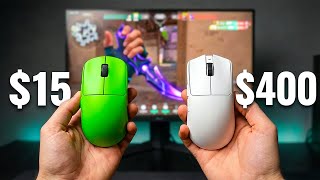

$3,000 on gaming mice? Here's the truth
45sHigh spending and controversial claim about diminishing returns grabs attention.
▶ Play ClipThe video provides a comprehensive tier-by-tier analysis of gaming mice ranging from $15 to $400, based on extensive testing of over 30 mice. It reveals where performance gains plateau and where you're paying for branding rather than actual improvement.
Costs $15-$30, fits most hand sizes, but is heavy (85g) and prone to double-click issues after a year or two.
Around $35, specs look flagship (PAW3395, 4K Hz) but quality control is poor—dented box, inconsistent glides, sensor drops.
$35-$40, 49g, 3395 sensor, 4K Hz polling. Performs like a $150 Logitech Superlight clone for fingertip grip. No tracking issues, but software flagged as malware.
Clearance $20-$30, legendary ergonomic shape but heavy (85g) and thick cable. Only for those who need that specific shape on a tight budget.
$55-$70, Logitech Superlight clone, 55g, 3395 sensor, 4K/8K Hz. Performance nearly identical to $160 Logitech, but lacks software ecosystem and warranty.
$65-$80, 47g, low-profile aggressive shape (similar to Razer Viper V3 Pro), 3395 sensor, 4K Hz. Excellent for claw/fingertip grip.
$55-$70, 45g, 8K Hz stable polling, best mechanical clicks. Cable is a drawback even with a bungee. Requires aftermarket paracord mod.
$90, 38g, premium coating, but sensor tracking can be surface-dependent. Firmware updates may fix it.
$100-$110, 60g, ergonomic shape (like Logitech G703 but updated), 4K/8K Hz, includes extra skates and grip tape. Best for palm/claw ergo users.
$130, 45g, XS1 flagship sensor, optical switches, premium coating. Excellent for fingertip grip with consistent quality control.
$120, 60g (heavier than wired version), same great shape and build. Weight tradeoff noticeable on cloth pads.
$160, 60g, safe shape, Hero2 sensor. Reliable but boring; scroll wheel wears quickly. Value questionable vs $60 Mchose clone.
$160, best sensor implementation, excellent for fingertip/claw. More refined than Logitech, but VGN Dragonfly offers similar shape for half the price.
$200-$400 retail, but often sold out. Terrible clicks, coating, and software. Shape is interesting but performance doesn't justify price.
€355 (~$400), no software, no side buttons, wired. Requires button sequence to change DPI. For collectors/enthusiasts only.
The performance ceiling for gaming mice is reached around $70-$90. Spending more buys brand trust, materials, and diminishing returns—not better aim. A $40 mouse in practiced hands beats a $400 mouse every time.
Attack Shark X3
tool
Mchose A7
tool
VGN Dragonfly F2 Ultra Plus
tool
Endgame Gear OP18K
tool
ATK Blazing Sky F1 Ultimate
tool
Evolution Terra Pro
tool
Pulsar X2 Mini Crazy Light
tool
Endgame Gear OP1 Wireless 4K V2
tool
Logitech G Pro X Superlight 2
tool
Razer Viper V3 Pro
tool
Finalmouse (various models)
tool
Zone Coin M3K
tool
What is the approximate weight of the Logitech G102?
Around 85 grams.
0:34
What common issue does the Logitech G102 develop over time?
Double-click issues due to failing switches.
0:43
What sensor does the Attack Shark X3 use?
PAW 3395 sensor.
1:54
What is the polling rate of the Attack Shark X3?
Up to 4,000 Hz.
1:55
What is the weight of the Attack Shark X3?
Around 49 grams.
1:57
What is the main drawback of the ASG 159p wireless mouse?
Poor quality control—dented box, inconsistent glides, random sensor tracking drops.
1:15
What is the price range for the Mchose A7?
$55 to $70.
3:53
What mouse shape does the Mchose A7 clone?
Logitech Superlight.
3:56
What is the weight of the VGN Dragonfly F2 Ultra Plus?
Around 47 grams.
4:57
What is the polling rate of the Endgame Gear OP18K?
8,000 Hz, and it is stable.
5:24
What is the weight of the Endgame Gear OP18K?
Around 45 grams.
5:48
What is the price of the ATK Blazing Sky F1 Ultimate?
$90.
6:18
What is the weight of the ATK Blazing Sky F1 Ultimate?
Around 38 grams.
6:22
What is the price of the Razer Viper V3 Pro?
$160.
11:14
What is the approximate price of the Zone Coin M3K in US dollars?
Around $400.
13:02
95% of flagship performance for 25% of the price
Summarizes the value proposition of budget mice when quality control works out.
3:38Performance ceiling at $70-$90
Key insight that spending more than $90 yields minimal performance gains.
7:00Nothing in the exotic tier makes you aim better
Honest admission that $200+ mice are for collectors, not performance.
12:15$400 mouse in beginner's hands loses to $40 mouse in practiced hands
Powerful principle emphasizing skill over gear.
14:35[00:00] I've spent over $3,000 on gaming mice.
[00:02] 30 plus mice tested across thousands of
[00:04] hours in Valerant and CS. By the end of
[00:06] the video, you will know exactly what
[00:07] $30 actually gets you versus $150. We're
[00:10] going tier by tier from budget wire mice
[00:13] to $400 exotics. I will show you where
[00:16] the real performance gain stop and where
[00:18] you are actually paying for logos. So,
[00:19] let us start from the bottom and see how
[00:21] far budget can actually take you. So,
[00:23] let's start with Logitech G 102. 20 to
[00:26] $30, sometimes even 15 on a sale. The
[00:29] shape fits most hand size and works for
[00:31] palm, claw, and fingertip. At around 85
[00:34] g, it is heavier than modern mice. You
[00:36] will notice that weight during long
[00:38] sessions, and also the cable is
[00:40] something you will feel during fast
[00:41] swipes. One thing to watch out for,
[00:43] though, this develops double click
[00:44] issues over time. The switches Logitech
[00:46] uses in this price range tend to fail
[00:48] after a year or two of heavy use, and it
[00:51] becomes super annoying in games where
[00:52] that actually matters. For $15 to $30
[00:55] though, even if it lasts one year, you
[00:57] get your money's worth. But here is the
[00:58] thing. This is a wire mouse in 2026. And
[01:01] you might be thinking wireless at this
[01:02] price is impossible. It is not. And that
[01:04] is where things get interesting. And I'm
[01:06] talking about the ASG
[01:08] 159p wireless with high polling rates
[01:11] for around $35 on team. Sounds amazing
[01:13] on paper. But here is what actually
[01:15] happened with mine. Boxer dented. Mouse
[01:17] glides inconsistently on my glass pad.
[01:19] Sensor stops tracking mid round
[01:20] randomly. This is the reality of ultra
[01:22] budget Chinese mouses from T. The specs
[01:24] looks identical to flagship mice. Paw
[01:26] 3395 sensor, 4,000 Hz bowling rate,
[01:29] sub50 g weight. But the implementation
[01:31] is where they cut corners. Quality
[01:33] control is also random. So people get
[01:35] perfect copies that work flawlessly for
[01:36] years. Some people get what I got. You
[01:38] are basically gambling. So you think
[01:40] budget wireless is a scam, right? Not
[01:42] exactly because the next mouse I tested
[01:44] for the same price range completely
[01:45] changed my mind. And I'm talking about
[01:47] the TS Shark X3. No, same Teimo
[01:49] situation, same $35 to $40 price range,
[01:52] [music] completely different outcome.
[01:53] wireless 3395 sensor up to 4,000 Hz
[01:56] polling rate around 49 g. Now, this is a
[01:59] smaller clone of the Logitech Gro Super
[02:01] Light shape and for fingertip grip, I
[02:03] actually prefer this over the $150
[02:05] original. The smaller dimensions fit my
[02:07] hand better. Less palm contact means
[02:09] more control with my fingers. I play
[02:11] rank matches with this match sessions,
[02:13] the finals, Battlefield, all of the
[02:15] popular games. At this point, at no
[02:16] point did I feel limited. I forgot that
[02:18] I was using a $40 Timo mouse. The sensor
[02:21] implementation also feels snappy. No
[02:23] spin outs on my glass pad. No random
[02:25] tracking drops like the Ajas. Battery
[02:26] life is around 70 hours which means you
[02:28] charge it maybe once a week with heavy
[02:30] use. But the software again is the same
[02:32] situation where it's getting flagged as
[02:34] malware. So it is what it is. Build
[02:36] quality is obviously cheaper than
[02:37] flagship mice. The coating were faster.
[02:39] Scroll wheel is not as precise. Side
[02:41] buttons feels a bit mushy. None of that
[02:43] though affects your aim. If I was not
[02:45] obsessed with testing every mouse that
[02:46] exists, I would made this for real. Now
[02:48] you might be thinking, what about the
[02:49] big brands? Surely Razer or Logitech
[02:52] have something at this price range that
[02:53] beats random team [music] of mice. And
[02:55] I'm talking about the Razer Dead Adder
[02:56] V2 wire. Discontinued, but you can find
[02:58] it on clearance sales for 20 to $30
[03:01] sometimes. The Dead Adder shape is
[03:02] legendary for ergonomic users, but
[03:04] compared to mo standards, it shows its
[03:06] age. At around 85 g, that is heavy for
[03:09] 2026. Also, the cable is mega thick, not
[03:12] the flexible paracore styles cable
[03:14] modern mice use. The only reason to buy
[03:16] this if you specifically need that added
[03:18] ergonomic shape basically and you cannot
[03:20] really afford the newer V3 models. For
[03:22] most people though, just pass on this.
[03:24] The shape is great, but everything else
[03:25] is way too outdated. So, what budget
[03:27] actually gets you? Under $50, you can
[03:29] get flagship sensors, wireless
[03:30] connectivity, competitive weight, and
[03:32] shapes that match $100 m. The trade-off
[03:34] is quality control, build materials, and
[03:36] software safety. But when the gamble
[03:38] pays off, you get 95% of flagship
[03:40] performance for 25% of the price. The
[03:43] question is whether you want to roll the
[03:44] dice or pay more for consistency. And
[03:46] that is exactly what the next year
[03:47] offers. Consistency, reliability, no
[03:49] more gambling. So, let me prove it. The
[03:51] first mouse I'm going to talk about is
[03:52] MU A7. $55 to $70 depending on the
[03:56] variant. This is the Logitech Super
[03:57] Light clone. Same shape, same size,
[03:59] similar weight at around 55 g. Paul 3395
[04:02] sensor up to 4,000 Hz bowling rate
[04:04] option, even 8K depending on the variant
[04:06] that you get. If you blindfolded me and
[04:08] made me play, I could not tell if I was
[04:10] using this or the $160 Logitech. The
[04:13] performance feels almost identical. The
[04:15] difference is everything around the
[04:16] performance. Logitech gives you the
[04:18] software ecosystem, their warranty
[04:20] support, their brand trust. Moose gives
[04:22] you the generic box and a mouse that
[04:24] works just as well. And again, stock
[04:25] skates are decent but not amazing. Since
[04:27] this copy the super light shape exactly,
[04:29] any GPX compatible skates will work.
[04:31] Tiger eyes, Corpad, little gaming gear,
[04:33] whatever, or even like super glides. But
[04:34] what if you do not like the super light
[04:36] shape? What if you want something more
[04:38] aggressive and low profile? This is
[04:39] where the next mouse comes in. And I'm
[04:41] talking about the VGN Dragonfly F2 Ultra
[04:43] Plus. $65 to $80 depending on the model.
[04:46] Shapewise, this is one of the best mice
[04:47] I ever felt. Similar vibe in a way to
[04:49] Razer Viper V3 Pro angle and the final
[04:51] mouse UX that I have. That low flat
[04:53] aggressive style, but at a third of the
[04:55] price of this flagship mice. Around 47 g
[04:58] 3395 sensor up to 4,000 Hz bowling rate.
[05:01] Battery life around 7 hours. The clicks
[05:04] are light and responsive and good for
[05:05] spamming in games that need fast
[05:07] clicking. So if you play aggressive claw
[05:09] or fingertip and want that low profile
[05:11] shape without flagship prices, this is
[05:13] the answer. But what about wired? Is
[05:15] there any reason to use a cable in 2026?
[05:17] And I'm talking about the beloved
[05:19] Endgame Gear OP18K wired. $55 to $70.
[05:22] Best mouse on paper 8,000 Hz polling
[05:25] rate and actually stable 8000Hz, not
[05:27] what a lot of other companies tell when
[05:29] they say 8k Hz. This is basically the
[05:31] highest available on any mouse which is
[05:33] consistent of course excepting like top
[05:35] flagship mices. Now the clicks are the
[05:37] best on the market. Mechanical switches
[05:39] with zero pre-travel and crispy
[05:40] actuation. Every click feels intentional
[05:42] and precise. Build quality is German
[05:44] engineering. Tight tolerance, no
[05:46] creaking, no flex around 45 g which is
[05:49] excellent for a wide mouse. The problem
[05:51] is again the cable. I actually tried
[05:52] maning this mouse. The performance is
[05:54] addictive but even with a mouse bungee I
[05:56] feel the cable during aggressive flicks.
[05:58] You can buy a paracle replacement for
[06:00] like $ 20 to $40 and install it
[06:01] yourself, but you risk breaking the
[06:03] mouse during installation if you
[06:04] actually mess it up. For aggressive
[06:05] aimers who flick constantly and like on
[06:08] crack or meth, just get something
[06:10] wireless instead. Now, speaking of
[06:11] wireless, there is one more mouse in
[06:13] this tier that pushes the limit of what
[06:14] mid-range can offer. And I'm talking
[06:16] about 80K Blazing Sky F1 Ultimate. $90
[06:19] top of mid-range, bottom of the
[06:21] high-end. Great shape, great weight at
[06:23] around 38 g. The coating is premium
[06:26] feeling. Clicks are solid, but quality
[06:27] is tight. I noticed some tracking
[06:29] inconsistency at certain moments. Felt
[06:31] like the sensor was slipping. And after
[06:33] testing on different surfaces, I found
[06:34] it's a surface dependent type of mice.
[06:37] Works perfectly on some type of pads,
[06:39] but acts weirdly on others. Some people
[06:41] with specific grip styles also reported
[06:43] some issues. Seems related to how you
[06:45] hold the mouse affecting the sensor
[06:47] angle. This can be fixed with firmware
[06:48] updates and ADK is responsive to
[06:50] community feedback, so I would really
[06:52] like worry too much about it. At $90,
[06:54] you are getting a mouse that competes
[06:55] with 150 flagships. The gap from here to
[06:58] Logitech or Razer pricing buys you very
[07:00] little additional performance.
[07:02] Everything above this price gets you
[07:04] smaller improvements for bigger price
[07:06] increases. So, what mid-range actually
[07:08] gets you? $50 to $90 buys you flagship
[07:10] sensors, reliable wireless, premium
[07:12] coating, quality switches, and a
[07:14] consistent quality control. But I know
[07:16] some of you are not satisfied with that
[07:17] answer. Some of you want the absolute
[07:19] best regardless of value. You want
[07:20] flagship, you want premium, you want the
[07:22] names you see pros using. So, let me
[07:23] show you what actually happens when you
[07:25] cross the $100 line. What do you
[07:27] actually get for that money? The answer
[07:28] might actually disappoint you. And I'm
[07:30] going to start with the Evolution Terra
[07:31] Pro. $100 to $110. This is the most
[07:34] ergonomic users waited 10 plus years for
[07:36] a lightweight wireless version of the
[07:38] Logitech G73. Logitech refused to update
[07:41] the shape for modern standards, so the
[07:42] Evolution did it instead. If you use
[07:44] palm grip or clog lip with ergonomic
[07:46] shapes, this is currently the best
[07:48] option available at a decent price. The
[07:50] shape is refined. The weight is
[07:51] competitive at around 60 g which is
[07:53] light for an ergonomical mouse up to 8K
[07:55] herz of course 4K stable battery life
[07:58] around like 70 hours. So what says this
[08:00] apart from budget ergonomic option is
[08:02] everything in the box extra skates
[08:04] included grip tape included the 8K
[08:06] dongle included in some options that you
[08:08] might get. Of course sometimes you have
[08:09] to buy it separately depends on the
[08:11] region and also depends on the bundle
[08:13] they have available on the website. For
[08:15] aergonomical users this is the answer
[08:16] unless you want to pay like $180 for a
[08:19] dead V4 Pro. But what if you do not use
[08:21] ergonomical shapes? What if you want
[08:22] something that looks as good as it
[08:24] performs? And I'm talking about the
[08:26] Pulsar X2 mini crazy light around $130.
[08:29] My favorite shape to hold in this tier
[08:32] by far. One of the light is m with a
[08:33] hard shell and no honeycom holes on top.
[08:36] And here you start getting different
[08:37] type of sensor and I'm talking about
[08:39] flagship. This one has the XS1 flagship
[08:42] sensor made by Pulsar. [music] It's one
[08:44] of the best sensors on the market and
[08:46] also very consistent with no problem.
[08:47] The Pulsar implementation is also
[08:49] consistently good. Optical switches that
[08:51] feel super crispy. Coating that grips
[08:53] without being [music] sticky. Software
[08:54] that works properly. The company build a
[08:57] reputation on quality fingertise. They
[08:59] understand what this grip style needs.
[09:01] Weight optimized for minimal effort and
[09:02] size that lets your fingers wrap
[09:04] properly around it. If fingertip grip is
[09:06] your style and you want quality
[09:07] assurance without the QC lottery, Pulsar
[09:10] delivers. But what about the wired
[09:11] option from earlier? The Endgame gear
[09:13] OP18K. They make a wireless version too.
[09:15] And I'm talking about Endgame Gear OP1
[09:18] wireless 4K V2. $120, sometimes even
[09:22] more wireless version of the wired mouse
[09:24] I praised earlier. Everything good about
[09:26] OP18K applies here as well. The shape,
[09:28] the build quality, the German
[09:29] engineering. The problem is the weight.
[09:31] Wired OP18K weighs around 45 g. This
[09:34] wireless version weighs around 60 g. For
[09:37] me, the extra weight is a problem on
[09:38] cloth pads. On my fast pad is just
[09:40] perfect. More friction means more effort
[09:42] to move the mouse. And with fingertip
[09:44] grip, you are using a small contact
[09:45] [music] area. Heavier mouse plus high
[09:47] friction pad equals hand fatigue over
[09:49] long sessions. On a glass pad where
[09:51] friction is minimal, the weight matters
[09:53] less. The mouse glides easily
[09:55] regardless. It doesn't really matter
[09:56] that much. Now, if you need wireless and
[09:58] love the OP18K, this is your option.
[10:00] Just understand the weight tradeoff is
[10:02] significant. Now, let's talk about the
[10:03] elephant in the room. The two mice
[10:05] everyone talks about. The names that
[10:06] dominate competitive gaming. And I'm
[10:08] talking about the Logitech Gro X Super
[10:10] Light 2. This is what pros default to
[10:12] when they do not know what else to use.
[10:14] Safe shape that works for every clip
[10:16] style is 60 g which is not the lightest
[10:18] anymore but still super competitive. And
[10:20] Hero2 sensor develop with like a lot of
[10:22] budget. Logite has the resources to
[10:24] innovate but they still play it safe.
[10:25] The shape has barely changed in years.
[10:27] They released a mini version that felt
[10:29] worse than the $40 attachure clone. The
[10:31] scroll wheel is also a known problem.
[10:33] Heavy use will wear it down in like 3
[10:35] months or something like that. Quality
[10:37] wise you're getting a Chinese
[10:38] manufacturing with the Logitech logo.
[10:40] It's I don't I don't really feel any
[10:42] difference when it comes to Logitech and
[10:43] Attack Shark or any other Chinese
[10:45] companies to be honest. Most likely same
[10:47] factories, similar components, you are
[10:49] paying for the brand name, the software
[10:51] ecosystem and the warranty support. So
[10:53] is that worth $160 when MHOS offers the
[10:56] same shape and similar performance for
[10:58] $60. That depends on how much you value
[11:00] Logitech name and their support if
[11:02] something breaks. If you want something
[11:04] safe, reliable, and boring with brand
[11:06] backing, this delivers. Now let's talk
[11:08] about the next one. What about Razer?
[11:09] And for this example, I'm going to talk
[11:11] about the Razer Viper V3 Pro. $160,
[11:15] current flagship king by far. The shape
[11:17] is excellent for fingertip and claw
[11:19] grip, low profile and aggressive like
[11:20] the VGN Dragonfly, but more refined.
[11:23] Now, by far, Razer has the best sensor
[11:24] implementation, also the best sensor on
[11:26] the market. Their optical switches are
[11:28] crispy as well without being too light.
[11:29] Now, I like the mouse. The shape fits my
[11:31] grip well. If they made the smaller
[11:33] version without charging $300 for a
[11:35] limited edition, it would have been
[11:36] perfect. Now, is it worth $160 versus
[11:39] $70 alternative with similar
[11:40] performance? Technically speaking, yeah,
[11:42] the VGA and Dragonfly gives you a
[11:44] similar shape and similar specs at less
[11:46] than half the price, but the sensor
[11:47] implementation is not really quite on
[11:49] the same level. So, if the money is not
[11:51] the main concern and you want the
[11:52] flagship from a major brand, this is the
[11:54] best one. Performs better than the
[11:55] Logitech in my opinion. More interesting
[11:57] shape, better feeling overall. But there
[11:59] is more. A tier where mice cost more
[12:01] than the budget graphic cards. where
[12:03] logic and value completely disappear,
[12:05] where you are paying for stories and
[12:06] materials instead of performance. So,
[12:08] let me show you how deep this rabbit
[12:10] hole actually goes. Now, I need to be
[12:11] completely clear about something before
[12:13] we continue. Nothing in this tier will
[12:15] make you aim better than the mice we
[12:17] already covered here. You are paying for
[12:18] materials scarcity collecting
[12:20] bragging rights. If you understand this
[12:22] and still want to see what exists at
[12:23] this extreme end, let me show you. $200
[12:26] retail, $300 to $400 actual price
[12:28] because you cannot buy it at retail. So,
[12:30] what do you get if you actually manage
[12:31] to buy one? Terrible clicks. Light to
[12:33] the point of feeling accidental. Easy to
[12:35] misclick. Terrible software. Buggy and
[12:37] limited. Terrible coating. Wears off
[12:39] faster than mice. Half the price. The
[12:41] shape is interesting though. Low and
[12:42] flat and aggressive. The weight is
[12:44] light, but nothing about the performance
[12:46] justifies the price. You are not buying
[12:47] a mouse. You are buying membership to
[12:49] the final mouse club. For actual gaming,
[12:51] there are better options at every price
[12:53] point below this. But there is one more
[12:55] mouse, the final boss, the most extreme
[12:57] option that exists. And I'm talking
[12:58] about the Zone Coin M3K. €355
[13:02] around $400 US. This is actually what I
[13:05] mean at this point. No software, no side
[13:07] buttons, and also has a wire. Now, to
[13:09] even change DPI on this, you have to
[13:11] hold specific buttons and count clicks
[13:13] in a sequence. Now, this is not a mouse
[13:14] for people trying to improve. This is a
[13:16] mouse for people who already know
[13:17] exactly what they want and have tested
[13:19] everything else before this. For
[13:20] everyone else, this is like a $400 that
[13:23] could buy an entire mid-range
[13:24] collection. You could use M choose VGN
[13:26] Dragonfly Pulsar X2 Mini and still have
[13:28] money left. Buy this only if you're
[13:30] bored and want to see what's all the
[13:32] fuss about. So where should your money
[13:34] actually go? Under $50 here 95% of
[13:37] performance if you actually get a good
[13:39] copy. The Attack Shark X3 competes with
[13:41] mice four [music] times its price. But
[13:43] quality control is random. It's kind of
[13:44] worth it for beginners and budget
[13:46] conscious buyers who accept the risk $50
[13:48] to $100. The sweet spot. Quality control
[13:50] becomes consistent. Coating and switches
[13:52] are premium. Wireless is reliable.
[13:55] Performance matches flagship mice. Mhos
[13:57] A7 at $60 or VG Dragonfly at 75 gives
[14:01] you everything you actually need. This
[14:02] is where value picks and diminishing
[14:04] returns begin. $100 to $170 brand trust,
[14:08] warranty support, and perfect polish,
[14:10] performance gains over mid-range are
[14:12] minimal here. You are paying for peace
[14:14] of mind and the last 5%age of
[14:16] refinement. $170 and up. These are
[14:18] basically all about materials and
[14:20] collectors. Performance identical to
[14:22] mid-range and high-end only for
[14:23] enthusiasts who have tested everything
[14:25] and want extreme options. The
[14:27] performance ceiling is around $70 to $90
[14:29] to be honest. Everything above is
[14:31] preference, materials, brand trust, and
[14:32] diminishing returns. A $400 mouse in
[14:35] beginner's hands loses to a $40 mouse in
[14:37] practice hands every single time. So,
[14:39] what mouse are you using right now? What
[14:41] is your rank? Drop it in the comments. I
[14:42] want to see if expensive gear actually
[14:44] correlates with high skill. So, if you
[14:46] want to learn how to choose your perfect
[14:47] mouse in 2026, check out this next
[14:49] video.
⚡ Saved you 0h 14m reading this? Transcribe any YouTube video for free — no signup needed.