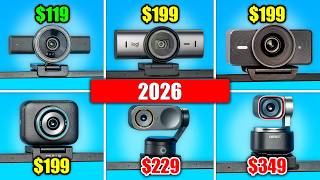

This $200 Webcam is SHOCKINGLY Sharp!
40sThe unexpected image quality and AI calibration surprise viewers, making them want to see the demo.
▶ Play Clip"Delivers exactly what the title promises: a thorough comparison and clear recommendations for the best 4K webcams."
This video compares six popular 4K webcams, including the YoloCam S3, OBSBOT Tiny 3, Razer Kiyo V2, Elgato Facecam 4K, Logitech MX Brio, and Insta360. The reviewer evaluates image quality, autofocus performance, and special features, ultimately recommending the YoloCam S3 as the best static webcam and the OBSBOT Tiny 3 as the top auto-tracking option.
Heavy build with magnetic stand; price ~$200 on Amazon.
Exceptional sharpness, fast autofocus, AI calibration that fixes color issues.
Quick and responsive even at distance; supports 4K 30fps and 1080p 60fps.
Auto-tracking webcam with premium carrying case; magnetic monitor stand.
Sharp image, quick autofocus, AI tracking options (self or group).
Razer's upgraded webcam; price ~$150. Previous Razer models had bad autofocus.
Initially over-sharpened; needed adjustments in Razer Synapse to reduce sharpness and enable noise reduction.
Better than previous models but still slower than competitors.
New 4K webcam at $200; only one supporting 4K 60fps. No autofocus – fixed focus.
Colors not great; automatic white balance confused by background; manual adjustment needed.
Ultra-wide 4K webcam, $200; available used/renewed; older tech but good image.
Good autofocus, natural-looking sharpness, less noise than Razer.
New flagship auto-tracking webcam with magnetic stand; image settings automatic.
Quick autofocus, but tracking smoother horizontally than vertically; some color issues.
Static: YoloCam S3 is best (near $4K camera quality). Auto-tracking: OBSBOT Tiny 3 preferred over Insta360 due to color science.
For a static 4K webcam, the YoloCam S3 offers image quality comparable to a $4,000 camera at under $200, while for auto-tracking, the OBSBOT Tiny 3 excels with its quick autofocus and pleasing color science.
What is the price of the YoloCam S3?
About $200 on Amazon.
00:30
Which webcam supports 4K 60fps?
Elgato Facecam 4K.
06:12
What unique feature does the OBSBOT Tiny 3 offer?
Auto-tracking with AI that keeps the user in frame.
01:26
Which webcam does not have autofocus?
Elgato Facecam 4K (fixed focus).
06:50
What was the main issue with the Razer Kiyo V2 initially?
Extreme over-sharpening and weird processing.
04:11
Which webcam does the reviewer recommend as the best static 4K webcam?
YoloCam S3.
11:44
Between OBSBOT Tiny 3 and Insta360, which does the reviewer prefer for auto-tracking?
OBSBOT Tiny 3 due to better color science.
11:32
What is the price of the Razer Kiyo V2?
Around $150.
03:43
How does the YoloCam S3's image quality compare to a $4,000 camera?
The difference is negligible.
12:00
Which webcam's automatic white balance got confused by the blue background?
Elgato Facecam 4K.
06:36
YoloCam S3 Image Quality Stunning
Demonstrates that a sub-$200 webcam can rival professional camera quality.
00:42OBSBOT Tiny 3 Autofocus Speed
Shows how quickly and accurately auto-tracking webcams can keep users in focus.
01:26Razer Kiyo V2 Over-Sharpening Issue
Highlights common software processing problems in webcams that can degrade image quality.
04:11YoloCam S3 Chosen as Best Static Webcam
Clear recommendation based on direct comparison; reinforces value-for-money assessment.
11:44[00:01] [singing and music] popular 4K webcams, the OBSBOT Tiny 3 as a sponsored like the rest. And we're going to start with a webcam that has been requested the most by all of you. This is the YoloCam S3. It's a very new one. I have
[00:16] never tested it before, but it should be amazing. I can already say that it's pretty heavy and it looks and feels pretty beefy. Besides a webcam, it comes with a very strong magnetic stand. You can use this to also position it
[00:30] vertically. Let's test what it looks like. It's about $200 on Amazon. All right, you should be seeing the webcam right now. I've been playing around a bit with the settings here on the left and look at the quality of my eye when I
[00:42] zoom in. Look how sharp this is. And also look at how good the autofocus is. One of the settings here on the left is AI parameters and if you click on start, it takes almost a minute, but it calibrates your whole webcam and it
[00:55] actually fixed my colors a bit. The hair was a bit too red for example and it's fixed. So, for this webcam, you can get either 4K 30 FPS, which it is at right now, obviously, or you can set it to 1080p 60 FPS. Also, when I go further
[01:09] away, the autofocus is still working. It is focusing on my face. And [laughter] it is just so quick. It is absolutely insane. There is also a very extensive screenshot of your webcam and then you can just select a color, adjust how that
[01:26] color should be displayed. You can also go to professional here, do a bunch of video, these options will be great. Next, we have the OBSBOT Tiny 3. This is an auto tracking webcam and I'm becoming a bigger and bigger fan of them. Content
[01:40] creation used to be just sitting in front of your PC, playing games, and that has definitely changed. Having an auto tracking webcam that always keeps you in the frame no matter where you are moving. This is my camera, by the way.
[01:53] That is super useful. In the box, you're getting a premium carrying case, a USB cable, USB to USB-C converter, and on the webcam which connects magnetically monitor stand. All right, and then this
[02:07] is what it looks like, and I think this is just as sharp. The sensor is the same size as the previous one, as the YoloCam S3. Now, many people are interested in these auto tracking webcams. I can see it moving on the screen, and it is very
[02:21] the way. If you do this, for example, it will zoom in. The auto focus is also very quick, so that's a good thing. You can record in high FPS if you want. There's AI tracking options. It can track yourself, or it can track a group.
[02:35] your upper body in the frame. Let's move further. Now, it will zoom in, and then as I get closer, it will always keep the same part in the frame. Of course, now it can't cuz I'm just too close to the webcam, and this auto focus is also very
[02:48] quick. I'm not sure if I talked about it, but it's quicker than the previous one. The webcam does support HDR. White balance right here. Let's set it to auto. Maybe I should have done that sooner cuz my face might have been too
[03:00] red before. There are also AI beauty filters right here. This is not really too much into it. Now, there is also going to be another auto tracking webcam in this video, so I'm very curious, but this is definitely very impressive.
[03:15] Next, we have a webcam I am very curious for. This is the Razer Kiyo V2, and I have tested the complete Razer lineup before. We had the budget version, budget with a ring light, upgraded budget version, kind of mid-range, and
[03:30] then this was ultra high-end. Basically, all of these were good deals in terms of image quality, but had bad auto focus. This one was by far the worst. So, my hope is that they fixed this with their upgrade. You have the Kiyo V2, and then
[03:43] you have the Kiyo V2 X, which I don't have. It's the budget version of this one. The one we're testing right now is 150 bucks. I am very curious. It definitely looks more premium than the previous webcams. So, this is what it
[03:56] looks like. I like it. It's pretty heavy. Now, the cable is USB-C to USB-C and apparently with no adapter. So, do take that into account if you're buying this. Let's check it out. All right, the webcam should be recording right now and
[04:11] I had quite some problems with this one. I will quickly show you what it looked like before. It was extremely over sharpened. There was some weird processing going on. I used the options in Razer Synapse to try and fix the
[04:23] image. I also went to the bottom here to this setting which allowed me to reduce the sharpness quite a bit and this was absolutely necessary. And then in the processing tab here on the top, I also enabled all the noise reduction options
[04:36] and in this way I was able to adjust it just enough. It is still very sharp. As you can see, once it focuses, it looks very sharp. Probably still a bit too sharp, but I already reduced the sharpness so much. However, this one is
[04:49] definitely better if I move very close, you will see that it takes a bit and then now it sharpened. I will move away. It takes a while. Now it sharpened. It is quite good. However, this webcam costs, I think, around $150.
[05:02] And so, that means that it is almost in competition with the Yolo Livestream S3. It is $200 instead of $150. But I mean, if you remember the quality of this webcam before when we checked it out, the quality of this webcam right here
[05:16] was absolutely insane. The autofocus was super quick. I definitely like this one much better than the Razer Kiyo Pro V2. All right, next we have one I am very curious for. This is the Elgato Facecam 4K. It is brand new. I have never
[05:31] checked it out. Now, in my opinion, Elgato didn't do that well with their previous webcams. They were either too expensive or they just weren't up to par with other budget options. And this webcam here is the one that should
[05:44] change this. In the packaging, you're getting a stand, then a USB-C cable, and of course also the webcam. Now, unlike some of the other webcams, it is not magnetic. You need to screw it on. Now, this is not necessarily a problem, but I
[05:57] feel [music] with the magnetic stand. The USB-C cable plugs here into the back. [music] The webcam itself is pretty light. It feels almost hollow. And before we go on, one thing I should mention, this webcam is
[06:12] thing I should mention, this webcam is 4K 60 FPS. It's the only one out webcams that does that. But let's connect it to the PC to see what it looks like. I quickly updated the firmware, and I just checked the price.
[06:24] It is $200. So, it should definitely look very good to beat the other webcams. I do not like the colors or the resolution right now, but we will have kind of fixed it. I had to choose manual
[06:36] white balance cuz if I set it automatic, it gets confused with all the blue thing because the other webcams did manage that. And right now, you should be able to see me full screen in full quality. One thing I forgot to mention,
[06:50] this webcam does not have autofocus. It is fixed focus from a specific distance, probably about this range, till probably about this range. I'm not sure, but it should all kind of be in focus unless I move too far away. And yeah, this is a
[07:05] quality that you can expect from the Elgato Facecam 4K. And before I forget, right, then the next webcam we're checking out is the Logitech MX [music] Brio. Now, this is not a new webcam. I've also tested it before. I do take
[07:20] good care of the webcams, though. But the reason that this, by the way, it opens like this. The reason that this webcam is included is that, first of all, it is ultra wide 4K, which means it will have a very wide field of view,
[07:33] which some people definitely like. The second reason is that it's a quality second reason is that it's a quality product cuz it's $200, but also, as it has existed for a while, it is also available used or renewed, and you could
[07:45] possibly get a good deal on this. What I think is that it will be the same price as this if you buy it used or renewed, and I think it will beat this one, but I think it will not beat the Yolo Cam S3. And by the way, I keep mentioning the
[07:58] other webcams, but I just wanted to mention that the OBSBOT Tiny 3 has the insane quality of the other ones, or for example, the Yolo Cam S3, but it doesn't include auto tracking. So, if you want that insane quality we've been having in
[08:11] this video, but you want auto tracking, then this one is the way to go. A few re-record the segment because I was a bit off, and I was a bit to the side of the webcam. I did not have that with this one because it just kept me in the
[08:25] frame. Anyway, let's test the Logitech MX Brio Ultra. All right, I made a few adjustments to the image with the normal settings, of course, and I think it looks as good as it can look right now. The autofocus is definitely very good.
[08:41] Let's move further away and see how long it takes. That wasn't too long. I didn't screen. Let's see how long it takes right now. It takes a bit, and then it focuses. So, I think it's about the same as the Razer one. However, the
[08:54] background doesn't look as noisy as with the Razer Kiyo V2. I think the colors also look better. I should check on PC, but it also looks sharp without looking artificially sharpened. Like right now, it is just high resolution [music]
[09:07] sharp. That's it. And I definitely like the image. It's just that it has been made with technology from a year ago, and that might have an impact while >> [music] >> which we will do very shortly, because
[09:20] the last one we're going to check out is the Insta360. Right now, this is the new flagship auto tracking webcam of Insta360. It comes with a stand that is also magnetic, and then the cable does seem to be very long. Actually, it's
[09:34] [music] pretty normal. I will install the software, and then we can check out how good we can make this look. All the image settings are set to automatic and right now you should be able to see me in full screen. I'm recording in OBS
[09:47] right now, so this is the full quality. When [music] I move closer like with the other webcams, this is the autofocus performance [music] when I move a bit and then it has to refocus. I think it's also very quick like the other ones. I
[10:00] feel like my hair is not looking perfect in terms of color. I do feel like the side is tracking is smoother than when I move up and down. Like right now it does not track me yet and then at some point it will see me and then it will quickly
[10:12] readjust. I've seen it happening a lot. All right, as promised here are all the webcams we tested in this order. Starting now I am going to loop all the webcams while giving my quick thoughts and then after you check out all of them
[10:25] back to back, I will tell you my opinion which webcams I like the most and for which reason. It is probably harder to choose between the auto tracking webcams because they are both amazing. They both track very [music] well. They look very
[10:39] good. The image looks amazing. The auto tracking is amazing. But between the other four for me it is pretty clear which one I like the most. I will give you the reasoning behind my choices and I also want to mention that all these
[10:51] They are affiliate links but they help me make these videos buy this gear. So products, the official listings are [music] linked below. And yeah, which one will be the winners in this video? As I mentioned before for the auto
[11:06] tracking webcams, they are both great options and it might come down to personal preference. I have tested Insta360 before and also in the previous video. I thought that it looked a bit too processed, a bit too over sharpened.
[11:19] I did see the same thing right now, but some people prefer that. I will quickly show both options next to each other right now in case you want to make a direct comparison. I will also include a part where I move closer and they focus
[11:32] on my eye. So, maybe this helps you to make the choice. I like the Obsbot one better. It's also the reason I work with them a lot. I like the color science they apply to the webcams, but you can make your choice. [music] For the other
[11:44] normal 4K webcams, for me the choice is very, very clear. The YoloLiv Yolo Cam S3. I had seen very good reviews of this webcam, so I was looking forward to checking it out. And honestly, if I was looking for a static, non-auto tracking
[11:59] >> 4K high-quality webcam that would replace a camera or something, this is absolutely insane. People will genuinely barely see the difference between a $4,000 camera and then this webcam right here. I will show you a comparison next
[12:13] to each other right now. The difference is negligible if you know that this is below $200. The Elgato one, I don't like the fixed focus where it doesn't auto focus exactly on your eye. And then the Razer, I mean, I think I'm kind of done
[12:27] with Razer webcams. They just never deliver. I'm not sure. For me, these are my [music] two favorites. If I have to choose two, one for the auto tracking and then one as a static [music] 4K webcam. Again, all of these, but
[12:39] especially these two, will be linked in the description. Thank you so much for watching these videos. I love making them. I will link another video right there that might be interesting. And I will link other comparison videos in the
[12:51] for watching and I hope that I will see you in my next video. >> [music] >> Have a nice day.


⚡ Saved you 0h 12m reading this? Transcribe any YouTube video for free — no signup needed.