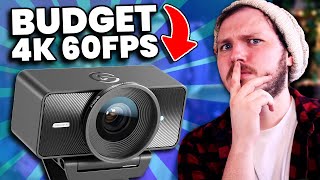

Blind Webcam Test: Can You Spot the $200 vs $80?
40sInteractive blind comparison hooks viewers immediately with a challenge, boosting engagement and comments.
▶ Play Clip"Delivers exactly what the title promises — a thorough, honest review with a surprising twist."
This video reviews the Elgato 4K Facecam, a new webcam released today, comparing it to a decade-old champion and a mystery camera. The reviewer emphasizes image quality, ease of use, and price, and conducts a blind test to get unbiased opinions. The video also covers technical aspects like shutter speed, ISO, and the impact of a fixed f/4 aperture.
The reviewer has recommended the same decade-old webcam for five years, and the Elgato 4K Facecam is the challenger.
The reviewer sets up a blind test with three cameras: the Elgato, a mystery webcam, and an $80 webcam.
Image quality is the most important factor, followed by ease of use and price.
The Elgato's 4K sensor makes 1080p footage crisper due to higher pixel density.
The Elgato has a fixed f/4 aperture, which means it needs more light and forces higher ISO, introducing noise.
The software's noise reduction feature minimizes noise but reduces sharpness.
The Elgato 4K Facecam costs $200, which is above what most consider budget.
The mystery webcam was an iPhone 15 Pro Max streaming at 720p over Wi-Fi, which was surprisingly crisp.
The Elgato 4K Facecam offers excellent color and sharpness, but its fixed f/4 aperture and $200 price tag mean it's not for everyone. The software helps mitigate noise, but proper lighting is essential. The iPhone twist shows that your existing devices might be good enough.
Shutter Speed Rule of Thumb
Provides a simple, actionable rule for creators to get natural-looking footage.
04:35Fixed F-Stop Trade-Off
Explains how a fixed f/4 aperture impacts ISO, noise, and lighting needs.
05:45iPhone 15 Pro Max as Webcam
Reveals that a high-end phone can rival a dedicated webcam, even at 720p.
14:01Lighting is Key
Emphasizes that lighting, not just the camera, determines image quality.
13:21[00:00] Picking the right webcam is a big decision, not just for the quality of your content, but also for your wallet. There are literally thousands of webcams to pick from, and it just got harder because this is the Elgato 4K Facecam, which was released literally today.
[00:12] For the past five years, I have recommended the exact same decade-old webcam on this channel. So the question we're answering today is, can the Elgato 4K Facecam defeat the reigning champion of half a decade? As always, though, the very first thing we are doing is blind, unbiased samples.
[00:27] We need your opinion. The challenge for you is to pick which webcam is which, and tell me in the comments. Can you tell which is the Elgato 4K Facecam, which is our special mystery webcam, and which is the $80 USD webcam I've always recommended?
[00:40] The reason I'm doing it this way is because Elgato did sponsor this video, which means it is crucial I give you a chance to have an unbiased opinion. And look, if you've watched the channel at all over the past few years, you'll know that I am pretty harsh on Elgato, or really every brand,
[00:54] when I think they make something that misses. With the disclaimers done, let's talk about what a webcam or camera in general needs me to recommend to you guys. Which I will admit, I am incredibly picky, but also an incredibly simple man. 1. Image quality is crucial. That is the most important thing. I will forgive everything if the image quality is amazing.
[01:12] 2. Ease of use. Is it a pain to set up, or is it really easy to set up? And of course, number 3. Price. It has to be affordable for the quality it gives you. With the name Elgo 4K Facecam, you can imagine it is a 4K camera.
[01:24] And now earlier I said image quality was crucial, and what you heard was high resolutions are better. But actually to me, quality comes from how a camera handles light, how it handles color, and of course how crisp it is.
[01:37] Don't blow some minds here, but I've never actually shot in 4K ever. I've owned many 4K cameras, but I filmed documentaries worldwide on a 1080p camera for over 9 years. The only time I care about resolution is because having a 4K sensor means my 1080p footage from that sensor will or should be crisper,
[01:55] because the sensor should have 4x the pixels, aka when I shoot 1080p, the pixel density is much higher. This is absolutely something I noticed on the Elgato 4K webcam, and if we show these shots side by side and zoom in,
[02:08] the Elgato 1080p is much crisper than the AUSD webcam, so if that detail is something you care about, that's a huge plus. I want to quickly show you the Elgato 10P side by side with the noise reduction software on and the noise reduction software off.
[02:22] I spoke to Elgato and they said they kind of expect you to always use the noise reduction, so I'm going to cover this in detail at the end of the video because it's pretty impressive. And to add on to that, this is me using a custom color correction and custom light just to quickly throw together a nice look,
[02:34] and the digital blur, which I'm not a huge fan of digital blur, but it's just to show it off. But really importantly, the reason I'm showing the camera without noise reduction quite a lot is because, as I said, when I buy 4K, I do it because I want that amazing sensor clarity, that crisp image, and I did notice
[02:47] the noise reduction affects that sharpness that's so important to me. But again, full tests of both will be coming up in the video. And for good measure, this is the Mystery webcam, looking incredibly crisp as well, which I want you to remember because at the end, that's going to be really interesting.
[03:00] Stick around for that reveal. A quick note, this high-quality 1080p is great on webcams because most acquired wide-angle lenses sitting around 20mm, which the 4K is no exception, it's a 21mm lens. This means you capture the entire room, and that is great.
[03:16] But to someone like me with a dozen projects on the go, I like a tighter lens to hide my disgusting filth. So I find myself zooming in digitally on most webcams, which means I lose quality, which of course is less of a problem on a webcam with a 4K sensor.
[03:31] With the Mega, here are three shots zoomed in using digital zoom in their prospective software which to add Elgato software is quite nice for this as I can zoom and then just drag the little box around to reframe Now the Elgato also does 60 frames per second at 4K which is rare Most webcams when they get to higher resolutions force a cap of 30 frames per second For example the 80USD webcam when it comes to 1080p
[03:52] only does 30 FPS. Now, in your gross little gamer head, you probably think higher FPS means smoother footage. That is true for TVs, monitors, and gaming to a certain extent, but when it comes to cameras, this also depends on our shutter speed. In fact, someone argues that shutter speed is far more
[04:07] important. And in fact, setting a higher FPS can actually make your image quality and the smoothness of it far worse. What do I mean? Well, shutter speed is literally referred to how fast and how long or how often a shutter opens and closes. Now, we don't actually have shutters anymore,
[04:22] it's all digital, but the rules still apply, and they affect two things, motion blur and light. Lower shutter speeds are open longer, and therefore have more motion blur as they're capturing all of the motion the image is given, but because they're open-molded, they also
[04:35] let in more light, making a brighter image. Shutter speed is all about balancing motion blur and brightness. But a rule of thumb with this setting to get the most natural look is to set it to be double your FPS, essentially. So, 30 FPS would be 1 60th shutter, and 60 FPS would be 1 20th.
[04:51] Look at these two shots in Elgato 4K. One is 60 FPS, 60 shutter. The other is 1 20 shutter. You can see the difference both in blur and brightness. In fact, 120 is darker, and I would say technically underexposed.
[05:03] But of course, having a higher FPS in this camera isn't a bad thing. It's more flexibility for you as a creator, which is a win for Elgato. But personally, because of the next choice Elgato went with, I found myself unable to truly utilize the 60 FPS of the camera,
[05:17] instead only using 30 FPS. Why? Because when you have a darker image, like what would happen if I needed 120 as shutter speed, there are four things you can do. First, add more lighting. Second, lower your f-stop, lower your shutter speed, and fourth, raise your ISO.
[05:31] And you have to do those in that order to maintain quality, by the way. So, small problem, my lights are already blasting. Both of my lights, when I use this, are mapped out at 3000 lumen. I can barely see the screen when I'm doing these tests.
[05:45] My shutter speed is 160 at 30 fps, so the next step would be to lower the f-stop, except I can't. The Elgato 4K has an f-stop of 4, and that is fixed. You cannot change that, you can't go up or down.
[05:58] This means a few things. First, you'll always be in focus. Awesome. You never have to worry about a soft out-of-focus shot, because the webcam is a 21mm lens, aka it's very wide and compresses depth down. It becomes very flat,
[06:10] meaning F4 will make your entire shot in focus from my wall to my hand. It also means you need a lot more light. F4 doesn't seem very high, except you have to remember that most webcams, including Elgato's other webcams,
[06:22] usually sit around 2.4 or 2.8, giving better depth and allowing more light. So what do we do to increase our exposure if we can't change our f-stop as well? Well, we'll need to turn our ISO up, as I said.
[06:34] We need to raise this until we are properly exposed. Now, unlike shutter speed and f-stop, this is digitally altering the image, which means it will add visual noise and the image will degrade. For simplicity, your goal should be to have the lowest possible ISO,
[06:48] which tends to give you the cleanest image. For an example, this is the 4K at 300 ISO. is properly exposed, both of my 3000 lumen lights are maxed out and now I will lower the brightness of my lights and raise this ISO up until it's properly exposed which is
[07:03] 1200 ISO and you can see the digital noise. To my flight you won't use 1200 ISO and shouldn't be but this is a good example to see digital noise. A great comparison is also between our three testing cameras today. If I max my lights out again, first of all copy the settings across all three and then
[07:18] and raise the ISO to be properly exposed the Elgato is around 300 ISO the 80 USB camera is around 100 ISO and the mystery webcam cannot be included because 50 ISO is as low as it goes and it so overexposed
[07:31] The reason the three cameras behave this way is because this has an f4, which is the highest of the three, the 80USD is an f-stop of 2.8, and the mystery camera is an f-stop of 1.8. Now all these tests are being done with my lights absolutely blasting me.
[07:45] They are maxed out. I cannot create like this. I would never record like this, but I'm kind of having to in order to use the lowest ISO possible. So let's just lower them so my eyes are more comfortable, and we'll just go straight to the edge of where I could record without being blinded.
[07:59] One light will be 70%, and the other will be 30%. It's still very bright, but I'll manage. Now, we're going to raise our ISO on the Elgato, and as you can see, we're reaching about 750 to 800 before we're properly exposed,
[08:11] which, if we compare that to the AUFD webcam, which is now at ISO 400. Put them both side by side and let's zoom in a little bit and we can see that the noise that it's produced is really interesting. The Elgato is coming out far noisier but it's still far crisper and handles colour better.
[08:28] In fact I would say this 4K sensor might actually be bringing out that noise because it has so much clarity. But this isn't actually a bad thing and you'll see why soon. I'm setting something up so trust me. And quickly I will point out the 80mm camera is nowhere near as crisp or accurate to my
[08:44] skin tone. So this is a huge win for Elgato. Most webcams struggle to have colour accurate images, and the Elgato 4K is clearly miles ahead in that regard. While the Mystery Cam looks pretty clean, it's a little bit washed out and uncolourful. I don't think the colours are quite as nice.
[08:58] But what am I getting at here? Well, I wanted to show how this small decision to lock and set the f-stop of 4 impacts your entire setup. I'm not bringing all this up to bash Elgato. After all, they paid for the video, and that would be pretty stupid of me.
[09:12] I'm bringing it up because when you buy Elgato, you don't just buy a webcam or a microphone. For the longest time, people have always said the phrase, buying Elgato is because you want the software, which takes us from image quality into ease of use.
[09:25] Elgato is known for their software. It is designed for creators, for streamers, and while it is fast and perfect, it usually has huge features that other brands just don't have. It's not like buying into Apple.
[09:37] If you want Apple's cool software and features, you've got to buy their phone. You've got to buy their watch. And once you're in, you're in. And in this case, their software sort of solves the hiccups that the F4 lens creates. So let's open up Camera Hub.
[09:50] Let's go down to the bottom and turn on noise reduction. We're going to set this to high as well because I want you to watch closely here. There is a moment when I turn it on which is insanely noticeable. Did you see it? Hopefully YouTube compression doesn't ruin that.
[10:03] And just in case it did, here are two shots side by side as well. The Elgato has lost some of that crispness. It is definitely smoother now. But when I'm not moving, all of that noise we created by being forced to raise the ISO is minimized.
[10:16] The reason this is powerful is because the $80 camera doesn't have this feature and doesn't work with Elgato's software. So we are stuck with that noise. Now, as I said, we do lose some sharpness, and when I move, you see the noise or artifacting slightly come back.
[10:32] So this in no way is a substitute for proper lighting. But I've had proper lighting, so I am glad the setting exists and that it's this impressive. I don't think it's unfair or unreasonable to say that this setting and this software is what makes the difference.
[10:46] And without it, it would be pretty hard to overlook the noise. The software being designed like this adds to the image quality in a way that makes it inseparable from the webcam. When I use this camera it does come across like it been designed with the noise reduction software in play but one of the major questions I get asked every day on my videos is how do you get that crispy out of focus look behind you So how do we deal with the depth of field snack Well the software does help with that as well with a few drawbacks
[11:15] If you want depth of field you can head over to the effects tab, quickly install NVIDIA SDK which takes 2 seconds and then turn on blur. Now a few really important notes. These blurs and also the LUT effects here can't be used in 4K right now and will only
[11:29] be shown in OBS if you set your camera hub to 1080p and then virtual cam it across to OBS, which is a bit of a pain. Apparently they're working hard on changing this. Another note, this blur of course would increase resource usage on your GPU,
[11:42] the amount would depend on your computer, and I guess that doesn't really matter because if you don't have a NVIDIA card, none of this will work as it's the NVIDIA SDK, and the major thing the comments are going to yell at me for is that calling this depth of field would be a sin.
[11:55] But look, if you can't do it any other way, it works. Granted it does look like someone on the lens and it can be very glitchy around your headphones, head, hair, any kind of detail, gaps popping around you, and it does perform worse the worse lighting you have, which brings
[12:08] me back around to lighting quickly before we reveal which shots are which. I haven't revealed the price of your Galaxy 4K yet, and that is because I wanted you to go into this with an unbiased look at the footage. If I told you it was insanely cheap, you'd love the footage.
[12:21] If I told you it was pricey, you'd hate it. Now that you've made up your mind, I can reveal it is 200 USD on release, which is not terrible, honestly. But, would you call it a budget camera? Well, it's important to note 4,500 of you voted on a recent poll, and 85% said under $100 is what you would consider budget.
[12:39] Whereas another poll had 3,000 people vote, where 68% of you said they'd expect a good quality webcam to cost around 100 USD. It does come with all sorts of bells and whistles, such as HDR, or the fact that the video is
[12:52] uncompressed in most codecs, or what's really cool is the lens has a 49mm filter inside it so you can put on things like lens filters, privacy caps, and while all of that is cool, I will admit, personally, my mind only cares about that image quality and ease of use.
[13:07] Which is why, of course, we have to factor in lighting. Based on what we've talked about, you'll likely need two dedicated proper film lights when you use this camera. I won't recommend specific brands here out of respect for Elgato, but you'd want at least 2800 lumens of brightness on each.
[13:21] Personally, the ones I use cost around 100 USD, so 200 USD for two is pretty good. I would try to factor that into your budget, because as shown, lighting is truly what makes or breaks image quality. And I'm not saying that about the Elgato, I'm saying that about all cameras.
[13:34] And with all of that said, I think you probably know this already, but let's reveal which shots are which. Line B, of course, is the Elgato. You can tell now, it's so obvious. You can tell from the crispiness, you can tell from the colors, you can tell from the noise.
[13:48] Blind C was the $80 camera. You can tell because it's softer, it's less sharp. The colors are a little bit worse, a little bit less accurate. But the really interesting one is that Blind A is my iPhone 15 Pro Max.
[14:01] I used Elgato's E-Pod Cam Pro software. I bought it a few years ago. Sadly, I don't believe it's supported anymore, so you guys can't get it. And the reason that it's not just important but impressive is because, remember at the start of the video when we compared those 70p shots. Well, I said it was 70p, however,
[14:17] I'm lying to you. So all that crispiness, everything you've seen of this camera in this video is being sent over Wi-Fi at 720p. That is nuts. Of course, this is a 900 USD phone. It's not fair to compare
[14:30] it to a 200 USD webcam, but it was to add the extra element of what you might already have in your pocket. But nothing I say matters. I want to hear what you think after seeing all of this. I'd love
[14:42] to hear your thoughts. Is this something you'd consider buying? What would you like to see added or removed? If you want to see all the budget gear I use daily, click here.
⚡ Saved you 0h 14m reading this? Transcribe any YouTube video for free — no signup needed.