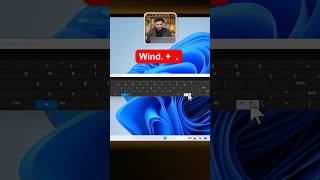
Hidden Windows Emojis Revealed!
45sReveals a hidden feature that most users don't know about, sparking curiosity and immediate try-it-yourself behavior.
▶ Play Clip"The title promises hidden emojis and the video delivers exactly that with a clear, actionable shortcut — no fluff, but it's a very short tip."
This video reveals a hidden Windows feature: a built-in emoji panel accessible via a simple keyboard shortcut. The presenter demonstrates how users can quickly access and use a wide variety of emojis with just one click, enhancing their productivity and communication.
Many Windows users are unaware of the hidden emojis available within the operating system. The video introduces this feature as a useful tool for everyday use.
Pressing the Windows key plus the period (.) key simultaneously opens the emoji panel. This is the primary method to access the hidden emojis.
The emoji panel contains a large collection of emojis. Users can browse and select any emoji with a single click, making it easy to insert them into any text field.
The video provides a quick and simple tip for Windows users: use the Windows + . shortcut to access a hidden emoji panel, making it easy to add emojis to any text. This is a practical trick for enhancing communication.
What keyboard shortcut opens the emoji panel in Windows?
Windows key + period (.)
How do you insert an emoji from the panel?
Click on the desired emoji with a single click.
00:12
Hidden Emoji Feature
Reveals a lesser-known Windows feature that can improve user efficiency.
Simple Keyboard Shortcut
Provides a quick, memorable shortcut (Windows + .) that is easy to adopt.
[00:00] बिशुमार लैपटॉप इसे यूज़ करने वालों को मालूम ही नहीं कि आपकी विंडोज के अंदर बहुत सी हिडन इमोजीज भी हैं। वो मिलेंगी कहां से। सिंपली या प्रेस करेंगे विंडोज प्लस डॉट का बटन। तो आपके सामने emojis का panel आ जाएगा, यह देखें.
[00:12] यहाँ पे emojis का धेर लगा पड़ा है, आप जैसी चाहें emojis को एक क्लिक के साथ use easily कर सकते हैं. तो Windows plus dot का बटन याद कर लें.




⚡ Saved you 0h 00m reading this? Transcribe any YouTube video for free — no signup needed.