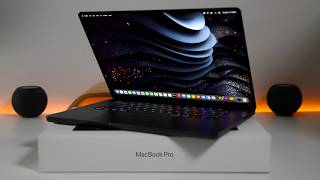

M5 Max MacBook Pro Unboxing: $4,599 Beast
45sThe high price and unboxing of a premium laptop create immediate curiosity and engagement.
▶ Play Clip"Title accurately describes unboxing and first look with impressive speed benchmarks."
Aaron from zolotete unboxes and provides a first look at the new 2026 MacBook Pro M5 Max 16-inch, highlighting its upgraded specs, new keyboard symbols, and performance benchmarks compared to the M4 Max.
The M5 Max 16-inch starts at $2,699, goes up to $7,349, and the reviewed configuration is $4,599 with an 18-core CPU, 40-core GPU, 64GB RAM, and 2TB storage. Comes in space black or silver.
The keyboard now uses symbols instead of text for keys like delete, enter, shift, caps lock, and tab. The function key lettering has moved to the bottom.
The M5 Max has 18 CPU cores (up from 14), with 6 super cores and 12 performance cores, and a 40-core GPU. Memory bandwidth increased to 614 GB/s from 546 GB/s.
Battery life improved to 16 hours wireless web (up from 14) and 22 hours video playback (up from 21). Includes N1 chipset with Wi-Fi 7 and Bluetooth 6.
The M5 Max now supports voice isolation and wide spectrum mic modes in FaceTime, which were unavailable on the M4 Max.
Blackmagic disk speed test showed write speed of 12,029.5 MB/s and read speed of 11,875.7 MB/s on M5 Max, significantly faster than M4 Max's 10,179 MB/s write and 5,575 MB/s read.
Geekbench 6 scores: M5 Max single-core 4,337 (vs 3,869), multi-core 29,474 (vs 26,154). GPU Metal score 229,415 (vs 196,985). AI GPU score 40,951 (vs 25,559).
Cinebench GPU: M5 Max 94,581 vs M4 Max 67,533. CPU multi-threaded: 8,764 vs 7,472. Single-threaded: 740 vs 646.
Using Draw Things, M5 Max generated an image in 2 min 12 sec (30 steps) vs M4 Max's 6 min 38 sec, a significant improvement.
4K video export (12 min 38 sec) took 2 min 59 sec on M5 Max vs 3 min 30 sec on M4 Max. Supports up to four external displays via Thunderbolt, including 8K at 60Hz.
The M5 Max offers substantial performance gains in AI and GPU tasks, but for video editing, the upgrade from M4 Max may be marginal. It's a significant jump from M1 or M2 models.
What is the starting price of the 2026 MacBook Pro M5 Max 16-inch?
$2,699
How many CPU cores does the M5 Max have in the reviewed configuration?
18 cores (6 super cores and 12 performance cores)
02:30
What is the memory bandwidth of the M5 Max compared to the M4 Max?
614 GB/s vs 546 GB/s
03:00
What new microphone modes are available on the M5 Max?
Voice isolation and wide spectrum
03:30
What was the Geekbench 6 multi-core score of the M5 Max?
29,474
05:00
How much faster was the M5 Max in Draw Things image generation compared to the M4 Max?
2 min 12 sec vs 6 min 38 sec (about 3x faster)
08:00
What is the maximum number of external displays supported by the M5 Max?
Up to four displays
09:00
AI Image Generation Speed
The M5 Max completed image generation in 2 min 12 sec vs 6 min 38 sec on M4 Max, a dramatic improvement.
08:00Keyboard Symbol Changes
Apple replaced text labels with symbols on keys, a subtle but notable design shift.
02:00Cinebench GPU Score
M5 Max scored 94,581, faster than M3 Ultra, showcasing significant GPU gains.
06:30[00:00] Hi everyone, Aaron here for zolotete and this is the new 2026 MacBook Pro M5 Max 16in. This starts at $2,699, goes up to $7,349 and in its current configuration is $4,599. It comes in space black or silver. Let's go ahead and take a look at it and see what's new. So, this particular configuration is the upgraded processor. So, we have an 18 core CPU, 40 core GPU, 64 gigs of RAM, and 2 TB of storage. Let's
[00:27] go ahead and open it up. So, we'll flip it back over here and take a look at it. We'll also compare it with the M4 Max as well. So, inside here, of course, here's the MacBook. It's pretty heavy. We'll move it over here for just a moment. And in the packaging here, of course, we've got our paperwork. No stickers. We haven't had that for a while, but you'll see MacBook Pro. Again, this is not color matched
[00:55] like the MacBook Neo. Hopefully, future products will have that where everything was color matched and just looked great overall. Inside, we've got a power adapter here. So, this one in particular, let's open it up. This is the, I believe, 140 W power adapter. So, let's open it up here. You'll see it's 140 watts, so you can use that with your MacBook. And then, of course, you get the included cable that's color matched and braided, so you've
[01:22] got USBC to Mag Safe. Now, let's go ahead and unwrap it here. You'll see it says MacBook Pro on the bottom. No change here as far as the physical design. So on the side here, we've still got MagSafe, two Thunderbolt 5 ports, as well as a headphone jack. And then on the other side, we've got our SD card slot, again, another Thunderbolt or USBC along with HDMI. Let's go ahead and set it down, and we'll open
[01:50] it up. And we'll compare it, like I said, with the M4 Max in a moment. So, we'll open it up here. It should turn on automatically. We'll remove that and you'll see everything looks pretty familiar. There are some changes here though. Now, let me go ahead and get this set up and we'll take a look at what's new. So, we'll unlock it here. Set up the language and I'll begin to sign in and get this all
[02:17] set up. I do love that you can set it up with your iPhone now so it can connect and set your account up. Move everything over. Now, unlike the MacBook Air, this is allowing me to update it later. So, we'll see what it's pre-installed with and then we'll update it. It's done setting up. We'll go ahead and click get started. Let me get rid of some of the widgets. We'll take a look at the OS, update
[02:45] it, and then of course do some comparisons. So, first let's go into our settings here, system settings, and then we'll go to about. And you'll see we have Mac OS Tahoe version 26.3, build number 25D2125. So, let's go ahead and take a look and see if we've got an update, as I'm sure we do. We have a day one update with Mac OS Tahoe 26.3.1. So, I'll get this updated. I'll install a bunch of software so
[03:12] we can test it. And then we'll take a look when this is complete. Everything's up to date and we're now running Mac OS Tahoe 26.3.1 with a build of 25D 2128. So, we're ready to go there. Now, one of the disappointing things here that they did with the MacBook Neo, but not with the high-end MacBook Pro, is there's no customized theme for the device. Maybe this is something we'll see in the future. They didn't include it
[03:40] with the M5 MacBook Air either. And we also don't have any new wallpaper. So, it looks like this generation is all the same wallpaper, but if we scroll down, you'll see that we have the new MacBook Neo wallpaper included. So, they included these for some reason, but no new MacBook Pro wallpaper or MacBook Air wallpaper. So, let's go ahead and switch back. We'll just use the default one for now and let's take a look at what's
[04:07] new and then we'll talk about the overall specs and how it compares to last year's model. So, the first thing that's new has to do with the keyboard. It looks mostly the same, but we have some new symbols here. Let me bring in last year's model so we can compare. Now, we have the keyboard side by side. On the right is the M5 Max 16-inch MacBook Pro and on the left is the M4 Max 16-inch MacBook
[04:35] Pro. You'll see they've changed some of the symbols here. So instead of saying delete here, it now has an arrow to the left with an X in it. We have a symbol for enter or return. Also one for shift. The same is true on this side as well as caps lock and tab. So they've moved some of that around and changed where the function key lettering is. So Fn is down here instead of at the top.
[05:02] Some small changes. Not sure why they did this. Maybe to make it a universal keyboard and cheaper to print keys instead of maybe all in English. I'm not sure. But either way, they're now symbols. Now, as far as what else is new, well, the CPU is new, of course, but it starts at 18 cores, up from 14. We also now have six super cores and 12 performance cores. They've gotten rid of the name efficiency core, at
[05:29] least in the high-end chips. We also now have a 40 core GPU that has neural accelerators, and the memory bandwidth has increased to 614 GB per second compared to 546 GB per second last year. We also have the same integrated 100watth lithium polymer battery. Now it's good for 16 hours of wireless web compared to 14 last year and 22 hours of video streaming again compared to 21 last year. We also have the N1 chipset and the
[05:57] N1 chipset gives us Wi-Fi 7 and Bluetooth 6. The only other thing I could find that's new other than of course the chips is the actual microphone itself now has voice isolation and wide spectrum. So, if we go into FaceTime, for example, if we move this over in the top right on the M5 Max here, you'll see if we go to our little camera here, we now have mic mode and we now have voice isolation and
[06:24] wide spectrum. If we take a look at the same thing on the M4 Max here, so we'll look at the exact same thing here. And if we go here, we go to mic mode, it says voice isolation and wide spectrum are currently unavailable. So, the options are actually here, but they're not listed as having it for the M4 Max. So, let's go ahead and run Blackmagic disc speed test. We'll run it on both. In default here,
[06:52] we'll just click start, and let's see what we've got. So, on the M4 Max, the highest right speed I got was 10,179. That's the highest I've ever seen on the M4 Max with a read speed of 5,75 megabytes per second. On the M5 Max though 12,029.5 megabytes pers right speed and 11,875.7 megabytes pers read speed. So definitely a lot faster here. So we'll start with Geekbench, then we'll run a bunch of other tests as well to
[07:19] see how they compare. So we'll start with the CPU benchmark. Benchmarks completed and you'll see this is pretty much a new record for Geekbench. 29,474 compared to 26,154 for single core, 3,869 on the M4 Max compared to 4,337. So definitely a bump up as far as that goes. I also ran a GPU benchmark test using metal and we have 229,415 compared to 196,985. I also ran Geekbench AI using the GPU and Metal and you'll see 40,951
[07:47] compared to 25,559. We're also seeing a big jump up in half precision score here with 44,19 compared to 27,377. And then again, single precision score is a little bit of a bump up at 27,383 compared to 24,08. We're running Cinebench on both of these. And since it's fairly warm and the fans are on both, you can see the heat signature where it's pushing out the heat from the fans there. And it's about 40 or 50° C
[08:14] or so. On the M4 Max, you're going to see the same sort of thing here. And we would expect similar temperatures, about 50° C. So quite warm, but again, it's doing its job. Cinebench completed. And I had to plug in both Macs as the battery was getting low. But you'll see the GPU scores are significant here. 94,581 for the M5 Max compared to 67,533 for the M4 Max. That's faster than not only the M4 Max, but
[08:42] the M3 Ultra as well. It's also quite good for the CPU. So, if we switch over here, you'll see on the CPU side, multi-threaded was 8,764 compared to 7,472. And again, not quite as good as an M3 Ultra, but definitely better than anything else. Also, if we go to the singlethreaded CPU, this was quite good as well. 740, which again was faster than an M3 Ultra, an M4 Max, and the M4 Max was 646. So, very
[09:09] impressive here overall. Now, I'm running Draw Things as the next benchmark, and the fans really ramped up this time. So, take a listen. And using the decibel meter, it seems like it's about 56 dB on the M5 Max compared to about 60 dB on the M4 Max. Doing the same task. Now, I use Draw Things. And I had to run this test twice because of how big the difference was between the M5 Max and the M4
[09:37] Max. Both of them are the topsp spec processors for each year. And with the M5 Max, it completed my prompt just generating an image in 2 minutes and 12 seconds with 30 steps. on the M4 Max. 6 minutes and 38 seconds again with 30 steps. So, that's pretty incredible. I ran it twice. You can see the images here. And I didn't expect it to be that much faster, but it definitely is. And it's repeatable. The export
[10:04] completed. It's a 4K video that's 12 minutes and 38 seconds long. And I exported this the same as all the others that I'll show here as well. It exported it in 2 minutes and 59 seconds. Now, this compared to the M4 Max, that was 3 minutes and 30 seconds. However, my M1 Ultra is even faster at 2 minutes and 24 seconds. This is because I use allow export segmentation. This splits it up to two different segments
[10:31] while exporting on a max processor, but on an ultra processor, it splits it into four segments, speeding it up. So, so far, I haven't seen anything faster than the max CPUs. However, this is still super fast at under 3 minutes. The other thing I wanted to mention is the external support of monitors through the Thunderbolt port. It supports up to four external displays over any combination of Thunderbolt and HDMI ports. It works simultaneously while supporting the
[10:59] built-in display at full native resolution. And it supports four displays up to a native resolution of 6K at 60 Hz or 4K at 144 hertz or two displays up to a native resolution of 8K at 60 Hz, 5K at 120 Hz or 4K at 240 Hz. It supports up to four external displays over a single Thunderbolt port. So that's pretty impressive. And that's Display Port 2.1 speeds. So that's great to see. I'll be testing it out
[11:26] with a Studio Display XDR as well. So, that's a first look at the new M5 Max MacBook Pro 16in. Now, of course, there's a lot of different reasons you would want to upgrade to this. But, if you're a video editor like me that you edit a ton of video, I'm not sure 30 seconds is worth upgrading from an M M4 Max to an M5 Max or even an M1 Ultra. It just depends what you use regularly.
[11:54] However, if you want to run those studio display XDRs, you'll probably need something like that. So, it just depends on what your use case is. If you're using it for AI, of course, it's going to be a big bump up. But again, it depends on what you're using it for. If you have maybe an M1 or an M2, it's going to be a huge jump up. But from an M3 or M4, it's hard to justify, especially
[12:21] given the price. But if you want a more in-depth review, maybe where I test some other things over time, use this for a while, let me know in the comments below, as I will be using one full time. If you haven't subscribed already though, please subscribe. And if you enjoyed the video, please give it a like. As always, thanks for watching. This is Aaron. I'll see you next time. Heat. Heat. N.
⚡ Saved you 0h 12m reading this? Transcribe any YouTube video for free — no signup needed.