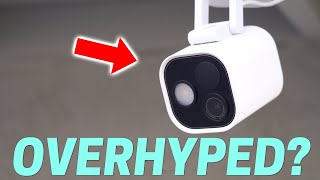

This New Camera Is a BEAST at Night!
40sThe dramatic comparison of night vision quality between the Aqara G5 Pro and a more expensive 4K camera creates a visually striking and engaging segment.
▶ Play Clip"Delivers a thorough, honest review with real testing, though the 'NOT Sponsored' claim is unverifiable."
The Aqara G5 Pro is a new 2.5K security camera with advanced AI features, but it lacks a battery and has some limitations. This review covers its design, video quality, storage options, smart home integration, and overall value.
The Aqara G5 Pro has a 2.5K resolution, an adjustable mount, and a design similar to an iPhone camera module. It's large and not ideal for indoor use.
Installation involves attaching a base plate with screws and sliding the camera on. It has no battery, so it must be plugged into an outlet (Wi-Fi version) or use PoE for power and data.
Daytime footage is decent, with clear license plates at close range, but not as sharp as a 4K UniFi camera that costs twice as much.
Night vision is excellent, even without porch lights, showing great detail and minimal ghosting. It outperforms the UniFi camera in low light.
Two-way audio worked on iPhone but crashed the Android app. Audio quality was clear but quiet.
Storage options include 8GB onboard storage (no SD card), HomeKit Secure Video, and RTSP for NVRs. Onboard storage has no pre-roll and footage cannot be downloaded without a cloud subscription.
HomeKit Secure Video works with iCloud+ plans, offering 10 days of event recording for up to five cameras. The PoE version is the only HomeKit Secure Video camera with PoE.
RTSP allows connection to NVRs like Blue Iris or Synology Surveillance Station, enabling 24/7 recording. This is the only way to record continuously.
Works with Home Assistant via generic RTSP camera integration, with low lag. Matter integration was not functional. Apple HomeKit integration works without Apple devices, providing live feed, motion, and spotlight control.
AI features include person, vehicle, package, animal, and face recognition. Face recognition works when facing the camera but not with partial obstruction. Notifications lack image previews. Lingering detection is a highlight.
Can act as a Zigbee hub or Thread border router. Operates in extreme temperatures from -22°F to 122°F.
PoE version costs $200, Wi-Fi version $180. Recommended for HomeKit Secure Video or RTSP users, but not for onboard storage due to the inability to download footage without a subscription.
The Aqara G5 Pro excels in low-light performance and offers flexible storage options, but its lack of battery, subscription requirement for downloading onboard footage, and limited smart home integration make it a niche product. It's best for users invested in HomeKit or RTSP setups.
What is the resolution of the Aqara G5 Pro camera?
2.5K
00:33
What are the two power options for the Aqara G5 Pro?
Wi-Fi version (plugged into outlet) and PoE version (ethernet cable for data and power).
01:29
What is the main disadvantage of the onboard storage?
You cannot download footage without a cloud subscription.
04:46
Which storage option allows 24/7 recording?
RTSP to an NVR like Blue Iris or Synology Surveillance Station.
05:57
What is the price of the PoE version?
$200
09:27
What is the operating temperature range of the Aqara G5 Pro?
-22°F to 122°F
09:11
Which smart home integration worked best in the review?
Apple HomeKit integration (without Apple devices) and generic RTSP camera in Home Assistant.
06:27
Excellent Night Vision
The camera outperforms a 4K UniFi camera in low light, showing exceptional detail.
02:52Subscription Required for Download
A major drawback: users cannot download onboard footage without paying a monthly fee.
04:46Home Assistant Integration
Works well via RTSP with low lag, but lacks AI features and extra controls.
06:27Lingering Detection
A useful AI feature that notifies when someone stays in view, customizable per event.
08:31[00:05] new aara G5 camera and this camera is extremely you have this camera should work with it it has tons of bells and whistles but
[00:21] can it live up to the hype there's only one way to find out let's start off with one way to find out let's start off with the first thing the camera
[00:33] similar to the camera module on the iPhone give it a few years and the iPhone camera bump will be this big the resolution is resolution is 2.5k it's not bad but it's not great
[00:45] either there's an adjustable mount on the bottom that's really strong it would make it easy to just stick on a shelf and aara says you could use this indoors but I don't know if I would I mean look how big this camera is it looks like a
[01:01] wise cam ate itself three times there's no way Ally would let me put this indoors so let's go take this camera and install Outdoors to install the camera little base plate that detaches from the stand and there's two screws that come
[01:15] with it that you attach to your house and then you take the Camera slide it little screw to the base plate and plug it in for power one of the big negatives about this camera is that there's no battery
[01:29] on board so you can't use solar and it really limits on where you can put it around your house so if you get the Wi-Fi version like I have I have to plug it straight into an outlet luckily I have one nearby but there's still really
[01:42] ugly cord going all the way to the outlet and there's really no way around it or you can get the poe version and that you can use one ethernet cable and go straight into a switch that can provide data and power Poe is going to
[01:54] be the most reliable option but not a lot of people are going to have their house wired for Poe so something like this yui camera is going to be a lot panel on the camera and a rechargeable battery so you can basically install it
[02:07] work all right let's check out this video quality I'm going to grab a license plate and try not to get hit by a car now looking at the footage it's not that bad you can see the license plate really clearly in my face the a
[02:20] lot of detail and as I scoot back you can still see quite a bit but as I go further back into the road luckily I don't get hit by the car and oh feel a my neighbors probably think I'm some kind of psycho but the license PL isn't
[02:36] super easy to read especially compared to the 4K UniFi camera I have right next to it that's a lot more clear now that 4k camera is twice as expensive so it's it's good to see the difference all right it's night time so let's check out
[02:52] front porch lights on first to see how well it does and as you can see it looks extremely bright you can see all the details of my face no matter where I'm standing the UniFi camera is also
[03:04] keeping up it's not quite as good but let's turn off the front porch lights and see how well it does with the front porch lights off it's pretty dark out here and look how amazing the footage looks I can see tons of detail in my
[03:19] face and even if I'm walking back and forth there's not much ghosting and look at it compared to the UniFi camera this new aara camera is not messing around when it comes to nighttime footage there's also Spotlight on the camera and
[03:31] for how good the night vision is without it but it can't hurt I wanted to try out the two-way voice and see how it sounds you know talking through the camera but every time I try it in the app the app just crashes and I know it's a brand new
[03:45] disappointing so it must be a glitch with the Android app because I tried it on an iPhone and it worked fine it was really clear but a little quiet this is audio coming from the G5 Pro all right let's go look at video storage options
[04:05] footage for this camera the first is the onboard storage so there are no SD card slots on this but there is 8 GB of onboard storage which is great because you can just buy this camera plug it in and it'll immediately start recording
[04:20] events it'll give you like a few hours probably I don't know like four or 5 hours of event recording before it just starts erasing the old ones and looping through it and the time line to view these was pretty smooth and I like how
[04:32] it just jumps to the beginning of the next clip I did notice that there's no pre-roll so this can be a problem because I would start walking into the frame and there would be a few seconds of delay before it start recording me so
[04:46] you could miss some valuable footage without this pre-roll now the biggest without this pre-roll now the biggest problem and this is I'm so mad about this you cannot download the footage if it's recorded to the on Device Storage
[05:01] you have to pay for the cloud subscription to download footage that has been recorded this is so stupid I hate when companies do this because such a money grab they know that you're going to want to download the footage to show
[05:16] the police or whatever and you can't unless you're paying that monthly subscription yeah I'm not happy that you cannot download your Clips the second option is homekit secure video and this is great for those Apple users if you're
[05:29] already paying for iCloud plus so if you're paying like $3 a month you can have up to five cameras it can give you 10 days of event recording that's a already paying for it I know a lot of people want this camera for homekit
[05:44] people want this camera for homekit secure video especially because the poe version of this camera is the only homekit secure video enabled camera that has Poe I don't use home kit secure video but I know a lot of people do and
[05:57] they like it the third option is rtsp now this is going to be the most flexible because you can choose your own NVR like blue iris or sonology surveillance station and record straight to that this is the only way you can
[06:11] to that this is the only way you can record 24/7 footage with the aara G5 Pro settings and enable rtsp it'll give you a little URL username and password and you just plug that in and you can start
[06:27] connecting it to your smart home a car has done a great job in making sure that it works with pretty much every smart home system out there now to get it straightforward as I was hoping it would be there's not like a normal aara
[06:40] integration I tried matter first and when I did that it just didn't pull anything in it like added the device and you couldn't do anything with it which was kind of lame and then I added a generic camera using the rtsp URL that a
[06:55] car gives you and that worked great there's almost no lag between what's happening on the camera and what's shown in home assistance so that is awesome if in front of your house you could pull up your home assistant dashboard see the
[07:09] live feed that will work great but there's no extra controls you won't be able to see if there's motion or anything like that the way to add that is you have to use the Apple homekit device integration and you do not need
[07:23] an Apple device to get this working you don't need an iPhone Apple TV or anything like that and I can see the the live feed I could see if there was motion I could control the spotlight on the camera so everything worked
[07:35] extremely well it's fast it's local but you're still going to be missing some of those AI features that AAR is packing into this camera and so let's talk about
[07:50] the basics people Vehicles packages animals but it can also recognize faces I uploaded an image of my face on the phone to the app if I was staring straight at the camera it would detect me but if I was just walking into the
[08:06] camera's field of view and my hat was slightly blocking my face or the lighting wasn't great it didn't recognize me and I didn't like how the notifications do not show an image preview of who's there there's no way to
[08:19] enable that from what I can see on the Android app so that was a little that I really like is lingering detection so if someone is just standing in front of your house and not moving
[08:31] around then you can get a notification that someone is there and not just walking by and you can customize all the notifications for each of these AI detections so if you only want to be notified for lingering detection and if
[08:44] it doesn't detect a face you can do that but all these AI tools are only available in the AAR app they're not available in something like home
[08:57] couple quick features fees I want to go over one the camera can be a zigg hub or a thread border router to extend device range outside of your house and I think this is a nice to have feature it's not something I would probably use right now
[09:11] but if you are needing that extra range then it's pretty cool this camera has this the other thing that I think is awesome is that it can handle extreme temperatures down to -22° F all the way up to 122° fhe here in Arizona we
[09:27] appreciate that because we can push those limits on the Heat this camera comes at two different price points the poe version is 200 bucks and the Wi-Fi version is 180 bucks I recommend this camera if you're using homekit secure
[09:41] video or if you're using your own NVR for rtsp 247 recording this camera is a low light beast and it's a great option if you're using one of those systems now if you're going to buy this camera and use the onboard storage uh I don't know
[09:55] if I can fully recommend it because you cannot download the footage without paying that monthly subscription super disappointing so does this camera live up to the hype well with recording at night oh yeah it's amazing I can't
[10:09] a lot of the other things like integrating into home assistant not so much I'm going to stick with my UniFi cameras for now because they integrate so well into home assistant and get all those AI detect
[10:22] features to use for automations and all of that but if that ever does change for the aara camera well that's a different story but all have links to everything story but all have links to everything down in the description and thanks for
[10:49] yeah oof that was tiring well the lingering detection on the camera says you've been sitting outside the house for 20 minutes busted ah you got me I for 20 minutes busted ah you got me I guess it's my turn to take a walk


⚡ Saved you 0h 11m reading this? Transcribe any YouTube video for free — no signup needed.