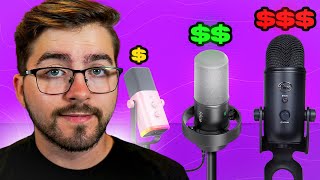

Best Budget Mic Showdown!
45sImmediately hooks viewers with a comparison of popular mics and promises a winner, driving curiosity.
▶ Play Clip"The title promises a comparison of budget microphones, and the video delivers exactly that with clear recommendations — only slightly exaggerated by saying 'YOU NEED To Buy'."
This video compares four popular microphones — the Shure SM7B, Logitech Yeti, Fifine AM8, and Fifine K688 — for use with OBS Studio, focusing on price-to-performance. The presenter highlights key buying factors: connection type (USB vs XLR), microphone type (dynamic vs condenser), and features like gain knobs and mute buttons. The Fifine K688 is recommended as the best value, offering a warm, professional sound under $100.
Key factors: connection type (USB vs XLR), microphone type (dynamic blocks noise, condenser captures detail), and controls/features (gain, mute, headphone jacks).
Dynamic XLR mic, warm/rich/natural tone, excellent noise rejection. Requires audio interface and preamp. Price ~$350. Top-tier but expensive.
USB condenser mic, crisp detail but picks up room noise. Four pickup patterns (cardioid, stereo, omni, bidirectional). Plug-and-play, $120. Good for beginners.
USB + XLR hybrid dynamic mic, ~$60. RGB lighting, touch mute, gain knob, headphone jack. Clean sound, good noise rejection. 16-bit via USB, less detail.
USB + XLR hybrid dynamic mic, ~$80. Dedicated gain/headphone knobs, mute button, real-time monitoring. Balanced/warm tone, excellent noise rejection. No RGB. Best price-to-performance.
K688 wins for price/performance/flexibility. SM7B is best for pro budget. Yeti is simplest. AM8 for RGB on a budget. Recommends dynamic mics for OBS and tuning OBS filters.
The Fifine K688 offers the most professional sound quality under $100, making it the top recommendation for streamers on a budget. For those with a higher budget and professional gear, the Shure SM7B remains unbeatable.
What are the three key factors to consider when choosing a microphone for OBS?
Connection type (USB vs XLR), microphone type (dynamic vs condenser), and controls/features (gain, mute, headphone jacks).
0:18
What type of microphone is the Shure SM7B and what additional gear does it require?
It is a dynamic XLR microphone that requires an audio interface and likely a preamp or cloud lifter.
0:38
What is the price of the Shure SM7B and its key advantage?
It costs around $350 and offers a warm, rich, natural tone with excellent background noise rejection.
0:41
What is the main disadvantage of the Logitech Yeti regarding noise?
It is a condenser microphone that picks up room noise, including keyboard, fans, and background sounds.
1:09
How many pickup patterns does the Logitech Yeti offer and what are they?
Four pickup patterns: cardioid, stereo, omni, and bidirectional.
1:14
What is the hybrid connectivity feature of the Fifine AM8?
It has both USB and XLR connectivity, allowing users to plug it into a PC now and upgrade to an interface later.
1:41
What is the bit depth of the Fifine AM8 when used via USB?
16-bit.
2:00
What is the price range of the Fifine K688 and why is it recommended?
Under $100, it offers a balanced and warm tone with excellent noise rejection, sounding more professional than its price suggests.
2:08
Which microphone does the presenter recommend for most creators and why?
The Fifine K688 wins on price, performance, and flexibility.
4:03
What is the recommended microphone type for OBS Studio and why?
Dynamic microphones, because they reject background noise better than condensers.
3:36
Microphone buying criteria
Establishes a clear framework for evaluating microphones: connection type, mic type, and controls.
0:18Yeti's noise sensitivity
Highlights a key trade-off: ease of use vs. noise pickup, important for streamers in non-treated rooms.
1:05K688 as best value
Presenter's top pick for price-to-performance, combining hybrid connectivity and pro sound under $100.
2:08Dynamic mics recommended for OBS
Direct advice for OBS users to choose dynamic mics for noise rejection, a practical tip.
3:36Final verdict summary
Provides a clear, tiered recommendation for different budgets and preferences.
4:03[00:00] Bad mic audio can ruin even the best
[00:02] streams. So, today I'm showing you the
[00:04] best price to performance microphones
[00:05] for OBS Studio. I've tested top picks
[00:08] like the Sure SM7B, the Logitech Yeti,
[00:11] the Fifine AM8, and the Fifine K688. And
[00:15] one of these easily beats the rest for
[00:16] its money. Let's get into it. When
[00:18] you're picking a mic, here's what really
[00:19] matters. The connection type. So, USBs
[00:22] are easy to plug in, but then XLR mics
[00:24] need extra gear. Then there's also the
[00:26] microphone type. Dynamic mics block
[00:28] noise. condensers capture more detail.
[00:31] And then finally, the controls and
[00:32] features like the gain knobs, the mute
[00:34] buttons, and the headphone jacks. Keep
[00:37] those in mind as we go through each
[00:38] model. First up, the Sure SM7B. It's a
[00:41] dynamic XLR microphone known for its
[00:43] warm, rich, natural tone. You'll hear
[00:46] this microphone everywhere in podcast,
[00:48] studios, and even live broadcast. It's
[00:51] built like a tank with amazing
[00:52] background noise rejection, but it's
[00:54] only XLR, so you'll need a audio
[00:56] interface and probably a preamp or cloud
[00:58] lifter to power it properly. At around
[01:00] $350, it's not cheap. But if you want a
[01:03] pro setup, this is a top tier choice.
[01:05] Next is the Logitech Yeti, probably the
[01:07] most famous USB microphone out there.
[01:09] It's a condenser microphone, so it
[01:11] captures crisp detail, but also more
[01:13] room noise. You get four pickup
[01:15] patterns cardioid stereo omni and
[01:18] birectional, plus a mute button and a
[01:20] game knob right on the front. It's
[01:22] plug-andplay. There's no interface
[01:24] needed, which makes it perfect for
[01:25] beginners or quick setups. Just keep in
[01:27] mind, it'll pick up your keyboard, fans,
[01:29] and even background noise. Real quick,
[01:31] if you're finding this video helpful so
[01:33] far, be sure to drop a like on the video
[01:34] and subscribe down below for more gear
[01:37] breakdowns and OBS setup tips. Now,
[01:39] let's talk about the Fine Fine Ampl.
[01:41] This one costs around $60 and it's a USB
[01:44] plus XLR hybrid dynamic microphone so
[01:47] you can plug it straight into your PC
[01:48] now and then upgrade to an interface
[01:50] later. It's got RGB lighting, a touch
[01:52] mute button, a gain knob, and a
[01:54] headphone jack for live monitoring. The
[01:56] sound is clean and focused, and it
[01:58] blocks the background noise really well
[02:00] for the price. It's only 16 bit through
[02:02] USB, so it's not quite as detailed as
[02:04] some pro mics, but overall an awesome
[02:06] choice for budget streamers. Next up is
[02:08] the Fifine K688, and this one's my pick
[02:12] for the best price to performance. It's
[02:14] also a USB plus XLR dynamic microphone,
[02:16] but with a more studio sound compared to
[02:18] the AM8. It's got dedicated knobs for
[02:20] gain and headphone volume, a mute
[02:22] button, and real-time headphone
[02:24] monitoring. The tone is balanced and
[02:26] warm with excellent noise rejection.
[02:28] Perfect if your room isn't soundproof.
[02:30] It skips the RGB lights, but for under
[02:32] $100, it sounds way more professional
[02:34] than it should. All right, so let's
[02:35] quickly break it down. For the Sure
[02:37] SM7B, it's over $350. The sound is very
[02:41] professional. There's a top noise
[02:42] control. It's very expensive, and it
[02:45] also needs a preamp. For the Logitech
[02:46] Yeti, which is at $120, it's easy to set
[02:50] up. There's multiple modes, but the
[02:51] biggest downside is it obviously picks
[02:53] up a bunch of room noise. For the Fifine
[02:56] AM8, it's around $60. There's RGB,
[02:59] there's solid sound, but overall, the
[03:01] microphone gives you slightly less depth
[03:02] in your audio. Finally, for the Fifine
[03:05] K688, it's priced around $80. There's a
[03:07] warm tone, a pro feeling. If you're into
[03:10] RGB, unfortunately, there is none. And
[03:12] for the USB, it's only 16 bit. So,
[03:14] here's my overall thoughts. The SM7B
[03:17] sounds the best, but unfortunately, the
[03:19] price point is crazy. The Yeti is easy
[03:21] and versatile, but it's sensitive to
[03:23] noise. The AM8 is fun, flashy, and
[03:25] affordable, but unfortunately, it
[03:27] doesn't have the greatest depth. And
[03:29] finally, for the K688, it gives you the
[03:31] most balanced studio-like sound for
[03:34] under $100. If you're using OBS Studio,
[03:36] I would go with a dynamic microphone
[03:38] like the Sure SM7B, the AM8, or the
[03:41] K688. They'll reject background noise
[03:44] better than condensers. And don't
[03:45] forget, your OBS filters matter just as
[03:48] much as the microphone itself. If you
[03:49] want to learn exactly how to tune your
[03:51] filters for the best sound, check out my
[03:53] full video on the OBS microphone filter
[03:55] settings. I'll walk you through noise
[03:57] suppression compression EQ and
[03:59] everything you need to know for that
[04:01] clean broadcast quality sound. Now, for
[04:03] my final verdict. For most creators, the
[04:05] Fine Fine K688 wins on price,
[04:08] performance, and flexibility. If you got
[04:10] more budget and the gear, the Sure SM7B
[04:12] is unbeatable. If you want something
[04:14] simple, I would just go with the Yeti.
[04:16] And if you want RGB and want solid
[04:18] performance on the cheap, I would go
[04:19] with the AM8. Thank you so much for
[04:21] watching. Be sure to drop a like on this
[04:22] video and subscribe down below. And I
[04:24] hope we see you in the next one.
⚡ Saved you 0h 04m reading this? Transcribe any YouTube video for free — no signup needed.