
Best Budget Mic Under $100?
45sViewers love budget gear recommendations, and the mic's performance claim sparks curiosity and debate.
▶ Play Clip"Delivers exactly what the title promises—a practical, budget-focused gear list with honest trade-offs."
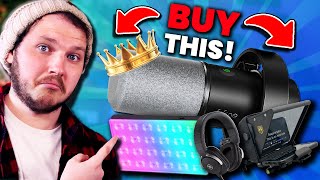
The video presents a curated list of 15 pieces of gear the creator uses daily as a full-time content creator, focusing on budget-friendly options that deliver professional quality. It covers microphones, teleprompters, headphones, capture cards, and lighting, with practical advice on what to prioritize.
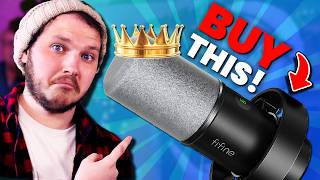
The Fifine K688 is priced at $60–70, sounds better than any mic under $300, and is both USB and XLR, making it a future-proof choice.
The GlideGear TMT-100 teleprompter reduced recording time from 60–90 minutes to 20 minutes, and works with phones or tablets.
The Yamaha HPH-MT8s ($250) are the current favorites for comfort and sound, while the Audio Technica ATH-M50Xs ($125) are a budget alternative that broke every three years.
The Elgato HD60S+ ($60) handles console capture, and the Cam Link 4K ($100) is used for camera capture, though it can be glitchy after Elgato updates.
The Neewer GL1C ($100–130) is a full RGB light with excellent output, and smaller siblings like the GL25B and G01 Pro are also recommended.
The SmallRig handheld light ($25) offers full RGB, 8-hour battery life, and can be used while charging, making it a versatile tool.
The video offers a practical, budget-conscious gear list for content creators, emphasizing that quality audio and lighting matter more than expensive cameras. It's a solid resource for anyone starting out or looking to upgrade without overspending.
Budget Definition from Audience
Provides a concrete, community-driven definition of 'budget' (under $100), grounding the recommendations in real user expectations.
Lighting Over Camera
Emphasizes that lighting, not camera price, is the primary driver of image quality—a key principle for creators on a budget.
04:53Teleprompter Efficiency
Demonstrates a concrete workflow improvement (cutting recording time by 60–70%) that can significantly boost productivity.
01:38Headphones as Health Investment
Frames good headphones as essential for ear health, not just audio quality, adding a long-term perspective to gear choices.
02:35[00:00] Here is all the gear I use as a full-time content creator daily and can confidently recommend to everyone. The microphone has to be the Fifine K688. I asked you guys to define budget. 4,000 of you voted, with 3,300 saying budget is defined as under 100 USD or significantly cheaper than its industry competitors.
[00:21] Not only is this microphone both of those things at around 60 to 70 USD, but it sounds better than every other microphone I've tested in the under 300 USD bracket. Right now I'm using this as USB, it's pretty much plug and play, pretty much sets itself up, it sounds crisp but not nasally, which is impressive because I'm very sick right now.
[00:39] It sounds warm but not overdone, and it's dynamic, not condenser, so it handles loud noises incredibly well and rejects background noise more naturally. I made a whole video about this microphone, I'll link it in the description, and my comments were filled with people vouching for it.
[00:53] And then since I made that video, I've had hundreds of people saying they're glad they bought it after watching said video. The only problem with this microphone is that it has made microphone review videos obsolete for me. It's too good, it's too affordable, I can't recommend anything else, there's no point making mic videos.
[01:08] So if you need a microphone, get this mic because it's also XLR, so you'll never need to replace it if you decide to get a physical mixer as well. I've directly linked this mic and all the gear from this video in the description, and with it being Prime Day I think tomorrow when this releases, all of the gear that I link will be on sale, so go check it out.
[01:25] Sorry to interrupt, please don't click away, FlyFy and I just reached out to me after I finished recording. They asked if I was doing any gear videos coming up. I said I was, they asked if they could be involved. I said, sure. I don't know if that takes away from me loving this. I've made videos about it before. I hope that's okay that they're now sponsoring the video.
[01:38] Here's a curve ball for you. This next piece of gear took 60 to 90 minute long recordings and made them take 20 minutes If you struggle reading scripts Twitch chat or anything else mid teleprompters are amazing but they become over You don need fancy shit
[01:55] All you need is something like the GlideGear TMT-100 or one of its siblings. You set it up, you put your camera inside it, you chuck your phone or your iPad, throw it in the tray, it reflects whatever the phone screen has up onto the mirror, you stare down the lens and you read
[02:08] the scripts, or heck, even a Zoom call if you need to look someone in the eyes and really freak them out. One small note is some of these work with webpads, some of these work with cameras, some work with both. I'll link mine below, but please read the product description to make sure it works
[02:20] with your camera. Headphones. You might not think this is important, but as someone who wears these for eight hours a day while working, and then more when I game at night, they need great quality. Seriously, please listen to me when I say good headphones will make or break your ears. Right
[02:35] Now, I am using and absolutely love the Yamaha HPH-MT8s. These are genuinely some of the best sounding and, more importantly, incredibly comfortable headphones I've ever used. They're a little bit expensive. They come in at around $250 USD, roughly.
[02:50] But the quality and performance feels worth it, at least in my opinion, for someone doing video editing and everything else. I will say, I have used these. These are the Audio Technica ATH-M50Xs. I've used this exact set of headphones for about 10 years, roughly.
[03:02] These are much cheaper at around $125 USD. The quality of them is amazing for that price. They're very comfortable and no before you ask I did not get the Bluetooth version. I'm not a psycho.
[03:14] That said I did hear a noticeable difference in quality when I upgraded the Yamaha's from these. Other issue with the M50X's is they did break every three years. This is likely because I'm very rough and I was traveling globally with them, but also they do peel a little bit.
[03:29] There are abrasions to these but it's kind of frustrating. Despite all this I did keep buying them because as I said they fairly budget they sound great and I a sucker for consistency I hate having to find something new but I really glad I upgraded to the Yamaha Capture cards Keeping it simple for
[03:43] capturing consoles into OBS I like to use this this is the HD 60s plus I've used it for several years now it was fine it's nothing to write home about it's roughly 60 USB it does the job well to capture my PlayStation 4 Pro and my
[03:56] switch OLED so I will say it's a bit annoying if you're trying to use party chat because you do need an extra tool to capture that. Would I recommend it? Sure, but there are cheaper options out there that seem less reliable, and it takes a lot of legwork to find those. For my camera capture though, I use
[04:10] this, the Camelot 4K. It's literally just a USB that plugs into the back of your PC, preferably to a USB 2 or 3 slot, and then a HDMI on the other side that runs into your camera, and that's how you do it. That's all you have to do. It worked most of the time, but it was quite glitchy anytime
[04:26] Elgato release an update, especially because they changed their camera capture software a few times before merging them all together. It works though, it's great, it's 100 USD. Again, there are two options if you want to do the legwork. Personally, I like recording reliable, which if you've watched
[04:40] this channel before, me saying that is crazy because usually Elgato is not reliable for me. The capture cards tend to be the exception. Let's talk lighting. I'm only going to focus on lights for content creation or streaming because I've owned a lot of lights over the years. We'd be
[04:53] here for days and I covered them all. Essentially, good lighting makes or breaks a camera and image quality. It doesn't matter if it's a $5,000 camera or a $100 webcam, image quality comes from your lighting. So if you want good LED light that can clamp your desk or a stand that don't take up
[05:07] much room, you'll want to check out Neewer. Specifically, I use the Neewer GL1C because they're not just bi-color, they're full RGB. They have amazing output. They're really color accurate while only costing around 100 to 130 USD which is a lot cheaper than most commonly recommended brands And if that outside of your budget don worry it has two younger brothers I can also recommend the newer GL25B and the G01 Pro
[05:31] I'll link a full video where I cover them more in detail in the description, but in short, they're all budget, all have physical controls, all work over WiFi as well if you wanted, all buy colour and all have amazing output or brightness.
[05:43] These three newer lights are the only ones I recommend anymore, anything with less lumens and output, anything with less features isn't worth it and will usually suck or need to be replaced. Now you may notice this little orange rim light, this is designed to help separate me from the
[05:55] background, it's coming from my iFootage SL1-200BNA. This light is expensive, it's around $350 USD, it is not required at all but I use it daily so I have to mention it. It looks great both as a
[06:07] background prop and for what I'm using it for but again don't recommend it, not for streamers, but if you're a similar person it's beautiful, it's compact and it just does amazing work. That said, you can achieve an orange rim light like this to separate yourself from the background with pretty much any light you want, such as this little handheld light.
[06:23] This is a small rig handheld light. It costs you 25 USD for this. It does full RGB, as you can see here. It has an insane battery life. It's about 8 hours when fully charged, but at the same time, you can use it while it's charging.
[06:36] So, for example, I've plugged in this little power pack now, and if this was fully charged, this light would essentially last me days. Like, it would never turn off. It is going to be so handy. This is just a normal power pack. I'll link it down there with the light as well if you want to.
[06:48] Everyone should own one of these because it's just so incredibly helpful. The amount of film shoots or video shoots that I have been on where this has saved our arses is uncountable. It also comes with these little presets as well, which is quite nice.
[07:00] This is emulating a candle. This is the police. It's very, very, very, very cool. That's 15 pieces of gear that I use daily. Seriously, check out the Fifine K688. The full video will be linked in the description. Just click the link in the description and grab it today on Blind Day.
[07:13] It's golden. I'm in love with it.
⚡ Saved you 0h 07m reading this? Transcribe any YouTube video for free — no signup needed.