
Format JSON Instantly in Browser
46sShows a practical tool for developers to quickly format JSON in the browser.
▶ Play Clip"Title says 'Build' but the video is a demo of a completed app with a link to purchase source code, not a step-by-step build tutorial."
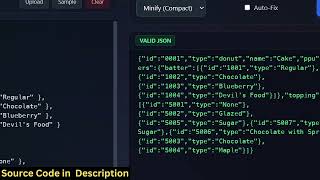
A demonstration of a ReactJS single-page application that functions as a JSON formatter, validator, and minifier, running entirely in the browser. The app allows users to paste or upload JSON, format it with customizable indentation, minify it, and detect syntax errors with precise line numbers.
The application is a ReactJS single-page application running on localhost that processes JSON directly in the browser.
Users can either upload a JSON file or paste raw JSON. A sample button provides example JSON for testing.
Users can format JSON with selectable indentation (2 or 4 spaces). The formatted output can be copied to clipboard or downloaded as a new file.
The app includes a minify option that compresses JSON by removing whitespace.
Invalid JSON (e.g., missing brackets) triggers an error message showing the exact position and line number of the issue.
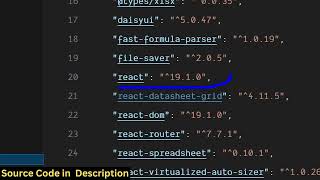
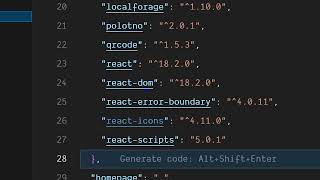
The project uses React 19 and TypeScript, with components written in JSX. The main file is app.tsx.
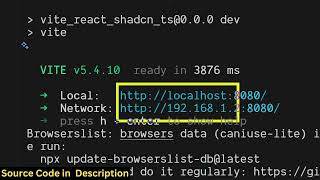
The local development server is started with the command 'npm run dev' and runs on localhost:3000.
The full source code is available for purchase via a link in the video description.
The video showcases a practical, in-browser JSON tool built with modern React and TypeScript, highlighting its speed, error handling, and ease of use. The source code is available for developers who want to customize or deploy the app.
What command starts the local development server for this React project?
npm run dev
02:32
Which version of React is used in this project?
React 19
02:17
What three main functions does the JSON tool provide?
Format, validate, and minify JSON.
00:33
How does the app indicate a JSON syntax error?
It shows the error position and line number.
01:19
How can users load a JSON file into the app?
By uploading the file via the file upload button.
02:01
In-browser JSON processing
All processing happens entirely in the browser without server calls, ensuring speed and privacy.
00:02Flexible formatting options
Offers customizable indentation spacing (2 or 4 spaces) and one-click minification.
00:33Real-time error validation
Detects syntax errors and shows exact line numbers for quick debugging.
01:19[00:02] in this video, I'll show you I built out a ReactJS JSON formatter validator minifier web application directly in the browser. I'm running it on local host. It's a single page application uh which directly happens all the processing in
[00:17] the browser. The interface is quite simple. You basically come to the application and uh you can either upload a JSON file or basically paste a raw JSON. To get started, you can click this button or sample. It will paste a bunch
[00:33] of JSON right here. And then you have an option right here to actually format this by selecting whatever spaces, two spaces, four spaces. And click on this right hand side your JSON will be formatted
[00:48] and then you can either click the copy to clipboard button or you can download to clipboard button or you can download this as a new JSON formatted new file. You can also change the formatting to four spaces and then click on. So now it
[01:02] will be formatted through four spaces. We also have the option to minify this as well. So it's an all-in-one JSON editor directly in the browser. So with the single click you will able to download this as a formatted and it also
[01:19] make any sort of mistake here let's suppose you miss a bracket here and click on this. So it will exactly tell you the error which is happening on
[01:31] position or line number. So after you fix that so exactly you see this bracket is missing. So here you need to just add this bracket and then again click. So now the JSON is valid.
[01:46] So also you have an option right here to actually upload a JSON file as well. So
[02:01] well and similarly repeat the process if you want to format this. So automatically you can format this. So this is a full ReactJS project. So it's all the components are coded directly in JSX. As you can see this is the main
[02:17] component. So I've given the source code in the it. So once you purchase it, you will get this directory structure. It's coded inside latest version of React as you can see 19 and this is the main file
[02:32] here app.tsx. So we are running this project locally here. So simply you just need to run the command npm rundev. So this will start the local development this will start the local development server at localhost 3000. So it's a
[02:45] single page application. The interface is quite simple. Either you can upload or you can paste your raw JSON. After pasting it, you can simply format this
[02:57] or validate this or minify this with a single click. So it will do all the processing for you directly in the browser. It's a single page application. As you can see, it's really fast as well. So it's a professional JSON
[03:11] formatter validator and minifier that I developed in ReactJS. So if you're interested the link is given in the description you can directly purchase the full source code. So this is the main file here app.tsx
[03:25] So this is the main file here app.tsx in typescript. project. So once you get the source code you will be able to modify the source code or add additional features as well. So it basically directly runs in the
[03:40] browser here. So I just shown you the demo here. we are running it locally. You can even deploy this to a domain name as well. So very simply. So the
[03:52] name as well. So very simply. So the application is very uh fast and efficient as well. So all the processing directly happens in the browser. It's a interested, the link is given in the description.
⚡ Saved you 0h 04m reading this? Transcribe any YouTube video for free — no signup needed.