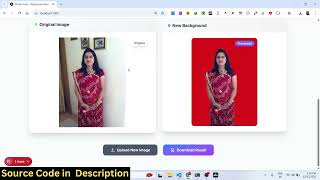

Remove Image Backgrounds with One Click!
35sShows a quick, impressive demo of browser-based background removal, which is highly relatable and visually satisfying.
▶ Play Clip"Promises a build tutorial but only offers a demo and a sales pitch for source code."
This video demonstrates a full-stack Next.js single-page application that removes image backgrounds in the browser using open-source libraries. The creator shows two tools: a background remover and a background changer, both powered by TensorFlow, MediaPipe, and BodyPix. The source code is available for purchase.
Builds a Next.js Canva clone for image background removal directly in the browser.
Select an image, the app automatically analyzes and removes the background, then you can download the result.
No paid APIs; uses TensorFlow, MediaPipe, and BodyPix for all processing.
The full source code is for sale, link in description.
Runs with npm run, easy to deploy Next.js app.
Removes background and lets you pick a static color to replace it.
All processing happens client-side in the browser.
Includes PDF conversion, merge, split, and PDF to Word features.
TensorFlow is an open-source ML library, MediaPipe is a Python-based library, BodyPix does real-time segmentation.
Background removal completes in about one second.
The video primarily serves as a demo and sales pitch for a pre-built Next.js application that leverages open-source machine learning libraries for image background removal. It highlights the speed and simplicity of the tool.
What open-source libraries are used for background removal in the demo?
TensorFlow, MediaPipe, and BodyPix.
00:54
How long does the background removal take?
About 1 second.
04:49
Is the application using a backend server?
No, all processing happens directly in the browser.
02:22
What does BodyPix do?
It performs real-time image segmentation, analyzing the image pixel by pixel.
04:49
Use of Open-Source Libraries
Shows how to avoid paid APIs by leveraging free ML libraries.
00:54Fully Client-Side Application
Highlights the possibility of running complex ML models in the browser without a backend.
02:22Fast Processing Time
Demonstrates that client-side ML can be performant (1 second).
04:49Explanation of ML Libraries
Provides a clear overview of TensorFlow, MediaPipe, and BodyPix roles.
03:50[00:01] to this video. So in this video I'll show you I built out a fullstack nextjs single page application similar to Canva clone to actually remove your image backgrounds directly in the browser with a single click. So this is actually the
[00:15] demo of the application. So we have this image background removal tool right here. And uh let me show you the demo and then first after that I will show you the source code. So first of all here the interface is quite simple. You
[00:28] simply select the input image. After that the application will automatically analyze the image and then on the right hand side you will see the output here and then you can easily download the output
[00:40] image really simply. So now the image is successfully downloaded successfully downloaded and you can easily see the output image. So for this we haven't using the any sort of API. So we are not using any
[00:54] paid API instead we are using open-source libraries such as open-source libraries such as TensorFlow, Media Pipe and Body Pix. So all the source code is given. You can directly purchase it. The link is given
[01:06] in the description. So after you purchase it, uh the source code will be automatically. So each and every component is divided into its appropriate TypeScript file here. So we are running this uh application in the
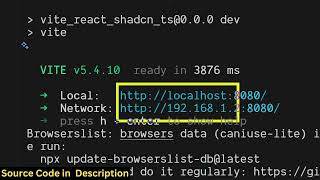
[01:21] terminal and locally as you can see npm run. So it's started this nextjs application locally. It's very easy for you to deploy the application as well. And the second tool is the change background tool. So this also does the
[01:36] same thing. It first of all removes the background from the input image and then it allows you to actually pick a color from the color picker and click on change background and instantly the background of the image is
[01:51] successfully uh changed. First of all it change removes the background and then it actually allow you to change the background with a static color. So here you can change the color. Just select your favorite color and click on change
[02:06] background and instantly in a matter of second all the processing is taking place directly in the browser. It's a single page tool. So it doesn't have a back end. So all the processing is directly happening it in the browser.
[02:22] So if you are interested in this, you can actually purchase this project and get this full source code. And once you get the source code, you will be able to see how I coded this using those free libraries. And you also will be able to
[02:37] modify it or add additional features as well. Apart from that, we also have tools for converting your images into PDF, merge PDF, split PDF, PDF to doc as
[02:49] well. So using this tool, you can actually convert your PDF file. [snorts] just select your PDF file and then it will convert that PDF into word document. So you just click on convert and then
[03:03] automatically that PDF file will be converted to word document file. So as converted to word document file. So as you can see it's a Canva clone uh image background removal and PDF editor tool as well. It has all the features here.
[03:19] as well. It has all the features here. You can see it converted this PDF into word document file and then you can open that word document and then you can open that word document dox file in any editor.
[03:35] converted this into word document. So it will save you a lot of time as well because uh you don't require any special editor rather than you can use this you can use it with any image. Let me try out with different image and show it
[03:50] to you. So basically all the background that you see is successfully removed here and you can these are the two tools here remove background and change background. So for building this we are using if you don't
[04:05] know about TensorFlow it's it's a very popular library we are using this TensorFlow it's a basically an open-source Python based machine learning library which allows you to actually remove background
[04:22] so we are using this and we are also using this library media pipe which is again a Python based library. So we are actually
[04:34] using these Python based libraries inside our nextJS project so that we can use these libraries directly in the browser. So this is another machine learning library and also we are using body pix
[04:49] which is again a realtime segmentation library which actually analyzes the image. First of all, as you select the image, first of all, we are using these libraries in nextJS to first of all analyze the image pixel by pixel and
[05:04] then we are removing the background and you are seeing this result. So the application is really fast as you select the image. It doesn't take larger than 1 second. It just take 1 second for uh background removal. So you can basically
[05:21] background removal. So you can basically use this tool. So again in the same tool we the change background tool first of all it removes the background and then you can select any background and click the it will the
[05:35] color will be applied in a matter of seconds. So it's coded inside NexJS it's a single page tool. So if you're interested guys the link is given in the description you can directly purchase it.
⚡ Saved you 0h 05m reading this? Transcribe any YouTube video for free — no signup needed.