
CPU vs GPU vs TPU: The Real Difference
45sClear, high-level explanation of chip differences that appeals to tech-curious viewers.
▶ Play Clip"Delivers a clear, informative comparison of CPU, GPU, and TPU, though the sponsor segment adds a bit of padding."
This video explains the fundamental differences between CPUs, GPUs, and TPUs, focusing on their architectural optimizations for different types of computation. It highlights how each processor excels in specific workloads, particularly emphasizing the role of matrix multiplication and tensors in machine learning, and concludes that performance comes from matching the workload to the right architecture.
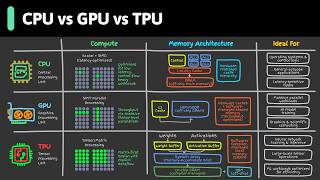
CPUs handle general-purpose tasks, GPUs handle large amounts of math in parallel, and TPUs are optimized for specific machine learning workloads. The same problem can behave very differently on each.
CPUs are built for flexibility, handling web servers, databases, operating systems, and application logic. They excel at branching and decision-making with a small number of powerful cores.
GPUs pack many more arithmetic units than CPUs, making them great for high-throughput parallel work like graphics rendering, scientific computing, video processing, and machine learning.
Matrix multiplication involves multiplying and adding numbers row by row and column by column. When matrices are huge, it becomes a massive amount of repetitive math, which appears constantly in machine learning.
A tensor generalizes scalars, vectors, and matrices to higher dimensions. In ML, a color image can be represented as a tensor with height, width, and color channels; processing many images together creates even larger tensors.
TPUs (Tensor Processing Units) are designed specifically for ML workloads, especially tensor-heavy tasks like training and inference for large neural networks. They shine in serving large language models and training transformers.
The more specialized the hardware, the less flexible it becomes. CPUs can do almost anything reasonably well, GPUs excel at many parallel workloads, and TPUs are extremely efficient for ML workloads that fit their design.
Modern systems often use different chips for different parts of the workload: CPUs handle control flow and orchestration, GPUs handle large-scale parallel compute, and TPUs are most useful for tensor operations. Performance comes from matching the workload to the right architecture.
The key takeaway is that CPUs, GPUs, and TPUs are optimized for different types of computation, and the best performance comes from matching the workload to the appropriate architecture. Understanding these differences is crucial for optimizing machine learning and other compute-intensive tasks.
What is the primary difference between a CPU and a GPU?
A CPU is a general-purpose processor with a small number of powerful cores for flexibility, while a GPU has many more arithmetic units for high-throughput parallel work.
00:28
What is a tensor?
A tensor is a generalization of scalars, vectors, and matrices to higher-dimensional arrays of numbers.
03:14
Why are GPUs useful for AI?
GPUs are very good at doing the same operation many times in parallel, which is essential for matrix multiplication in neural networks.
03:00
What is the trade-off of specialization in hardware?
The more specialized the hardware, the less flexible it becomes. TPUs are extremely efficient for ML workloads but less flexible than CPUs or GPUs.
04:22
What is the key to achieving performance in computing systems?
Performance comes from matching the workload to the right architecture.
05:03
Different chips for different computations
Sets the foundation for understanding why the same workload behaves differently on CPU, GPU, and TPU.
00:02Matrix multiplication is core to ML
Explains the fundamental math behind neural networks and why GPUs are essential for AI.
01:40Tensors demystified
Clarifies the concept of tensors, making it accessible for beginners.
03:14Specialization trade-off
Highlights the key principle that specialization reduces flexibility, guiding hardware selection.
04:22Match workload to architecture
Summarizes the main takeaway for optimizing performance.
05:03[00:02] Why can the same workload run one way on a CPU, very differently on a GPU, and sometimes faster still on a TPU? Because each chip is optimized for a different type of computation. CPU handles general-purpose tasks. GPU
[00:15] handles large amounts of math in parallel. TPUs are optimized for specific machine learning workloads. That's why the same problem can behave very differently on each one. A CPU is a general-purpose processor. It is built
[00:28] for flexibility. It handles web servers, databases, operating systems, and application logic. This is a kind of work where every step can be different. Read a request, check authentication, look up data, apply business rules,
[00:43] That is a lot of branching and decision-making. CPUs are good at that. They have a small number of powerful cores designed to handle many different tasks efficiently. Now compare that with workloads that repeat the same math over
[00:57] and over across large amounts of data. That could be graphics rendering. It could be scientific computing. It could be video processing. It could be machine learning. That's where GPUs come in. A GPU packs many more arithmetic units
[01:11] than a CPU, which makes it great for high-throughput parallel work. For example, in graphics rendering, many pixels can be computed independently. In scientific computing, the same numerical operation may be applied across a huge
[01:25] data set. In machine learning, the same math is repeated across large batches of inputs. That is a great fit for a GPU. To understand why, we need to talk about matrix multiplication. Today's video is sponsored by Snowflake.
[01:40] systems, your pipeline keep breaking, and your team spend more time fixing infrastructure than building product, this is for you. Snowflake's AI data cloud brings everything together in one unified platform. You can work across
[01:53] data, apps, and teams, spin up workspaces and notebooks, and build AI-powered solutions out of the box. And with native support for Apache Iceberg, there's no vendor lock-in. That's why thousands of enterprises trust Snowflake
[02:07] to move faster with their data. Start building a data lakehouse on Apache Iceberg in minutes. Get Snowflake's free 30-day trial using the link in the description. A matrix is just a grid of numbers. For
[02:19] example, a 2 by 3 matrix has two rows and three columns. Matrix multiplication takes two compatible grids of numbers and combines them to form a new grid. You do that by multiplying numbers and
[02:32] adding them together, row by row and column by column. That sounds simple, but when the matrices are huge, it becomes a massive amount of repetitive And that math shows up constantly in machine learning.
[02:45] When a neural network processes input, a lot of what it's doing under the hood is matrix multiplication. The input is one big set of numbers. The model weights model combines them through matrix multiplication to produce a next set of
[03:00] outputs. Then it repeats the process across many layers. That is one reason GPUs are so useful for AI. They are very good at doing the same operation many times in parallel. Now, let's talk about tensors. A tensor
[03:14] sounds intimidating, but it's basically a generalization of some familiar concepts. A single number is a scalar. A list of numbers is a vector. A grid of numbers is a matrix. In machine learning, you can think of a tensor as a
[03:28] higher dimensional arrays of numbers. For example, a color image can be represented as a tensor. It has a height, a width, and color channels. If you process many images together in one batch, that becomes an even larger
[03:42] tensor. That brings us to TPUs. TPU stands for Tensor Processing Unit. Unlike CPUs, which are general-purpose, and GPUs, which are highly parallel but still fairly general. TPUs are more specialized.
[03:57] They're designed specifically for machine learning workloads, especially tensor heavy workloads like training and inference for large neural networks. For example, if you're serving a large language model, part of the workload may
[04:10] involve huge tensor operations during inference. If you're training a transformer model, the workload is even more dominated by matrix multiplications on giant tensors. That is the kind of task where TPUs can
[04:22] shine. So, why not use TPU for everything? Because specialization is a trade-off. The more specialized the hardware is, the less flexible it becomes. A CPU can do almost anything reasonably
[04:35] well. A GPU is excellent for many parallel workloads. A TPU can be extremely efficient for machine learning workloads that fit its design. In practice, modern systems often use different chips for different parts of
[04:48] the workload. CPU often handle control flow and orchestration. TPUs often handle large-scale parallel compute like rendering and model training. TPU are most useful when the workload is heavily centered around tensor operations.
[05:03] Performance comes from matching the workload to the right architecture.



⚡ Saved you 0h 05m reading this? Transcribe any YouTube video for free — no signup needed.