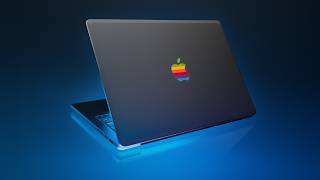

MacBook Neo: The $500 Beast?
45sChallenges common clickbait claims about the Neo's performance, creating controversy and curiosity.
▶ Play Clip"Title accurately promises guidance on choosing a cheaper MacBook; the video delivers detailed comparisons and cost-saving tips."
The MacBook lineup is currently the best and most confusing it's ever been, with multiple generations of Airs, Pros, and the new Neo. This breakdown helps you choose the right model and avoid wasting money on unnecessary performance.
The Neo is ideal for students or light tasks like web browsing and email, but it can handle Photoshop, video editing, development, and music production surprisingly well for $500-$600. However, 8GB RAM may feel slow in a few years, and it has limited ports (one usable when charging) and average battery life.
For $200-$300 more, the MacBook Air offers better performance, MagSafe charging, Thunderbolt ports, and support for two external displays (M4 and newer). Refurbished M4 Airs from Apple start at $760 with 16GB RAM. The M4/M5 Airs can outperform older M1 Pro/Max Pros for many workflows.
The Air is fanless and silent, but sustained workloads (e.g., 45-minute 3D renders) cause throttling. For short tasks, the Air saves thousands of dollars for just a few extra minutes of render time. Battery life is excellent, especially on M3+ with AV1 decoding.
Pros offer the best performance, especially for video editors with heavy layers, Xcode users with large projects, local AI tasks, and 3D apps. Gains over Air are modest for short projects. Pros also have superior screens, SD card reader, HDMI, better speakers, and larger batteries.
Always prioritize RAM (16GB minimum) over storage or GPU, as it's non-upgradable and crucial for future-proofing. Storage can be supplemented with external drives. Extra GPU cores offer minimal benefit for most tasks except heavy video/3D work.
Choose the Neo for budget-friendly entry-level use, the Air for the best balance of performance and value, and the Pro only if your workflow demands sustained high performance or specific features like a better screen and ports. Prioritize RAM over other upgrades.
What is the starting price of the MacBook Neo?
$500-$600.
What is the main hardware shortcoming of the MacBook Neo?
8GB of RAM, which may feel slow in a few years as macOS becomes more bloated.
01:00
How many usable ports does the MacBook Neo have when charging?
One (the left USB 3 port; the right is USB 2).
01:30
What is the price of a refurbished M4 MacBook Air on Apple's website?
$760.
02:30
Which MacBook Air models support two external displays while running the internal display?
M4 and newer MacBook Airs.
03:00
What is the number one upgrade priority for a MacBook?
RAM (memory), because it is non-upgradable and crucial for future performance.
07:00
Why might the MacBook Air throttle under sustained workloads?
It is fanless, so it throttles to protect itself from heat after about 8-9 minutes of heavy use.
04:30
Which MacBook models have AV1 hardware decoding for better battery life?
M3 and newer MacBook Airs and Pros.
05:00
What quality-of-life features does the MacBook Pro offer over the Air?
Better screen (colors, contrast, refresh rate, matte option), SD card reader, HDMI, more Thunderbolt ports, larger battery, and superior speakers.
06:00
Which MacBook Pro size does the presenter recommend for portability?
The 14-inch, as it offers similar performance to the 16-inch but is lighter and more portable.
07:30
Best and most confusing lineup ever
Sets up the core tension of the video: the MacBook lineup is simultaneously excellent and overwhelming.
Clickbait claims debunked
The presenter dismisses clickbait headlines about the Neo's limitations, calling them 'clickbait cap' and asserting the Neo is an amazing machine.
01:00Air saves thousands for minutes of time
The presenter highlights that the MacBook Air can save thousands of dollars in exchange for just 2-3 extra minutes per render, a compelling value proposition.
04:30[00:00] The MacBook lineup right now is the best it's ever been. But at the same time, it's the most confusing it's ever been because there's so many devices to choose from. We have the new MacBook Neos. There's four different colors. We have multiple generations of MacBook Airs to choose from. And we have multiple generations of MacBook Pros to choose from. These are all wrapped in the new retro skin from Dbrand. But I'm going to break it down
[00:22] so you know what's what and also so you're not wasting money on performance that you just really don't use. All right, let's start with the Neo. If you are a student or if you just need a light computer for I don't know web browsing, email test, this is the obvious choice. And if you look at Apple's marketing around this, they pitch it for that kind of entrylevel computing device, right? It's like it's meant to be an
[00:44] inexpensive $500, $600 machine that kind of gets you into the gateway of the Apple or like the Mac ecosystem. Uh the thing is this is capable of so much more. Like you'll see a lot of clickbait headlines of how the chip because it's a phone chip isn't strong enough or how eight gigs of RAM is limiting on this. It's not it's not powerful enough or this and that. Like that's all like clickbait cap. This is an
[01:06] amazing machine. Arguably the best $500 machine. It's able to handle Photoshop really well on it. Video editors can edit with it. Developers can develop with it. Music producers can produce with it. I'm not saying it's the best laptop possible for those tasks, but for $500 or $600, I don't think you're going to find anything better. There's a reason why Windows laptop manufacturers are so worried about this the presence of this device. Now, there are several hardware
[01:29] shortcomings that I think you should be aware of with this device. So, the big one is the 8 gigs of RAM. So, it runs perfectly right now with 8 gigs. Uh the way that Mac OS handles memory swap really effective at making 8 gigs feel enough. However, in a few years time, because this Mac OS as it gets new generations and new versions, it's just going to get bigger and more bloated to as they add more
[01:51] features and more stuff to make the system a little bit more advanced. This in a few years time with 8 gigs of RAM will absolutely feel slower than it does today. And my prediction is in like four years time, it's not going to feel snappy. It's also the trajectory of Mac OS. They are aiming for implementing more and more Apple intelligence and that uses memory. Just understand that a 16 GB system on Mac OS will invariably
[02:13] feel better and smoother and more responsive in a few years time than a 8 GB system. Now, the second shortcoming is the ports. There are two ports on the Neos. The left one is USB 3, the right one is USB 2. And if one's plugged in, you just have one for the peripherals. Now, if you are someone who has to plug up several like external drives or you want to produce music on this thing, you want
[02:35] to have like your your audio interface and your MIDI controller, like things just use ports. And with only one usable port once it's charging, and it's a USB 3 port at best, it just limits what this thing can do when it comes to connectivity with peripherals. The other more expensive MacBooks just handle more. The last thing I want to mention is the battery life. It's good, but it's not like the legendary battery life that a lot
[02:57] of MacBooks usually have. It's because it's a physically smaller battery. It's particularly rough if you bump up screen brightness. The webcam and mic are pretty good if you compare across the MacBooks, but if you compare it to like any of the five or $600 laptops out there, these are amazing. >> Hello. Hello. >> Hello. Hello. >> Now, if the MacBook Neo isn't the right fit for you and you have $200 or $300 more that you can
[03:19] spend on a laptop, you can enter the MacBook Air territory. And this is where I think the sweet spot of the whole lineup lies. In particular, the refurbished M4 MacBook Air that's available on Apple's website for $760. So, this is a device that gets you 16 gigs of RAM and you can get Apple Care and Apple's warranty, like all of it as if it was a brand new machine, and it's priced at $760 US. Now, this
[03:41] machine, starting with the M2 devices and higher, get a MagSafe charging port. So, you get a dedicated charging thing as well as the two USBC. And these USBC ports support Thunderbolt, Thunderbolt 4 for the previous generation, Thunderbolt 5 for the newest stuff, but this allows you to connect really high-speed peripherals and just connectivity in general. Uh, the other thing is that the M4 and newer MacBook Airs allowed two external displays while running the internal one concurrently.
[04:03] So, if you need lots of displays, M4 or higher. Now, at this point, we're looking at five generations of MacBook Airs from M5 all the way down to M1. The single and multi-core performance has improved a lot over those years, making everything feel faster and more responsive. The M4 and M5 devices in particular have such good performance that they can legitimately outperform the beloved M1 Pro and M1 Max for a lot of workflows. So, when those
[04:26] devices came out, the M1 Pro and M1 Max MacBook Pros, they had really impressive performance, but they were crazy expensive. And I think a lot of people still use their device that they bought back then. But it's even more impressive that now a mid-tier MacBook Air product can keep up with those devices. And the point I'm trying to make is that if you're drawn to the Pro devices because like the marketing says that, you know, you're
[04:48] professional, you should probably buy the professional laptop, MacBook Pro, there's a very good chance, a very real chance that one of the M4 or M5 MacBook Air products will absolutely handle your workflow very comfortably. Now, in terms of upgrades, if you have the budget, the number one thing I would prioritize is memory. If you are looking at an older MacBook Air that only has 8 gigs, like skip it. Do your best to just save a little
[05:10] bit more and get a system with 16 gigs. It'll make a difference in a few years. Like a very noticeable difference, I believe. Uh the other thing is storage. Obviously, more storage is better, but it's the thing that I would skip. It's just a convenience thing. You can always connect external drives. The other thing is the GPU. Uh Photoshop does not benefit all that much from those extra two GPU cores. A lot of Photoshop is still
[05:32] CPU and RAM dependent or just bound by those things. So, the GPU is not much. Uh, if you really lean in heavily on video editing and 3D stuff and you're using a MacBook Air, perfectly good for it. That point, maybe go for the GPU if your budget allows for it. But it's a perfectly good system without those extra GPU cores. Uh, the MacBook Air does not have a fan, which makes it completely silent, but if you
[05:54] crank it hard for like eight or nine minutes, it will throttle down to protect itself from the heat. So, short renders and builds are totally fine. You won't even notice that it's a fanless system. But if you have long sustained like continuous workloads, like if you are, you know, if you're doing a 3D render and it takes 45 minutes for Blender to push it out, you will have limitations on this and you absolutely would do better
[06:16] on a MacBook Pro system. Those have fans. But I bring this all up because the way that people looked at the MacBook Air when it first launched, like build times were much longer back then that they just weren't as powerful systems. So you would wait like 15 minutes, 20 minutes for a build or like a render to finish. And those like when you have time of that long, of course, you're going to notice a like a
[06:38] thermal limitation. But nowadays, I make one of my YouTube videos. I don't make super long videos, but they'll be done way before this thing starts to throttle. And I'm like, the MacBook Air, it can save you thousands of dollars in exchange for 2 or 3 minutes of your time every time you hit the render button. And for some people who only render once or twice a week, it might be worth those savings. Now, the battery life
[07:00] on the Air is really good. And starting with the M3 devices and newer, those had AV1 hardware decoding. So if you're streaming in Netflix or YouTube or just stuff with AV1 videos, you would get better battery life on those devices. Okay. Now, if you have an even bigger budget, you can go to the MacBook Pro. And these are the most powerful MacBooks, but also the most brutal to buy because uh for one, they're the most expensive,
[07:23] but they're also the most number of configurations you get, like GPU, CPU, RAM configurations, plus different sizes. And the price for all this stuff adds up really quickly. Now, if you're just looking at performance compared to the M4 and M5 MacBook Air, video editors actually see the lowest gains here. The MacBook Pros are faster for sure, but not by a significant enough margin to make it an obvious upgrade, especially on shorter projects. But if you have
[07:45] lots of layers or like huge projects or you use a ton of you know GPUheavy effects then yes it does become more cost effective on a pro or a max chip especially M4 or higher. Xcode users can see some big gains going to the MacBook Pros with the Pro and the Max chips. It's two things. First is more memory and the other thing is higher memory bandwidth and Xcode loves those two things. If you have big
[08:07] projects with really long compile times, the MacBook Pros can be really good for it. The same thing goes for local AI tasks. 3D apps that can take advantage of the GPU cores also really benefit with the Pro and Max chips with their massive GPU count. It can get very expensive though, but ultimately it becomes a question of like how much money are you willing to pay to save time, right? And for some people spending thousands of
[08:29] dollars to shave off a few minutes is an absolute necessity in their workflow. But for others, it's like it would not benefit them nearly enough to pay that kind of money. So, it just depends on what your workflow is and how much money you want to spend on it. Now, there's a couple of the things that you get with the MacBook Pro. It's not just performance, right? There's a whole list of quality of life features that
[08:51] you get on this device. The big one is the screen. You get better colors, better contrast, you get higher refresh rate with matte finish options. Uh, you also have a built-in SD card reader, and you also have a bigger battery, so you get better battery life. You get an extra Thunderbolt port and HDMI port. You can handle more external displays. You get better speakers. The speakers on the 16-in are phenomenal. Like, if you care about audio,
[09:13] like I've done measurements on these things. They're just fantastic speakers. Speakers on the MacBook Air are already really good. But the ones on the MacBook Pros are just truly phenomenal. Now, my thoughts on upgrading a MacBook Pro. Uh, the first thing is size. So, the very first MacBook Pro I bought, the M1, I got a 16-inch. I'm like, "This is going to be awesome. 16-in screen, it's going to be great." But this is a relatively heavy
[09:35] device. And because the 14-in devices are so capable, you get the same kind of performance for much less weight. Uh obviously smaller screen, but I just found it so much more portable and I travel a lot. So I'm like I go with the 14. So you kind of if you have an opportunity to go to the store, like feel these things, put them in your bag, just I think a lot of people who buy the 16
[09:57] end up not regretting it, but they're like "Ah maybe the 14-inch would have been better fit just because they travel a lot with it." Uh the other thing again, prioritize RAM. Memory is super expensive from Apple and you can't ever upgrade it. So, I just always give that priority. Uh, if you ever need extra storage, you can always plug up some devices. Okay, that pretty much wraps it up. Keep in mind, like I've said this every
[10:20] time I've done one of these videos, these are tools. As attractive as Apple makes like the marketing around this stuff, like these are literally just tools to do whatever is that you do for work. And if you can save some money, like you'd be surprised as to how low of a device you can get in terms of like the cost of it and still get away with really good performance nowadays. Okay, hope you guys enjoyed this
[10:42] video.



⚡ Saved you 0h 10m reading this? Transcribe any YouTube video for free — no signup needed.