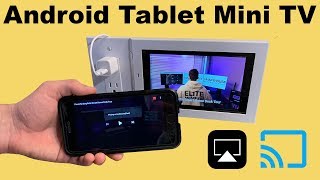

Set Up Your Tablet for Casting
53sEasy step-by-step setup for device name and installing the AirScreen app that makes mirroring possible.
▶ Play Clip"The title accurately promises a straightforward how-to and the video delivers it, though the giveaway plug and minimal filler slightly reduce density."
This video by Lux Mounts provides a step-by-step tutorial on how to enable AirPlay, Google Cast, and Miracast on an Android tablet using the AirScreen app. The guide covers device naming, app installation, configuration, and practical casting instructions for both iOS and Android sources.
The video demonstrates how to use Miracast, Google Cast, and Apple AirPlay to mirror or cast content to an Android tablet for a larger screen experience.
Examples include watching videos in the bathroom, viewing recipes in the kitchen without taking up counter space, and sharing funny content with others.
Promotes a monthly giveaway of a tablet and wall mount kit. This month's prize is an Amazon Fire 7 wall mount kit, entered through LuxMounts.com or the description link.
Go to Settings > Device Options > Change device name, then enter a meaningful name like 'LM - MK bedroom' to identify the tablet on casting lists.
Open the Google Play Store, search for 'AirScreen' by Lana Tech, and install it. If the Play Store is missing, refer to a previous video on installing it.
First launch shows a guide; recommended to review it, but you can click 'Start Now'. Ensure the device name inside AirScreen matches the tablet's name via settings.
Default settings are sufficient; the app operates in the background so casting can begin at any time.
Open Control Center, tap Screen Mirroring, select the tablet, and stop by returning to Control Center and tapping Stop Mirroring.
Open a Google Cast-compatible app, tap the Cast icon, select the device, and disconnect via the Cast icon when done.
By installing and configuring AirScreen, any user can quickly turn an Android tablet into a wireless display for AirPlay, Google Cast, and Miracast, making it a versatile secondary screen for phone content.
What app does the video recommend to enable AirPlay, Google Cast, and Miracast on an Android tablet?
AirScreen by Lana Tech.
01:53
Where do you change the device name on the Android tablet?
Settings > Device Options > Change device name.
01:25
Why should you give the tablet a meaningful device name?
To easily identify it on casting lists.
01:25
How do you access AirScreen settings if the device name doesn't update?
Tap the three-line menu, then go to Settings.
02:30
What is the first step to AirPlay mirroring to the tablet?
Open Control Center and tap Screen Mirroring.
03:24
How do you stop screen mirroring on iOS?
Open Control Center, tap Screen Mirroring, then Stop Mirroring.
03:38
How do you disconnect a Google Cast session to the tablet?
Tap the Cast icon and press Disconnect.
04:22
What giveaway is being promoted in the video?
A monthly tablet and wall mount kit giveaway; this month it's an Amazon Fire 7 wall mount kit.
00:58
Descriptive device naming simplifies casting
Setting a device name like 'LM - MK bedroom' makes it easy to select the right target among multiple casting options.
01:25AirScreen unifies all three casting protocols
One app handles AirPlay, Google Cast, and Miracast, reducing the need for multiple third-party solutions.
01:53AirPlay on Android mirrors the iOS experience
Users familiar with casting to an Apple TV will find the same Screen Mirroring interface on the tablet.
03:24Google Cast works with any compatible app
You can cast from YouTube, Netflix, and other Cast-enabled apps directly to the tablet, just like a Chromecast.
03:54[00:01] Monday guide I will show you how to miracast google cast and Apple AirPlay to your Android tablet so you can enjoy your content on a bigger screen
[00:16] you want to mere cast Google Apps or Apple AirPlay to an Android tablet well are in the bathroom and there's no we're good to place your phone to continue watching your favorite YouTube show you can simply cast it to the Android tablet
[00:31] kitchen looking at a recipe on your phone and don't want to find it again on the bigger Android tablet or better yet you don't want to or don't have the room on the counter for your phone this is not a problem you can mirror your phone
[00:43] and want to show them something funny you found simply cast it to the Android your trip simply marry your screen and swipe away would you like to air play in Google cast your TV connect an Android tablet and you'll be able to do both
[00:58] these are just a couple examples if you have any more ideas leave them in the comments section below before we get into the guide i'd like to remind you that every month lux mounts gives away a tablet and a lux mounts wall kit for it
[01:10] this month Lux Ponce is giving away in Amazon fire seven wall mount kit in an be announced on the first Monday in February to enter the giveaway and go to Lux Montcalm and click on the giveaway tab or the link in the description now
[01:25] let's get into the guide from the home screen scroll down and tap on settings screen scroll down and tap on settings then tap on device options and tap on change your device name name the tablet something meaningful or relevant to its
[01:37] location this is what it is going to show up as in miracast google cast and Apple AirPlay I'm going to name mine LM - MK bedroom this means that is a locks mounts and the location is in MKS bedroom then tap save next go back to
[01:53] the home screen in tap on the Play Store if you do not have the Google Play Store then check out my last video where I show you how to install the Google Play Store then in the search bar type in air screen install the air screen app by
[02:06] screen install the air screen app by Lana Tech once it is installed open the app the first time you open app it'll bring up this guide I recommend going
[02:18] through and watching their guide to learn all the settings and features but I'm just gonna click start now as you may have noticed the device name is still some weird sometimes it works where if you changed
[02:30] the device name then then Aircast will also change the name but if it doesn't you can simply open the three lines from the side and go to settings unfortunately with this app it opens in vertical mode so you're gonna have to
[02:43] type sideways but still tap on device name and then like in the device options in settings change the name to something meaningful meaningful and relevant to
[02:55] its location so I'm gonna give it the same name as I give it in device options once your name is inputted go ahead and tap ok now you can click the back arrow other than that personally I'm satisfied with the settings that are on by default
[03:10] well you can obviously modify the settings however you want one setting or with is the fact that this app runs in the background so at any point you can just cast it a device to airplay to the Android tablet simply open up your
[03:24] control center tap on screen mirroring and then tap on the device it'll then process your client show you up on the screen and now your screen is being screen and now your screen is being mirrored to the Android tablet see same
[03:38] mirrored to the Android tablet see same thing on both devices and then to stop mirroring simply go back to the control center tap on it and click stop mirroring to Google casts of the device simply open your Google cast compatible
[03:54] simply open your Google cast compatible app and then you'll see the Google cast icon in the top tap on it and then select the name of the device so there select the name of the device so there it is and it's connecting so now I'm
[04:07] it is and it's connecting so now I'm going to go into my subscriptions and going to go into my subscriptions and let's just watch a dr. Zee's video click let's just watch a dr. Zee's video click Play and it'll start playing on the
[04:22] tablet so you can put your phone away and keep watching and then to disconnect just tap on the cast icon and press disconnect congratulations you can now cast to your Android tablet alright that concludes this locksmith Monday guide
[04:37] come back next Monday where I'll show you some useful alexa commands wall mount kit for the Amazon fire tablets from Lux palette then head over to locksmiths comm or you can find it on Amazon what is cheaper if you buy from
[04:51] Lux bounce calm as well as free shipping on all orders supply is limited so pick up one today hey you made it to the end of the video if you find it helpful press the like button if your our small lousiest then subscribe if you want to
[05:04] check out the videos on the screen anyway see you all next Monday
⚡ Saved you 0h 05m reading this? Transcribe any YouTube video for free — no signup needed.