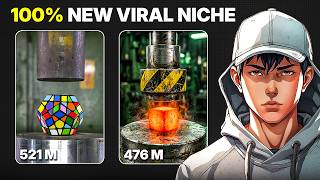

Hydraulic Press Videos Go Viral
44sHigh engagement from revealing a secret to millions of views using AI, tapping into curiosity and trend-following behavior.
▶ Play Clip"The title accurately promises a simple AI method for creating viral hydraulic press videos, and the video delivers exactly that."
This video reveals a simple AI-powered method to create viral hydraulic press videos without any recording equipment. The creator demonstrates how to use ChatGPT for idea generation and Flow AI for image and video creation, producing satisfying, realistic-looking content that attracts millions of views.
Some hydraulic press videos pull in millions of views, and they are super simple to create without recording.
Copy a provided description into ChatGPT to get 15 viral-style ideas based on trends. Then define your theme or branding for consistency.
For a glowing metal cube, request three ideas. ChatGPT provides ideas along with an image prompt and a video prompt.
Copy the image prompt into Flow AI's create image option. Select aspect ratio (vertical for shorts, horizontal for normal) and number of images.
Go to Flow AI's create video section, choose frames to video, set the generated image as the first frame, paste the video prompt, and generate.
The resulting video looks real and has a satisfying effect. The method works well for starting a channel or leveraging trending content.
By combining ChatGPT for ideation and Flow AI for media generation, anyone can quickly produce viral hydraulic press videos. This method is effective for building a channel or capitalizing on trends.
What two AI tools are used to create viral hydraulic press videos?
ChatGPT and Flow AI.
00:15
What does ChatGPT provide besides video ideas?
It also creates an image prompt and a video prompt.
00:42
What aspect ratio should be selected for YouTube Shorts?
Vertical.
00:55
Which Flow AI feature is used to create the video from an image?
Frames to video.
01:07
Viral Potential of Simple Videos
Highlights that simple AI-generated videos can attract millions of views.
00:01ChatGPT for Idea Generation
Demonstrates a practical use of ChatGPT for content creation.
00:15Realistic Satisfying Effect
The final video looks real and has a satisfying effect, key for virality.
01:43[00:01] right now. And some of them are pulling in millions of views. What's crazy is most of these videos are super simple and you don't even need to record walk you through how to create these kinds of hydraulic press videos using AI
[00:15] step-by-step. Let's jump into it. So, first you need video ideas. Instead of simple shortcut. I've put together a description. Just copy it and paste it into chat GPT. Once you run it, chat GPT
[00:30] will instantly give you a bunch of viral style ideas. Usually around 15 that are based on what's trending. After that, it'll ask you to define your theme or branding. This part is important because it gives consistency to your videos. For
[00:42] glowing metal cube. And let's say I want three ideas. Then for the brand name, I'll just type something like AI vision. Now here's the useful part. Chat GPT will not only give you the ideas, but it will also create an image prompt and a
[00:55] want to do is copy the image prompt first. Next, go over to Flow AI and open the create image option. From here, select your aspect ratio. Vertical if you're making shorts or horizontal for
[01:07] normal videos. Choose how many images you want, paste your prompt, and hit images will be ready. Now let's turn that into an actual video. Go to the create video section inside Flow AI and choose frames to video. Set the same
[01:21] image as the first frame. Now, go back to chat GPT again, copy the video prompt it gave you earlier, and paste it into Flow AI. Click generate and give it a moment. And that's it. Your hydraulic press video is done.
[01:43] real and it has that super satisfying effect people love. I've personally tested this method with different objects and it works really well. So, if channel or you just want to take advantage of trending content, this is a
[01:56] video helped you out, don't forget to subscribe AI Vision for more content subscribe AI Vision for more content like this.

⚡ Saved you 0h 02m reading this? Transcribe any YouTube video for free — no signup needed.