
Loud Clean Master in 5 Steps
45sPromises a rare, systematic approach to achieving loud, clean masters, appealing to producers frustrated with distortion.
▶ Play Clip"Title promises a quick method and delivers a detailed 5-step process, though it's more than 10 minutes of content."
This video presents a five-step process for achieving loud, clean masters in music production, focusing on techniques like low-cut EQ, mid-side processing, clipping, multiband compression, and limiter settings with true peak and codec preview. The host demonstrates how to push loudness to -6 LUFS or beyond while maintaining clarity and avoiding distortion.
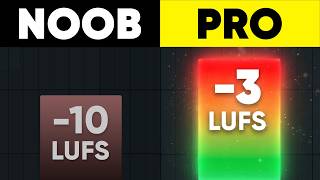
The video claims that with proper processing, a track can be pushed to +17 LUFS without distortion, compared to -10 LUFS with standard limiting.
Peak meters (dBFS) don't measure perceived loudness; LUFS does. Target at least -8 to -6 integrated LUFS for electronic music.
Spotify's -14 LUFS recommendation is a playback threshold, not a target. Master as loud as possible without quality loss; platforms adjust volume, not apply limiting.
A clean mix is essential: remove unnecessary elements, control low end, use sidechaining, clip individual groups, and keep sub-100 Hz mono.
Apply a low-cut filter on the master at around 30-40 Hz (just below the lowest note). Avoid linear phase or oversampling at this stage.
Cut side (stereo) information below 120 Hz to avoid phase issues and mono incompatibility. Use a free mid-side EQ preset.
Use a clipper (e.g., G-Clip) after EQ to shave off unnecessary peaks. Push until you barely hear distortion, then back off 10%. Enable oversampling, keep softness at 0%.
Apply multiband compression (e.g., Maximus) to reduce dynamic range per band. Increase pre-gain by 7-10 dB, then lower each band and make up gain accordingly.
Use a limiter (e.g., Ozone) with true peak enabled, output ceiling at -0.3 dB. Preview codec (AAC 256 kbps) to check for intersample peaks. Adjust ceiling to -2 dB if needed.
Apply an imager to widen mids and highs while keeping lows mono. This can increase headroom.
Achieving a loud, clean master requires a combination of proper mixing, strategic use of EQ, clipping, multiband compression, and careful limiting with codec preview. The key is to control peaks early and use true peak metering to avoid distortion after encoding.
What does LUFS measure?
Perceived loudness, not peak level.
00:45
What is the recommended integrated LUFS target for electronic music?
At least -8 to -6 LUFS.
01:38
Why should you avoid linear phase or oversampling on the low-cut EQ?
They can cause phase issues and should be reserved for the final limiter.
03:56
What is the purpose of cutting side (stereo) information below 120 Hz?
To avoid phase cancellation and mono incompatibility, ensuring consistent bass in clubs.
04:13
How do you set the hard clipper (G-Clip) for optimal results?
Push until you barely hear distortion, then back off 10%. Enable oversampling, keep softness at 0%.
06:08
What is the recommended output ceiling for the limiter with true peak enabled?
Start at -0.3 dB, but may need to go to -2 dB to avoid clipping after codec conversion.
09:26
Why is true peak important?
It prevents intersample peaks that can cause distortion after digital-to-analog conversion.
09:30
What codec does Spotify use for its web player?
AAC at 256 kbps.
11:33
LUFS vs dBFS
Clarifies a common misconception about loudness measurement.
00:45Streaming Platform Myth Busted
Explains that Spotify's -14 LUFS is a playback threshold, not a mastering target.
01:47Mixing is Key
Emphasizes that a clean mix is 80% of the work for a loud master.
02:26Mid-Side EQ for Low End
Reveals a pro technique to avoid phase issues and ensure mono compatibility.
04:13True Peak and Codec Preview
Explains the technical reason for true peak and how to avoid distortion after MP3 conversion.
09:30[00:00] For some people, getting loud and clean
[00:01] music seem to be impossible. But there
[00:03] are five steps that I have never seen
[00:05] anybody talk about in a single video
[00:07] that will get your music to sound as
[00:08] loud as you wanted to while making it
[00:10] cleaner and crisper. My name is Max.
[00:12] Welcome to Mix Elite Academy. And how
[00:14] come this track here we get [music]
[00:19] about minus 10 LFS. We are even peing 1
[00:22] dB and I cannot push it harder [music]
[00:26] because it just start distoring. But the
[00:28] same track with different processing
[00:30] applied. I can push to plus 17.
[00:36] You're getting -5 - 6 LFS. [music] We
[00:39] are not picking
[00:42] and it sounds clean and crispy. Louder
[00:45] equals better. Like literally
[00:46] psychologically and physiologically.
[00:48] Docs hate it. We love it. But here is
[00:51] not just louder. It's crispier,
[00:52] punchier, and glued together. The very
[00:54] simple way to achieve this loudness is
[00:56] by playing our song through a limiter
[00:58] that doesn't allow the audio to get
[00:59] above zero dBFS threshold, which is the
[01:02] limit for your speaker to play music,
[01:04] and turning on the gain. So, we shave
[01:06] off the peaks of the sound, making the
[01:08] [music] louder parts quieter and the
[01:10] quieter parts sound louder.
[01:13] [music] And this is exactly what I've
[01:14] just done to this track. is a cardinal
[01:16] sin VDM right here
[01:17] >> that you should never ever do. So,
[01:19] what's going on and what should you do
[01:21] to get the crispy masters? First, let's
[01:23] clear up that the PQC on the meter
[01:25] inside your door has nothing to do with
[01:27] how loud your music is actually
[01:28] perceived. We measure this with LUFS
[01:31] instead. It's a separate metering plugin
[01:33] you have to use. If you don't have one,
[01:34] just click the link in the description
[01:35] below. As electronic music producers, we
[01:38] want this number to be as high as
[01:39] possible, ideally to at least minus 8 to
[01:42] -6 integrated LUFS. Scril X goes minus
[01:45] three. We'll get to how in a moment.
[01:47] Second, why did you just say louder
[01:49] equals battery max when Spotify tells me
[01:51] that recommended is minus4 LFS or they
[01:53] will lower it? Because people are
[01:55] confused between distribution target and
[01:57] playback threshold. Spotify uses minus14
[01:59] LUFS as playback settings. Is their
[02:02] target for average integrated LUFS of
[02:04] your entire song? If your drop is
[02:07] hitting minus1 LUFS and it still sounds
[02:09] great, that's amazing. No streaming
[02:11] platform is going to be applying limiter
[02:13] on your song. People will just turn up
[02:15] the volume as they want it on their
[02:17] studio Bluetooth speakers and Spotify
[02:19] might just change the volume. So, we
[02:20] always master our tracks as loud as
[02:22] possible without it starting to sound
[02:24] worse. Full stop. Next, before we start,
[02:26] fundamentally, your muscle will suck and
[02:29] not be crispy. Not because of what you
[02:31] do on the master mainly, but what you do
[02:33] while mixing. If you want a clean and
[02:35] loud mix before we get to mastering,
[02:37] your friends are right click delete
[02:39] button. You cannot make 50 misins loud
[02:41] because they're fighting for the same
[02:43] pixel of headroom. Selfish low end
[02:45] because low end is carrying the most
[02:46] energy but least loudness. That's why if
[02:48] you listen closely, protras actually
[02:50] don't have as much sub frequencies as
[02:53] you might think. Frequency masking, a
[02:55] lot of side chaining, not only from kick
[02:57] to bass, but to make space for whatever
[02:59] is the priority in your mix. Clipping
[03:01] individually and groups to control the
[03:03] peaks and everything below 100 htz is
[03:06] mono. These guys will give you 80% of a
[03:08] clean mix. that we now can get to making
[03:10] loud and crisp. So, let's start from the
[03:12] loudest part of our rendered mix.
[03:19] This applies to every genre, ADM, trap,
[03:22] hip-hop, etc. First, on your master,
[03:25] since low frequencies are the heaviest,
[03:27] we always apply a low cut to cut
[03:29] everything that's unnecessary. So, I'll
[03:31] apply Fruity Parametric EQ2. And
[03:33] unnecessary starts just under the lowest
[03:36] note that your song plays. that
[03:38] shouldn't be lower than 30 Hz. For
[03:40] example, D1 or D2 in FL
[03:43] place at 36 Hz. In FL, there's this
[03:47] preset you can apply. And I will take it
[03:49] a little bit higher because my track is
[03:51] in E. It hits at around 41 Hz. So, I'll
[03:54] just start rolling down after it. You
[03:56] should not turn on linear phase or
[03:58] oversampling. Linear phase and
[04:00] oversampling will leave for the final
[04:02] limiter.
[04:13] You can hear it's getting worse within
[04:15] our face and over something applied.
[04:17] Some people like to also use shelf
[04:19] instead. That would look something like
[04:21] this. You use this shelf if you feel
[04:23] like after the low cut your track became
[04:26] boommy, right? There are some phasing
[04:28] issues. Then we don't need any lows from
[04:30] the side channels because side channel
[04:32] is everything that's different between
[04:34] left and right ear. Side is what creates
[04:37] stereo width effect. And serial width in
[04:40] low frequencies is bad. Very bad. Want
[04:42] to know why? Right? Because they
[04:44] oscillate in lower frequency. And if two
[04:46] play the exact opposite signal, you'll
[04:48] hear silence. Not in your headphones,
[04:51] but when you listen back to it on mono
[04:53] speakers or there will be blind spots in
[04:56] clubs with no bass audible at all. I
[04:58] will use a free midside EQ preset for
[05:01] Patcher that you can download for free
[05:02] below and just start increasing the side
[05:04] low cut.
[05:18] So this is how it looks like from two to
[05:20] 300 Hz. We're starting to roll off
[05:23] everything so that at 120 Hz everything
[05:26] down is only mono. There's no side
[05:28] signal and this is what we are cutting.
[05:30] Take a listen and notice how the phase
[05:32] shifts. So the bass is inaudible every
[05:35] couple of seconds.
[05:43] So it's also really inconsistent and it
[05:45] will screw up our face a lot. That's why
[05:47] we do it like this. And if you worry
[05:48] that we are losing a little bit of this
[05:50] punch and bass, we'll be adding the good
[05:52] one back in a moment after we would get
[05:55] into dynamics. take a look at our
[05:57] waveform, how many weird little peaks we
[06:00] have. That's why we would usually apply
[06:03] a clipper just after the EQ. If we
[06:06] wanted to really push the loudness, I
[06:08] really like this small plugin, literally
[06:10] very small, called the G-Clip, you push
[06:13] it until you just barely hear it change
[06:15] the knock of your drums, then back it
[06:18] off 10%.
[06:33] And now we also turn on the over sample.
[06:40] We do not turn on softness. We keep it
[06:42] at 0%.
[06:48] So I had it started to distort and then
[06:50] I backed it off. So I don't hear it no
[06:52] more. Take a look at what waveform looks
[06:54] like with and without it.
[07:05] >> We're cutting the unnecessary peaks that
[07:07] don't really make it sound different,
[07:09] but we'll screw up our limiter in a
[07:11] minute. Technically, even better way
[07:13] would be if we applied multiband
[07:14] clipping. So you would not be limited by
[07:16] the whole waveform and you'll find a
[07:18] whole niche for multiband clipping on
[07:21] YouTube. But ideally instead you don't
[07:23] do multiband clipping on your master
[07:25] when mastering but do it on individual
[07:27] groups of instruments when mixing. This
[07:29] is what for example Skrillex does to
[07:31] achieve this minus 3 LFS. That's why
[07:33] some mastering engineers will want you
[07:35] to send stems of your track for
[07:37] mastering so that they can do stuff like
[07:39] this. But this is basically mixing
[07:40] already. We are not doing that today.
[07:42] Now, why did we use hard clipping before
[07:44] compressors or a limiter? Because our
[07:46] limiters are trying to be smart. Their
[07:49] goal is to be as transparent as possible
[07:51] without adding distortion. If you have a
[07:53] huge snare hit like that upcoming, this
[07:55] smart brain of this thing will soften
[07:58] the hit to fit the snare under the
[08:00] ceiling we set over here. On the other
[08:03] hand, clipper is damp and that's why we
[08:04] love it. It just chops all the waveform.
[08:07] That's why the next step after we got
[08:08] our signal clear from this weird harsh
[08:11] peaks is multiband compression. You can
[08:13] do this in Maximus or something like Fap
[08:16] Filter Promb MB. Inside Maximus, I think
[08:18] it's pretty easy to see. I like to set
[08:19] the preggain of each band by like 7 to
[08:22] 10 dB so we have more [music] room to
[08:25] work with.
[08:35] Our goal here is just to lower the
[08:37] dynamic range of every single band
[08:39] individually instead of at once. And at
[08:41] the same time, very important, make up
[08:43] for that. So if we are going down from
[08:45] plus 8 dB to around five, we would add
[08:49] about 3 dB of gain to the lows like
[08:52] that. Then do the same for mids
[08:59] [music] and highs.
[09:08] And now we can get to limiting and
[09:10] maximizing. This is the most important
[09:12] part. If you were to watch just one
[09:13] minute of this whole video, this is the
[09:15] one. I really like to use this one from
[09:16] Ozone because it has all the features we
[09:18] really need. First, before we even tweak
[09:20] anything, we turn on always true peak
[09:23] and set the output level to start at
[09:26] minus0.3
[09:27] dB ceiling. Why this is important?
[09:30] Because when audio leaves your computer,
[09:32] it goes through digital to audio
[09:34] converter DAC from PC to speakers. It
[09:37] basically takes the dots and draws a
[09:39] smooth curved line between them to send
[09:41] to your speakers. If two dots are too
[09:43] high, the curve can get about zero dB
[09:46] causing distortions. So speakers try to
[09:49] play signal that's technically
[09:50] impossible for them to play and it's
[09:52] called inter sample peing because the
[09:54] signal is peing between the samples.
[09:57] When you turn on true peak, it over
[10:00] samples the audio to create more dots to
[10:02] make sure they won't go above the
[10:04] thresholds you've set after converting
[10:06] to the signal that speakers can read.
[10:08] You will not hear these issues inside
[10:10] your DA because your D works in 32-bit
[10:13] float at least. But this all only
[10:15] applies to lossless file, meaning a wave
[10:18] file that nobody will be listening to.
[10:20] Actually, everybody will be listening to
[10:22] something like MP3 versions of your
[10:24] file. Like maybe DJs on festivals play
[10:26] wave files, but usually this would be
[10:28] Spotify converting your file to MP3. And
[10:31] this settings don't fix this. Your
[10:33] limiter even in true peak mode doesn't
[10:35] care about MP3 or any other codec.
[10:37] That's why inside of ozone you have this
[10:39] codec so that we can preview how it will
[10:42] sound and what will be the true peak
[10:44] after converting to MP3. And this is
[10:47] key. Okay, we don't even start turning
[10:49] on the gain before [music] we do that.
[10:51] So we have true peak minus 0.3 is a good
[10:54] starting point. And now I'll start with
[10:55] the chaotic off so we can hear the
[10:57] difference. And we'll start turning on
[10:59] the gain up until I hear audible
[11:02] distortion. No LFS [music] matters for
[11:04] now.
[11:13] All right.
[11:17] So [music] you can see we are under
[11:20] minus 6 LUFS. This is crazy. And we are
[11:23] picking at minus0.1
[11:25] even if you have output level set to
[11:27] minus0.3 with crooic on. Okay. And now
[11:30] let's turn on codec. go to for example
[11:33] AAC because that's what Spotify for
[11:35] example uses for their web player and
[11:37] set it to 256 and we'll be looking at
[11:39] this peak to see if we are clipping
[11:44] [music] and immediately we're clipping
[11:52] even though with no [music] codec light
[11:55] we are pretty much at the true peak Go.
[12:02] Now this plus one shouldn't be outable
[12:04] at all. But if we go lower in codec,
[12:12] it's getting much worse. That's why so
[12:14] many people will tell you to go lower in
[12:17] the true peak ceiling. Spotify tells you
[12:20] to go minus 2 dB true peak ceiling just
[12:23] because of this codec. If we go minus 2
[12:26] dB,
[12:30] we only have half a dB of headroom after
[12:33] converting it to AAC 128 kilob. I would
[12:37] personally before limiting apply some
[12:39] kind of imager to make the stereo width
[12:43] of our track a bit more rich. I would do
[12:46] something sort of like that where we
[12:48] have lows fully in mono and mids to
[12:51] highs a bit more stereo. This will also
[12:54] increase a little bit of our headroom.
[13:02] The problem I see here is that our
[13:05] [music] peaks are still a little bit too
[13:08] high even though we've applied clipper
[13:10] already. If you seen something like
[13:11] this, what I would do after our
[13:13] multiband dynamics, I would apply
[13:15] another G clip just to make sure we are
[13:18] controlling those tiny little peaks that
[13:21] don't really bring anything. But
[13:23] unnecessary volume peaks.
[13:36] As you can see, now [music] we are much
[13:37] more in control environment. Now, if I
[13:40] just apply a limiter and apply the same
[13:42] amount of gain we've added, this is how
[13:43] it would sound.
[13:49] And this is after everything we've done
[13:51] today.
[14:02] >> [music]
[14:02] >> Even though I'm trying to give you my
[14:04] best here on YouTube, there's just so
[14:05] much that I can cover. That's why inside
[14:07] our Mix Elite Academy, you get lifetime
[14:09] access to all of our premium courses,
[14:11] all of our samples, presets, song
[14:13] templates, including this one, and
[14:15] weekly live group coaching, unlimited
[14:17] one-on-one feedback on your music,
[14:19] discounts on thousands of plugins. So,
[14:21] if you want a foolproof way to start
[14:23] making professional sounding music,
[14:24] check the first link in the description.
[14:26] And remember that the best way to get a
[14:28] loud master is to make music that people
[14:30] want to turn up. Quality is the best
[14:32] volume booster. That's why in this video
[14:34] you can see here, I'll take you through
[14:36] the start to finish process of mixing
[14:38] your track. So click over and I see you
⚡ Saved you 0h 14m reading this? Transcribe any YouTube video for free — no signup needed.