
Keyboard that solved my Mac/PC problem
40sMany creators struggle with switching between devices, so a solution that works seamlessly is highly relatable and shareable.
▶ Play Clip"Delivers exactly what the title promises – a genuine recommendation backed by daily use, though some may find it a bit long."
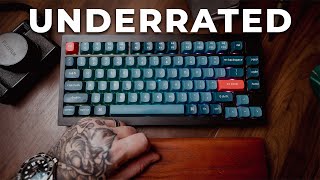
The Keyron V1 Max wireless mechanical keyboard offers a practical solution for content creators and gamers who need to switch between multiple devices. Priced around $100, it combines a compact, aesthetic design with three-device connectivity and hot-swappable switches, making it ideal for dual PC setups or shared desks.
The keyboard addresses the need for seamless switching between multiple devices like Mac and PC, especially for streamers and creators.
The reviewer uses the keyboard with a dual PC streaming setup and found it perfect for switching between gaming and editing.
Compact layout, wireless and wired modes, hot-swappable switches, priced around $100.
The keyboard can connect to three devices via Bluetooth, USB dongle, and USB direct, with easy switching.
A physical switch allows instant swapping between Windows and Mac layouts without software.
Used for 7-9 hour stream sessions and then switched to Mac for video editing, maintaining workflow.
Soft keys minimize noise picked up by microphones during streaming.
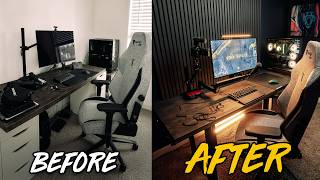
The keyboard's design blends into a modern creator setup without being obtrusive.
No latency issues reported despite using multiple inputs; feels natural for gaming.
The video is not sponsored; the reviewer bought the keyboard himself and uses it daily.
The Keyron V1 Max is a versatile and affordable mechanical keyboard that excels in multi-device environments, making it an excellent choice for content creators who value both functionality and aesthetics.
What are the three connectivity options on the Keyron V1 Max?
Bluetooth, USB dongle, and USB direct.
01:38
How many devices can the keyboard connect to simultaneously?
Three devices.
01:38
What is the approximate price of the Keyron V1 Max?
Around $100.
00:53
What feature allows switching between Windows and Mac layouts without software?
A physical switch on the back of the keyboard.
02:04
Why are soft keys beneficial for streaming?
They minimize noise picked up by the microphone.
03:10
Three-Device Connectivity
This feature is the core selling point, solving a common pain point for multi-device users.
01:38Platform Switching Ease
No software installation required for switching between Windows and Mac, a rare convenience.
02:04Workflow Efficiency
The keyboard enables seamless transition from streaming to editing, enhancing productivity.
02:30Unsponsored Authenticity
The reviewer bought it himself, adding credibility to the recommendation.
05:13[00:02] you game and create? Maybe you're more advanced and have a dual PC stream setup. This keyboard [music] solved a problem I didn't realize was slow and me needs to check off a lot of boxes. Whether it's gaming and editing, being
[00:14] somebody like me where I swap back [music] and forth from Mac and PC or using a PC and a laptop, even being like a shared desk household where me and my wife will both do things in the same area. Over the years, especially with
[00:27] the dual PC streaming setup and going back and forth from Mac [music] to PC, I keyboards. So, I found this keyboard here, and it's the Keyron V1 Max wireless mechanical keyboard. It's a compact layout, very creative friendly.
[00:40] It's both wireless and wired, and [music] it has hot swappable switches. Now, as somebody that's into mechanical keyboards, [music] but isn't super into them, I wanted something that sounded good, but I also can [music] control
[00:53] gives me the ability to do that. But if you guys are into mechanical keyboards really pricey. With this one being around the $100 price range and having a variety options from this brand, anywhere ranging from $90 to $180 plus
[01:10] for the more premium versions. For me, this sat in a sweet spot of not paying an arm and a leg, but also being able to use it in the multi-functions. I'll be little unsure. It is a plastic case. It didn't feel premium to the touch. So, I
[01:24] very cheap. But after using it daily for months in a dual PC setup, also adding a over and edit the stuff right when I was switching devices, this thing is actually badass. Like when you're
[01:38] fragile as I thought it would. Now, the reason why I love this keyboard, three keyboard can be connected to three different devices. Now, I found some keyboards in the past that can connect different inputs to other devices, but
[01:52] they never really had that mechanical aesthetic look and feel to them, like a a quality feel. On top of that, too, those previous keyboards were just not fun [music] to game on. So, on the back of this keyboard, you have three
[02:04] switches, one being Bluetooth, another one being a USB dongle, and the final one being USB direct in. On top of that, you can switch between [music] Windows and Mac layout. So, with the switch of a button, you can instantly swap from Mac
[02:16] to PC or between two dual PC gaming setups. No repairing, no software jiggling, no [music] installation of software at all, which I'm a big fan of because I really don't like having to download third party [music] things to
[02:30] keyboard that sounds great, looks great, I was able to do 7, 8, 9 [music] hour stream sessions, maintaining and modding back and play games on it. Then as soon as I was done, able to switch it right
[02:43] over to Mac and use it to edit my videos. To me, being able to have a workflow feature while still having [music] that clean aesthetic and the clean mechanical keyboard sounds so sick. Like, it sounds good without being
[02:56] obnoxious. So, for anybody like me that's not a full-on mechanical keyboard snob, you get the mechanical satisfication with practicality all for lot of streamers can relate with this where they get a keyboard that's so loud
[03:10] though my mic is good, this is why I like having softer keys because even also doesn't pick up the [ __ ] in the background when I'm streaming. On top of that, the aesthetic and setup for this, it just looks so good in my setup. I
[03:25] but for somebody like me who is a content creator and takes a lot of pride in taking photos [music] and having a goodlook setup, I want it to look clean it doesn't overpower the setup and kind of matches a modern creator look. Like
[03:40] it just blends in your setup in the best way and doesn't take too much attention guys know what I'm talking about. Some gaming keyboards in 2026 are just so loud and obnoxious and extravagant. But if you go [music] too far into the
[03:53] gaming side, they become smaller and compact and don't give you a lot of the But if you go too far in the creator side, you get a larger keyboard, too space. Aesthetically and functionalitywise, [music] it's just a
[04:07] perfect mix. From a gaming standpoint, I've been using it daily for months now. the different inputs, but I didn't have any [music] problems with that. Feels sessions. While it's got a lot of practicality, and you can use it in a
[04:21] working environment, it doesn't give you a working keyboard feel. It just feels use it with. So, originally when I wanted to talk about this, I had this whole idea of making a video that' be great for people with dual PC streaming
[04:35] setups because it really is perfect for that. Well, what I figured out over the last few months is this is just like perfect content creator keyboard. Being able to use it on multiple devices, having [music] it just fit so many
[04:47] creator aesthetic setups, getting to dive into the mechanical keyboard [music] world without having to take out a [ __ ] loan, it's nice. And hey, my particular model, if you're looking for like extreme quality aluminum [music]
[04:59] casing, it's not going to be for you. But with this brand, you do have some of those options. So, you're not going to get your ultra custom, your collectible you're a content creator that wants to tiptoe into that world, have something
[05:13] that looks great in your setup, and then having the practicality of using it in Also, just want to make it very clear. I'm making this video today because I wanted to have fun making a video talking about a piece of tech that I use
[05:26] every single day and I think it's pretty badass. Not sponsored with this brand, keyboard at a microenter, bought it myself. I use it daily. If you're I'm going to be providing as examples [music] talking about this product,
[05:40] links. So, obviously getting anything through those links will support me as a creator. But yeah, if you're a content creator who also prioritizes aesthetic, looking to minimalize your workflow and your setup in 2026, this is one keyboard
[05:54] can't recommend it enough. If any of you guys have any experience with Key Ground down below. If you guys have had any problems with these keyboards, [music] all I got for you guys today. I'm out. Peace. Dois.
⚡ Saved you 0h 06m reading this? Transcribe any YouTube video for free — no signup needed.