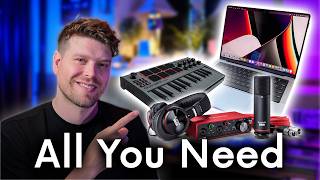

3 Things You Need for a Home Studio
45sDirectly addresses a common pain point for beginners, offering a simple framework that's easy to remember and share.
▶ Play Clip"The title accurately reflects the video's content: a practical, step-by-step guide for setting up a first home studio with both budget and pro options."
This video provides a beginner-friendly guide to setting up a first home studio, focusing on three essential components: a computer, an audio interface, and headphones. The creator recommends a cost-effective starter setup and a professional setup that requires no future upgrades.
You only need three things: a way to make sound, get sound into the computer, and get sound out.
Recommends a refurbished MacBook Pro with M1 chip and 16GB RAM for longevity and value.
Ableton Live Intro at £69 is the recommended DAW for beginners, with upgrade options later.
Focusrite Scarlett 2i2 (Mark IV) with auto-gain and safe mode is the recommended audio interface.
The Focusrite bundle includes a condenser microphone and headphones, ideal for starting out.
Akai MPK Mini MIDI controller at £75 is recommended for playing chords and beats.
For professional quality, upgrade to Shure SM7B microphone and Sony MDR7506 headphones.
What are the three main things needed for a home studio?
A computer, a way to get sound into the computer (audio interface), and a way to get sound out of the computer (headphones/speakers).
00:26
What computer does the creator recommend for a beginner home studio?
A refurbished MacBook Pro with an M1 chip and 16GB of RAM.
01:34
What DAW and version does the creator recommend for beginners?
Ableton Live Intro, which costs £69.
02:39
What audio interface is recommended in the video?
The Focusrite Scarlett 2i2 (Mark IV).
03:22
What two features of the Focusrite Scarlett 2i2 help beginners avoid recording mistakes?
Auto-gain and safe mode.
03:59
What MIDI controller is recommended and how much does it cost?
The Akai MPK Mini, costing £75.
05:25
What microphone and headphones are recommended as professional upgrades?
The Shure SM7B microphone and Sony MDR7506 headphones.
06:32
What is the difference between Ableton Live Lite and Ableton Live Intro?
Ableton Live Lite comes free with some hardware but only has 8 tracks, while Intro has 16 tracks and more instruments.
02:53
Three Core Components
Simplifies the studio setup into three essential elements, making it less intimidating for beginners.
00:26Refurbished Computers
Suggests a cost-effective way to get a high-quality computer without the new price tag.
01:09Auto-Gain and Safe Mode
Highlights features that prevent common recording errors, saving beginners time and frustration.
03:59Upgrade Path
Provides a clear, logical upgrade path from beginner to professional gear without needing to replace everything.
06:32[00:00] Setting up your first home studio can feel like a bit of a daunting task, especially when there's so much gear to choose from, it's very easy to get worried about making the wrong choices. If you're new to music production, you probably want to avoid the trial and error
[00:14] of buying, regretting, replacing equipment. Well, I'm here to help you. I've been teaching music production professionally for years and I recommend equipment to students all the time. Now look,
[00:26] you do not need a fancy studio setup to get started. You only really need three main things. You need a way to make sound. You need a way to get sound into the computer and you need a way of getting sound out of the computer. In this video, I recommend a cost-effective beginner-friendly setup.
[00:45] I also recommend a professional pro home studio setup that you probably will never need to upgrade. It's that good. Okay, so without further ado, let's jump into it. First thing to talk about is
[00:57] the most important thing. It's the computer. Now if you don't already have a computer, it's probably going to be your biggest expense, but there are ways to save lots of money if not thousands of pounds.
[01:09] I would recommend getting a refurbished one. What refurbished computer is essentially it's an old computer, but they've replaced all the parts that can be replaced and made them new, serviced it and made
[01:22] sure it's as good as it can be. Usually most refurbished Mac providers will provide you with a warranty as well, so the computers sometimes can be as good as new, but without that price tag.
[01:34] Good solid computers to start off with is the 13-inch MacBook Pro with the M1 chip. But essentially, the main thing you're looking for is that it has 16GB of RAM. Let's have a little look on
[01:46] back market roughly how much the minimum requirements of a MacBook would cost you. Okay, so if you have a look here, we have a MacBook Pro 13-inch 2020. Fair condition basically means it might have
[01:58] some few scratches on it. It's 740 pounds, which for a computer that's going to last you roughly around 10 years, that's a fantastic deal. They can probably get a cheaper Windows laptop out there on the market, but it's hard to say if the build quality is going to be as good as a Mac. Okay, so now we've
[02:15] got the computer sorted. Let's look at the software. So I recommend Ableton Live to get you started. The reason why I recommend Ableton Live is because it has three different price points. It's price
[02:27] that beginner, medium, and then expert. So let's have a look at that. So if you look here, you have three options to buy Ableton Live. We have Ableton Live intro, standard, and sweet. Now starting out,
[02:39] I recommend getting intro. It is 69 pounds or you pay in three installments. You can always upgrade a late date. You don't have to pay the full price here. You just pay an upgrade price. Now there's
[02:53] also something called Ableton Live Lite, which comes free with some software. There's essentially the same intro, but you only have eight tracks in it seems to play with. So that is the limitation with intro. We only have 16 tracks, 16 scenes, and it doesn't have as many software instruments or
[03:10] sounds, but there's more than enough there to get you started. So now we've got a way of storing and editing our music. Let's look at a way of getting music into the computer. The main thing you're
[03:22] going to need is something called an audio interface. That's this red thing here. This is by a company called Focusrite, and it is called the Scarlet 2i2. Now this is something called the Mark IV version,
[03:34] and it's much better than the previous Mark II and III. It has updated the converters and the preamps to such a good level. I have brought one of these myself, even though I have all this studio equipment. It
[03:47] sounds really good, and it's what I'm recording my microphone on right now. It has a bunch of features that are really good like auto gain and safe mode. Auto gain will automatically set the right
[03:59] amount of volume for you to record your microphone or your guitar into the computer, which can be a troublesome thing when you first start learning how to produce music is you either record it too loud or too quiet. So this automatic sorts you out. Also there's a safe mode so that ensures that you
[04:15] don't record in too loud and clip the audio. And that basically means it would sound broken and unusable. So with safe mode on it ensures that doesn't happen which is a really good feature to have especially when you're starting out with music production. Another nice thing is it has the inputs for
[04:30] a microphone on the back of the interface, which is really nice for making it all nice and tidy on your desk. Now this interface comes as a bundle with this microphone here and these headphones
[04:43] for a really good price. Then you are pretty much sorted. So the microphone here that comes with it is a condenser microphone. You're going to get a very good sound out of this microphone but it's
[04:56] not completely professional. You will probably need to upgrade this microphone at some point. I'll talk a bit about what I recommend doing later in the video. But for now that's a great option to start out.
[05:08] It also comes with the lead as well so you don't even need to worry about the lead. It's fantastic. Now one more optional thing to get stuff into the computer is this thing here which is called a MIDI controller. So this is the Akai MPK Mini. This is a fantastic little controller because it's
[05:25] small, it's lightweight, it's compact, it has pads and dials and a little screen to help you figure out what you're doing. This will help you play chords and beats into the computer. It's a MIDI controller
[05:37] which basically means it controls sounds that are already inside your DAW which is able to live and it is very cost effective. This one here is 75 pounds brand new. By the way,
[05:49] everything that I'm recommending here, I have put in a link below, it's an affiliate link, no extra cost yourself. So if you like to support the channel, you can purchase all these items through that link. So now that we've got stuff going into the computer, we need to be able to get it
[06:03] out to the computer. That's where the focus right bundle is another plus because you get headphones with it. Now these are nice big, comfortable studio headphones. There are a few things that I would
[06:15] recommend upgrading as soon as you get a little bit more of a budget or if you have the budget already, I recommend upgrading straight away. It's going to make your music sound better and it's going to save you a lot of problems in the long run. And that is upgrading the microphone and the headphones.
[06:32] I'd recommend upgrading the microphone as soon as you can to the microphone I'm using now, which is the short SM7B. Now it is a bit more expensive than take the headphones and the microphone and the
[06:44] interface put together, but you're never going to need to upgrade this microphone. It is an industry standard and you're going to get a really good quality vocal recording from it. You're also going to want to update your headphones as well. These headphones are pretty good but they do EQ the sound
[07:03] a little bit. They make it sound a little bit different from what's coming out of the computer. The headphones I recommend are the Sony MDR7506 and in terms of headphones they're fairly cost effective as
[07:16] well. Coming in brand new 83 pounds. Any production choices you make based on what you hear in these headphones are going to translate a lot better to say another pair of headphones, a pair of speakers
[07:29] around your mates house or the speakers in a car. So those are my recommendations for your first home studio setup. So if you're coming at this as a beginner on a budget, you want the focus right
[07:42] bundle with the microphone headphones, the AKI MPK Mini and a MacBook from back market. If you want a professional setup that needs no upgrade for whatever, you want to get focus right MPK Mini
[07:59] MacBook as stated before. Then you want to upgrade to the Sure SM7B microphone as I'm using here and the Sony MDR7506 headphones. So now if you're ready to buy don't forget to use the affiliate
[08:15] link below. Every little bit helps this channel with no extra cost yourself. And when you do get everything, if you want to learn a bit more about Ableton Live, I have a free course on Ableton Live here which also applies to intro. However, if you do decide to get either standard or sweet version
[08:30] Ableton Live, I have a crash course in it here. Hopefully see you soon, bye for now.
⚡ Saved you 0h 08m reading this? Transcribe any YouTube video for free — no signup needed.