
This Mic Is FAKE?
45sThe immediate reveal that the audio is from a webcam mic, not a studio mic, creates a surprising hook that challenges assumptions.
▶ Play Clip"Delivers on the promise of testing NVIDIA's new AI features, but the title oversells the 'faking' aspect; it's a solid review with honest drawbacks."
NVIDIA Broadcast 2.0 introduces two new AI-powered features: Studio Voice and Virtual Key Light, designed to enhance audio and video quality for streamers and professionals. The video tests these features using an affordable webcam, discusses their performance, and highlights significant drawbacks, particularly the high GPU requirements and performance impact.
NVIDIA launched Broadcast 2.0 a couple weeks ago, featuring new AI tools including Studio Voice and Virtual Key Light.
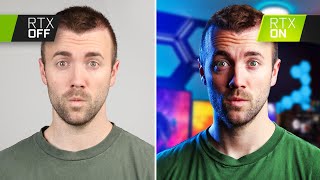
Studio Voice uses AI to turn any microphone into a studio-quality mic, while Virtual Key Light simulates a light source on the subject.
The entire video is shot on the Insta360 Link 2C webcam, showcasing its quality and features like phase-detect autofocus and 4K resolution.
The creator applied EQ to Studio Voice to reduce harshness in high mids (around 1,400-2,400 Hz), making the sound more natural.
Studio Voice maintains audio presence even when moving away from the microphone, but it can sound unnatural when too far.
Virtual Key Light adds proper skin tones and warmth without washing out bright areas, but reduces facial sharpness.
NVIDIA recommends at least a 4080 or higher GPU for these features, and they are not recommended for use during gaming.
In Marvel Rivals, frame rate dropped from 240 to 140 FPS with the features on; PUBG had stuttering despite stable FPS.
Studio Voice adds 250-500ms delay, requiring camera delay adjustment for live streaming.
The drawbacks currently outweigh benefits; the features are more useful for mitigating catastrophic problems than for everyday convenience.
NVIDIA Broadcast 2.0's new AI features are impressive but currently have significant performance costs and limitations. They are best suited for high-end GPU owners and specific use cases, with potential for improvement in future iterations.
What are the two new features in NVIDIA Broadcast 2.0?
Studio Voice and Virtual Key Light.
01:36
What GPU does NVIDIA recommend for using these features?
At least a 4080 or higher.
07:56
What is the audio delay added by Studio Voice?
250-500 milliseconds.
09:08
What happens to facial sharpness when Virtual Key Light is enabled?
It reduces sharpness, making the face less detailed.
06:35
What was the frame rate drop in Marvel Rivals when using the features?
From 240 FPS to 140 FPS.
08:24
AI-Powered Audio and Lighting
Introduces two new AI features that can simulate studio-quality audio and lighting, a significant advancement for content creators.
01:36High GPU Requirement
NVIDIA recommends a 4080 or higher, making the features inaccessible to many users.
07:56Performance Impact in Games
Demonstrates a 100 FPS drop in Marvel Rivals, highlighting the heavy computational cost.
08:24Audio Delay Issue
Studio Voice introduces a noticeable delay, complicating live streaming setups.
09:08Drawbacks Outweigh Benefits
The creator concludes that the current drawbacks make the features more of a niche solution than a daily convenience.
09:37[00:01] your mind this microphone is not actually being used right now the microphone you're hearing is the webcam microphone which normally sounds like this but let's turn it back on so you can hear it this is a part of the brand
[00:15] new Nvidia broadcast 2.0 that they just launched a couple weeks ago and that virtual key light that I'm going to tell you about we'll talk about how good it is we'll talk about how to use it and we'll talk about a short list of issues
[00:27] that I found in in both of these features and at end I'd actually love to tradeoff to some of those things so let me know but first couple quick updates schedule so I'm streaming every Tuesday Thursday Saturday both on this YouTube
[00:40] Thursday Saturday both on this YouTube channel and on twitch.tv/ heresell so if you want to do either subscribe here or a lot of testing with like enhanced broadcasting 1440p streaming on Twitch
[00:53] see your face over there and then also Dustin the master cameraman and editor of this channel just launched his own camera course called Lumix Pro it's a onetime payment to sign up no subscription it already has over 175
[01:06] signups so if you shoot on Lumix like we do and want to hone your craft a little bit I will put a link in the description down below to that go check it out but down below to that go check it out but let's talk about nvidia's brand new AI
[01:22] happened after Nvidia launched their noise removal feature along with their the original launch of the software not only have those gotten a lot better over screen virtual background effect that's gotten very good but also they've
[01:36] launched two brand new tools we've got Studio mic which utilizes the AI processing inside nvidia's gpus to turn any microphone into a studio microphone but also their virtual key light which simulates having a light on you even
[01:51] when you don't it's pretty wild since the whole purpose of video broadcast is to improve affordable gear I'm actually shooting this entire video on an afford but high quality webcam one of my favorites lately the esta 360 link 2C
[02:05] one that they're launching today but let me give you some sound tests some video different settings turned on and off while I tell you about today's sponsor the insta 360 link 2C first of all the reason the insta 360 link 2 and 2C look
[02:19] sensor built into it it's why you have a great dynamic range why you have super natural colors why HDR looks so good in both 4K 30 and 10860 plus the brand new Auto Focus which is the same autofocus technology used in our big boy cameras
[02:33] it's called phase detect autofocus is phenomenal like I'm I'm always in Focus you never see any Focus pulsing like you see on other webcams I mean the quality of the link 2C is so good it even looks good in low light like you can tell it
[02:46] automatically readjusts the brightness for this new Lighting on my face but actually looks better than some other webcams in good lighting and because this webcam has such a crisp image and it's 4K it can use something called
[02:59] and still follow you around the room and Center you in the middle of the frame on and off using hand gestures so if you stand up to walk away and remember that it a little wave basically so this camera is designed not only for
[03:13] streamers but also Professionals in Zoom meetings for teachers basically anybody who needs a high quality webcam at a very affordable price range so if you're interested in picking up on of these brand new white insta 360 link to C's
[03:25] now there's an Amazon Link in the description Down Below in the first 20 people to use that will get an additional 10% off the camera that's $15 off so now's your chance to make your live stream look super crispy make your
[03:37] parents proud back to Nvidia broadcast so I'm sure you noticed in that section that I was not only adding Studio voice I was also adding EQ to it I was doing that because even though Studio voice is making my voice sound thicker and more
[03:49] little bit too much and it was adding some harshness in the high mids area so by pulling down just a little bit and a couple of those frequencies around 1,400 to 2400 it ended up kind of smoothing
[04:02] out that line and making it feel more natural I thought it may have just been I tested it on my nice shotgun microphone and it kind of did the same thing so clearly with this first beta they're kind of cranking that presence
[04:15] it'll be interesting to see how good it a little bit more dialed in in the future Studio mic is also really cool for if you stand up and want to walk around the room but still sound super
[04:28] present cuz normally when you stand up and move further away from a microphone you you lose that presence that you get from being right up close to a microphone but I'm going to fix this here it's impressive let's turn on
[04:41] Studio mic here studio studio voice as I stand further and further away they manag to keep that presence intact you more digital as the GPU has to work a little bit harder so you start to hear a
[04:55] little bit more processing in there as you step further away but it's still very impressive so while the tech is impressive I think it can start to get a little bit too hard it's just a little bit unnatural to be that far away from
[05:11] the mic and have it working so hard to make it sound like you still have a face like right now it just seems like the effect is cranked up to 11 I'd like it back to like a seven or an eight it's awesome when you're at a desk though and
[05:26] you're at a normal webcam distance away from your microphone in fact I'd say in this circumstance it'd be really cool to just be able to have it on all the time but there are some drawbacks you need to know about and there the same drawbacks
[05:38] let's talk about that real quick let me switch my video feed to the webcam going through Nvidia broadcast you can see at the bottom of Nvidia broadcast we've got this brand new virtual key light here and when I turn it
[05:55] it's very impressive let me even close this window a little bit more I assumed recognize what's you what's the background and then just brighten you up but it doesn't just do that it adds
[06:08] proper skin tones it doesn't wash out areas that might be too bright like I've still got this light on the side of my head and you can see when I have it off that section of my head is really bright if we were just cranking the brightness
[06:21] that would wash out but it doesn't that maintains the same brightness but the dark side of my face is brighter and the skin tones feel warmer my face feels more natural and you can change the actual warmth of the light
[06:35] itself although I've found really only the middle to look even decent but one thing you might notice is that my face is no longer as sharp as it was before let me turn it back off I retain a lot more detail on my face when it's turned
[06:48] off but where this would really come in handy is if we were to shrink this down to the corner so that now you don't really notice a lack of sharpness because it's gotten so small and then we turn on Virtual
[07:02] background let's remove the background this looks amazing this would be an absolutely incredible gaming stream keep in mind not only am I not green screened right now but I have no lights in front of my face and this looks pretty
[07:17] incredible this would allow me to game without having lights shining in my eyes the whole time if it weren't for one major issue let's turn these lights back Studio voice is a little bit more of a game changer not only are there more
[07:31] applicable situations where it makes sense like having a friend sitting next to you when you don't have a second mic or walking around in the room but also the end result is just I think a little bit better on Studio voice than virtual
[07:43] however is something that they are not hiding it says right on here requires high-end GPU not recommended to use with games or GPU intensive apps and this is
[07:56] features in fact Nvidia themselves told me they would recommend you have at me they would recommend you have at least a 4080 or higher so 4080 4090 5080 or 5090 if you want to use these and you shouldn't use them during games you
[08:10] should only use them during just chatting so these are very much beta softwares that are more designed to Showcase what these gpus are capable of rather than actually make something usable for everyone right now but we did
[08:24] true if they were just being extra cautious uh I did notice in Marvel Rivals when I had this turned on I was losing about 100 frames I went from 240 losing about 100 frames I went from 240 frames down to 140 frames still very
[08:38] playable but in other games like pubg even though my frames stayed at around 160 frames I was getting crazy stuttering and it was basically features on how much harder the components of my PC actually have to
[08:52] work just process all of this we also tested it on n380 just for fun and it tested it on n380 just for fun and it worked but his PC made some weird
[09:08] up Studio voice also adds quite a bit of delay like we fixed it in the editing back to how it was before this this is what happens when you turn on Studio voice so if you want to use it while you're live streaming
[09:23] you're also going to have to delay your camera 250 to 500 milliseconds just to even noticed that when I switched the webcam to being sent through the Nvidia broadcast app even when virtual key light wasn't turned on we were dropping
[09:37] frames so right now with the way the software is the drawbacks feel a lot stronger than the actual benefits and it feels like it's more of a way to mitigate catastrophic problems you're in a room where you can't have a light this
[09:51] helps if you're in a place where you have to use a webcam microphone and there's no other option sure turn this on and fix the sync but out of convenience it doesn't actually seem more convenient but let's give it a
[10:04] couple years and see what happens what do you think what are your thoughts on the Improvement versus the drawback let me know in the comments down below if you don't have any opinions just leave your favorite emoji for engagement
[10:16] subscribe if you haven't already for future videos I hope you found this interesting I did and I hope you found it helpful and as always happy streaming I'll see you in the next stream here or on Twitch whatever doesn't matter to to
[10:29] on Twitch whatever doesn't matter to to me I'll see you over there
⚡ Saved you 0h 10m reading this? Transcribe any YouTube video for free — no signup needed.