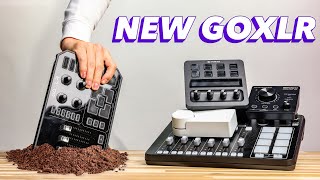

The GoXLR Is Dead — Here’s Why
30sBreaking news about a beloved device being discontinued sparks urgency and emotional investment from the streaming community.
▶ Play Clip"Delivers exactly what the title promises: four solid replacements with honest pros and cons, though some fluff and sponsor mention."
The video announces the discontinuation of the GoXLR audio interface due to TC Helicon laying off the entire team, and provides four replacement options ranging from budget to premium. The host reviews each device's features, pros, cons, and target audience, aiming to help streamers find a suitable alternative.
TC Helicon has laid off the entire GoXLR team, making the device obsolete. It will eventually stop working due to Windows updates.
The video presents four replacement devices, highlighting their strengths, weaknesses, and target users, all within a five-minute timeframe.
Budget option at $179. Features a powerful mic preamp, voice effects, line in/out for second PC, and multiple mixing modes. Downsides: simple hardware interface and basic software UI.
Priced at $259. Unique for its powerful plugins (EQ, compression, expander, noise reduction) and dual USB with multiple inputs/outputs, allowing four separate audio tracks to/from streaming PC. Downside: only a single dial for headphone volume; additional mixers cost extra.
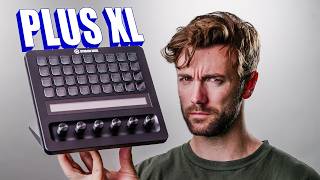
Combines a stream deck with XLR input, allowing control of audio, OBS, Discord, lights, cameras. WaveLink software and Voice Focus (like Nvidia Voice but better). Downsides: processing done on PC, simple I/O makes 2-PC setup harder.
Premium option at $319 (Rodecaster Pro shown). Features two mic inputs, four faders, monitor outputs, programmable soft buttons, SD card slot, dual USB for 2-PC. Designed for streamers, podcasters, and audio engineers. Downside: complexity and learning curve.
The GoXLR's discontinuation is unfortunate, but there are excellent replacements for every budget and need. From the budget-friendly Roland Bridgecast One to the feature-rich Rodecaster Duo, streamers can find a device that fits their setup and workflow.
What happened to the GoXLR?
TC Helicon laid off the entire GoXLR team, so the device will eventually stop working.
00:02
What is the price of the Roland Bridgecast One?
$179
01:47
What unique feature does the Beacon Studio offer?
It has dual USB with multiple inputs/outputs, allowing four separate audio tracks to and from the streaming PC.
03:10
What is the main downside of the Elgato Stream Deck Plus with XLR Dock?
Processing is done on the PC, and the simple I/O makes 2-PC setup harder.
05:10
Which device is designed for professional podcasters and audio engineers?
The Rode Rodecaster Duo.
06:46
GoXLR Discontinued
Confirms the death of a beloved device, prompting the need for replacements.
00:02Budget Replacement
Highlights a cost-effective option with essential features.
01:47Beacon's Unique Dual USB
Explains a standout feature that sets Beacon apart.
03:10All-in-One Control
Shows how the Stream Deck Plus integrates audio and stream control.
04:03Professional-Grade Device
Identifies the Rodecaster Duo as suitable for professionals, not just streamers.
06:46[00:02] died again this is the second time this has happened TC Helicon has laid off the entire go XLR team we kind of saw this coming with that new and exciting hire environment that the higher-ups didn't care about the project but it's official
[00:16] it was posted in their Discord the team is gone your goxlr will eventually stop working it's not today it might be tomorrow it might be a year from now but one day there will be a Windows update and the goxlr will stop functioning so
[00:28] this video is for those of you looking for a replacement I want to share with you my four favorite Replacements that all do things slightly different I want about what's good about them what's bad about them and who they're for and we're
[00:40] going to see if we can do this under five minutes so I'm going to shut up and five minutes so I'm going to shut up and just get into it let's streamers that are looking for a really cool and simple aesthetic no more crazy
[00:55] overlays but instead really clean widgets on your stream I've been working recently shifted their entire priority from Big flashy overlays to simple widgets that do really cool things the two I'm using on my stream right now are
[01:08] the multi- chat overlay which allows you to have a combined chat on your stream I stream and I used a really clean music widget which looks really really nice my stream everyone watching can see what song is playing some other widgets they
[01:22] have available right now are some really cool stylized goal bars as well as some coming in the next couple weeks that I'll be I'll be excited to tell you signing up for owned. proo and some of
[01:34] the link in the description below check them out and start adding them to your rid of the go XLR it's gone let's do this in order of cheapest to most expensive let's start with this guy the Roland bridgecast one
[01:47] one of my favorite budget devices right now the bridgecast one is available for $179 and the best thing about it is it's a device that does basically everything have a powerful microphone preamp just like all these do you have voice effects
[02:01] a line in and a line out Jack for connecting to a second PC and you can like a PlayStation 5 they even have a couple different mixing modes available in their software to make it easier to mix while only using a single dial and a
[02:15] couple buttons the major downsides of this are the overly simple Hardware interface no multiple dials or faders or anything and also the software UI is is looking for a beautiful interface you're not going to get it for $179 but this
[02:30] looking to get all the features that you need in the cheapest box possible and by the way come here this is obviously a very simplified review of all of these information I'm going to put a link to every video covering each of these
[02:43] individually in the description below so if one of them pequs your interest go check out the full video on it let's move to the next one the beacon studio now the beacon studio is259 and it does a couple things that none of the other
[02:57] ones do my personal favorite thing about Beacon is they make prle plugins things like incredible EQ compression expander noise reduction all the things are incredibly powerful and super easy to use no one else does that quite like
[03:10] device itself so whatever you set inside the software you get to hear in your feature of the beacon studio is their implementation of the dual USB which not only allows you to connect to multiple PCS but gives you multiple inputs and
[03:24] outputs over USB from each this is the only device that lets you send four separate audio tracks to and from your streaming PC as well as all the tracks from the gaming PC so that's really cool the biggest downside of this is
[03:37] only a single dial and that's for the headphone volume if you want to be able fingertips you're going to need to pick up either their mix or their mix create adding an extra $150 to $200 to the total price which ends up putting this
[03:50] as the second most expensive almost tying the most expensive one so let's jump to the Elgato stream deck plus with the XLR dock built into the back of this and Elgato is actually the combo of devices I use at my streaming setup
[04:03] well as the wavelink software for my mixing software just because of the Simplicity and I I like using the stream deck plus and then I use the beacon mic as my Dynamic mic when I'm gaming mostly for the plugins the expander on that
[04:16] ever use but the advantages to going with the stream deck plus this is dirty do I have the time to clean it are we hitting time okay anyway the reason plus with the XLR dock is for the obvious reason that you're not just
[04:30] getting with the rest of these you're getting an entire stream deck you can't just control your audio with this you can also control OBS you can control Discord you can control your lights your cameras you can control everything with
[04:43] this so it's an all-in-one device that you can also plug a microphone into and wavelength 2.0 and a bunch of features that we're missing this thing's become way more robust and their voice Focus software is fantastic it's like Nvidia
[04:56] voice but it sounds better and you don't need an Nvidia graph grac card to using this device is one none of the processing is done on the device itself so if you add a voice changer via a stream deck app or something like that
[05:10] happening in your ears while they happen they're processed on your computer and number two because the io is so simple with just a single headphone jack USB and XLR input it's a little bit harder to do a 2pc setup you don't have all the
[05:23] use the line in and the line out on your motherboard and it can just get a little bit more difficult to control something like that it's possible but it's not other devices and at this point we're getting to a device that's over $300 I
[05:36] want to say this is going for on Amazon $319 right now I'll have links to all of interested in picking any of these up and by the way those are affiliate links so if you do pick one up thank you it supports the channel and like I said
[05:49] these individual videos if you want to learn more about them let's get to the learn more about them let's get to the last one the roadter duo this is not the roadter DU Duo this is the roadter pro I don't have a roadter Duo so this is the
[06:03] closest I have the roadter duo is insane it is the cream with the crop it does overkill for most people for example you can plug two microphones into it if you need it's got four this says six it's the pro but it's got four faders built
[06:18] it's got outputs to monitors if you need them it's got these soft buttons on the side that you can completely programm to either play sound bites or change your capabilities with a mic SD card slot in the back and it has two USBs for
[06:32] plugging into a 2pc system I mean it's the thing that does other than the fact that it's $500 is the fact that it's designed not only for streamers but also professional podcasters and audio engineers and
[06:46] think should be simple things like EQ compression routing and it can get a little bit more complicated because road is accommodating everybody with this device so if you want the device that does everything and has physical faders
[07:00] okay with a little bit of a learning curve this is the guy for you how did we do on time were we close are we under 5 minutes that was the dream I'm going to be live streaming here on YouTube and on Twitch tomorrow so if you have any
[07:15] that I missed in the full length videos pop in let's talk about it but I hope this helped I hope it made the death of this beautiful device the go XLR that we've loved for so long just a little bit easier that you're not mourning
[07:28] quite as hard and I'll see you in the next one happy streaming guys peace
⚡ Saved you 0h 07m reading this? Transcribe any YouTube video for free — no signup needed.