
Budget Webcams That Punch Above Their Weight
45sReveals the 'trickle-down' strategy behind budget tech, making viewers curious about how $99 can get premium features.
▶ Play Clip"Delivers on the title with a thorough review of the new budget webcams, though some filler and sponsor-like content."
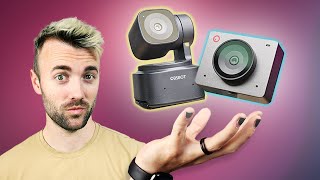
This video reviews OBSBOT's new budget webcams, the Tiny SE and Meet SE, which bring premium AI tracking and software features from their high-end counterparts to a much lower price point. The reviewer discusses the strategy of using profits from premium devices to fund budget models, and details the compromises made to achieve the lower cost, such as a smaller sensor and lack of phase-detect autofocus.
Tech companies build a premium product, then use profits to make a mid-budget device, then a budget device that benefits from software tweaks from previous models. Tesla and camera companies use this strategy.
The Tiny SE is a fully motorized PTZ webcam with AI tracking, similar to the $300 Tiny 2, but priced at $99.
The SE includes refined tracking software with modes like closeup, upper body, normal tracking, headless, lower body, and Zone tracking with presets for auto start/stop and non-tracking areas.
PTZ cameras allow you to sit in place and use software to point the camera, avoiding the hassle of manual adjustment.
The SE has a smaller sensor, which can cause graininess, but OBSBOT compensated with a wider aperture and dual base ISO. The reviewer couldn't verify the dual base ISO claim.
The Meet SE is a lower-cost version of the Meet 2, $60 cheaper, and offers 1080p at 100 FPS (150 FPS at 720p), though the reviewer notes this is a niche feature.
The SE models lack phase-detect autofocus, resulting in focus hunting, but since the depth of field is deep, manual focus set to your sitting position keeps you sharp within five feet.
The Tiny SE and Meet SE have the same lens and sensor; the only difference is the $30 extra for motors in the Tiny SE for PTZ functionality.
The SE models have a slightly wider field of view, and the reviewer had to increase sharpness from 50 to 70 to get a sweet spot. Overall, the image quality is impressive for the price.
OBSBOT's SE line brings high-end tracking and software to budget webcams, offering great value for streamers. The reviewer recommends the SE models as excellent starter cameras, with the Meet SE being a solid choice for static use and the Tiny SE for motorized tracking.
What is the price of the OBSBOT Tiny SE?
$99
01:24
What are the two ways OBSBOT compensated for the smaller sensor in the SE models?
Wider aperture and dual base ISO
04:29
What is the maximum frame rate at 1080p for the Meet SE?
100 FPS
06:03
What autofocus feature is missing in the SE models?
Phase-detect autofocus
07:01
What is the only difference between the Tiny SE and Meet SE?
The Tiny SE has motors for PTZ functionality, costing $30 more.
08:12
Premium-to-budget strategy
Explains a common tech industry strategy that allows budget devices to inherit premium features.
00:02Cost-cutting compromises
Details the trade-offs made to achieve a lower price, which is crucial for budget buyers.
03:37Autofocus difference
Highlights a significant feature downgrade that may affect user experience.
07:01Same lens and sensor
Clarifies that the only difference between the two SE models is the motor, helping buyers choose.
08:12[00:02] lot of tech companies and the strategy goes like this you build a premium product with premium hardware and software then you take the profits from that device and you make a medium budget device with it then you take the profits
[00:15] from both of those and you make a budget device and the best part is that budget device gets to benefit from all the software tweaks from the previous two Tesla is notorious for this Elon Musk has talked about how they first started
[00:29] with the Roadster then us that to build the model 3 then used that to build the model S camera companies also do this a lot the camera that I'm using right now is basically a $1,500 repackaging of the $4,000
[00:42] Flagship camera they launched 5 years ago and it looks like obsbot is doing the same thing they built a premium device then they used that and put the software into a mid-budget device and then they took that same software and
[00:57] they put it into a super budget device and what you end up with is a super cheap super budget device that has almost all the same features as the super high-end ones and it works out really well let's talk about OBS bot's
[01:12] really well let's talk about OBS bot's brand new two webcams that they're [Music] launching so we've talked about the tiny 2 we've talked about the tiny 2 light but today we're talking about the tiny
[01:24] SE this is a fully motorized webcam a PTZ webcam with AI tracking the same tracking that's in their $300 tiny too but this is $99 and in order to make it
[01:36] $99 they had to make some adjustments so let's talk about what's inside of this strategy in the beginning of this video the the software the tracking software and features on this have been very refined since the original model you
[01:51] have tracking features in this camera like different tracking modes for example you have closeup or upper body mode or even just normal track Ing and even some weirder ones like headless mode or lower body mode not 100% sure
[02:05] what the use case on those is but we great feature called Zone tracking which has two kind of presets for different situations where you'd want the tracking to automatically start and stop the
[02:18] up a specific tracking Zone you set up borders and you say as long as I'm Within These zones track me but if I step outside of these borders just kind of go back to a middle SP spot that I've
[02:30] previously designated that way if you're like walking up to your computer you don't get that like double chin shot you know you know what I'm talking about and then it also has a non-tracking area kind of the opposite of that where you
[02:42] say in this spot if I'm in this Zone set this webcam to look this direction and don't move and then if I step outside this Zone then start tracking me this is super cool because sometimes these PTZ cameras feel kind of Niche like you
[02:55] really want a moving camera all the time but these things allow these cameras to function like normal webcams when you're not moving and then tracking webcams when you are moving also there's a situation where PTZ cameras really come
[03:08] in handy that a lot of people don't think about if you ever tried to set up angle it can take some time a lot of Reaching Forward and adjusting then Forward and adjusting and if you have a PTZ camera you can just sit where you're
[03:23] supposed to sit and then use the software to point the camera exactly where you want it to point kind of nice nice just some fuel for thought but so been what's the same as the previous cameras let's talk about what makes it
[03:37] less expensive this is the most important part because I can throw specs about these cameras but at the end of the day if your audience can't tell the difference Nothing Else Matters let's jump back to the cameras I don't think
[03:49] there are a lot of great 1080p cameras and I've set it 100 times that putting 4K as a spec is one of the least important things you can do things like important and even until recently twitch capped out at 1080p anyway like it just
[04:04] do think this would be an important distinction if you plan on using this for something like a top down camera for a for an art stream or something the new tiny SE the less expensive one also has a smaller sensor which probably is a big
[04:17] expensive and typically this hurts a little bit more grainy because you have less of a surface area for light to land on but obsbot compensated for this in two ways first they opened up a wider
[04:29] aperture like a wider hole for the light to go through allowing more light to go inside the camera the second thing is they added something called a dual base they added two Bas levels I don't really know how
[04:42] cameras like this one right here has dual Bas ISO meaning as you turn up the digital brightness it gets noisier and noisier until you hit the second base ISO and something electronically inside
[04:55] again like it starts fresh I tested this by turning the exposure to Auto and then turning off this light to see if the SE would jump into its second base ISO and be less noisy than the light and I I
[05:09] camera I feel like a lot of webcams have gotten pretty good in low light but low light performance but I didn't notice anything particularly better notice anything particularly better about the new tiny SE like I didn't see
[05:23] it jump to a second base I so I didn't see like the noise reset and because none of the specs they sent actually had what the second base ISO was I couldn't manually turn it to that and test it myself so uh I don't know how big of a
[05:38] myself so uh I don't know how big of a claim that is but again the spec is less important than they look pretty good but this is not the only webcam we're talked about the meat 2 on this channel before their little square camera that's
[05:51] really tiny and really powerful they also launched the meat SE today a lower cost version of the meat 2 and similar to the tiny SE that we were just just to the tiny SE that we were just just looking at the meat SE is $60 cheaper
[06:03] than its 4K counterpart so interestingly enough this webcam is actually 1080p at 100 frames per second not just 60 and at 720p you can do 150 frames a second I saw that highlighted in the spec sheet I thought that was interesting I'm not
[06:18] tiny SE that we just finished talking about also can do 1080p 100 FPS I'm going to be honest with you I don't see this being a feature that 99.9% % of buyers end up using like sure you could set OBS to record in 100 frames per
[06:34] webcam and slow it down in your recording software later for slow-mo footage but like you can't stream at 100 FPS and shooting slow-mo on a webcam connected to a computer is just not super practical so how often is this
[06:47] going to get used if it if it's you if you're like that 0.1% that's awesome but seems like more of a niche perk that now you know about and that's cool I guess another super important distinction made on these new SE models is the autofocus
[07:01] I talked pretty heavily about this in my previous videos on these cameras where they have phase detect autofocus which is basically mirrorless camera level autofocus this is something missing in the SE models it goes back to just
[07:14] the recording When I had it in autofocus you do see some extra Focus was it Focus pulsing Focus hunting I guess I think is the word now if you absolutely need little bit frustrating I don't think this is a huge deal breaker on these
[07:30] genuinely because on these little webcams there's not a huge shallow depth everything is in Focus which means if you just set it to manual focus based on where you're normally sitting which is what I ended up doing for my test you're
[07:43] what I ended up doing for my test you're in Focus within like five feet moving stepped forwards and I was sharp the whole time so I'd probably recommend know it's going to be in Focus all the time the meat SE can also do the same AI
[07:57] just remember that because this is a 1080p webcam and not 4K any digital cropping is going to add some extra pixelation to your to your image but the meat SE and the tiny SE have the same lens the same sensor on them they're
[08:12] basically the same camera the only difference is you're paying an extra $30 for the motors in it for the PTZ functionality and so if you need motorized stuff you're going to have it watch you around the room then yeah go
[08:25] for that one if you want just a still webcam for you in your face then get meet SE for $30 cheaper I was impressed at the image quality they're now able to get out of a $70 webcam the new less expensive SE models also had a slightly
[08:38] wider field of view which I prefer I think that makes a webcam look typically on the SE models well obviously because they're 1080P and not 4K I had to turn up the sharpness a tiny bit I went from 50 to 70 and that seemed to do a pretty
[08:54] sweet spot but at the end of the day this is just obsbot Tak taking their Tech taking their software taking their image and bringing it to an even lower cost for streamers and to me that seems like a good day it's a good day for
[09:09] streamers more options is never a bad thing and do you agree do you like these for a webcam would you pick the more budget one over the slightly more expensive one honestly if I were on a budget where I was looking for like a
[09:23] $150 webcam or cheaper I I might go with the SE I was super impressed seems like a great starter camera with a great image 100 times better than the $70 webcams we were getting five six years ago when I first started streaming so
[09:38] in the comments down below and uh hit the like button while you're down there subscribe if you're not already hope you enjoyed this and I'll see you in the next one happy streaming [Music]
⚡ Saved you 0h 09m reading this? Transcribe any YouTube video for free — no signup needed.