
TikTok Monetization is HERE in Mexico!
43sAnnounces a major platform update that creators are eagerly waiting for, creating immediate relevance and urgency.
▶ Play Clip"The title promises immediate monetization, and the video delivers a solid strategy, though it leans heavily on a sponsored tool promotion."
This video explains how to monetize TikTok content through the Creator Rewards Program, focusing on the strategy of recycling existing YouTube or Twitch content using an AI-powered tool called Nexus Clips. The creator shares his personal experience of achieving monetization quickly and efficiently, emphasizing consistency and smart content repurposing.
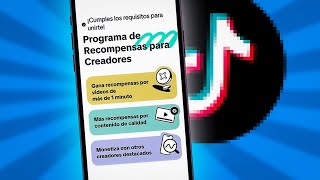
TikTok activated its Creator Rewards Program in Mexico on October 1st, paying for views on videos longer than a minute. Requirements include being over 18, having a public account, at least 10,000 followers, 100,000 views in the last 30 days, and original content.
The creator advises choosing a niche you can explore deeply, avoiding reaction or re-uploaded content (including film clips), and posting at least one TikTok daily to meet the requirements quickly.
The creator's approach is to take the best excerpts from YouTube videos or streams, edit them, and upload them to TikTok. This saves time and effort compared to creating original TikTok content from scratch.
Nexus Clips is an AI-powered tool that automatically generates clips from uploaded videos. It analyzes the content, creates fully edited clips with subtitles and framing, and provides a virality index for each clip.
In a few minutes, Nexus Clips generated nine clips from a single video. Users can manually adjust clip length, framing, subtitles, stickers, and hooks, or use advanced styles for further customization.
Nexus Clips allows direct publishing or scheduling to TikTok and YouTube, with options to add descriptions and viral hashtags. The calendar feature helps manage all scheduled posts.
The creator concludes that TikTok monetization is about strategy and consistency, not waiting for viral luck. Applying these methods can help meet requirements within days and start earning the next month.
The video provides a practical, step-by-step approach to monetizing TikTok by repurposing existing content with AI tools, highlighting that success comes from strategic consistency rather than chance.
What are the requirements to join TikTok's Creator Rewards Program in Mexico?
Be over 18, have a public account, at least 10,000 followers, 100,000 views in the last 30 days, and original content.
00:45
What is the recommended posting frequency to achieve TikTok monetization quickly?
Upload at least one TikTok video every day.
01:26
What is the 'secret' strategy the creator uses to monetize TikTok?
Recycling the best excerpts from YouTube videos or streams and uploading them to TikTok.
02:18
What tool does the creator recommend for automatic clip editing?
Nexus Clips.
02:56
How long does it take to upload a video of 8-10 minutes (2-3 GB) to Nexus Clips?
About 4 minutes or less, depending on internet speed.
04:00
What features does Nexus Clips offer for each generated clip?
Automatic framing, subtitles, stickers, a virality index, and manual editing options for length, hook, and styles.
04:40
Can Nexus Clips schedule posts on TikTok and YouTube?
Yes, it allows automatic publishing and scheduling on both platforms.
05:58
TikTok Monetization Requirements
Provides concrete, actionable criteria for creators to qualify for the Creator Rewards Program.
00:45Content Recycling Strategy
Reveals a time-efficient method to repurpose existing content for multiple platforms.
02:18AI-Powered Auto-Editing
Highlights how AI tools can drastically reduce editing time, a major pain point for creators.
02:56Monetization is Strategy, Not Luck
Shifts the mindset from viral luck to consistent, strategic action.
07:05[00:02] on TikTok right now? Now that monetization has arrived in Mexico, I'm going to access to this feature from day one. Hey there, kids , Mitich here and yes sir, you can finally monetize decently on TikTok without
[00:16] having to make a fool of yourself live or spam like crazy to sell crap. Before continuing, I would like to clarify that although this video is making it with content creators in mind , people who upload videos to
[00:29] YouTube, people who stream. That said , let me give you a super quick update October 1st, TikTok activated its creator rewards program in Mexico paid for the views your TikTok videos get. TikTok videos that last more
[00:45] obviously follow the platforms, the requirements to join here are extremely expensive. To be over 18 years old, have a public account, have at least 10,000 followers, have
[00:59] achieved 100,000 views in the last 30 days, and have original content that does not violate community rules. Once inside, your will start generating monthly rewards that you can withdraw via TikTok Wallet or
[01:13] PayPal. In short, this is all you need to know. Now, let's get down to business . How to achieve monetization as quickly as possible? recommend you choose a topic that you can explore so you don't run out of
[01:26] ideas. Under no circumstances should you react to or re-upload content that is not your own. And yes, this also refers to film excerpts. Upload at least one TikTok every day. We continue with the main course. I'm going to show you what I've been
[01:39] doing to enable monetization on TikTok. But before we , you'd be helping me a lot if you liked, commented, shared, and all that stuff, because lately YouTube has been messing with me about that and lowering
[01:51] cool. Thank you very much for your attention, and you need to have a TikTok profile. Here's mine, you can see my numbers, followers, the number of likes, everything. And something you can easily
[02:04] notice is that all my videos, or at least 99% of them, are excerpts from my YouTube videos. For example, this one here with 19,000 views that I uploaded content from my YouTube videos. And so you can see that I'm not just talking for the sake of
[02:18] can check from here whether my account is already monetizing. Oh, I don't think so. Or from yes, look, here it is. This was the process I followed to monetize my channel, and it was yesterday, October 2nd, and what I did was recycle my content. The secret is
[02:32] how to do it quickly and well. So my recommendation for you is to take the best excerpts from your videos, from your streams, edit them, put them in a presentable way to upload them here to TikTok and that way you don't have to be creating
[02:44] original content for TikTok, in addition to what you already do on YouTube or Twitch or whatever platform you want. But the trick is to do it quickly and well, because obviously editing TikTok also takes a lot of time,
[02:56] even hours, hours that many of us don't have. And thank goodness these kinds of websites exist, automatic clip editors. I use Nexus Clips and you can see that I do use them daily. I'm recycling content from my
[03:08] main YouTube channel and re-uploading it to platforms like TikTok and So, I'm currently monetizing on two platforms with minimal effort, and I want to recommend Nexus Clips because it's super easy to use. To
[03:22] channel; it works for both Twitch and YouTube. And I'm going to go here to videos and clips. And check this out, I've already got all the videos I've Twitch here, it's just that I don't have anything here, but if I had recent streams,
[03:35] never hurts is that you can also upload videos, download a video of something else, from other channels, from other people, whatever you want, upload it my case, which is YouTube, all I have to do is select the video
[03:48] from which I want to extract clips. I'm going to select the last video I uploaded, and to ensure the clips are at maximum quality, I'm going to upload my file. I waiting a few minutes for the video to upload. It also depends a lot
[04:00] on your internet speed, but in my experience, videos of 8 to 10 minutes that weigh between 2 and 3 GB take 4 minutes to upload, or even less. the AI what you want to search for. Since the artificial intelligence has already analyzed your
[04:14] but you can enter a custom AK. I'm going to choose clips and I have to wait a couple more minutes while all the clips are generated and fully edited. Oh, and by the way, you can connect both
[04:27] your email and WhatsApp to Nexus Clips so you get notified there when your mentioned, this usually takes about 5 minutes and that's it. In just a few minutes it generated nine clips for me, and they are fully
[04:40] themed and even include a virality index. For example, here I'm going to create clip" up here, and if I wanted to lengthen the clip or modify it manually, I could do it from here. Look, I select more, less. That's where I
[04:54] remove. Once I've selected this, I simply click on edit clip. have a clip that automatically frames itself, has sticker. And anyway, if you wanted to modify something here, change
[05:09] the framing, the subtitles, everything, you can do it. In this timeline, for example, I can move my sticker. Of course. I can make the hook shorter. I can even remove some of these
[05:21] remove them all, look, no problem. and I can modify it even further in a more advanced way. Look, here in
[05:33] advanced styles you can modify it to your liking. Note: all of this is subject to change, and everything is modifiable. You can change the sticker too. I don't know if it's something from Twitch, something from YouTube, it's all there. You can also modify the hook
[05:45] if you want to put something else in front of it. I'll leave it up to you. But one of apart from saving me many hours of editing with this, is that when I click here on share, I have the option to download it. Of course, and I
[05:58] Facebook or Instagram, but I can also automatically publish and schedule them on YouTube and TikTok. And if I wanted to post it on TikTok, for example, I description and viral hashtags
[06:11] like it. From here you activate the permissions, the visibility too, and you can schedule it, and that way you already have your whole plan. Look, days, hours, however you want. It works the same way for YouTube; it gives you a title,
[06:25] and you can schedule it without any problem. And you can manage everything from here. Look, in the calendar section, on the home page, we have all of this. From here have scheduled. Those marked with a green dot are the ones that have already been
[06:38] published, and the orange ones are the ones that are yet to be published. Check yourself without any TikTok. Regardless of whether this is promotion or not, honestly, I wholeheartedly tool that saves you a lot of time, not to mention all the
[06:52] benefits it brings and can bring you. If you're interested in trying Nexus the description and the first comment. There are features you can try for free, and if you like it , you can also
[07:05] a great discount. I honestly believe it's a win-win . Ultimately, monetizing TikTok isn't a matter of luck or waiting for a video to miraculously go viral . It's a matter of strategy and consistency. If you start
[07:18] applying this today, in just a few days you could meet all the requirements to next month. And I know it might be a bit of a scary. But remember, all creators start like this, and the only
[07:32] difference between us and those who didn't make it was that we dared to try. And with Remember that you can let me know all your questions, complaints, or suggestions about this or other videos comments section, on my social media, especially on Instagram where I'm more
[07:46] either here or on another platform, I'll be happy to help you. I've included all the links description section. Thank you so much for watching this video.
⚡ Saved you 0h 08m reading this? Transcribe any YouTube video for free — no signup needed.