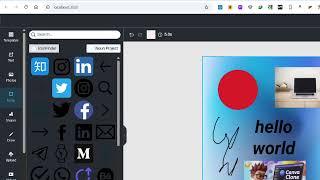

React App That Destroys Canva & Photoshop
55sBold claim challenging industry giants sparks curiosity and debate.
▶ Play Clip"Title exaggerates 'destroys Canva & Photoshop' for a basic editor demo; heavy on sales pitch, light on substance."
This video showcases a React-based all-in-one editor that claims to rival Canva and Photoshop, featuring image, PDF, and video editing capabilities. The creator demonstrates the app's functionality and promotes the source code for purchase.
Demonstrates a React application that can edit images, PDFs, and videos, presented as a Canva/Photoshop alternative.
Shows an empty canvas similar to Canva and Photoshop, with background color change option.
Add text, adjust size, and change content; top bar offers bold, italic, underline, and animation.
Download as image, PDF, HTML, or GIF file.
Full source code is available for purchase; requires Node.js to run.
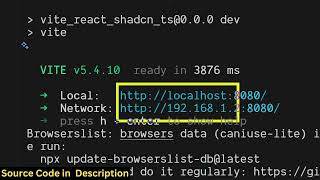
Uses Node.js v22.17.0 and 'npm run start' to launch on localhost:3000.
Integrated Unsplash API for stock images; users can search and embed images.
Upload own images via file button.
Brush tool for freehand drawing.
Embed videos via Pixels, and apply pre-built backgrounds.
Third-party icons via IconFinder API; pre-made templates for instant editing.
Exports edited template to PDF.
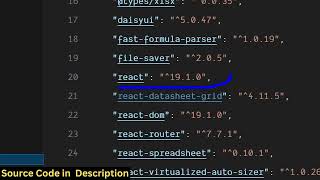
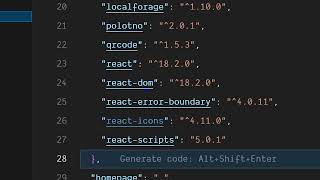
Source code uses React 18.2.0 and is written in JavaScript; modifiable.
Alignment options, blur, transparency, opacity adjustments.
Duplicate, add, and remove pages.
The video presents a fully functional React-based editor with extensive features, but serves primarily as a promotional demo for purchasing the source code.
What Node.js version is used to run the app?
22.17.0
01:28
What command starts the React application?
npm run start
01:42
Which API is integrated for stock images?
Unsplash
02:11
What export formats are supported?
Image, PDF, HTML, GIF
00:57
Which icon service is integrated?
IconFinder API
03:11
All-in-One Editor Concept
Presents the core value proposition: a single app for images, PDFs, and videos.
00:02Commercial Source Code
Indicates the video is a product pitch rather than a free tutorial.
01:13Unsplash Integration
Demonstrates real-time search and embedding of stock photos.
02:11Multiple Export Formats
Highlights versatility with PDF, HTML, and GIF export options.
03:41React 18.2.0 Usage
Shows the app uses the latest React version, implying modern practices.
04:10[00:02] in this video, I'll show you a react application that I created that will actually destroy Canva and Photoshop. It's actually a all-in-one editor where you can edit your images, PDF, videos, everything. So I'm running this
[00:16] application on localhost 3000. As you can see here, this is a React application. So right here we have this empty canvas similar to Canva and Photoshop. So here you can actually change the background color
[00:29] and then we inside the left hand se section you can add actually add text here. So simply click on this similar to canva and photoshop you can adjust the size of it and just
[00:44] change the text here and we have all these options of at the top bar. You can bold, itallic, underline, everything is present. You can even animate the text present. You can even animate the text as well. You can see that and then we
[00:57] also have the export options download button. So if you click on that you can actually export this to a image PDF HTML GIF file. So if I select image click on download PNG. So now it will export this everything into a image. So this is the
[01:13] overall project here uh of inside ReactJS. So if you need the full source description. So you can directly purchase it. uh after purchasing it, you will actually get a zip file here. Uh once you extract the zip file, simply
[01:28] you need to run the project. I'm simply running it on localhost 3000. And for installed. So I'm just running the latest version of NodeJS, which is 22.17.0. After that, you just need to say npm run
[01:42] start. So this will start your ReactJS application locally application locally at your local host 3000. So I have given the link you can directly go to it and purchase it. After purchasing it you
[01:56] will automatically get the source code from Google drive once the payment is done. So you will see that we also have options to add different kinds of shapes as well. So you can even change the background color. Then we also
[02:11] integrated the support for stock images using Unsplash. You can actually click on any of these stock photo images. You can even search for it in real time. So it will search the images for you and then you can embed those images. Use it.
[02:28] You can also use your own images as well inside the upload section. So right here, click on the add file button to actually upload your own images as well. And you can add those images as well. So it's very simple.
[02:43] And uh we also have the support for drawing. You can use the brush here. draw something and uh we also have the support for embedding videos as well which is pixels. We have integrated this support here and then we have a set of
[02:59] backgrounds that Canva and Photoshop supports. So you can actually use these backgrounds as well like this instantly change it and see the result here. So
[03:11] it's a really awesome ReactJS application that I created. We also have the support for integrating third party icons using icon finder API. And then we also have a set of templates that you can ready templates. You can simply
[03:25] click on those templates and edit those templates instantly. And then you can export this let's suppose to PDF file. Now you can click on download PDF. So instantly this template will be exported to PDF file. So this is the support. you
[03:41] will see that you can export it to a image file, PDF file, HTML, GIF, animation as well. So, it's an all-in-one editor which can even compete see here.
[03:56] So, it's very easy to run. As I already told you, you should have just NodeJS installed. And once you get the source code, you can modify the source code as well. So you can just see here all the
[04:10] files have been coded inside JavaScript. So if you understand the code here, you can easily modify it to add additional features as well. So you have actually used as you can see the latest version of React here 18.2.0.
[04:24] The link is given. If you like it, you can directly purchase it. And uh you can just see here we have all these options here. You also have the position option which Canva supports. You can align them accordingly.
[04:40] You also have different effects as well. We can blur the text here. We can change the transparency, opacity, everything we can do. We can even duplicate this page here if you like it. Click on copy. Then it will create a duplication of this
[04:53] page here. So you can add a new page. You can add multiple pages as well. Remove certain pages. So all these things are there. You can directly integrate this everything here. Just select the page here and select the
[05:09] template here as well. So definitely check out this editor.
⚡ Saved you 0h 05m reading this? Transcribe any YouTube video for free — no signup needed.