
Never Miss an Interrupt Again!
55sShows a game-changing visual cue for interrupts that directly addresses a common pain point, making it highly shareable among gamers.
▶ Play Clip"Delivers on the promise of showcasing new nameplate capabilities, though it's a niche add-on update."
This video presents the latest update to the MF Plater profile for World of Warcraft, focusing on improved nameplate visibility and customization for Mythic+ dungeons and raids. The update introduces thinner nameplates, reduced opacity for non-targets, a mod that highlights casting mobs, and customizable boss energy bars, along with tweaks to friendly nameplate display in instances.
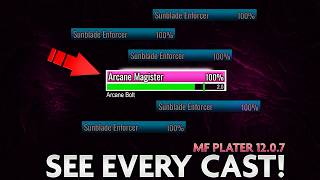
Important casts are colored vibrant orange with an animated glow. If your kick is ready, the cast bar has a green border; if your kick will be ready during the cast, a green indicator shows the exact interrupt time. These features are customizable via the MF kick mod.
Each mob's nameplate shows its percentage contribution to the key. Bosses have a clear energy bar underneath their nameplate, now customizable in this update.
For purge/soothe classes, purgeable buffs show a yellow glow on the left side of the nameplate, and suitable enrages show a red glow. These are customizable.
Mobs are color-coded: dark blue for bosses, bright pink for casters, purple for important mobs, aqua blue for ordinary mobs, and gray for non-elite mobs. Classification is decided by Blizzard.
Dealing with more than 10 mobs in a pull was frustrating, especially for casters, as it was hard to see which mob was casting. In keys 17+, missed interrupts are often fatal.
Nameplates are thinner to improve visualization with stacking restrictions. This helps avoid clutter when pulling large packs.
All nameplates have reduced opacity except the target. A new mod makes any mob that starts casting have a bigger nameplate and become 100% visible, making it easier to spot casts.
You can customize the boss energy bar via the MF energy mod in Plater's modding section. Use test mode to preview changes in real time, then uncheck preview and /reload.
Blizzard forces its nameplate settings on friendlies in dungeons, but this update includes tweaks to make friendly names look better. Ensure 'friendly player nameplates' is checked in game options.
In instance content, change font/size via the advanced tab in Plater settings. In the open world, use the friendly player tab.
Friendly names are activated by default; you can turn them off with Shift+V or by unchecking 'show friendly nameplates' in Plater's general settings.
If you don't like the update, you can revert to the previous version (May 5th) via the Wago.io link, copying the import string and importing it in Plater.
Before importing, export your current profile to Wago or save the string in a notepad. Use the shared profile section in Plater settings to copy the string.
The MF Plater update significantly improves nameplate clarity in Mythic+ and raids, with customizable features to reduce visual clutter and highlight critical casts. Users can easily revert to previous versions or back up their profiles, ensuring a flexible and user-friendly experience.
What color are important casts in the MF Plater profile?
Vibrant orange with an animated glow.
00:29
How does the MF Plater indicate that your kick is ready?
The cast bar of any mob will have a green border.
00:44
What does the green indicator on a cast bar show?
The exact time to interrupt if your kick will be ready during the mob's cast.
00:44
What color is used for bosses in the MF Plater color scheme?
Dark blue.
01:43
What is the purpose of the mod that highlights casters?
To make any mob that starts to cast have a bigger nameplate and become 100% visible, making it easier to spot casts.
04:39
How can you customize the boss energy bar?
Go to Plater modding section, click on MF energy mod, toggle test mode, adjust color/size/position, then uncheck preview and /reload.
05:19
Why do friendly player names look different in dungeons?
Blizzard forces their nameplate settings on friendlies in dungeons, overriding custom settings.
06:02
How do you turn off friendly nameplates?
Press Shift+V or uncheck 'show friendly nameplates' in Plater's general settings.
07:48
What is the date of the previous version of the MF Plater profile?
May 5th.
08:39
How do you back up your current Plater profile?
Go to Plater settings > profiles > shared profile, copy the string with Ctrl+C, and save it in a notepad or on Wago.io.
09:26
Cast visibility features
Highlights the core improvement: making critical casts unmissable with color and glow.
00:29Thinner nameplates for large pulls
Addresses a common pain point in Mythic+ by reducing visual clutter.
03:41Caster highlight mod
Innovative solution to spot casts during chaotic big pulls.
04:39Friendly nameplate workaround
Explains a Blizzard limitation and provides a workaround for better friendly name visibility.
06:02Easy version rollback
Shows how to revert to a previous version, giving users confidence to try updates.
08:11[00:04] with even better name plates, better visibility and stacking so you never miss an important cast, customizable energy bars for bosses, friendly player names working in dungeons and raids with class colors and all that good stuff.
[00:17] class colors and all that good stuff. You don't want to miss this one. Plater profile, here's a quick recap of all its features developed from the
[00:29] launch of the expansion until now. If you already know how good MF Plater video chapters below. First off, all important casts are super visible because they are colored to a vibrant orange and have an animated glow
[00:44] on them. If your kick is ready, the cast bar of any mob will have a green border and if your kick will be ready during a mob's cast, you will see the exact time to interrupt by a green indicator on that cast bar. All of these are super
[00:59] customizable, by the way, inside our MF kick mod. Right underneath any mob's name plate, you will see the percentage contribution of that mob to the key right here on the left side. Again, customizable. Change
[01:13] its position, size, color, etc. All bosses for both dungeons and raids have a clear energy bar right underneath their name plate and this will also now be customizable with this new update. More details in a minute.
[01:29] In case you play a purge or soothe class, you will be able to see buffs that are purgeable with a yellow glow on the left side of the name plate or suitable enrages with a red glow on the same left-hand side of the name plate.
[01:43] Needless to say, you can customize this to your liking as well inside our mod. Lastly, MF Plater has retained its color scheme for mobs since the war within. So, you have a dark blue for bosses, bright pink for casters, purple for
[01:59] important mobs, aqua blue for more ordinary mobs, and gray for non-elite mobs. Do note that mob classification and cast classification is strictly
[02:11] decided by Blizzard. We just color them and hope they get it right. frustration when doing keys and having to deal with more than 10 mobs in some
[02:25] pulls. When that would happen, for any caster player, seeing what mob actually cast something while also trying to interrupt it was hell. Not to mention that in keys from 17s and up, most of the important casts that would not get
[02:40] interrupted would most likely be fatal. I know I'm guilty of missing some of these interrupts. Our patrons got to play with this for almost a month now as they do get early access to any updates to the Plater and Plater nameplate
[02:53] profiles on top of priority support on our Discord, and all the other stuff we have on patreon.com/Marcelian and Flame. Patrons make all of this possible. And remember, all of our stuff will always be free regardless of how
[03:08] much work goes behind it. So, I have to take this moment and say thank you to you, dear patron, for all the support for both our videos and Plater and Plater nameplate profiles. And if you ever were curious on what this
[03:22] Patreon for Marcelian and Flame is all about, it's one click away on patreon.com/Marcelian and Flame. Custom wallpapers, early access, exclusive podcasts, and all the good stuff. Check it out.
[03:41] nameplates are thinner this time around. And this is purely because it helps with better visualization due to the stacking restrictions. And trust me, I fiddled to the depths of the moon with the stacking settings and selection space between the
[03:55] name plates, but whatever I do, it just gets cramped and messy when more than 10 mobs are pulled. One thing I always do when we deal with large packs is adjust when we deal with large packs is adjust my camera like this in order to see most
[04:10] of them because I know most of us prefer to see everything from a bird's-eye view, but when you do that as a caster, name plates will always look like a mess. Having thinner name plates helps with that, but also remember to pull
[04:24] your camera down to a more, let's say, console game view like this. Second change to help with visibility is that now all name plates have reduced opacity except the target you have selected. The main reason for this
[04:39] change is because of a new mod I made that will make any mob that starts to cast have a bigger name plate and become 100% visible. This way, it will be a lot
[04:51] easier to spot any casts that are going on. One thing I can say for sure is that the thinner name plates, reduced opacity, and the mod that highlights casters definitely improved my experience and I was a lot less stressed
[05:05] in big pulls because it became much more easier to spot casts during all the easier to spot casts during all the chaos happening in Mythic Plus.
[05:19] As for this, you can now customize the bar to your liking. If you go to any target dummy or mob and then open your plater, go to the modding section, and click on the MF energy form. You can toggle the test mode here.
[05:35] Now, you can see in real time the changes you make to the energy bars for bosses. You can change the color from here. You can change the size and position, as well as the size of the text. Once you are done and happy with
[05:49] your changes, remember to uncheck the preview, then maybe do a {slash} reload, preview, then maybe do a {slash} reload, and you're good to go.
[06:02] you have issues with friendly nameplates when in dungeons, and we have to set the dungeons, [music] Blizzard forces their nameplate settings on friendlies. So, this is why when you are in Silvermoon or any other open
[06:17] world zone, you see nice names and class colors on players, but in dungeons, you don't. And yes, you will see the standard Blizzard names on some players, and this is because if they are from the opposite faction, Blizzard does not let
[06:33] world. That being said though, this update comes with a couple of tweaks to have friendly players names look better even inside dungeons. See? Right here. For this to work properly, be sure to go
[06:49] into the game options and type in the search bar nameplate. From here, have the friendly player nameplates checked, and the rest is handled by our Plater profile. Now, in case you want to change the font
[07:05] or size of the friendly names, you do that from the advanced tab in your Plater settings. In the middle here, you have the Blizzard nameplate fonts. Increase or decrease the size, and change the font from here.
[07:19] Remember, these are for the names that appear inside dungeons and raids, all instance content. In the open world, if you want to change the font or size for these, you have to go into the friendly player tab in your Plater settings,
[07:34] right here. In the section player name text, you once again have the option to change the font and size for all the names you see in Silvermoon and such. Now, this MF Plater update comes with friendly names
[07:48] automatically activated, but if you want to turn them off, you can either press shift V on your keyboard or go into the general settings of Plater and just uncheck the show friendly nameplates box and they will be deactivated forever.
[08:11] like this update for whatever reason and you just want the new MF energy mod, for example, the link for the mod is also in the description if you just want to import that. Also, if you already imported this new version of the MF
[08:24] Plater profile and don't like it, you can always go back to the previous version. All you have to do is go on the Wago.io link from the description and from here click on versions. Here, you can see that the previous
[08:39] version is the one from May the 5th and this is the one that we were all using prior to this update. You click on view, then same as always, click on copy then same as always, click on copy import string, then go into the game,
[08:54] open Plater and from the profile step, you click import profiles and then hit control V to paste the string. You can also add something to the name here like previous or old I don't know. Then hit okay and done. You are using the older
[09:10] version. Also, if you prefer the previous version and also made your own changes to it, before you import anything, make sure to export your profile to Wago so you have it saved or you can just have the string of your
[09:26] profile saved in a notepad or something. To do this, go into your Plater settings once again in profiles and from here click on shared profile. You see this big chunk of text here. You copy this by hitting control C on your
[09:42] Now, you can either paste this in a notepad or Google Doc and make sure you notepad or Google Doc and make sure you save it properly or you can go to wago.io and if you are logged in, you have the space here where it says paste
[09:57] your import string here. You hit control V and you can make it public or hidden from here, give it name, etc. Then you hit the submit and boom, your modified MF Player profile is saved on wago.io. So, whenever you want to get to that
[10:13] version of it, you just click over here on my data and then click on my profile and you will see it. Again, you do need to have a wago.io account for this and be logged in, but if you cannot be bothered, remember you
[10:28] can always paste the string into a notepad or Google Doc. Hope this helps. With all this being said, I want to thank you for watching and using our Player profile with a special shout out once again to our patrons over on
[10:42] patreon.com/marcelianandflame. And if you want to go super in-depth with customizing both Player and Player Nator, click on this video right here that I made at the beginning of the season as I pretty much cover everything
[10:56] you need in order to change and tweak any part of the add-on. any part of the add-on. Click it.



⚡ Saved you 0h 11m reading this? Transcribe any YouTube video for free — no signup needed.