
How to Get Paid When Anyone Uses Your Music on YouTube
42sArtists love discovering they can earn automatically from fan-made videos, and the Content ID system makes it happen without any extra work.
▶ Play Clip"Delivers exactly what the title promises — a practical, comprehensive masterclass with clear steps and real examples."
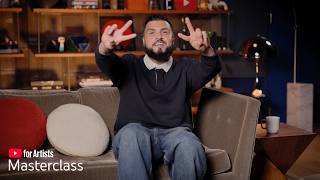
This masterclass, led by AJ Ramos, Head of Artist Partnerships for Latin Music and Culture at Google/YouTube, explains how artists can earn money on YouTube. It covers the YouTube Partner Program, content owners, monetization features like ads, Supers, Merch, Ticketing, and Brand Connect, along with practical steps to get started.
Advertisers pay to reach the engaged audience; ad spend is split between YouTube and the creator when fans watch ads on their content.
Content ID automatically scans every video upload to match intellectual property; when fans use your music, the video is claimed and revenue from views is routed to rights holders.
In the last 4 years, YouTube paid $100 billion to creators, media companies, and artists; in a single year, over $8 billion went to the music industry.
Artists can earn through the YouTube Partner Program (YPP) directly or via a content owner (CO) like a distributor, label, or publisher that collects and distributes revenue.
Requires two-step verification, no active community strikes, compliance with monetization policies, location availability, and an AdSense account. Thresholds: 500 subs/3 uploads/3,000 watch hours or 3M shorts views for fan funding; 1,000 subs/4,000 watch hours or 10M shorts views for ad revenue.
Go to YouTube Studio > Earn tab, check eligibility, click Apply Now, accept terms, connect AdSense, and wait 2-4 weeks for review.
Follow community guidelines, monetization policies, and ad-friendly guidelines. Common violations include violence, drug content, firearms, adult content; a yellow icon appears when earnings are limited.
Ads, YouTube Premium, Super Chat/Stickers/Thanks, Merch, Ticketing, and Brand Connect can be combined; availability varies by market and content owner policies.
Connect your store via Earn > Shopping to tag products across Shorts, long-form, and live streams.
Super Chat (highlighted live chat messages), Super Stickers (animated stickers), and Super Thanks (highlighted comments) let fans support you directly.
YouTube offers multiple money-making streams for artists, from ads and YPP to merch, Supers, and ticketing. The key is to understand your monetization path, comply with policies, and stay consistent to build a strong revenue foundation.
YouTube Studio
tool
AdSense
service
Bandsintown
service
Content ID
service
YouTube Partner Program
service
Shopify
service
Base
service
Fourth Wall
service
Wix
service
AJ Ramos
person
Bad Bunny
person
Karol G
person
Daddy Yankee
person
Maluma
person
Rosalía
person
Rauw Alejandro
person
Sombra
person
Chris Lake
person
Twice
person
Peso Pluma
person
Tito Doble P
person
What More
person
What are the two ways artists can monetize on YouTube?
Through the YouTube Partner Program (YPP) or through a content owner (CO) like a distributor, label, or publisher.
04:34
How much has YouTube paid to creators in the last 4 years?
$100 billion.
04:06
How much did YouTube pay the music industry in a single year?
Over $8 billion.
04:19
What thresholds unlock fan funding features (Supers, merch) in YPP?
500 subscribers, 3 video uploads, and either 3,000 public watch hours in the past 365 days or 3 million shorts views in the past 90 days.
06:16
What thresholds unlock ad revenue sharing in YPP?
1,000 subscribers and either 4,000 public watch hours in the past 365 days or 10 million shorts views in the past 90 days.
06:47
What does Content ID do?
It automatically scans every video uploaded to YouTube to match intellectual property by video, audio, or melody, and claims videos for rights holders.
03:22
What are the three types of Supers?
Super Chat, Super Stickers, and Super Thanks.
13:28
What is needed to enable concert ticketing on YouTube?
An official artist channel, a Bandsintown account, and upcoming concerts in supported territories.
15:43
What are common violations that cause limited or disabled ads?
Violence, drug-related content, firearms, and adult content.
09:10
How long does the YPP application review take?
About 2 to 4 weeks.
07:55
What should you do if your video containing your own music is marked ineligible for monetization?
Click 'see details' to check if the video is being claimed by your label, publisher, or distributor; if not, reach out to them.
19:11
YouTube's massive payouts
Concrete numbers ($100B/$8B) demonstrate the revenue potential on the platform and the scale of opportunity.
04:06Two monetization paths
Clarifies the key distinction between earning directly via YPP versus through a content owner, which affects how revenue flows.
04:34Live streams combine revenue streams
Shows a practical strategy to layer ads, Supers, merch, and ticketing in one activity to maximize earnings.
16:30Consistency builds community
Emphasizes the principle that consistent content creates community and turns followers into fans, driving long-term revenue.
23:31[00:03] day to have a beautiful day. Hello everyone. We're so excited to have you all at yet another YouTube for artists masterclass. It's likely that you joined us today because, like so many other artists and folks across the industry,
[00:18] you're probably wondering, "How do I actually make money on YouTube?" Guess chiropractor and today we'll cover everything you need to know to start earning revenue. But first, allow me to introduce myself. My name is AJ Ramos
[00:35] and I have the honor and privilege to be the head of artist partnerships, Latin music and culture here at Google and YouTube. And what does that mean? What that means is that I have spent the last 6 years championing the artists who
[00:47] define the global soundscape. My work is rooted in being an active partner in an artist's process, but also progress. Having the privilege of managing powerhouse partners like Bad Bunny, Karol G, Daddy Yankee, Maluma, Rosalía,
[01:01] Rauw Alejandro, just to name a few. I bridge the gap between authentic artistry and global strategy, connecting the culture from the streets to the C-suites. Whether it's helping artists maximize their reach through Google and
[01:14] YouTube products or fiercely advocating for Latin representation both inside and outside the company. My goal is to ensure our music and our culture continues to lead the industry. Well, enough about me. Today we'll split our
[01:29] session into a few parts. First, we'll set the scene by explaining how revenue works on YouTube. Next, we'll discuss the different ways artists can monetize on YouTube through content owners or the YouTube Partner Program, along with some
[01:44] of our policies for earning. Then, we'll dive into some of YouTube's monetization features and go over a checklist to help you along the way. Finally, we'll wrap up the class by answering a few of your questions. As we
[01:59] reviewing a few specific actions you can take within YouTube Studio. Say it with me, YouTube Studio. If you want to follow along, you can access YouTube follow along, you can access YouTube Studio on desktop at studio.youtube.com
[02:13] or select your profile picture in the top right corner of youtube.com and choose YouTube Studio from the drop-down menu. Finally, you can also use the YouTube Studio mobile app. So, tell a friend to
[02:27] that app. All right, ladies and gentlemen, once again, I want to thank you for your time. You could have been anywhere in the world, but you are here with us. So, let's jump into it. When ads play on your content before a
[02:40] music video, during a live stream, or between shorts, you earn money. That's right, you. Artists invest a lot of time and resources in the visual storytelling around their music. Not only to help build the world on YouTube, but to also
[02:54] engage with current fans and hopefully connect with new ones. Advertisers pay to reach your engaged audience. When fans watch your videos, the brands ad fans watch your videos, the brands ad spend is split between YouTube and you.
[03:07] Beyond ads on your own channel, you can earn from your music being used in videos created by others, which we call user-generated content or UGC. Think of it like this. A fan uses your music in their video, our Content ID
[03:22] system automatically scans and claims that video for the rights holders. This system scans every single video uploaded to YouTube to match intellectual to YouTube to match intellectual property by video, audio, or melody.
[03:36] Every view on these claimed UGC videos generate revenue, which is then routed back to the music right holders. The rights holders can then choose to rights holders can then choose to monetize, track, or block the video as
[03:49] Artists can have a slice of the revenue generated on YouTube, but just how big is the pie? Well, we think the numbers speak for themselves. In the last 4 years, YouTube paid a total of a hundred billion dollars to creators, media
[04:06] companies, and artists just like you. More recently, YouTube paid over eight billion dollars to the music industry alone, all in a span of a single year.
[04:19] So, ladies and gentlemen, the revenue potential is huge on YouTube. Now, it's important to note that monetization differs for each artist depending on their situation. Revenue is distributed to artists and channel owners through
[04:34] to artists and channel owners through the YouTube Partner Program known as YPP the YouTube Partner Program known as YPP or through content owners known as a CO. A content owner is the entity that manages the rights of your music like a
[04:47] distributor, record label, or music publisher. With a content owner, revenue from your music is collected by the CO who then decides how to distribute earnings. Without a content owner, joining YPP
[05:03] allows you to earn money directly from YouTube's monetization features. No matter how your channel is monetized, Content ID will ensure that any content uploaded containing music is routed back to the music right holders.
[05:19] If your channel is part of a CO, it will show on the dashboard tab of your YouTube Studio in a section titled network relationship. There you can find the CO's name and the dates the network relationship began. If your channel is
[05:33] not a CO, no worries. You can start your monetization journey by applying for the YouTube Partner Program to unlock earning features and earn money directly from YPP. So, what does it take to get into YPP? For starters, you must have a
[05:49] into YPP? For starters, you must have a two-step verification on, no active community guideline strikes, follow our monetization policies, be in a location monetization policies, be in a location where YPP is available, and have one
[06:02] active AdSense for YouTube accounts. You'll also need to hit one of our eligibility thresholds. There's actually different tiers that unlock different features in YPP. In order to set up your YouTube merch shop and fan funding
[06:16] features like supers, a channel needs at least 500 subscribers, three video uploads, and one of the following: either 3,000 public watch hours in the either 3,000 public watch hours in the past 365 days or 3 million shorts views
[06:32] in the past 90 days. Pretty reasonable, right? But, what if you want to take it to the next level? I love the way that you're thinking. That's where ad revenue options kick in. In order to unlock ad rev share, you
[06:47] must have at least 1,000 subscribers and one of the following: either 4,000 one of the following: either 4,000 public watch hours in the past 365 days or 10 million shorts views in the past 90 days. Now, let's take a look at how
[07:02] to view your eligibility for YPP and apply. As a reminder, if your channel is already in a CEO, you will not have to complete this step. All right, let's get into it. Open YouTube Studio and navigate to the Earn tab in the left
[07:18] menu. If you're not yet eligible for YPP, you can track your progress towards eligibility and sign up to get notified with an email when you're able to apply. with an email when you're able to apply. If you are eligible, click Apply Now and
[07:31] then follow the steps on the screen. You'll first need to accept YouTube's space terms. Then, you'll need to connect an AdSense account. If you don't yet have an AdSense account, that is okay. You can create one at
[07:43] adsense.google.com. But, keep in mind an AdSense account can But, keep in mind an AdSense account can only be registered to an email address only be registered to an email address one time. Say it with me, one time. So,
[07:55] yours. Finally, your application will go into review. This can take around 2 to 4 weeks, but typically it's fairly quick. Once approved, turn on features you want by heading back to the earn tab and
[08:11] clicking get started. It's important to remember, ladies and gentlemen, that while YPP unlocks select features for OACs, artists with content owners may have varying access. Do me a favor, reach out to your content owner
[08:26] if you have any questions. No matter how you earn, there's going to be a few guardrails around what type of content can actually earn money. As you start planning for your next video, keep these in mind. First, follow the community
[08:41] guidelines. Get familiar with them. Every user on YouTube is held to these. Be sure to avoid spam, sensitive, and violent content, as well as misinformation. Then, consider our monetization
[08:53] policies. These policies are in place for any monetized channel. Finally, make sure your videos follow ad-friendly guidelines to help ensure your videos are ready to earn from day one. Some common violations include violence,
[09:10] drug-related content, firearms, adult content, and more. A yellow icon, we don't like those. A yellow icon will appear in your YouTube Studio if your videos violate these guidelines, with earnings being limited or disabled. We
[09:26] use a combination of automated and human reviews of each video uploaded to YouTube. If a video is flagged for violating ad-friendly guidelines, ads will stop running. You can always request a human review if you think it's
[09:40] a mistake. You can read more about our guidelines in the resources tab. With that, let's dig into the fun stuff. These are some of the many streams of revenue an artist can access on YouTube. Ads, YouTube
[09:53] Premium, Super Chat, Stickers, and Thanks, Merch, Ticketing, and Brand Connect. While all amazing alone, just imagine, ladies and gentlemen, the potential when you combine them. Keep in mind, feature availability may vary by
[10:09] market and if monetizing with the CEO can depend on your content owner's policies. Now that you've set up monetization on YouTube, the big monetization on YouTube, the big question is, how can you begin earning?
[10:21] Simple. One path is through ads running on your content including long-form videos and shorts. As we mentioned earlier, the money spent on ads from brands is split among YouTube and monetizing artists and creators each
[10:36] time someone watches an ad on their content. Once you're part of YPP, you can make the most of each of your monetizable videos by navigating to the content tab in YouTube Studio. From here, you can toggle monetization on and
[10:51] here, you can toggle monetization on and off under the monetization column. You can also choose individual videos in the content tab by clicking on a video's title, selecting monetization on the left side menu, and then the drop-down
[11:05] menu to turn it on. Make sure that all ad types are on for the most reach. For non-music shoulder content over 8 minutes like behind-the-scene videos, make sure to turn on mid-roll ads by checking the box. Similar to long-form
[11:20] videos, monetizing partners can also earn money from ads that are viewed earn money from ads that are viewed between videos in the Shorts feed. And remember, if you upload content with music in it, no matter how you monetize
[11:32] your channel, the video will be claimed by the rights holder and the revenue will go to the rights holder. Now, it's not just about ads. YouTube offers artists many ways to make money on the platform. One way is YouTube Premium.
[11:47] When a viewer who is subscribed to YouTube Premium watches content, the content's right holder gets part of the feed they pay for YouTube Premium. You can also customize your strategy with alternative monetization features
[12:00] like your channel store, concert ticketing, fan funding like Supers, and Brand Connect. Let's take a closer look at each of them so you can decide how to customize your strategy. Did you know fans can shop for
[12:14] merch while watching your content including your music videos? They get to skip the merch line while keeping their front row seat to you. We encourage you to connect your channel store to tag products in Shorts, long-form videos,
[12:28] and live streams. And make it easier for fans to shop your merch by creating a virtual merch table across your channel. Let's take Sombra for example. He tagged the vinyls for his album I Barely Knew Her and other merch across many of his
[12:43] videos. That way, fans who were excited about the album could seamlessly find their merch of choice. Karol G is a great example of bringing merch to fans on YouTube. She tagged her products from her TROPICOQUETA merch line across many
[12:57] of her videos that related to her 2025 album TROPICOQUETA. So, to enable shopping, go to Earn in YouTube Studio and select the Shopping tab. Here, you can connect your existing online store with one of our supported
[13:12] retailers or platforms to sell your products. Supers allows fans to support you directly by purchasing features that highlight their interaction with you. There are three types of Supers. Super Chat, which are highlighted messages in
[13:28] a live chat. Super Stickers, which are fun animated stickers in a live chat. And lastly, Super Thanks, which are highlighted comments under your videos and shorts. Supers helps you identify top fans,
[13:44] build community, and create an additional revenue stream. Take for example, English dance music producer and DJ Chris Lake often sees his fans engage with him using Supers during his studio sessions live streams. During one
[14:00] stream, Chris live created songs from submitted fan demos. Some fans chose to use Super Chat to highlight their demo submissions. They're smart. And even ask Chris questions. To enable Supers, go to earn in YouTube Studio, select the
[14:15] earn in YouTube Studio, select the Supers tab, and toggle on which Supers you would like enabled. YouTube Brand Connect connects you with brands for paid content campaigns. We provide the resources, but you always retain control
[14:29] and choose the brands you work with. Brand Connect can also create a media kit just for your channel that offers rich audience info and channel metrics to help you position yourself more effectively. You can download and use
[14:43] this kit to your liking, but make sure that you're comfortable with sharing media kit. To enable Brand Connect, you go to earn in YouTube Studio, select the Brand Connect tab, and follow the instructions
[14:58] on the screen. Put your upcoming shows front and center as fans watch your videos with concert ticketing. We partnered with Bandsintown to make sure fans don't miss your upcoming tour date in their city. For instance, check this
[15:13] out. New York native group What More. As soon as What More announced their debut tour, they activated ticketing on YouTube. As fans watch their new videos, they could also find the nearest show to see what more live. As Peso Pluma and
[15:27] Tito Doble P dominated the global charts with their collaborative synergy, they turned YouTube into a high-speed lane for the Dinastia tour. By integrating tickets directly onto Peso's channel, he helped them capture the massive surge of
[15:43] traffic from the album's debut and turn viewers into concert goers. To use the ticketing feature, you will need an official artist channel, a Bandsintown, and have upcoming concerts in any of our supported territories. You can enable
[15:58] concert ticketing in YouTube Studio by clicking concerts in the left side menu. There, toggle on sell tickets on YouTube and then follow the instructions to connect your Bandsintown account. Note that all edits to the show information
[16:14] must be done in Bandsintown. Changes will show up on your channel and content based off Bandsintown. If you don't yet have an official artist channel, check out the resources tab after class for further instructions. I know it's a lot,
[16:30] but you're still with me, right? Perfect. Let's get into it. Live streams are a powerful way to combine multiple revenue streams while engaging with your fan base. Let's take a look at how you can utilize a few monetization features
[16:45] can utilize a few monetization features at once. First, ad revenue. As longer streams offer more opportunities for ad placements. Next, supers, where you can engage directly and prioritize fans who purchase super chats and stickers. With
[17:01] merch, you can pin limited edition items like vinyl in the chats to deepen connections. With ticketing, you can also drive sales for your next show while fans are engaged. Take Twice for example. Twice
[17:16] went live to celebrate their 10th anniversary as a group with fans all over the world by enabling concert tickets. Fans could see Twice's upcoming shows while watching the stream. Ladies and gentlemen, and there you have it.
[17:31] All the different ways you can start earning real money on YouTube. To recap, we want you to walk away knowing clear steps you can take as you sign off this
[17:43] masterclass. So, let's review the most important steps. If your channel is not managed by a CEO, join YPP or set it as a goal, create a Google AdSense account, and then enable the monetization features that make
[17:59] sense for you. And for everyone, be sure you connect your channel store to start selling merch on YouTube, and connect your Bandsintown account to start letting your fans on YouTube know when they can
[18:13] your fans on YouTube know when they can experience your live show. With these steps, you'll be on your way to setting up a strong foundation to earning on YouTube. With some of the time we have left, it would be an honor
[18:26] and privilege to answer some questions that you submitted prior. Once again, thank you for asking the questions. Let's check out what we have. AJ, my videos containing my music are showing up as ineligible for monetization. Am I
[18:42] great question, and I thank you for asking it. We know this can be a bit confusing. But first, let us reassure you that the first, let us reassure you that the video most likely still monetizing. Our
[18:55] Content ID system automatically scans and claims any copyrighted content from the rights holder. If you notice one of your videos containing your music is marked ineligible for monetization due to copyright restrictions, click see
[19:11] details. See details to make sure your video is being claimed by your label, publisher, or distributor. And if it's not, be sure to reach out to them. But listen, ladies and gentlemen, always remember if you upload content with your
[19:26] music in it, no matter how you monetize your channel, the revenue will go to the rights holders. Let's move on to the next. What is the best way to monetize?
[19:38] The YouTube Partner Program or a content owner? Is it tomato or is it tomato? There really is no right or wrong answer. Monetizing via a content owner or via the YouTube Partner Program are both great ways to earn. It's very
[19:54] dependent on your circumstances. Just keep in mind each option has its own eligibility requirements. I don't work with Bandsintown. What do I have to do to get one set up? If you don't have a Bandsintown artist profile,
[20:09] you can claim your profile at artist.bandsintown.com. Then we recommend that you review your Bandsintown artist profile to make sure that your events are listed correctly. Your Bandsintown aggregates events data
[20:22] directly from artist and a number of ticketing services, promoters, so your concert information will likely already be shared with YouTube. Be sure to check the concerts tab in YouTube Studio to make sure your upcoming events are
[20:36] appearing. If your events appear as you'd expect, then no action is needed from you. If your events do not appear, then we recommend you review the information on Bandsintown website, which will walk you through how to add
[20:49] which will walk you through how to add events to appear on YouTube. Does ticketing have any impact on shopping features like the merch shelf or product tag? No, actually. Both concert information and shopping
[21:02] features will appear on eligible services if you have both features enabled. We actually recommend you to have both enabled to easily meet your fans where they are. That's it. AJ, do I have to make a store
[21:17] to sell my merch on YouTube? Check it out. The easiest route to sell merch on YouTube is to connect your existing online store with our supported retailers or platforms to sell your products. Some of those partners include
[21:30] products. Some of those partners include Shopify, Base, Fourth Wall, Wix, and a ton more. You can check out the full list of our supported shopping retailers and platforms on our help center. We'll link this page in our resources tab, so
[21:43] you can check it out further after the class. Great question. Thank you. All right, let's move on to the next one. I recently used YouTube Collabs to do a video with another artist. How does revenue work? First of all, can we just
[21:55] take a second to to highlight and to honor the Collabs? My goodness, it is incredible, and I hope that you're enjoying it. Great question. So, check it out. At this time, revenue earned on a video that uses collaborations will be
[22:08] attributed to the channel that the video is posted on, and will now be split amongst collaborators. But, it's important to remember that if the video contains copyright material, like music, the video will be claimed via Content
[22:22] ID, and revenue will be distributed to the rights holders. But, AJ, how will I know if my video is approved for ads? Is there a way to know before it goes live? That's the million-dollar question. Ladies and
[22:37] gentlemen, yes, there is a way. Where there's a will, there's a way. When you upload a video on desktop, you'll see the checks step in the upload flow before choosing your video's visibility. At this step, once your video is done
[22:52] automatically check your videos for issues related to ad suitability if you're monetizing. The ad suitability will look into your video follows our ad
[23:04] friendly content guidelines. If there are no issues found, you'll see a green check mark. And ladies and gentlemen, let's wrap it up with this final day. Once again, we appreciate your time, your effort for being here, and I
[23:18] hope that you feel educated, empowered, and inspired to continue to lean in and make this money on YouTube. Last question, what can I do to drive more revenue from my channel? My goodness, I love the way you're thinking. Well, to
[23:31] start, utilize the monetization features that work best for you and your fans. that work best for you and your fans. Use what feels authentic to you. Then, aside from all those great tips we covered today, one of the best actions
[23:45] you can take is just to stay consistent. Consistency builds momentum. Consistency creates community. Consistency turns followers into fans. Activate on
[23:57] YouTube. You don't have to do it, you get to do it. Let fans know that YouTube is your one-stop shop to connect with you on all levels. And do it with your Bueno mi gente, todo lo bueno tiene su final. Ladies and gentlemen, all good
[24:12] things must come to an end. My name is AJ Ramos, head of artist partnerships, Latin music and culture here at Google and YouTube, and I really hope that you joining us. We hope that this masterclass was valuable and helped you
[24:25] to find the next steps in earning on YouTube. We appreciate you more than you think. Remember, when we learn, we earn, and remember, consistent content creates community. You don't have to do this, you get to do this. Be great. Have a
[24:38] good day. Happy breathing, live, and laugh.
⚡ Saved you 0h 24m reading this? Transcribe any YouTube video for free — no signup needed.