
TikTok Video Downloader in Seconds
50sShows instant gratification of downloading any TikTok video with a simple paste and click.
▶ Play Clip"The title implies a build tutorial, but the video only shows a finished product and directs viewers to buy the code."
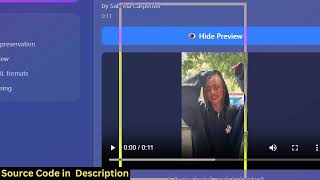
This video demonstrates a TikTok video and reels downloader web application built with Next.js and TikTok's GraphQL API, running entirely in the browser. The creator shows how to paste a TikTok URL, fetch the video, and play or download it, then promotes purchasing the source code for the project.
The creator introduces a TikTok video and reels downloader built with Next.js, running locally in the browser.
Users paste a TikTok or reel URL into the application.
Clicking download makes an API call to the TikTok GraphQL API, fetches the video, and displays it in a player.
The source code is offered for purchase via a link in the description, with full TypeScript components.
The application provides a free, unlimited solution that works entirely in the browser using the TikTok GraphQL API.
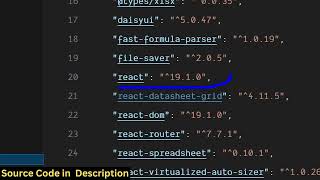
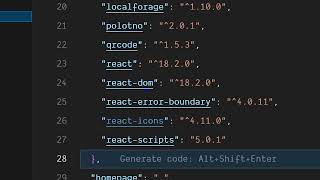
The project uses Cheerio, Axios, Next.js (latest version 16), React, and fluent-ffmpeg.
The application can be deployed to a real domain name, not just run locally.
The process of pasting a URL and downloading can be repeated for any TikTok video or reel.
The video primarily serves as a demo and sales pitch for a pre-built TikTok downloader, rather than a step-by-step tutorial. Viewers interested in obtaining the source code can purchase it via the description link.
Free Unlimited Solution
Claims the application is free and unlimited, which is a key selling point for users.
01:46Tech Stack Revealed
Lists the specific modules and libraries used (Cheerio, Axios, Next.js, fluent-ffmpeg), which is useful for developers.
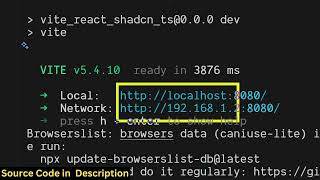
02:01[00:02] So, in this video I'll show you I built out a TikTok video and reels downloader web application directly in the browser using the TikTok GraphQL API. So, we are running this project locally. And the interface is quite simple. Right
[00:18] here you will paste your TikTok video or reel URL. So, let me paste a URL that I pasted. So, I simply copy the link address and simply plug this inside this
[00:33] application. So, as soon as you paste the link, click on this download button, then it will make a API call to the GraphQL TikTok API and then this video can see. Then you can click the download button
[00:54] So, you can play this video. Here you can see the video is playable. well. So, it's a ready-made project that I developed in Next Next JS.
[01:07] Uh, if you need the source code, please go to the description link and directly purchase the full source code. So, after purchasing it you will actually see this directory structure. It's actually coded
[01:19] directly inside TypeScript. Each and every component is divided into its appropriate TypeScript file here. It's a video and reels downloader. So, you plug the URL of whatever video file or
[01:32] reel that you are downloading. So, right here you simply paste. Just you need the video URL. You simply paste it and then it will actually make the API call in the background.
[01:46] So, this is actually a free unlimited solution. So, it's a single-page directly happening in the browser. It's actually communicating with the TikTok GraphQL API inside the Next JS application. So, if I show you the
[02:01] actual modules that we are using, so we are using the cheerio module. We are using the axios module. We are using the Next JS, which is the latest version, 16. React. So, it's a fully fleshed project. We are
[02:16] So, it's a fully fleshed project. We are also using fluent-ffmpeg as well. So, I'm just running this project locally to actually show you the actual demo. It's very simple to run this locally and also you can deploy this to
[02:28] a real domain name as well. So, it's a fully fleshed TikTok downloader for videos and reels. So, all the components are divided into the TypeScript files here. And it's really simple. Once you get the
[02:41] source code, you will be able to see how I coded this application from scratch and you will able to actually add additional features if you want to actually change something, you can even easily do if you have the code.
[02:54] So, I've given the link. You can directly purchase it and you can just see here. It's a single It's a web application which directly runs in as a single-page Next JS
[03:07] application. So, right here you can actually take any video for example and simply repeat this process. You paste the link repeat this process. You paste the link and just click download and the video
[03:20] download process happens directly in the browser. browser. So, it basically fetches the link of the video and displays the video right here in a video player
[03:33] and it supports reels, it supports videos. It's You just need a URL and then you click on that and it will also have the option to extract the
[03:47] playable. So, as you can see that. So, it's very simple. Once you get the source code, you will be able to try see the source code, change anything. So, it's really simple to run
[04:02] run this locally and also deploy this as a domain name to a real domain name as well. So, this is a overall project, the source code files. So, the link is given. I definitely check this out.
⚡ Saved you 0h 04m reading this? Transcribe any YouTube video for free — no signup needed.