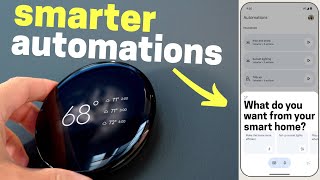

Nest Thermostat's AI Suggestion Feature is Genius
43sThe AI suggestion feature balances automation with user control, sparking curiosity and debate about AI in smart homes.
▶ Play Clip"Delivers on the promise of new Google updates with hands-on impressions, though some features are only announced, not fully tested."
The video covers Google's 2024 smart home updates, focusing on the new Nest Thermostat and the Google TV Streamer. The presenter flew to New York City to test the devices, highlighting features like AI-driven schedule suggestions, multi-sensor temperature averaging, Matter support, and the new design. The video also discusses the Streamer's specs, performance, and its role as a Matter hub and Thread border router.
The new Nest Thermostat can learn your schedule and either take care of everything or provide suggestions for schedule updates. Users can accept or ignore these suggestions, offering a balance between manual control and AI assistance.
Previously, Nest thermostats could only use one temperature sensor at a time. The new model allows averaging temperatures across multiple sensors, eliminating the need to schedule which sensor to use at different times of day.
The new Nest Thermostat works with Matter over Wi-Fi, ensuring compatibility with other smart home systems even if Google stops supporting it. This addresses the removal of the Nest API five years ago, which had upset many users.
The new Nest Thermostat features a design inspired by the Pixel Watch, with a 60% larger screen, minimal bezels, and a spinning ring for control. It comes in three colors and looks sleek on the wall.
The back plate is different from the third-gen model, but like previous versions, most systems do not require a C-wire. The Dynamic Farsight feature uses a motion sensor to show temperature from afar and weather/clocks when closer.
The new thermostat includes natural heating and cooling, adaptive Eco, smart ventilation, health monitor, and humidity helper. Some features like temperature averaging are initially exclusive to the new model.
Google announced Gemini AI features for Nest cameras, allowing users to ask questions like 'show me when the dog was digging' and get relevant clips. Also, Gemini can create automations from natural language voice commands.
The Google TV Streamer replaces Chromecast, featuring a Matter hub and Thread border router. It has a button on the back to find the remote, and the remote has volume buttons on top and a customizable button.
The Streamer has 4GB RAM, 32GB storage, and a processor 22% faster than the previous Chromecast. It felt snappier but still stuttered occasionally, not matching Apple TV or Nvidia Shield performance.
The presenter likes the AI-assisted features and the direction Google is taking, but notes the Streamer might not satisfy those expecting high-end performance. He encourages comments on whether the Streamer should be faster or cheaper.
Google's 2024 smart home updates bring meaningful improvements to the Nest Thermostat with AI assistance and Matter support, and introduce the Google TV Streamer as a hub for smart home devices. While the Streamer's performance may not rival high-end devices, the AI features and ecosystem integration are promising.
What is the new Nest Thermostat's AI schedule suggestion feature?
It learns your schedule and suggests additions, which you can accept or ignore.
00:27
How does the new Nest Thermostat handle multiple temperature sensors?
It averages temperatures across multiple sensors instead of using one at a time.
01:38
What protocol does the new Nest Thermostat use for smart home compatibility?
Matter over Wi-Fi.
02:17
What is the screen size increase on the new Nest Thermostat?
60% larger.
03:28
What is the Dynamic Farsight feature?
It uses a motion sensor to show temperature from afar and weather/clocks when closer.
04:07
How does Gemini AI help with Nest camera clips?
It analyzes clips and writes descriptions, allowing users to ask for specific events.
05:42
What is the Google TV Streamer's processor speed increase over Chromecast?
22% faster.
09:09
What are the RAM and storage specs of the Google TV Streamer?
4GB RAM and 32GB storage.
09:09
AI Suggestions Balance
Demonstrates a user-friendly approach to AI that assists without taking full control.
00:27Multi-Sensor Averaging
Solves a long-standing pain point for Nest users with multiple rooms.
01:38Matter Support
Ensures longevity and interoperability, addressing past API removal issues.
02:17Gemini Automation Creation
Natural language automation creation could significantly lower the barrier for smart home users.
05:28Streamer Performance
Highlights the trade-off between price and performance in streaming devices.
09:09[00:02] the new Nest Thermostat but there are a lot of features that go beyond the shiny new device so I flew out to New York City to get my hands on everything and there are definitely some standout updates that I've never seen before that
[00:15] take away a few smart home pain points and other decisions that might be the new Nest which hasn't been updated in 9 years nine so let's see what's been
[00:27] improved one of the features that's always Nest apart especially their Flagship model is that it can learn your schedule and to be honest I've never wanted to use this feature because I don't really trust AI to just make
[00:42] decisions for me to learn my schedule and just set up my thermostat like happen not really a big fan of that so I've never used it but what they did is way better so now you can still have that feature where it can just take care
[00:57] that feature where it can just take care of everything or it can give you suggestions on ways to update your schedule so say you always turn down the you didn't have that normally in your
[01:10] schedule well a notification can show up to suggest that this be added to your schedule that you can accept or just ignore so to me this is the best of both worlds cuz you can still manually control the thermostat but you get the
[01:22] benefits of AI giving you suggestions so you don't have to fine-tune the schedule that so you're not having to manually control the thermostat all the time Nest thermostats in the past is that even though you could have temperature
[01:38] sensors in different rooms you could only select one at a time to use that temperature to base your thermostat off of so it was super annoying even though you could select different times of day you would have to remember oh that one's
[01:51] in the morning oh the other one's at night and so now you can average the temperature across multiple sensors and the new thermostat so it's way better they did update the temperature sensor it's a little more round but it doesn't
[02:04] have motion still it just only senses temperature so that's a little bit of a bummer but it is going to be way better for nest users since before you'd have to schedule every little sensor on when you wanted to use it now it just
[02:17] to use now some of you might not remember but about 5 years ago there was remember but about 5 years ago there was a nest API where different smart home thermostats and you could control the nest thermostats and that just went away
[02:32] and people were very upset I was very upset that's kind of one of the main reasons I stopped using M thermostats because it stopped working with certain systems and yeah it was pretty much a big huge mess but they finally fixed it
[02:46] so now the new Nest Thermostat works with matter it is just matter over Wi-Fi there's no thread in this thermostat I don't think it's really that big of a deal but the good news is Google cannot kill off this this thermostat because it
[03:01] will always keep working with other systems even if Google stops supporting it you could keep using it with any kind of matter controller that you have like you can keep using with home assistant or apple or whatever you want so sorry
[03:14] going to be seeing the nest thermostat there obviously the biggest update with the new Nest thermostat is the design they changed it quite a bit Google says it's supposed to look like the pixel watch and it does for better or worse
[03:28] on Instagram to see if you like it as well and 85% of you liked it and seeing it in person it looked very premium very shiny was very hard to film a lot of
[03:40] Reflections and everything like that the screen is 60% bigger it almost has no bezels or borders it just kind of Blends in the ring is very small but has a nice click to it it's not touchscreen it's just the same normal Nest design where
[03:55] you spin it on the outside which I don't mind you don't get fingerprints on the screen or anything like that and yeah it looks great it comes in three different colors looks really Sleek on the wall and I just love the minimalist design
[04:07] the back plate on the new Nest is different from the third gen so if you it's not that big of a deal but just like the previous Nest thermostats you do not need a c-wire for most systems they also have this Dynamic far sight it
[04:21] uses the solley sensor which is like a motion sensor and if you're far away it only shows you the temperature but as you walk closer it changes to show you the we weather and the temperature and a few other options like a clock and the
[04:33] little weather Graphics look really nice I'm sure if I use this in Arizona might look a little different showing like the surface of the sun or lava shooting out the weather is nice and cloudy here in New York so that's what showed up on the
[04:46] features that you might find interesting natural Heating and Cooling adaptive Eco Smart ventilation system health monitor and humidity helper probably one of the big questions you have is should you upgrade if you have the previous Nest
[05:01] third gen well a lot of the features like the averaging temperature is initially not coming out to the previous Nest thermostats only the new one so if features and you like the look of the new Nest Thermostat then sure upgrade
[05:15] but if you're happy with your current Nest thir gen and you're willing to wait to see if those features ever roll out to it then yeah wait and I'll definitely with ecobe so hit that subscribe button if you haven't already Google also
[05:28] announced some features that I've never seen before using their Gemini which is Google's Ai and they're actually pretty useful the first one uses the nest cam feed so the way it works is every time there's a clip with the nest cameras
[05:42] Gemini will analyze the clip and write a little description of what happens and here's how you could use it say a dog dug in your garden your front yard you could just ask Gemini hey show me when the dog was digging in my front garden
[05:56] and it will pull up that clip you don't have to scrub through all the events or up right away or you can ask it questions like where bikes left on my driveway or did the FedEx truck drive by you know lots of things that we've
[06:10] scroll through and look for the event and it takes a lot of time so I'm curious to see how well this will work in real life but the new feature that I'm most excited for is being able to use Gemini to create automations just by
[06:24] using your voice so you can use natural language to describe an automation that you want to happen and Gemini will just create the Automation and you can look at it and say yeah that looks great this is awesome because so many people don't
[06:38] want to take the time to learn out how to make each automation what little action does you can just now say exactly what you want to happen and it will make it I'm very excited about this feature they also updated Google Assistant to
[06:52] conversations Pluto is no longer classified as a planet it was reclassified as a dwarf planet in 200 and all these features with AI and all out later this year now to another update that might be a little
[07:07] questionable the Google streamer now the name first off is a little questionable in itself I always thought of streamer like twitch streamer that's what a streamer was so I don't know am I wrong on this so the Google streamer replaces
[07:23] the chomecast which has been around for like 12 years like so long and that's way maybe for you know Smart TVs are really a thing you can't even buy a dumb TV now the need for a chomecast is kind of gone away so they're making a
[07:38] slightly higher end device that is more than just a chomecast so it has a matter Hub built in and thread border router so it's made to go right there on your TV stand not behind your TV like a normal chomecast where it's kind of hidden this
[07:55] center so it can have better signal for your thread devices to connect to it and they have a really cool feature with it there's a little button on the back and there's a little button on the back and if you press it the remote will start
[08:12] remote like I'm sure most families are I feel like every remote should have this government that every remote had this like backup cameras on cars it would they did change it a little bit the volume buttons are no longer on the side
[08:27] kind of hidden they're right there on the top so it's way easier to see and there's a little customizable button you can program to open up certain apps to switch inputs or to open up the Google smart home panel where you can access
[08:40] thermostat and other smartar Home devices in there but when we press the doorbell it didn't automatically show up on the TV screen you would just have to out in the future but the Live doorbell feed showed up fine on the pixel watch
[08:56] and you can control the remote of the streamer on the pixel watch which was pretty sweet so the biggest questionable thing about this streamer is the speed so Google did update the ram it's 4 gigs now and they updated the storage to be
[09:09] now and they updated the storage to be 32 gigs but the processor is only 22% faster than the previous chomecast and if you've used a previous chomecast it can work okay but sometimes it can be a little sluggish it did seem snappier
[09:24] just scrolling through everything it was a little faster but sometimes it still was slightly stuttering and just not working as fast as something like an Apple TV that has a much faster processor in there so I think for people
[09:38] that are expecting this to be like an Apple TV or an Nvidia Shield or something like that it's not going to be that it's really just a little bit better chomecast that also has a matter Hub thread border router built into it
[09:51] an ethernet port so it's a little bit faster with that but I'm curious to hear that they should have made it a little beefier and faster charge more or is that good where it's at where it's $100 like there's a lot of debate going on
[10:04] you think let me know down in the comments but overall I like the updates I love how they're using AI on the nest thermostat to learn your schedule and give you suggestions that way it makes it way easier to use so you don't have
[10:17] to fine-tune it yourself AI is helping you do that but it's not a mystery what the AI is doing so I hope other smart owned companies follow suit using AI where it assists you but it's not just like fully taking over and I can't
[10:30] believe that soon we'll be able to just use our voice and the AI will just create the automation for us it's it's crazy and I'm excited to get my hands on these devices in our house so I can test them out further and give you a deeper
[10:43] following the channel if you're not already thanks for watching Google's new smart home devices look amazing don't you think sure the pixel watch on the wall looks good it's a thermostat if you had Advanced artificial intelligence
[10:58] like me you would know that it literally has a clock on the screen well um I saw a device that wants to be an Apple TV but isn't you mean the streamer oh like on Twitch yeah Dr disrespect no they're already cancelled wait a second you're
[11:13] telling me the Google streamer is cancelled Google graveyard strikes again cancelled Google graveyard strikes again not that streamer the other streamer oh


⚡ Saved you 0h 11m reading this? Transcribe any YouTube video for free — no signup needed.