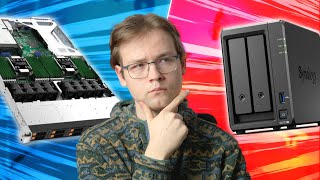

NAS vs Server: The Ultimate Debate
44sOpens with controversial comments that challenge the creator's work, sparking curiosity and debate among tech enthusiasts.
▶ Play Clip"Title accurately reflects the content: a defense of calling modest builds home servers."
The video addresses common YouTube comments that dismiss DIY home server builds as mere NAS devices. The creator argues that modern hardware blurs the line between NAS and server, and that even low-power builds can run diverse services beyond file storage.
Viewers often comment that builds are NAS, not servers, suggesting the creator doesn't understand the difference.
NAS originally meant a simple box with hard drives and an Ethernet port, running low-power ARM chips.
Modern NAS appliances from Synology/QNAP have x86 CPUs, upgradable RAM, PCIe slots, and run Docker/VMs, making them full-fledged servers.
Some use 'NAS' dismissively, implying a real server must run VMs, transcode media, etc.
Modern i3 CPUs outperform dual-socket Xeons from 2013 at a fraction of power and cost.
A Pentium G4600 runs a dozen Docker containers, serves files over 10GbE, and handles invoices, media, scanning, and password management.
A Celeron J4125 runs Proxmox with OpenWRT VM, home automation, and monitoring, with load below 1.
The creator advocates for affordable, quiet, power-efficient home server builds that are sufficient for most users.
The line between NAS and server is blurred by modern hardware; even low-power builds can handle diverse services. The creator will continue calling them home servers as long as they do more than store files.
What does NAS stand for?
Network Attached Storage
01:00
What was the typical hardware of early consumer NAS devices?
Low-cost, low-performance embedded ARM chips
01:14
Name two modern NAS appliance brands mentioned.
Synology and QNAP
02:01
What features do modern NAS appliances have that blur the line with servers?
Powerful x86 CPUs, upgradable RAM, PCIe slots, Docker containers, and virtual machines
02:13
How does a modern i3 compare to a 2013 dual-socket Xeon E5-2650?
The i3 scores almost twice as much in Passmark, at a fraction of cost and around a tenth of power consumption.
03:34
What services does the creator's Pentium G4600 system run?
A dozen Docker containers, file serving over 10GbE, invoice generation, media streaming, document scanning, and password manager hosting.
04:28
What does the Celeron J4125 system run?
Proxmox with an OpenWRT VM and a few CTs, handling internet routing, home automation, and monitoring.
05:08
What is the average load of the Celeron J4125 system?
Consistently below 1.
05:23
Petty motivation
The creator admits to being petty and having free time, setting a humorous tone.
00:43Modern i3 beats old Xeon
Reveals that a cheap modern i3 outperforms a dual-socket enterprise server from 2013.
03:34You go girly
Uses an unexpected, playful phrase to encourage enthusiasts who want beefy hardware.
06:00[00:00] So, here's a kind of comment that I see a lot under my home server builds. I'd consider what you built to be a NAS, not a server. Not to the level of a real server, we can best describe it as a NAS, but okay.
[00:13] It seems like you built a network attached storage, which is not a server and does not render server functionality. This is not a home server, this is a NAS. The video title should be How to Build a NAS, Not a Home Server.
[00:27] But he keeps referring to a NAS, which is not a server build. So I don't even trust this guy if he can't even understand what he is building. Now, most YouTubers would just read those comments, say, okay, and go on about their day.
[00:43] Or maybe not even read them at all. However, I am very petty and happen to have a lot of free time on my hands. So today, we're going to talk about the difference between a home server and a NAS, and maybe have a broader conversation about hardware gatekeeping in the home server community.
[01:00] First, let's talk about a NAS. NAS stands for Network Attached Storage, and if we just go off that definition alone, without any prior knowledge, it sounds like a bunch of hard drives in a box with an Ethernet port attached to them.
[01:14] Which, in the earlier days of consumer NASes, that's kind of what it was. The NAS boxes from companies like Zyxel, D-Link and Linksys ran on very low cost and low performance embedded ARM chips
[01:26] and had just enough juice to serve files from a couple of hard drives over the network. And this is basically what a NAS is, in its purest form. It stores the files, it attaches them to the network, that's it.
[01:39] That's all it does. But obviously, modern NASs are very different from the ARM-based boxes of mid-2000s. As time went on people realized that having raid for redundancy would actually be pretty nice and While we at it it would be nice if my NAS could maybe do something other than just serving files such as maybe serving media synchronizing my local backups with cloud storage
[02:01] collecting footage from surveillance cameras, automatically organizing my vacation photos, and so on. The point I'm trying to get to is, if you look at some modern NAS appliances from Synology or QNAP,
[02:13] they don't strictly qualify as a NAS either. They come with powerful x86 CPUs, upgradable RAM, PCIe slots, and even let you run Docker containers and virtual machines. Basically turning them into full-fledged home servers.
[02:28] And if the commercial NAS appliances are kind of limited in terms of software, there is no doubt that a DIY PC with similar specs will be more than capable of any home server use case you could throw at it. But let's also go back to the YouTube comments that I presented earlier.
[02:42] If you look at some of them, NAS is often used almost as a derogatory term. Like, this is not a real home server, this is a NAS at most. And I think that this still indicates that outdated view of what a NAS is.
[02:54] A dumb hard drive box that has just enough brains to serve the files and maybe play some movies. A real home server should be beefy enough to run multiple virtual machines, do a RAID, transcode media on the fly and do all these other cool things, right?
[03:08] Well, the thing is though, in the past decade, computer hardware has become more powerful, more power efficient and less expensive. All at the same time. Let's look at a real big boy server from 2013.
[03:21] A Dell PowerEdge R720XD. It's a dual socket rack mount server that comes with two Intel Xeon's E5-2650. Using old decommissioned enterprise gear and a home lamp is a big thing, right?
[03:34] And I'm pretty sure that if I showed you guys one of these on my channel, there would be no doubt that that's, now that what you call a real server Here an uncomfortable truth though If you look at the cheapest current i3 processor i3 we see that it runs elapsed around that Xeon
[03:52] scoring almost two times as much in Passmark, which means that you can easily replace one of these dual-socket dinosaurs with just one wimpy i3, at a fraction of a cost and around the tenth of a power consumption.
[04:04] And I know that for some of you guys, this is pretty obvious. Like, yeah, modern CPUs are faster than 10-year-old CPUs. What else is new? But I think that a lot of people underestimate just how much faster computer hardware has become
[04:16] and just how beefy of a machine they really need for their home server needs. Another type of comment that I often get under my home server builds is Pfft, this build has a Pentium CPU? Yeah, pass.
[04:28] I'm currently running a setup that is even less performant than my last home server build, an Intel Pentium G4600. And mind you, that's a 5-year-old dual-core CPU The system is currently running a dozen of Docker containers
[04:41] In addition to serving files over the 10 gig connection And I think it's fair to say that even this low-performance machine still does more than just store files I use it to generate invoices, download and stream media, scan my paper documents
[04:54] And it also hosts my password manager And looking at the load average, at the very least, it could run 12 more services with no issues whatsoever But Wolfgang, it doesn't run any VMs, so it's not a real home server.
[05:08] True, but you know what does run VMs? This little machine based on an even weaker Celeron J4125. It currently runs Proxmox with an OpenWRT VM and a few CTs. It basically handles the internet routing for my entire network,
[05:23] my home automation setup, and all of my monitoring needs. And guess what? The average load of this machine is also consistently below 1. And once again both of these machines run on years old technology An i3 would wipe the floor with both G4600 and J4125 But even these two machines are more than enough for my home server needs
[05:46] And as I just showed you, I don't just use them to store files either. So does that mean that no one should ever have beefy 64 core thread repair machines in their home lab? Of course not. There are definitely people who actually do need all that horsepower.
[06:00] And even if you like having beefy enterprise gear in your rack closed for no reason whatsoever, you go girly. But I think that there should be a place on youtube for home server builds that don't break the bank. Builds that don't utilize outdated power gobbling enterprise hardware, and that might
[06:15] not have 300 PCIe lanes and ECC support, but will still be more than enough for most people, without taking half the room and sounding like a jet engine. And that's what I'm going for with my builds.
[06:27] And for the purpose of clarity, and as long as they do more than just storing files, I will keep calling them home server builds. And if you feel like these machines lack performance or features, well, there are still plenty of channels on YouTube that are dedicated to overkill monster server builds.
[06:42] For me, though, I think I'm gonna keep building modest PowerFish and home servers with bulk storage, which I'm going to use to transcode media, run my virtual machines, and dock containers. And if you'd like to see these kind of builds in the future, smash that subscribe button,
[06:56] I guess. Don't worry, I still do impractical and stupid builds once in a while as well. That's gonna be it for this video, I hope you guys enjoyed it and as usual I'd like to thank my patrons. James Eppington, Kevin Ware, Alessandro Calori, Carlos Bonilla, David Love,
[07:12] Jabastica, MathiK, Robots Dream of Crypto and everyone else supports this channel. Thank you guys for watching and I'll see you in the next one. Goodbye.
[07:27] Thank you.
⚡ Saved you 0h 07m reading this? Transcribe any YouTube video for free — no signup needed.