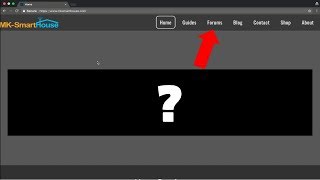

The Secret Feature Is Back on the Website
41sThe promise of a 'secret feature' immediately triggers curiosity and makes viewers want to stick around to discover it.
▶ Play Clip"Title promises a 'secret', but it's just a public forum relaunch — still a clear and useful walkthrough."
In this video, the host announces the return of the forums on the MK Smart House website, a feature previously available on the legacy site. He walks viewers through the new Discourse-based forum, explains its categories and how to create a topic, and shares the story behind the new website logo.
The forums have returned to the website after being on the old legacy site and briefly on the current site. The new implementation is described as the final place for community interaction.
After trying several forum providers and being unhappy with them, the team settled on Discourse. They plan to use it 'probably forever.'
You can access the forum via the 'Forums' tab on the MK Smart House website, or directly at forum.mksmarthouse.com.
The forum shows the logo at the top left, with categories, latest topics, top topics, and a search bar available.
Categories include openHAB, openHAB bindings, control devices (blinds, sprinkler, LED), sensor devices (door/window, Sonoff), home network, and site feedback.
The site feedback category lets users share suggestions about the website or forum. The video requests category lets users propose topics for future videos.
Click 'New Topic', enter a title, select the appropriate category, type the problem, and click 'Create Topic' to publish.
The goal is to build a big community where users create questions, post solutions, help each other, and build a large resource for people now and in the future.
The new MK Smart House logo uses orange to represent openHAB, a cryptic blue hint, a Wi-Fi symbol for Wi-Fi devices, a diode for DIY electronics, and a power cord for hardwired devices.
Viewers are invited to create an account on the forum, start a topic, or reply to the announcement topic to help grow the community.
The video is essentially a community announcement: the MK Smart House forum is back on Discourse, and viewers are encouraged to register, ask questions, and help build a shared knowledge base.
What feature is being re-launched on the MK Smart House website?
The forums.
00:29
Which forum platform did MK Smart House choose?
Discourse.
00:44
What are the two ways to access the MK Smart House forum?
Through the 'Forums' tab on the main website or directly at forum.mksmarthouse.com.
00:59
Which forum category should you use to request a video on a specific topic?
Video requests.
01:57
List the steps to create a new topic on the forum.
Click New Topic, enter a title, select a category, type your problem, then click Create Topic.
02:36
What does the orange element in the new MK Smart House logo represent?
openHAB.
04:00
What does the Wi-Fi symbol in the logo signify?
All their devices use Wi-Fi because it's simple and avoids wiring.
04:26
What is the overall goal for the forum community?
To create a large community where people post questions and solutions, building a resource for current and future users.
03:16
Forum comeback
The forums are returning to the website permanently after previously being on the legacy site.
00:14Discourse chosen
After disliking several providers, the team picked Discourse and plans to use it long-term.
00:44User-driven feedback
The forum includes a site feedback category and a video request section, giving users direct influence.
01:57Searchable knowledge base
The forum is designed to become a resource where common problems are already answered.
03:16Logo symbolism
The new logo encodes openHAB, Wi-Fi, DIY electronics, and hardwired power.
03:45[00:02] comp and in this video I'm gonna be showing you a new secret feature on the website [Music]
[00:14] so this new feature has been around for a while it was on the old legacy website that we had and it was a feature on this website for a brief period of time but it is now back and it's ready to stay and it's gonna be the final place where
[00:29] you guys can ask all of your questions and where the community can interact and and where the community can interact and that I am talking about the forums so if you click on the tab forums and click go to forums it brings you to forum MK
[00:44] now we have been working on this forum for quite a bit of time now because all the previous forum providers we've had we did not like and then we found discourse and decided to stick with it and it's gonna be the forum that we're
[00:59] gonna use probably forever now so there's two ways of accessing this forum you can either go from the MK smartest icon website or you can go to forum not MK sparse comm so some of you may or may not be familiar with this course this is
[01:14] how it looks in the top left we have the logo then here you have categories that you can choose from you have the latest topics the top topics the categories and I'll quickly go through them so you have the open tab category so this is
[01:30] everything that's to do with openhab and then you have open app bindings and you have control devices so all for the control devices that I have the blinds control sprinkler system LED circuit control these are all categories within
[01:43] the control devices category then you have sensor devices category so this has the door and window sensor subcategories you have son off and then you have home you have son off and then you have home network site feedback and so with the
[01:57] site feedback if you have any suggestions opinions on the website or the forum you can leave those there then you have video quests so if you have a you have video quests so if you have a video idea or want a video on a specific
[02:09] video idea or want a video on a specific topic then you can post your topic in this category and then I can see it and possibly do a video on it and now if I go back to the home page you can see and that's operate there's a new topic
[02:22] we'll cover how to do a new topic in a bit and then you have your search bar so you can search through the entire forum you have the menu and then you have your account I'm already logged in normally you would see a sign-up
[02:36] in normally you would see a sign-up button or a login button to log in and button or a login button to log in and then you have the new topic so let's you would create the title of your topic
[02:48] part you select the category of your topic so this is the category of what your topic falls into so say your esp8266 on your blinds control isn't
[03:00] esp8266 on your blinds control isn't flashing then you would go over to and then you type in your problem here and then create click create topic we're not going to do that for this video and that is the interface so my goals for
[03:16] this forum is that we have a big community and everybody can create community and everybody can create questions create post their problems post solutions help other people out and overall make a big resource for people
[03:32] in the future as well as now who are experiencing certain problems for other people that are currently having problems they can quickly come here type in their problem and it might already be solved and if it's not then they can
[03:45] type it in and hopefully get it solved so this is gonna be a little bit of bonus for people still sticking around in the video you may have noticed that there is a new MK smart house logo and I'm very proud and happy with this logo
[04:00] because it's bigger here and there's a couple symbols in this logo so the first part is that it is orange and the orange stands for openhab because that's one of
[04:14] the platforms that we use and then here we have a blue part just a little little we have a blue part just a little little hint right they're not gonna explicitly
[04:26] say what that is meaning and then we have Wi-Fi because all devices we make are Wi-Fi because those are simple and easy to use and you don't have to drive wires anywhere and then here you have a little diode symbol to simplify that we
[04:40] on our own and then we have a power cord because we have everything hardwired in but maybe in the future we'll make some battery-operated devices or convert some
[04:52] to battery but I thought that was a cool little touch and that is it so that concludes this video please go and head over to the forum create an account create a topic even reply to this main topic right here just say whatever you
[05:09] want to reply to it anything I want to get this forum up and running with many users many different people having conversations I'm so excited for this and I can't wait alright thank you guys for watching you get any questions leave
[05:22] them in the comment section below or head over to forum MK smarts that calm head over to forum MK smarts that calm goodbye
⚡ Saved you 0h 05m reading this? Transcribe any YouTube video for free — no signup needed.