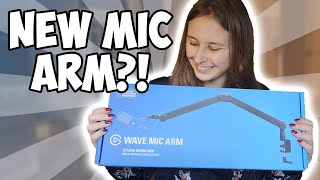

New vs Old Elgato Wave Mic Arm Unboxing!
44sThe immediate visual comparison and unboxing excitement hook viewers interested in tech upgrades.
▶ Play Clip"Delivers on the promise of a detailed comparison with installation guide—no fluff."
In this video, the creator unboxes and compares the new Elgato Wave Mic Arm to its predecessor, highlighting key differences in design, movement, cable management, and build quality. The review also includes a step-by-step installation guide and final recommendations.
The new Wave Mic Arm is an improved version from Elgato, unpacked and compared to the previous model.
Includes manual, clamp, optional riser, arm, screws bag, and cable management clips.
Old and new arms are set up next to each other to visually compare differences.
Roll out the clamp, place over the desk edge, and tighten securely but not overly tight.
The riser can be added for extra clearance; push it firmly into the clamp.
Snap-on clips are attached to the arm to route the microphone cable neatly.
New arm has no prominent Elgato logo, smoother movement, and is slightly less bulky than the old one.
New arm is slightly lower in height and reach (by about 2 cm) when at 90 degrees.
New arm integrates cables inside the frame; old arm uses a rubber holder on top.
New arm can close further and features circular design elements.
Thanks to Elgato for providing the arms; a 5% discount code is available in the description.
The new Elgato Wave Mic Arm offers subtle but meaningful improvements in smoothness, cable management, and design, making it a solid upgrade for streamers and creators.
What is the main improvement in movement between the old and new Wave Mic Arm?
The new arm has smoother movement.
08:22
What two optional accessories come with the new Wave Mic Arm?
A riser and cable management clips.
01:17
How does the new arm's cable management differ from the old?
The new arm routes cables inside the frame; the old arm uses a rubber holder on top.
09:08
What is one design change in the new arm regarding logos?
The new arm has no large Elgato logo, only a small one.
08:10
How does the new arm's height at 90 degrees compare to the old?
The new arm is slightly lower (about 2 cm).
08:52
Smoother Movement and Design Changes
Key improvement that enhances user experience for precise mic positioning.
07:55Improved Cable Management
Integrated cable routing looks cleaner and avoids the old rubber holder's potential wear.
09:08Greater Closing Range
New arm can be folded completely, saving space when not in use.
09:34[00:01] wave mic arm. And this is the new wave mic arm from Elgato because before we have taken a look at the wave mic arm from Elgato, but this is the the new one, the improved one. Thank you so much Elgato for sending me this one and being
[00:16] able to compare it to the previous one that was also a high-waisted one. They also have a low waist ones, but this is one the one that goes up and then over your desk instead of um flat over your desk. if it makes sense. I'm going to
[00:30] show you how it looks like on the desk later on. Uh so you guys gonna have an we're going to unpack it and see what's in the box. All right. So, here there's two seals. We already opened that and we basically cut it. You
[00:45] can do it with some scissors or with a knife. We did it with a knife. knife. We did it with a knife. And then you just pull this, put it down, and review. [snorts]
[00:59] So first of all we have the manual. Then here it says clam here it says clam and riser.
[01:17] desk with. And this is the optional riser which you can make it higher on your desk with. You don't have to use this but I use it myself. Then here it this but I use it myself. Then here it says wave mic arm, which um as you might
[01:31] guess is the wave mic arm. Here we go. This is the arm. little bag with screws. It says get connected on it. I think that's
[01:44] everything, but I'm going to Oh, no. It's not everything. It's not everything. We got Oh, these are the cable um the things where you put the cables in. for cable management.
[01:59] Everything. So, let's go to the desk and let's set holding this above my head, but let's set everything up on the desk and let's see how we we set it up and how it looks like and how it works in comparison to
[02:13] the previous one. This is how the back of the box looks like if anybody's wondering what's on the back of the box. So, here we have the old Wave Mic arm, the one that I was using before. This is the old model. So, we're gonna install
[02:26] the new model right in front of it so you guys can see the difference. To install this model, uh, we have to get this clamp first. To begin, we have get this clamp first. To begin, we have to roll it all out.
[02:42] roll it all the way out. If you don't have a really thick desk, like I don't have a really thick desk, this is probably enough. And we have to clamp it over the desk like that.
[02:54] like that. And then you have to tighten it up. desk now, not here. But this is just for illustration so you know how to do it. Needs to be tight but not too tight. Attached is attached. This is an
[03:09] optional thing you can do. But here's the extender. I like it because then it's a little bit higher like this one. And you have to put that in here. Make sticks out a little bit like this, that's not good. Push it in.
[03:23] [clears throat] If it if it's like as thick as the clam is, that's basically how how thick it needs to be to get in. And then you need to get the arm. And the arm does have like a I don't know, a pole sticking out
[03:37] of it, I guess. And that needs to go in here. If you cannot push this in, don't try to put on force. There is a hole right here uh for a reason. The bag we took out.
[03:53] The bag we took out. Oh, come on. Come on. Last part. There's three things in here. Which one of them three things in here. Which one of them we can actually loosen the screw.
[04:09] bit and it it falls in and we can tighten again. Boom. And now we can put it back in. Or you can just do it when it's in here. Uh, don't tighten the screw too much because then you can't turn it anymore.
[04:25] We have the arm. It's not completely done because we still have these. And these are for cable management which we can put on top of here and we can press in here. Here we go. And then
[04:39] we can basically have the cable go through here uh like with this one. And you don't have the cable just hanging about. Okay. Let's now move this setup to this one. Uh, have the cable go through it and everything like that. Set
[04:54] an empty arm. [laughter] Boom. This goes out. [snorts] First, I'm going to do the same for this other arm. I'm going to detach the cable and then I'm going to have the cable go
[05:07] and then I'm going to have the cable go through here instead.
[05:22] have the camera uh the microphone, not the camera, the microphone attached, so I can still like pull and push this a little bit. If I attach both, it's going to be harder to pull and push. So, I'm going to detach the microphone. Now,
[05:43] a different brand, watch out with detaching microphones. If there are springs in it, this arm might immediately smash you in the face. So, spring-loaded, they might smash you in the face. So, watch out with removing
[05:57] microphones from it that it doesn't do that, that you brace yourself. If you microphone like this, it might already have something in here like like this piece
[06:16] the arm like this microphone has. the case and this thing on your microphone is too wide, it came with two pieces here that can make this hole of your microphone a
[06:32] little bit smaller, meaning that you can actually attach it to the arm. So, these are basically just converters that are in that bag. Now, I'm just going to turn this microphone on the microphone arm. This microphone arm is
[06:48] working with multiple microphones, not just with Okato ones, but basically with all the standard uh screws. So, if you have a microphone that can be used on a have a microphone that can be used on a microphone arm, you're basically good. I
[07:03] can guarantee you like in 99% of the cases, you could as long as you can use a microphone arm microphone on a microphone arm, if it doesn't have anything to attach your microphone to a microphone arm, of course, you cannot
[07:15] attach it to an arm. I'm going to put that cable back in. And as you see, I don't have enough space, but because we didn't lock it in, I can just pull it right now. Let's uh figure out how the hole works
[07:27] underneath here. There we go. And then I can push this back however I want. Let's go sit down. And I know exactly how my microphone needs to be. You can tighten things. [snorts] And I'm
[07:43] because now we kind of know how the microphone is, microphone is, how much cable we need.
[07:55] what is the difference between this arm and the new microphone arm? Um, well, one of the things that I see is new is that the Ogata logo is not on here. Uh, there is a subtail. Oh, no, there is no logos on that, I think. Uh, the only
[08:10] logos on that, I think. Uh, the only Elgato logo on it, I seem to find a Elgato logo on it, I seem to find a really small one on here.
[08:22] this one does have one right here as well. The movement seems to be a little bit smoother. It seems to be a little bit less bulky than the previous one. It just moves a It just moves a little
[08:35] don't have a microphone on this one which makes it uh go a little less smooth anyway. Uh but it does feel like smoother on this one than it does on this one. Um the height
[08:52] if you keep it like 90° the height is a little bit less high for the new one versus the old one. Um, and it reaches a little bit little bit less far, but it's going to be like 2 cm or something like that.
[09:08] Nothing major. The cable management looks a little bit smoother as well because it is more inside the frame where with the old one, it's more on top of the frame. However, with the old one, you had a rubber um cable holder where
[09:22] with this one, it's more plasticky, I think. I don't know what kind of plastic. The other feels more rubber. I'm I'm not an expert in materials.
[09:34] seems like if you want to close them, the new one closes a little bit further than the old one does. So, that might be a pro for people. And this one has circular patterns right here. Uh, this one is circular where this is not
[09:48] circular right here. And this is circular where this is not circular. And we have a circle right here. So, they went for a circle design. So, they improved a little bit of the design phase of it. Thank you again, Ogato, for
[10:00] sending me this arm and this one as well because I got that when that one came out. Um, thank you so much. If you guys want to check out this arm, you can. I description where you can buy it. You can also get 5% discount with my
[10:14] discount code. So, if you want to get 5% discount, you can. If you want to check out more Elgato products, I do have a playlist with more Elgato products, but streaming gear. If you want to see other competitors or something like that,
[10:27] that's also possible. Or if you want to see OBS tutorials, I do have a playlist for that, too. So, I hope to see you in one of my other
⚡ Saved you 0h 10m reading this? Transcribe any YouTube video for free — no signup needed.