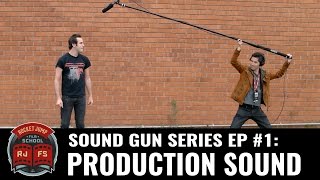

Why Separate Sound Recording is a Must
44sThis segment clearly explains the critical importance of recording sound separately from the camera, a key tip for aspiring filmmakers.
▶ Play Clip"Delivers exactly what the title promises—a solid, practical intro to production sound with no fluff."
This video from Sound Advice introduces the fundamentals of production sound for filmmaking. Kevin explains why recording sound separately from the camera is crucial, covers the pros and cons of boom and lavalier mics, and offers practical tips on levels, room acoustics, and wild lines to ensure clean, authentic audio.
Recording sound separately from the camera gives you a dedicated audio focus and avoids the camera's poor audio quality.
Boom mics allow you to get the mic close to the performance for clean, natural dialogue. Always communicate with camera to avoid being in frame or casting shadows.
Lavalier mics are a great option when booming is difficult. Rode's SmartLav connects directly to a smartphone, making it cost-efficient.
Always tell the actor before adjusting a lavalier mic and respect their personal space.
Keep volume levels low enough to have headroom for unexpected loud sounds. Use a limiter as a backup safety feature, not a fix-all.
Test rooms for reverb by talking or clapping. Turn off noisy appliances and use blankets to reduce reverb, placing them so the boom mic points toward the blanket.
Some shots, like close-up inserts, don't need sound recorded, so don't waste time. For difficult scenes, ask for wild lines—actors repeat performances while cameras are off, matching production sound.
Good production sound starts with recording separately from the camera, using the right mic, managing levels, and controlling your environment. With these basics, you'll capture clean, authentic audio that elevates your film.
Dedicated audio focus
Emphasizes that a separate sound recordist catches issues a camera operator would miss, a core principle of professional sound.
00:44Cameras treat audio as an afterthought
Highlights a common pitfall—even expensive cameras produce hiss or distortion, justifying separate recording.
01:11Leave headroom for loud moments
Practical advice to avoid distortion by keeping levels low enough for unexpected loud sounds like yelling.
03:00Use blankets to reduce reverb
A simple, effective DIY solution for controlling room acoustics, with a tip on placement for maximum effect.
04:12Wild lines for clean audio
A professional trick to capture clean performances on set that match production sound, useful for difficult scenes.
05:11[00:00] Hey guys, I'm Kevin. Welcome to Sound Advice, and this week we're going to talk about production sound. Getting high quality production sound while you're filming is essential to starting your film's sound off on the right foot.
[00:13] Actors' performances will always be the best on set, so you want to capture that authentic, original performance. So what's the best way to record good production sound, you might ask?
[00:27] Well, it's typically having a sound recording setup that's separate from your camera. Why, you may ask? Well, that's what this video is about. There are two major advantages to recording your sound separate from camera. The first big advantage is that you have someone whose attention is solely focused on the quality of the audio.
[00:44] That person is much more likely to notice any problems with your sound, like distracting noises or technical issues. Here we're talking about... Notice, go, baby. Hold the sound.
[00:57] Second, most cameras treat audio recording as a bit of an afterthought, so even expensive
[01:11] cameras will often produce recordings for kiss, noise, or distortion, even if you set your volume levels correctly. Oh, my word. Look at this. Here, look at this. Take it. Oh, my word. Look at this.
[01:23] Here, look at this. Take it. For Soundgun we have sound operate independently from camera using a boom mic Using a boom mic allows you to get the microphone close to the performance the optimal position to record clean and natural sounding dialogue Always communicate with camera before a shot to make sure you not in the frame or that you
[01:46] not casting a shadow that's in the frame.
[01:58] Another option are lavalier mics, like this one here, which are a great option when it's difficult, or impossible to boom the shot. Kevin?
[02:12] Don't need a boom. Great. I'm robbed. While traditional loud mics typically require the actor to carry a transmitter and the sound recordist to have a matching receiver,
[02:24] Rode's SmartLav connects directly to your smartphone and is a great cost-efficient option. Ravalier mics are typically buried beneath the actor's clothing, and they can require a little bit of maintenance now and then, a little bit of adjustment to make sure they're working properly.
[02:37] Always tell the actor that you're going to make a microphone adjustment before you start adjusting the microphone. Be courteous. Respect their personal space. Actors are people, too. Poor quality sound can really hurt the immersion and story comprehensibility of your film.
[03:00] If your sound is too soft, it's difficult to hear, and if your sound is too loud, it may be distorted. These are things that are sometimes difficult or impossible to repair in editing, so it important to try to get it right while you filming You want to keep your volume level low enough where you have a little bit of headroom which is extra space for the sound to get louder than you anticipate it getting For example if an actor is talking and may suddenly decide
[03:21] to yell, you'll still be able to record the yell cleanly without distortion. You can also check to see if your recording device has a limiter, which is a built-in function that acts as a bit of a cushion and takes the edge off of distortion if sounds get louder than
[03:33] you anticipate. But keep in mind, this is more of a backup safety feature than a magical fix all your problems thing. There's no magic in the world. Some rooms, particularly rooms that are really big and really empty,
[03:46] can have very distracting reverberation. You can always check our room sounds by just simply talking in it or, say, clapping your hands. Some locations can be challenging for recording good quality sound, so it's important to know what you can do to improve the quality of your audio.
[04:12] Try turning off things that make noise like this refrigerator. Ten! Perfect! You can use blankets to reduce reverb in a space or to make friends with homeless drug dealers.
[04:26] Try to place the blanket so your boom mic is pointed towards the blanket, and this will maximize its effect. On a bigger film shoot, you can ask the grip department to help you set up sound blankets. This is their favorite thing to do.
[04:38] It's good to keep in mind how the shot's going to be used in the film. Some shots, like close-up inserts, don't need any sound to be recorded, so you don't have to waste your f***ing time. Really Yeah This is typically for shots like inserts like close on certain objects where there nothing in the shot that would make any sound Look at this beautiful puppy cat It not saying or doing anything because it dead
[04:59] You could always record sounds, but of course, it's not necessary. Oh, we got it. That's it. Sometimes when it's difficult to get clean recordings on set,
[05:11] you can always ask for wild lines, which is having the actors repeat the same performance while they're still on set. You may have seen this previously in our behind the scenes for the Tie Fighter short, where we had Jimmy Kimmel and Freddy do a bunch of grunts and yells for their fight scene,
[05:24] on set, but while the cameras weren't rolling. That way we were able to get a bunch of different choices and clean performances without having to worry about getting in the shot. Two, three, three, two, two, two, two.
[05:41] The great thing about wire lines is because they're being recorded on set, the audio quality will match the rest of your production sound. The great thing about wildlife is that it's part of our heritage as human beings and citizens of the planet Earth.
[05:53] Thanks for watching, guys. I hope this video has introduced you to the basics of getting good quality production sound. You can use the tools and you can match... Oh!
[06:05] Thanks for watching, guys. I hope you learned something about production sound. Stay tuned next week for Foley. If you don't know what that means, you'll find out in a week. Or you can use Google. Thank you.

⚡ Saved you 0h 06m reading this? Transcribe any YouTube video for free — no signup needed.