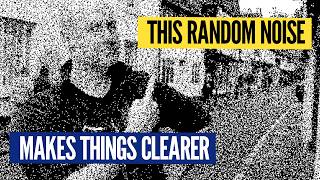

Random Noise Fixes Black & White Images
42sVisually demonstrates that adding random noise preserves more detail than a fixed threshold, creating an immediate 'aha' moment.
▶ Play Clip"The title accurately describes the video's content; it explains how adding random noise to black and white conversion can magically preserve more detail."
This video explores techniques for converting full-color images to pure black and white, moving beyond simple grayscale. It demonstrates the limitations of a single threshold and introduces methods like random noise, ordered Bayer dithering, and blue noise to preserve detail. The video concludes that blue noise offers the best balance of detail and organic appearance for black and white conversion.
Using a single threshold (e.g., 50%) to convert to black and white loses detail. Different thresholds (25%, 35%, 75%) show varying trade-offs between preserving highlights and shadows.
Applying random thresholds to each pixel preserves more detail than a uniform threshold, as it creates shades of gray through pixel density. Comparison shows random noise keeps fine details like the church spire.
Random noise pushes some light pixels dark and dark pixels light proportionally to their brightness, creating grayscale-like effects. This is analogous to a palette of grays made from varying black/white pixel ratios.
Bayer dithering uses a repeating pattern (e.g., 2x2 grid) to systematically turn pixels on/off. The 2x2 grid gives 5 shades of gray, while larger grids (4x4, 8x8) produce more detail but with a newspaper-like texture.
For any 2^n grid, Bayer dithering recursively subdivides and orders pixel flips diagonally to avoid vertical/horizontal lines. The 4x4 grid offers a good balance, revealing brickwork that the 2x2 grid misses.
Blue noise combines randomness with even distribution (no clumping), providing detail comparable to Bayer dithering but without repeating patterns. It looks organic and is analogous to an iPod shuffle avoiding repeats.
Blue noise has evenly spaced variation at small scales (high frequency), unlike true random noise which has hotspots at all scales. When blurred, blue noise goes uniform gray, while true random retains structure.
The creator invented 'Parker dithering' based on a 3x3 grid with unusual thresholds (e.g., 29%, 1%). It introduces a fun texture but is not optimal due to always-on pixels from low thresholds.
While naive thresholding is destructive, techniques like Bayer dithering and especially blue noise can convert images to pure black and white while preserving significant detail, offering a creative alternative for artistic or technical applications.
What is the main downside of using a single global threshold for black and white conversion?
It loses significant detail because a single cutoff cannot preserve both highlights and shadows.
1:41
How does adding random noise to pixel thresholds help preserve detail?
It creates shades of gray by varying the density of black/white pixels, mimicking grayscale through pixel distribution.
5:27
What is the Bayer dithering algorithm's key property?
It uses a recursive 2^n grid where pixels flip in a specific diagonal order to avoid vertical/horizontal lines.
8:04
How many gray shades does a 2x2 Bayer dithering matrix produce?
Five: all white, all black, plus three intermediate shades.
7:18
What does 'blue noise' mean in the context of dithering?
It is a type of noise with evenly spaced variation at high frequencies, avoiding the clumping of true random noise.
12:48
What is the visual difference between blue noise and pure random noise when blurred?
Blue noise becomes uniform gray, while pure random noise retains hot/cold spots.
13:43
What does 'Parker dithering' refer to in this video?
A novelty dithering technique invented by the creator using a 3x3 grid with thresholds like 29%, 1%, etc.
15:22
Random noise preserves more detail
Demonstrates a counterintuitive technique: adding randomness improves detail retention over a deterministic threshold.
4:03Diagonal ordering avoids artifacts
Key insight into why Bayer ordering is diagonal to prevent vertical/horizontal lines in the dithered image.
8:52Blue noise: best of both worlds
Blue noise achieves detail without repeating patterns, combining randomness with even distribution.
11:43Parker dithering as a creative hack
Shows how personal creativity can lead to fun, albeit suboptimal, dithering patterns.
15:22[00:00] Okay, here we go. How about this one? Any good? This one? I like this one. This one's got something to do it. Sorry, I'm dithering.
[00:17] This is a video all about how you take a full-color image like this and turn it into a purely black and white image, none of this gray scale ridiculousness. And a while ago, I did a video which was like self-referential text,
[00:30] where the text would describe how many pixels are in that image of the text and there was a deleted scene about what happens when you go all white or all black using a threshold. So let's go full black and white.
[00:43] What we can do is just pick some threshold and above that level of gray, we go white and below it we go black. And that's what the slider over here is indicating. I mean, that's not part of the frame. I'm putting that on afterwards.
[00:55] In fact, the count up here for the number of black pixels and white pixels, not part of the image of the spoiler, that's where we're going. The idea with the shot was to demonstrate the difference between black and white, like real black and white
[01:08] and what people call black and white. That's actually gray scale. And I had a lot of fun put the code together, we rented that and then we cut it. Because you know, sometimes you put a lot of effort in for the luxury of cutting it out of the edit and it was already a very full video.
[01:20] A video I love, underperformed on YouTube, what are you gonna do? I liked making it. And so we took that scene out, but it always kind of stuck with me. I was like, you know what, there is something in that. How do you take an image and make it pure, black or white
[01:36] and keep as much information as possible? We can try it on this shot as well. So here it is. Okay, if you did naive, 50% threshold, it looks like this, super dark. You can still kind of make me out,
[01:49] but we've lost basically everything from the background and the classic log perception of darkness, I guess, because if we got to 75% it looks like this. It's just, it's just the lamp is the only thing
[02:02] that survives at 75%. And this is 25%. So now the bottom, 25% of brightness from 0 to 255 goes down to black, everything else goes to white. You get some detail on my face.
[02:14] There's a little bit up over there, but we're losing a lot there. My head is just banishing into the wall. I played around for a while, this specific shot, I think 35% is the best threshold.
[02:28] That's keeping a decent amount of detail here. You can still kind of see the football's not bad, but like look how severe the shadow is. And this thing, it looks like there's an object there. That's just the shadow of this.
[02:40] The point is if you're trying to get detail and you've only got black or white and a single threshold where you're rounding one way or the other, very hard to keep like fine detail and darker detail, all that kind of jazz.
[02:52] And it gets even worse where we to go somewhere that's much more visually interesting. Such as this, there's some detail. Now, we think the best threshold for this scene is 28.
[03:05] That's what you're looking at right now. Everything below 28% brightness is going to black. The above is going to white. It's the best we could do to kind of keep the detail in the front of the church over there. And you can still see some detail in my face.
[03:17] But the top of my head is indistinguishable from the sky. The spider has gone on the church to get that back. We tried a threshold of 40 there. That's better, but now we've lost so much other detail.
[03:32] So we think 28 is the best. However, what if we weren't applying the same threshold to every pixel, but we mix it up a little? And the result looks like this.
[03:44] Okay, so there's a lot of static noise going on, but there's definitely more detail. And check it out, you can see me and you can see the spider. And you can see basically everything.
[03:56] So somehow by applying randomness, we've put noise into the shot, we've managed to preserve more detail. So compare this to when we had the 28 threshold, the best from before. So over on this side, let's say random noise,
[04:11] over here, 28 threshold, huh? Look at this, terrible. Different type of terrible. Or they actually remove the camera around. So the spider goes in and out. You can see that we're able to keep that separate
[04:26] from the sky by using randomness. And we can't do that with a threshold, at least without losing everything else. So what's the deal with random noise giving us detail back into a black and white image? Well, first of all, I just want to tell you one thing,
[04:39] you don't actually need to know. If we zoom right in on this image down to the pixel level, these individual pixels are actually little groups of four by four pixels. Because what I did, I scaled everything down to one K,
[04:54] because we film at four K, I go to a quarter of the resolution, then I do all the processing of black and whiteing, and then we pop it back out again to four K. And we do that with a kind of hard edge nearest neighbor. Technique, which means what look like pixels
[05:08] are actually little four by four groups of pixels. But if I did this with true pixels in four K, by the time we're done, if you're watching it on an HD TV, you're watching it on a phone, it would all just blur together.
[05:20] So that's why the true pixels aren't real pixels, but you should better see them. You need to know, but I just thought of you fun to share. Speaking of things you need to know, you need to know this video sponsored by Jane Street, because their Academy of Math and Programming
[05:32] is now accepting applications. More about that at the end of the video in the description below. Let's talk about the noise. What the random thresholds are achieving is taking some of the pixels in light regions
[05:44] and pushing them dark, when they shouldn't be, and taking some pixels in the dark regions and pushing them light. And that's happening random or rather proportional to how far from being light or dark each pixel is.
[05:58] And what that's doing is giving us, well, shades of gray, because if you had to come up with gray scale coloring from scratch using only black and white, you put together like a palette of grays like this,
[06:11] where you've got more or fewer black pixels in each one. So as you kind of lean back and blur your eyes, they become different amounts of gray. And what the random thresholds are doing is basically this, but in an ad hoc fashion,
[06:25] because the brighter or darker a region is, the more or fewer pixels get pushed in the wrong direction. So we're basically hitting all these in between combinations. Any issue with random noise is, of course,
[06:38] doing that randomly. If only there was another way, we could do it systematically. New location, where we're gonna try a new filter, which looks like this, it's not bad.
[06:51] I mean, my head a little bit disappears into that building, but we're keeping, like, look at the detail on the hanging basket. And the background is not bad, but it does have that weird kind of old-school newspaper feel.
[07:04] And that's because it's based on a repeating pattern. Any dithering scheme that uses repeated pattern, like what we just saw, is called ordered dithering. Specifically, I was using a two-by-two Bayer ordered dithering,
[07:19] which gives you five different shades of gray. Well, you get all white and all black, and then you get three in the middle, where you color in one, two, or three black pixels. And that's it, that's your whole spectrum.
[07:32] That kind of works. You just take that, have it as a repeating tile over the entire size of your image, and then use that as your series of filters. And the way you can get it to gradually step up, is you just set them as different thresholds, and it works.
[07:47] But the point is they turn on in that order. But what if we don't want just a two-by-two repeating pattern? Oh, well, you can go so much better. In fact, Bayer dithering works for any two to the end,
[08:02] by two to the end grid. Allow me to demonstrate. The secret as such to Bayer dithering, is the order in which the pixels flip from black to white, or vice versa. And they fire off in a very specific order, as an area gets brighter and brighter.
[08:15] The first one to go is the top left, that one there flips first, that's pixel number one. As we get brighter, then number two fires, then number three, and finally, we fill it in with number four. You might be thinking for a two-by-two grid,
[08:28] there's not a lot of ways to do it differently. But if you ever think about it, you could do it wrong. If you fired one and then two underneath, the moment you go up into a slightly brighter shade of gray, you get weird vertical lines appearing.
[08:41] And you don't want vertical horizontal lines, which is why we go diagonal, and then a corner, and then the other diagonal, by staggering the order in which we go from white to black, or black to white. You are less likely to get weird patterns,
[08:53] and it's better when you look at it with your human eyeballs, and you kind of average it out into a gray. Things get more complicated, though, when we go to a bigger grid size. Bayer dithering works for any two-to-the-end grid,
[09:07] so you can basically double it each time to get the next one up. And what you do is you imagine this as being, like, four lots of the previous ones. There's one there, another one there, another one there. And then you do the same pattern recursively, as you scale it up.
[09:23] So of these sub-grids, you always do them in that order. This one, then that one, then that one, then that one. And then within each one, you do them in this order. So for example, we're gonna do top left for all of them first
[09:35] in this order. So we do top left there, one, top left there, two, and then three, and then four. And now we come down to here, and we do them in this order. So there's five, six, seven, eight.
[09:49] Now we're gonna do that one, and all of them in that order. So that's now nine, ten, eleven, twelve, and finally, 13, 14, 15, 16.
[10:05] And you could repeat this and do an eight by eight, or a 16 by 16, and so on. It's a fantastic little recursive algorithm. And if you turn the pixels on and off in this order, you get a fantastic range of shades of gray.
[10:19] But what would that look like? Back out in the real world. Welcome back to the scene from before. We're still in the two by two Bayer filter, and just take a little note of what you can and can't see.
[10:32] And ready, here's the four by four. Isn't that special? You can see these bricks. Ready? Okay, back to two by two, they gone. Four by four, they're back. You can see all the brickwork over here.
[10:44] Look at the background and my face. In fact, if we do, we'll do a split screen as soon as this car comes through. You ought to do it now. I'm over here, this is the two by two side, where that car is just driven through.
[10:56] Ah, look at the emotion you can see now. And if you're thinking, we'll hang on. If the four by four is this good, imagine the eight by eight. But here's the eight by eight. It's the same.
[11:08] Here's 16. Above a point, it doesn't make a big difference. So for this scene at the resolution, we're using the four by four, what a winner. So there's your two options. Use completely random thresholds and get a nice organic look,
[11:21] but maybe not as many nice separations with grays as we would like. Or you use something ordered like Bayer Dithering. You get loads of nice distinct grays, but you get a weird repeating newspaper-esque locker.
[11:34] You're only two options, I'm afraid. It's not like there's some fantastic third option in the middle with the best of both. Of course there is. It's called blue noise. Instead of using pure random noise,
[11:47] you can use blue noise and you get much better grays. And here's blue noise out in the wild. You didn't even know what this scene looks like. All you can see is this dithered version, but it's not bad. Look at the posts.
[12:00] The posts like you can see they get darker as you go back. You can almost make out there's like brickwork and tiles. Just have a look at what detail you can get. We can also compare this to pure random. Actually we can do our split screen again.
[12:13] So I'm blue, blue noise on this side. Random noise on this side. Or come with me, round over here. Pass producing a call with the bounce because it makes so much difference once we've did that the shot.
[12:26] There's a tree. There you go. Blue noise and random noise. You be the judge. Right, we all love blue noise, but what actually is it? And how does it differ from true random noise? If we were to extract random thresholds
[12:39] for every pixel and just visualize them going from white to black, it would look like this. There you go. It's just standard random noise. Blue noise looks like this subtly different.
[12:51] So in the true random, your brain is doing human brain things. It's looking for patterns. You might be spotting some threads or filaments in there because real random noise clumps.
[13:03] Like you're gonna have hotspots and cold spots at every different scale. Whereas blue random noise. That's a lot more like, it was like remember when, well some of you might remember when the iPod shuffle came out and it was true random and everyone got upset
[13:17] because they're occasionally here the same song twice in a row. Yes, because that's randomness. You get every possible string and arrangement in there somewhere including things repeating, which is why you get like bright spots and dark spots. Or people wanted was a shuffle.
[13:31] And blue noise is much closer to being a shuffle. You don't just put things in randomly, you make sure on average, they're all roughly evenly spaced. It's nicely distributed noise.
[13:44] And you can see that if we blur them both because if we blur blue noise on a small, like let's say five pixel radius, it goes totally gray. Whereas true noise, you can still see hotspots and cold spots.
[13:56] There's still some structure in there because white noise has structure at every frequency. It's why it's called white noise. Whereas blue noise only has variation on very small distances. High frequency, like blue.
[14:08] I, you know, you also get different color, audio noise, not going near that. I'm pretty sure it's the same thing, but the point is this is not pseudo random,
[14:20] but it's not true random, it's blue random. And it looks a lot better. There's some blue noise, amazing. It's just incredible detail that you don't get a repeating pattern. And the reason you get the best of both worlds
[14:33] is it is still pretty random, but also it has that same property of Bayer dithering whereas the pixels turn on, the order in which they turn on is very evenly distributed.
[14:45] So if I take this blue noise and I cycle it all away from completely black to completely white and see when the different parts of the filter turn on and, I guess, turn off, you'll see at the extremes, it's just a bunch of points fairly evenly distributed
[14:59] but yet random-ish. In fact, if we pause it there, if you talk about a bunch of humans, arrange themselves in a room randomly that end up standing a bit like this because humans would think random means evenly distributed
[15:11] but a bit offset, it's not a grid. And that's exactly what we get here. Blue noise is what humans think true noise is, but it's not, it's blue noise.
[15:24] If you're thinking, come on, Matt, what about the dithering system you came up with? Well, who has to think I'm gonna come up with a course I did and we'll talk about that in a moment but first I wanna thank the sponsor of this video,
[15:37] Jane Street because their AMP course is accepting applications now. AMP is Jane Street's Academy of Math and Programming, it's for recent high school graduates who had some kind of barrier to their education
[15:50] but they wanted pursue an education in math or computer science. AMP runs from the very end of June, right through to the very end of July, 2026 and over that month the curriculum will focus on solving problems,
[16:03] involving things like mathematics, computer programming, game theory and much more. Not only will Jane Street cover your travel to New York City, your accommodation, your food and all fees associated with the course, but if you make it onto AMP,
[16:15] they will also give you a $5,000 scholarship to help you further your education. To apply for AMP, you don't need any particular background in finance or coding. You just need to be intellectually curious and have a love of mathematics and computer science.
[16:29] The deadline for applying for AMP, if you are a high school student or you know a high school student and you can pass this on to them, is the 11th of March. So get onto it, it's a huge amount of fun. I go every year, so you get to see me as a perk.
[16:43] I just love solving the sorts of puzzles that they have at AMP. In fact, they gave me one recently that I could ever go at. Imagine you're in a three game tennis competition where to be the champion, you have to win two consecutive games.
[16:56] Your opponents are Jenny, the best tennis player in the club, and Carla, who is less good. You either have to play Jenny, Carla, Jenny or Carla, Jenny, Carla. Your non-tennis challenge is
[17:09] which way around would give you the greatest probability of winning two consecutive games. I like this puzzle because there is kind of an intuitive way to look at it, but also you can just work it out, which I did.
[17:21] Here's all my working, I had a lot of fun doing it. I hope seeing this really clears things up. All the puzzle details will also be in the description if you want to try, as will the details for applying to AMP. Thank you so much.
[17:33] I mean, I know this is not for everyone, but if you are that high school student or you know someone who is, this could be a life-changing opportunity. So please do spread the word. Huge thanks to Jane Street for not only running AMP, but also sponsoring this video.
[17:45] And now, for my dithering technique, because I first came across all of this and got obsessed by it when I watched a bunch of YouTube videos about the mass behind the video game, Return of the Obradin.
[17:58] And in that game, everything is black and white, dithered. Although within each shot, there's different types of dithering. And you move around in 3D, but the dithering works. It's just incredible. I will link to the videos I watched below
[18:11] if you want to check them out, but just got me thinking, oh, you can come up with different types of dithering. In fact, they used new types of dithering for that video game. So I was like, well, I'm going to do my own. But what can I possibly base Parker dithering on?
[18:25] Well, I thought what about the original Parker thing? I used the Parker square. I used a three by three grid where that's 29%, 1%, 47%, et cetera, thresholds.
[18:38] Now, is that a good way to do it? No. In fact, I'm now Parker dithered and you'll see. So the issue is, because we got some 1%ers here, they're like always white,
[18:51] because what's going to get below 1%, so you always get this if you zoom in, these little pair of diagonal pixels are just always on. But I think that adds a certain amount of fun texture to a scene.
[19:04] And it works outside as well. Check it out. There's the tree from before. And that's not a bad amount of detail. If you come over here, I'll start a producer Nicole again. You can feel of this. There's your tiles up there. We've got the posts from before.
[19:16] That guy walking through? It's not bad. Even this shot isn't bad with the Parker filter, huh? We've got the spider. And I think that weird texture, nice moody element on the graveyard.
[19:29] And while we're here, thank you for visiting my Myspace page.


⚡ Saved you 0h 20m reading this? Transcribe any YouTube video for free — no signup needed.