
Kafka: From Logs to Everything
42sQuick origin story and evolution makes for an engaging hook.
▶ Play Clip"Delivers exactly what the title promises — a solid overview of five Kafka use cases, though it's a high-level summary rather than a deep dive."
This video provides an overview of the top five use cases of Apache Kafka, a distributed event streaming platform. It explains how Kafka's immutable append-only logs and configurable retention policies make it versatile for modern software architecture, covering log analysis, machine learning pipelines, real-time monitoring, change data capture, and system migrations.
Kafka started as a tool for processing logs at LinkedIn and has evolved into a versatile distributed event streaming platform, leveraging immutable append-only logs with configurable retention policies.
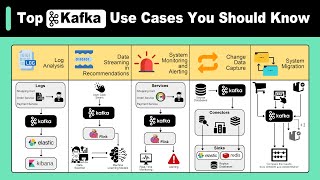
Kafka excels at centralizing and analyzing logs from distributed systems in real time, ingesting logs from multiple sources simultaneously with low latency, and integrates with tools like Elasticsearch, Logstash, and Kibana for visualization.
Kafka acts as a central nervous system for ML pipelines, ingesting data from various sources and streaming it to ML models in real time, with examples like fraud detection and predictive maintenance, using frameworks like Apache Flink or Spark Streaming.
Kafka serves as a central hub for metrics and events, enabling real-time processing for anomaly detection and alerts, with its pub-sub model allowing multiple consumers to process the same stream independently, and persistence enabling 'time travel' debugging.
CDC tracks and captures changes in source databases, feeding transaction logs into Kafka, allowing multiple consumers to read independently, with Kafka Connect used to move data between systems.
Kafka acts as a buffer between old and new systems, enabling gradual, low-risk migrations with patterns like strangler fig and parallel run with comparison, and replaying messages for data reconciliation.
Kafka's versatility makes it a critical component in modern software architecture, addressing challenges in log analysis, ML pipelines, monitoring, CDC, and migrations. Its design principles of immutability, retention, and pub-sub enable scalable, real-time data processing across diverse use cases.
What was Kafka's original purpose?
Processing logs at LinkedIn.
What are the key design features of Kafka?
Immutable append-only logs with configurable retention policies.
00:13
Which tools are used with Kafka for log analysis?
Elasticsearch, Logstash, and Kibana.
00:56
How does Kafka support machine learning pipelines?
It acts as a central nervous system, ingesting data from various sources and streaming it to ML models in real time.
01:24
What is the 'time travel' debugging feature in Kafka?
Replaying the metric stream to understand the system's state leading up to an incident.
03:22
What is Change Data Capture (CDC)?
A method to track and capture changes in source databases and replicate them to other systems in real time.
03:34
What tool is used to move data between Kafka and other systems?
Kafka Connect.
04:17
What migration patterns does Kafka enable?
Strangler fig and parallel run with comparison.
05:03
Kafka's Evolution
Highlights how Kafka grew from a log processor to a versatile event streaming platform, setting the stage for its broad applicability.
00:13Kafka as ML Nervous System
Illustrates Kafka's role in real-time ML pipelines, a key modern use case for fraud detection and predictive maintenance.
01:24Time Travel Debugging
Explains a powerful feature that speeds up root cause analysis by replaying metric streams, a unique advantage of Kafka's persistence.
03:22Kafka as Migration Safety Net
Shows how Kafka enables low-risk, gradual migrations with replay and comparison, a practical pattern for system evolution.
04:49[00:00] In this video, we take a look at the top 5 use cases of Apache Kafka. We’ll explore how Kafka solves critical challenges in modern software architecture. Kafka started as a tool for processing logs at LinkedIn.
[00:13] It has since evolved into a versatile distributed event streaming platform. Its design leverages immutable append-only logs with configurable retention policies. These features make it useful for many applications beyond its original purpose.
[00:28] Let's start with log analysis. This has evolved beyond Kafka's original use at LinkedIn. Today's log analysis isn't just about processing logs. It's about centralizing and analyzing logs from complex, distributed systems in real
[00:42] time. Kafka excels here because it can ingest logs from multiple sources simultaneously. and various applications. It handles this high volume while keeping latency low.
[00:56] What makes modern log analysis powerful is Kafka's integration with tools like Elasticsearch, Logstash, and Kibana. Logstash pulls logs from Kafka.
[01:09] Kibana then lets engineers visualize and analyze these logs in real time. Modern ML systems need to process vast amounts of data quickly and
[01:24] continuously. Kafka's stream processing capabilities make it a perfect fit for this. Kafka acts as a central nervous system for ML pipelines. It ingests data from various sources.
[01:36] or financial transactions. This data flows through Kafka to ML models in real time. For example, in a fraud detection system, Kafka streams transaction data to models.
[01:51] These models flag suspicious activity instantly. In predictive maintenance, it might funnel sensor data from machines to models that forecast failures. frameworks like Apache Flink or Spark Streaming is key here.
[02:07] These tools can read from Kafka, run complex computations or ML inference, and write results back to Kafka - all in real time. It's also worth mentioning Kafka Streams. This is Kafka's native stream processing library. It
[02:21] allows us to build scalable, fault-tolerant stream processing applications directly on top of Kafka. The third use case is real-time system monitoring and alerting. this use case is different. It’s about immediate, proactive system health tracking and alerting.
[02:41] Kafka serves as a central hub for metrics and events from across the infrastructure. It ingests data from various sources - application performance metrics, server health stats, network traffic data, and more.
[02:55] What sets this apart is the real-time processing of these metrics. As data flows through Kafka, stream processing applications continuously analyze it. They can compute aggregates, detect anomalies, or trigger alerts - all in real-time.
[03:10] Kafka's pub-sub model shines here. Multiple specialized consumers can process the same stream of metrics without interfering with each other. One might update dashboards, another could manage alerts,
[03:22] while a third could feed a machine learning model for predictive maintenance. Also, Kafka's persistence model allows for "time travel" debugging. We can replay the metric stream to understand the system's state leading
[03:34] up to an incident. This feature can speed up root cause analysis. CDC is a method used to track and capture changes in source databases. It allows these changes to be replicated to other systems in real-time.
[03:51] changes from source databases to various downstream systems. the primary databases where data changes occur.
[04:05] These databases generate a transaction log that records all data modifications, such as inserts, updates, and deletes, in the order they occur. The transaction log feeds into Kafka.
[04:17] This allows multiple consumers to read from them independently. This is where Kafka's power as a scalable, durable message broker comes into play. To move data between Kafka and other systems, we use Kafka Connect.
[04:33] For instance, we might have an ElasticSearch Connector to stream data to Elasticsearch for powerful search capabilities, and a DB Connector might replicate data to other databases for backup or scaling purposes.
[04:49] Kafka does more than just transfer data in migrations. It acts as a buffer between old and new systems. It can also translate between them. This allows for gradual, low-risk migrations.
[05:03] Kafka lets engineers implement complex migration patterns. These include strangler fig and parallel run with comparison. Kafka can replay messages from any point in its retention period. This
[05:15] is key for data reconciliation. It helps maintain consistency during the migration process. In a large-scale migration, Kafka can act as a safety net. We can run old and new systems in parallel. Both can consume from and produce to Kafka.
[05:30] It also enables detailed comparisons between old and new system outputs. That’s it for a quick overview of 5 popular kafka use cases.
[05:42] If you like our video, you might like our system design newsletter as well. Trusted by 1,000,000 readers. Subscribe at blog.bytebytego.com



⚡ Saved you 0h 05m reading this? Transcribe any YouTube video for free — no signup needed.