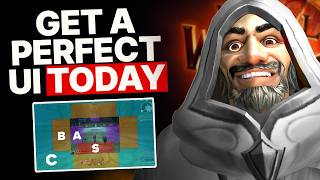

Fix Your WoW UI in 60 Seconds
42sImmediately addresses the overwhelming complexity of WoW and promises a simple fix, which resonates with many players.
▶ Play Clip"The title accurately reflects the video's goal of providing a simple, clean UI setup, and the content delivers on that promise."
This video provides a step-by-step guide to building a clean, effective World of Warcraft UI that prioritizes decision-making speed and reduces visual clutter. It introduces a screen space tier list to help players place the most important information where their eyes naturally focus, and recommends specific add-ons like WeakAuras and Plater for optimal functionality.
The video introduces a tier list for screen space: S-tier (below character's feet), A-tier (sides), B-tier (below S), C-tier (top), F-tier (obscuring character/enemies). The goal is to place critical info in S and A tiers.
The five things you need to see: cooldowns, health/class resources, buffs/debuffs, enemy status, and (for healers) party health bars. WeakAuras can consolidate the first four.
Luxthos class WeakAuras pack is recommended as a starting point. It shows health, resources, cooldowns, buffs, and debuffs in one area. Place it in S-tier space.
For those avoiding WeakAuras, use the personal resource display (S-tier) and action bars. Blizzard's spell alerts can cover 90% of needs.
Plater is recommended for nameplates due to its informational advantages (colored cast bars, health ranges, custom debuff tracking). A default-like profile is available.
Boss mods like DBM or BigWigs handle timers and mechanics. Turn off aggressive defaults (full-screen flashes, audio alerts). A WeakAura timeline is a space-efficient alternative.
Party/raid frames are important even for non-healers. Place them in A-tier space for awareness. Raid-style frames are preferred over party-style.
A DPS meter (Details!) can help with decision-making (e.g., who to PI). A Blizzard-style skin is available to keep the UI clean.
What are the five tiers of screen space priority for a WoW UI?
S-tier (directly below character's feet), A-tier (sides of character), B-tier (below S-tier), C-tier (top of screen), F-tier (obscuring character/enemies).
2:49
What are the two main approaches to tracking abilities, resources, and buffs?
WeakAuras (e.g., Luxthos pack) or the personal resource display with action bars.
4:47
What is the recommended add-on for customizing nameplates?
Plater.
8:00
Name two popular boss mod add-ons.
Deadly Boss Mods (DBM) or BigWigs.
9:11
Why does the creator recommend starting with no WeakAuras and adding them slowly?
To reduce cognitive load and avoid overwhelming the player with too much information at once.
10:31
What is the unironic purpose of a DPS meter mentioned in the video?
To help with decision-making, such as who to PI, focus, or battle rez.
12:38
Which style of party/raid frames does the creator recommend?
Raid style frames.
11:53
Screen Space Tier List
Provides a clear, actionable framework for prioritizing UI element placement based on visual importance.
2:49WeakAuras as a One-Stop Shop
Explains how a single WeakAuras pack can consolidate the four most critical decision-making categories into one area.
4:47Start Minimal, Add Slowly
Warns against the common trap of installing too many add-ons at once, which leads to clutter and cognitive overload.
10:31DPS Meter as a Decision Tool
Reframes the damage meter from a vanity tool to a practical aid for group support decisions.
12:38[00:00] sponsored by Squarespace let's cut to
[00:02] the chase World of Warcraft is a lot I
[00:04] mean in real time it's asking you to
[00:06] track a dozen or so like cooldowns Buffs
[00:08] resources for your own character then
[00:09] you've got to watch your own feet for
[00:11] aoe's and everything that every enemy is
[00:13] doing and then everything those same
[00:15] enemies will be doing soon and if that
[00:17] overwhelms you that's totally okay today
[00:19] we're going to fix that through making a
[00:21] damn good UI by the end of this video
[00:23] you'll be able to walk away with our
[00:25] import strings our settings our
[00:26] recommended add-ons and all those things
[00:29] but don't worry this is not just going
[00:30] to be a complicated series of super
[00:32] Advanced add-ons no this is the fastest
[00:35] way for you to get an easy to ous super
[00:38] effective setup one that actually looks
[00:40] and feels like World of Warcraft so
[00:43] let's make your setup great doubly so
[00:45] with today's sponsor who is Squarespace
[00:47] now they are the online site Builder
[00:49] with killer templates tools and features
[00:51] to get your web presence started right
[00:52] seriously they do so much and if you go
[00:54] to squarespace.com bellulargaming or
[00:57] just click the link down below well you
[00:58] can start your free trial and then you
[01:00] can use the code bellular gaming for 10%
[01:02] off your first purchase of a website or
[01:04] domain now I first used them to make our
[01:06] job sites since then though they've
[01:08] released so many features and my
[01:10] favorite especially for those a bit
[01:11] newer to design is blueprint blueprints
[01:14] awesome because with it you basically
[01:15] choose from professionally curated
[01:17] layouts and styling options and you
[01:19] essentially build your own site template
[01:21] from the ground up it's tailored to you
[01:23] and of course it'll work across every
[01:25] single device and helps you avoid common
[01:27] pitfalls for non-designers as an example
[01:29] blueprint helps you use cohesive fonts
[01:31] and colors and they make tweaking all of
[01:33] that stuff in your site super easy
[01:35] they've got dozens of modern intuitive
[01:37] options of how to display your content
[01:39] and even automatically pull in stuff
[01:41] from your social media accounts and
[01:42] they're always building supporting
[01:44] features as an example if you want to
[01:45] bio site for your social media to
[01:47] complement your full site you can do
[01:49] that and recently they've actually got a
[01:51] whole new template aimed at designers
[01:53] that's complete with a proposal document
[01:55] to help you land gigs which is kind of
[01:57] the point because beyond the website
[01:58] they have other things to help you
[02:00] support your goals online now that's
[02:02] just the taste of what Squarespace do so
[02:03] you can go to squarespace.com bgaming or
[02:06] just click the link down below you can
[02:07] start a free trial you can actually go
[02:10] make your site have a bunch of fun play
[02:11] with their tools and when you're ready
[02:13] to send that live use code bellular
[02:15] gaming for 10% off your first purchase
[02:18] of a site or domain first what is UI the
[02:21] whole point of UI is to show you stuff
[02:23] in a way that helps you make decisions
[02:24] quickly so we'll focus on that as an
[02:26] example the best key bindings are the
[02:28] ones close to West because that's where
[02:30] your fingers naturally are so let's
[02:32] imagine that but our screen your default
[02:34] is going to be looking at your character
[02:36] and that means the further away from
[02:38] your character the further away the
[02:39] information is so if you need something
[02:41] to make a decision put it closer but
[02:43] without covering up too much of the
[02:45] world so let's fix this problem by
[02:47] making a screen space tier list right
[02:49] below your character's feet is close to
[02:51] your eye but it doesn't cover anything
[02:53] up because of the camera angle and that
[02:54] means it is s tier space our most useful
[02:57] a tier space then would be around the
[02:59] side sides of your character now this
[03:01] can end up covering up the game world
[03:03] and making things feel claustrophobic if
[03:05] it's done wrong but it is really close
[03:07] and it can be useful B tier space then
[03:10] is the stuff that's just below the S
[03:12] tier space towards the bottom of the
[03:13] screen it's not going to cover things up
[03:15] and ruin your gameplay but you will have
[03:17] to move your eyes down and away from the
[03:19] action to see what's there and the same
[03:21] goes for near the top of the screen
[03:23] basically C tier space is anything on
[03:25] the outside like say chat and F tier
[03:27] space is anything that obscures your
[03:29] character or where your enemies usually
[03:31] are and rather than obsessed about
[03:33] laying everything out perfectly what you
[03:34] should instead do is avoid laying things
[03:37] out badly because it's the overcrowding
[03:40] that will make it hard for your brain to
[03:42] find what it's looking for imagine the
[03:44] dashboard of a car they look the way
[03:46] they do for a reason right distinct
[03:48] shapes in different locations lights
[03:50] that only come on when they're relevant
[03:51] a focus on dials instead of text and
[03:54] numbers all because every second you're
[03:55] looking away you risk your increase of
[03:58] crashing the Saks aren't that high in
[04:00] World of Warcraft but let's take the
[04:01] same principle the single most important
[04:03] thing while playing for most of us is
[04:05] deciding what we're going to press next
[04:07] so generally you need to know five
[04:08] things the most obvious is your
[04:10] cooldowns being able to see what actual
[04:11] abilities are available is uh sort of
[04:13] important in a game like well the second
[04:15] thing and the most obvious is your
[04:16] health and your class resources there's
[04:18] no point hammering chaos bolt if you've
[04:20] got no soul chards or you die before the
[04:22] damn thing goes off the third and fourth
[04:24] are Buffs and debuffs where of course
[04:25] you'll need to see dots in your enemies
[04:26] and your maintenance Buffs on yourself
[04:28] of course that's defensive as if you're
[04:30] a tank and the fifth and final thing is
[04:32] your enemy status because it would suck
[04:34] to perfectly execute your single Target
[04:36] rotation while you're looking at your UI
[04:38] only to look up and see that you're
[04:40] surrounded by mobs and you're dead and
[04:42] of course then if you're a Healer well
[04:44] you need to look at the health bars so
[04:45] that's the five things we need to see
[04:47] let's talk about how the good news is we
[04:49] can get our first four categories in one
[04:51] shot and unsurprisingly that shot is a
[04:53] good week ores pack they are basically
[04:55] everything you may need to make a
[04:57] decision put into one Area Health
[04:58] Resources cool down Buffs debuffs the
[05:00] whole lot complete with effects like
[05:02] glows and flashes to draw your attention
[05:04] to the important things that are coming
[05:05] up basically no matter what spec you
[05:07] play lux's class week ores are a
[05:10] fantastic set to get now of course you
[05:12] can try others for your spec but his are
[05:13] just a perfect starting place they're
[05:15] link down below basically just install
[05:17] the weak or addon and then you grab the
[05:19] import string from luxthos site so now
[05:21] we know how we're displaying info it's
[05:23] time to talk about where and it's
[05:24] obvious basically if you're using these
[05:26] weak ores put them in the S tier space
[05:28] just remember of course to keep your
[05:30] character's actual feet clear so you
[05:31] know what you're standing in and the
[05:33] good news is that our we or a friend of
[05:34] UI that you can find down below leaves
[05:36] this area open with some bars Below in
[05:38] the B tier space which basically are
[05:40] just there for some quick referencing
[05:41] while you're still learning your spec
[05:43] but of course you may not want to use
[05:44] weak ores so let's talk about that this
[05:46] is certainly a different approach the
[05:48] first thing you'll have to do is to
[05:49] track your abilities with your action
[05:51] bars and then for your resources like
[05:52] energy or holy power you got two
[05:54] different options one you can use the
[05:56] unit frame or you can use the personal
[05:57] resource display now I I think for many
[06:00] people the personal resource display
[06:01] will actually win out for two reasons
[06:03] number one is positioning and that's
[06:05] because it's right below your character
[06:07] so you'll always have an eye on it and
[06:09] reason to is the next item Buffs
[06:10] basically in the game you need to track
[06:12] your Buffs but only some of them and
[06:14] we're usually so swimming and procs and
[06:16] things that if you just look at all of
[06:17] your Buffs it kind of drowns out
[06:18] anything that's useful and the good news
[06:20] is the personal resource display after
[06:21] blizzard of attitude over the years now
[06:23] shows you almost everything you need to
[06:25] make the big decisions but without any
[06:27] of the fluff so between that and the
[06:28] spell alert system you can basically get
[06:31] 90% of the way there that only leaves
[06:33] debuffs but I'll cover them in a little
[06:35] later so that's weor and our weak or's
[06:38] alternative sorted out basically your
[06:40] personal resource display with action
[06:41] bars now your personal resource display
[06:43] is always in that s tier space under
[06:45] your character so next let's move over
[06:47] to our bars now with the default UI edit
[06:50] mode you can basically just move things
[06:52] about freely just make sure that all of
[06:54] your main combat abilities are on one or
[06:56] two bars and that those are as close to
[06:58] S tier space as as possible that way
[07:00] then you've got one place for your cool
[07:02] Downs your Buffs and your resources then
[07:04] you can throw some bars into the B tier
[07:05] or C tier space just for things that you
[07:07] might need to glance at but that aren't
[07:09] really that important it's definitely
[07:11] better to do things that way than just
[07:12] having your whole screen just crowded an
[07:15] icons to the point where you can't
[07:17] really inue it where things are and of
[07:19] course if you want this all done for you
[07:20] just pick up our no weak or is UI as the
[07:22] starting point for this basically I
[07:24] think the default options are fine for
[07:25] these but if you want some more advanced
[07:27] control you can get tons of add-ons like
[07:29] bartender or Domino's and then a quick
[07:31] Pro tip we've also got our key binding
[07:32] guide and seriously if you think UI is
[07:35] impactful man key bindings are almost
[07:36] more impactful and they can make the
[07:38] game feel so much more fun so after
[07:40] you've got your UI good with this video
[07:42] hit up the key binding one and get that
[07:44] right too name plates then so debuffs
[07:47] and enemy status are the thing we got to
[07:48] deal with and name plates will do them
[07:50] now you can't decide where these go so
[07:51] instead just make sure this entire space
[07:53] in your screen is free from anything now
[07:55] as for customization the default name
[07:57] plates are basically fine but I'd highly
[08:00] recommend you use pler instead and
[08:02] that's because the informational
[08:03] Advantage is just far too strong you got
[08:05] things like colored cast bars special
[08:07] marks for health ranges custom debuff
[08:09] tracking and way more things but of
[08:11] course I know so many people hate it
[08:12] when you download add-ons and suddenly
[08:14] wow doesn't look like wow anymore so we
[08:16] have made a profile for pler that looks
[08:18] as close as possible to as default while
[08:20] keeping in those nice extra features
[08:22] that's how to press your button sortage
[08:23] you'll be looking of course at the asure
[08:25] space for your abilities and your Buffs
[08:26] and then at enemy name plates for
[08:28] basically everything else which keeps it
[08:30] nice and simple but of course the game
[08:32] is a little bit more than doing just
[08:34] that often you also want to know what
[08:35] your enemies are doing so that you can
[08:37] handle it now for trash mobs this
[08:38] basically means enemy Health cast bars
[08:40] positioning and Buffs and for bosses it
[08:42] means mostly the same but also the added
[08:44] option of Boss timers and the good news
[08:46] is that almost all of this is already
[08:48] handled by name plates and that means
[08:50] that you can make decisions and
[08:51] interrupting or stunning like which mob
[08:53] to hit basically all of that stuff
[08:55] pretty easily but I did say almost the
[08:57] game has came a long way with like call
[08:59] out some mechanics being visually
[09:00] obvious but the thing is we still have
[09:02] got eight Dungeons and eight raid bosses
[09:04] which is quite a lot of stuff now you
[09:05] can do fine without add-ons but even for
[09:07] Heroic mode people largely do want to
[09:09] take just the advantages where they can
[09:11] find them which means boss mods like DPM
[09:13] and bigwigs these will handle timers for
[09:16] like every relevant mechanic for you
[09:18] they'll allow for the automatic marking
[09:19] of people for tactics and they'll give
[09:21] you instructions either in the form of
[09:23] text or now with a quick voice quip now
[09:25] I often find that their defaults are
[09:27] just way too aggressive and honestly a
[09:29] overloading so I'd recommend you turn
[09:31] off the full screen flashes and the
[09:33] audio alerts unless you need them now
[09:35] the timers usually take the form of bars
[09:37] all across your screen what some people
[09:39] like to do is to move them off into the
[09:40] corner for reference but more recently
[09:42] some people have been using this weak or
[09:44] the turns it into a timeline and this is
[09:47] a super like space efficient way of
[09:49] looking at this information it's really
[09:51] easy to see and understand so basically
[09:53] get that weak AA on top of your boss mod
[09:56] and then just drop it in some of your a
[09:58] tier space and you'll never miss a
[10:00] mechanic call out again then on top of
[10:02] Boss mods every season somebody usually
[10:04] cozies makes a massive weak or pack for
[10:06] Dungeons and rids now what these do is
[10:08] they will show you mechanics that will
[10:09] affect you and they'll just have a
[10:11] one-word summary of what to do and
[10:13] honestly these tend to be huge and
[10:15] they're designed to basically go in the
[10:16] middle or the top of your screen I'd say
[10:18] maybe move them into the B tier space
[10:20] and drop the size a little bit but if
[10:22] you do struggle with just not really
[10:24] knowing what to do these can be a really
[10:25] helpful pointer and of course once again
[10:27] everything's linked down below including
[10:29] DB M profiles now if you want a personal
[10:31] recommendation I would say to avoid
[10:33] using weak cores not because they're bad
[10:35] they're amazing and super powerful but
[10:36] honestly for most people it's better to
[10:38] start off with nothing and then slowly
[10:41] add things on top until you get
[10:43] something that actually fits your needs
[10:44] for a lot of people they basically go
[10:46] they Google top World of Warcraft
[10:48] add-ons they install two dozen things
[10:50] then they feel overwhelmed and they've
[10:51] got a big cluttery messy UI that garbles
[10:54] up their brain it's honestly like one of
[10:56] the number one Noob traps in wow so
[10:58] definitely keep that in mind World of
[10:59] Warcraft is an MMO though not a single
[11:01] player game even if you're not a Healer
[11:03] there is still some amount of helping
[11:04] out other people almost every class in
[11:06] the game can do something to help the
[11:07] group even if that's just a rogue
[11:09] throwing out an emergency blind to give
[11:11] the tank a little bit of breathing room
[11:13] and that's why our party and raid frames
[11:14] are real important now now some selfish
[11:16] DPS will just Yeet these off into C tier
[11:18] space but honestly you shouldn't I think
[11:21] you should maybe even have them in some
[11:22] a tier space as long as they don't get
[11:24] in the way but the point is you get
[11:26] awareness of the rest of your team
[11:28] that'll actually make you understand the
[11:30] Dungeons and the raids and the delves so
[11:32] much more and on top of that if you need
[11:34] to help somebody out your mouse will
[11:36] literally get there faster now some
[11:38] healers even swap things around and they
[11:40] put their bars or their weak ores in C
[11:42] tier space and their frames in s tier
[11:44] space just because as a Healer well
[11:46] those frames are so important now in
[11:48] terms of customization settings here
[11:49] there's not much to do without getting
[11:51] into add-ons but the raid style frames
[11:53] I'd say are way better than the party
[11:55] style ones with that said then let's
[11:57] talk about everything else honestly if
[11:59] you've got those things sorted the rest
[12:00] is a matter of preference some people
[12:02] like their mini map at the bottom others
[12:03] like their action bars or if they don't
[12:05] need them their action bars off to the
[12:06] side rui by Design is the most blizzlike
[12:10] we could make it in its nature so just
[12:12] pop open edit mode and move things
[12:13] around to your own taste but just
[12:15] remember the tier of information should
[12:17] match where you're putting it now there
[12:20] are a bunch of extra add-ons that do
[12:21] fall under UI but I'll dive into some of
[12:24] those in an in-depth add-on guide later
[12:26] for now I'm more focused on you having
[12:28] clear gameplay an easy decision making
[12:30] and we've basically covered everything
[12:32] that's vital to that except for one key
[12:35] ingredient to any good UI the damage
[12:38] meter look unironically a DPS meter can
[12:40] help you make decisions maybe you're
[12:42] wondering who do I pi as a priest who do
[12:44] I focus on as an Oker who do I battle
[12:46] res but we don't want details to show up
[12:49] and ruin our default friendly UI and uh
[12:52] that brings me to this this is a crazy
[12:54] blizzard style detail skin that is made
[12:57] just for this purpose it's amazing big
[12:59] shout outs to Carl and smoko for making
[13:01] this skin and the add-on to install it
[13:03] now if this all looks a bit much to you
[13:05] I've also got a basic details profile
[13:07] that uh does look great with blizzard
[13:09] defaults but seriously I would check out
[13:11] their profile if you want to put in just
[13:12] a little bit more work but certainly get
[13:14] a great visual reward so that's it
[13:17] you're sorted you can hit up the links
[13:18] below check out our guides and of course
[13:20] after this video do go and watch the
[13:23] keybinding one it'll help you out a lot
[13:24] and a big thanks to the hundreds of
[13:26] members who have joined us over the last
[13:27] month it's been absolutely awesome to if
[13:29] you want more of that go to bellular do
[13:31] games okay see you over there
[13:39] [Music]


⚡ Saved you 0h 13m reading this? Transcribe any YouTube video for free — no signup needed.