
Free Canva Alternative in React
55sShows a fully functional free alternative to Canva built in React, appealing to budget-conscious creators.
▶ Play Clip"Title promises a 'full tutorial' but only showcases a demo of a paid product."
This video presents a fully functional Canva clone built with React, offering a free alternative to Canva's paid subscriptions. The editor supports templates, text editing, animations, image/video uploads, and export to image, PDF, or GIF formats, all running locally on a user's machine.
The presenter introduces a Canva clone built in React that runs on localhost, eliminating the need for a Canva subscription.
The editor is completely free to use and supports templates, text editing, and animation, similar to Canva.
Users can export designs to image, PDF, or GIF files by clicking a button.
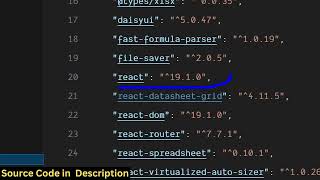
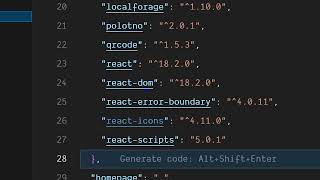
The project is built with React version 18.2.0 and requires NodeJS to run via 'npm run start'.
Users can change background color, edit text (size, alignment, font), and upload custom TTF fonts.
Both images and text can be animated, and videos can be embedded.
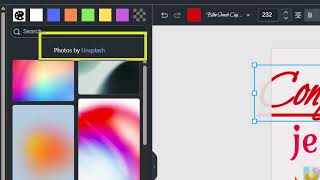
Free stock photos are provided via the Unsplash API.
The editor can automatically resize designs for different social media platforms like Instagram and Facebook.
The project is available for purchase via a link in the video description (though it is also described as free).
The video demonstrates a powerful, free alternative to Canva that runs locally, though the promised full tutorial is not provided; instead, it directs viewers to purchase the project.
What is the main technology used to build the Canva clone?
React version 18.2.0
01:09
What command is used to start the local development server?
npm run start
01:22
Which API is integrated for free stock photos?
Unsplash API
03:06
What file formats can designs be exported to?
Image, PDF, and GIF
00:43
What type of custom font files can be uploaded?
TTF files
02:20
Free Canva Alternative
Offers a fully functional design editor without a subscription, saving users money.
00:02Multiple Export Formats
Supports export to image, PDF, and GIF, covering common use cases.
00:43Unsplash Integration
Provides free stock photos directly within the editor, enhancing usability.
03:06[00:02] you uh the Canva clone that I created inside React. So if you're tired of paying Canva subscriptions, then you can actually use my free editor that I created inside React. It directly runs in inside as you can see I'm running it
[00:17] on local host. It doesn't cost you any subscription. So it's completely free to use and uh it has all the options that Canva supports. So as you can see, we have the template support. You can simply select any of the template, edit
[00:31] the text. All these options are available. You can animate disposition. All these properties are similar to this of Canva. And then we also have support for exporting this to
[00:43] a image file, PDF file or GIF file. So say simply click on that and then it will export this to a PDF file. So uh this is I created this inside react. So
[00:55] this is the overall structure of the project here. Each component is divided into its own JavaScript file here. I've given the link in the description. If you want to purchase it, the link is will be given in the description. So, as
[01:09] you can see, it's coded inside ReactJS latest version 18.2.0 dependencies. It's completely free to use. And once you open the project, you
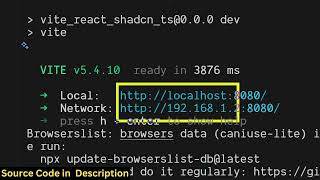
[01:22] simply run the command npm run start. And for this you just need one you should have at least NodeJS installed. So I'm just running the latest version. After that you simply say npm run start. So this will start the local development
[01:38] server at localhost 3000. So once the application start here it will look similar to canva Canva clone. So we have this canvas editor where you can add pages remove pages as well. So everything you can customize it. You can
[01:54] change the background color. You can add your own text as well like this. As you can see that you can change the size, alignment, everything you can customize it. So now if you want to remove this, you
[02:06] So now if you want to remove this, you can simply remove it. custom fonts, you can even upload your own custom font as well by uploading the
[02:20] TTF file here. So you can just see here how easy it is So you can just see here how easy it is to do this. You can just select itallic underline everything you can do. Change the font size, color of the font here,
[02:36] icons, shapes, you can draw, you can also upload your own custom images as well. Simply select it, add this to the canvas. Then you also have the option to animate this image. So animations are also
[02:51] supported. As you can see, you can also animate text as well. So this can be used to create thumbnails, social media post, everything you can create using this editor. You also have support for embedding videos as well. So
[03:06] these photos are coming through unsplash API. So which is a free website for integrating. So if you're interested in purchasing it, the link is given in the description. So you also have options
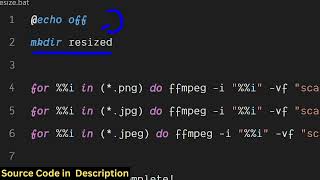
[03:19] for creating different kinds of social media post here. So if you're creating a Instagram post, you click on resize, it will resize it to different kinds of Instagram, Facebook.
[03:33] So instantly you can create for multiple social media networks. Simply select the template and then it will automatically resize it to if you're creating a thumbnail. Here you can just see you can also print it invitation card.
[03:49] So various template sizes are supported. So it will automatically resize it. So all these options. So you don't need to pay for Canva subscriptions. You can pay for Canva subscriptions. You can actually purchase this React project
[04:04] and it's a free React project. There is no need for paying any fees to Canvas. So all these options are supported here. As
[04:16] all these options are supported here. As you can see, You can even draw something here. Adjust the size here
[04:31] and then you can export this. So if you want to export this to a image file simply select and then it will export this to a image file. Here you will see that. So this is a demo of this react
[04:46] application. So the link is given in the description. So you can directly description. So you can directly purchase it.
⚡ Saved you 0h 04m reading this? Transcribe any YouTube video for free — no signup needed.