
Is This the Best Budget 4K Webcam?
45sImmediately addresses a common need for affordable 4K webcams, sparking curiosity and potential debate.
▶ Play Clip"Delivers a thorough review of a budget 4K webcam, matching the title's promise with detailed testing."
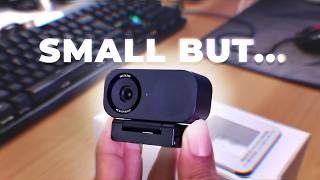
The video is a detailed review of the Insta360 Link 2C, a budget-friendly 4K webcam. It covers the unboxing, hardware features, software capabilities, and practical tests, highlighting how it retains many premium features despite lacking a gimbal.
The Insta360 Link 2C is a budget-friendly 4K webcam that retains many features from the higher-end Link 2 Pro, making it stand out in its price range.
The box includes the webcam and a mount that unfolds to attach to a monitor. The mount is adjustable and fits on universal tripods.
The webcam has a touch-sensitive area, features an f/1.8 aperture, and a 1/2-inch sensor. The back has a magnetic attachment for easy adjustments.
Includes a QR code for the guide and free stickers. The whiteboard feature requires placing markers in corners, and it flattens the image for readability.
Records at 4K 30fps or 1080p 60fps. It has a manual shutter that can be pressed or slid to cover the lens for privacy.
During Amazon Prime Day, it will be available for $99.99 (original $149.99), a 33% discount. A promo code offers a free mini tripod.
The software allows recording, scene presets, zoom, and framing adjustments. Presets save camera settings for quick recall.
Includes blur, bokeh, virtual backgrounds, filters, and makeup effects. Bokeh effect simulates a lens by considering highlights.
Full control over image settings, but the reviewer recommends leaving everything automatic, except white balance if using colored lights.
Auto-framing can be triggered by raising a palm. Another gesture for zooming: place hand in a specific position and move to zoom.
Smart composition frames the head or half body, automatically zooming to keep the subject in frame.
Desk view is less automatic without a gimbal; requires manual tilt and vertical correction to flatten the view.
Includes a teleprompter feature, smart whiteboard detection, and audio transcription. Double-tap resets the view.
The Insta360 Link 2C offers impressive value, packing many premium features into a budget webcam. Its software and gesture controls make it a strong contender for content creators and professionals.
What is the price of the Insta360 Link 2C during Amazon Prime Day?
$99.99, down from $149.99 (33% off).
02:26
What sensor size does the Insta360 Link 2C have?
1/2-inch sensor.
00:44
What is the aperture of the Link 2C?
f/1.8.
00:44
What video resolutions does the Link 2C support?
4K at 30fps and 1080p at 60fps.
01:43
How do you trigger auto-framing on the Link 2C?
Raise your palm up.
05:25
What is the purpose of the bokeh effect?
It simulates a camera lens by blurring the background while considering highlights for a more natural look.
04:06
What is the recommended setting for white balance?
Manual if you have colored lights, otherwise leave automatic.
04:58
Prime Day Deal
Provides a concrete price point and discount, making the product more accessible.
02:26Bokeh Effect
Explains a feature that enhances video quality by simulating a lens, a differentiator for a budget webcam.
04:06Gesture Controls
Demonstrates hands-free operation, a key feature for usability.
05:25Teleprompter Feature
Highlights a unique feature for content creators, adding value beyond typical webcams.
07:31[00:00] This is the link 2C a budget friendly 4K webcam from Insta360. Nevertheless, it manages to retain a lot of the features and options that makes it stand out, we're going to be checking that out today.
[00:14] All right, so here's the box for the link 2C. We'll remove the top And here we can see the mount and the webcam. And they want you to put it in the center of It unfolds like this.
[00:30] So it goes like this on your monitor with the camera facing you. This part is also adjustable if I push. So it fits on any universal tripod.
[00:44] Of the Just like that. in this part is actually touch sensitive. it says Insta360 4K AI And f 1.8.
[01:02] and half inch is the sensor the back we can see Now placing them together is easy because it's magnetic. And you can do little adjustments.
[01:17] AQR code for the guide. You also get some free stickers. not going to be demonstrating the whiteboard features.
[01:29] So you basically place them in the corners. but it will also flatten it so that everything is readable. which is very practical.
[01:43] since they give you an adapter. And there you have it. This is the quality I'm at 4K 30 right now but I can bring it down to ten ADP 60.
[02:00] So if you want to showcase a product or something like that, you can see it focuses on it with no problem whatsoever. And something kind of quirky with this one is that it comes with a manual shutter.
[02:13] like that, or if you're done working with it, you can literally press and slide something on the side. It's so interesting to see.
[02:26] but this is so interesting that I have to tell you right now. During Amazon Prime Day, it will ship for 99.99 with an original price of 149.99. That's the best time to grab it while it's 33% Oh, and I have an extra gift
[02:40] or use my code will receive a free mini tripod. I really like the fact that if you don't need a gimbal, without losing too many features, which we're going to check out right now.
[02:56] So this is Link Controller, the software that will be controlling your webcam. when I say that you don't lose most of the features. you can record, scene presets, you can save scene presets.
[03:12] This will basically take into account everything on this tab You may not have a gimbal, but you can still zoom and frame your camera correctly, and this actually gets saved in your preset.
[03:24] If I click on this, it goes back. So there's the zoom. And go back to your saved preset.
[03:36] So if you plan on using the virtual background, the makeup effects, the smart whiteboard, Virtual Camera in your broadcasting software
[03:48] So for the effects, we have blur that will blur the background You you know, decide usually you don't want to go too much. But if you're using this for content, then you want to keep it kind of low.
[04:06] If you want a more realistic type of blur, what you can do is use the bokeh effect It doesn't just blur everything, it actually takes into account highlights
[04:19] and things like that to give it a as if it was emulating a lens from a camera. So I have it on right now, and you can see that this looks way more natural then we have our virtual backgrounds.
[04:33] There's more gamer like ones, There's neutral ones and animated ones too. We also have filters to kind of play with the colors.
[04:45] We have some makeup effects. Look at that. some beautify filters can make my my skin super smooth just like Now under image panel is where you have full control over your image.
[04:58] But just like I said about the link2 Pro, this is probably the only webcam where I'm like, hey, just leave everything automatic and you'll be fine. I have my white balance to be manual because I have colored lights,
[05:11] My background light basically changes the color, other than that, the Dr. And to save the presets.
[05:25] And there you have it. to still have without a gimbal. So if you want auto framing, all you have to do is put your palm up.
[05:40] First of all, put your palm up and there you have it. So So without a gimbal, this is framing me perfectly. I'll try to set up a more intense test, so I'll zoom in and you can already see
[05:56] just zooming so it may not have a gimbal, but digitally it will keep you in frame. there's another gesture for zooming So I just have to place my hand like this. I'll see the camera blinking, And if I move up, it zooms in.
[06:11] You also get the smart composition feature at the bottom here. frame yourself for the head or half of the body at all
[06:25] It'll do its best to not only frame me, but also zoom in that to make sure that only my head is visible at all times.
[06:38] Which doesn't automatically show your desk because there's no gimbal. and then you have access to the vertical correction.
[06:51] It's just that you need to do it yourself. I'll just tilt the camera mount. Until you can see my desk, and you can see I can play with the vertical correction
[07:04] to try to make it flat, just like that, and maybe zoom out a little bit. So if I wanted to show you anything, show you stuff on my phone, So desk
[07:18] view is a feature that is still available, except it's a little less automatic. Oh, yeah. Pop, pop.
[07:31] And then double tap it again to reset. I try to highlight the most important one for me in my audience,
[07:43] and actually learn even more about this webcam. So if you decide to buy might be making a small commission. can quickly tell you that there's a teleprompter feature right
[07:59] Then click on start Teleprompter. But basically this pops up with your text you can place it So it's like you're almost looking directly into the camera.
[08:15] It'll do a countdown and start your teleprompter. to transcribe what you're saying and also improve the audio. there's also smart whiteboard which will just scan the image and detect
[08:31] any whiteboard and focus on Like I said, it's a lot, especially for a webcam. and I'll see you next time I get to do this. So cool!


⚡ Saved you 0h 08m reading this? Transcribe any YouTube video for free — no signup needed.