
Wall Tablets: Too Expensive & Damaging?
55sIt instantly calls out the biggest buyer objections—cost, wall damage, and electrical work—so viewers immediately want the solution.
▶ Play Clip"Delivers a decent product pitch with useful smart-home ideas, though 'best value' is a stretch for a single product ad."
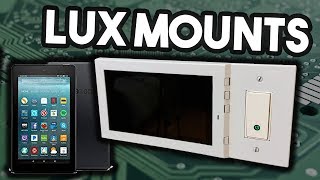
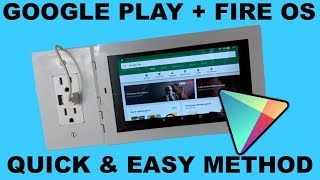
Matt Kaczynski, founder of Lux Mounts, presents an affordable and easy-to-install wall mount kit for the Amazon Fire 7 tablet. The video highlights the product's benefits, a step-by-step installation guide, and practical smart home use cases like Alexa control, security camera monitoring, and smart home device management.
Traditional wall-mounted tablets are expensive, damage walls irreversibly, require electrical work, and take a long time to install.
Lux Mounts creates low-cost, high-quality, easy-to-install tablet mounts. The first product is a wall mount kit for the Amazon Fire 7 tablet.
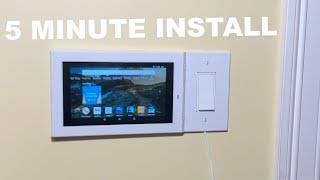
The mount does not damage walls, requires no electrical work, and is reversible, solving the main pain points of wall-mounted tablets.
Fire 7 tablets are inexpensive ($30–$50), making the whole setup affordable. The mount is compatible with both the first-generation and newer Fire 7 models.
The mount attaches to an existing rectangular light switch or outlet. An adapter can be purchased for non-rectangular outlets. The kit includes 2 micro USB cables, 2 screws, and 4 buttons.
Remove the existing wall plate, connect a micro USB cable to the Fire 7, route the cable through the mount's channels, place the mount over the outlet, screw it in, and plug the USB cable into power.
The wall-mounted tablet can control smart home devices including Philips Hue, Samsung SmartThings, Wink, Nest, Ring, and OpenHAB, and can also display security camera feeds.
A lockdown browser turns the tablet into a kiosk for taking orders, surveys, or displaying a website. Other uses include recipes, photo slideshows, and phone casting via AirScreen.
The Lux Mounts kit makes wall-mounted tablets affordable, damage-free, and easy to install, turning a low-cost Fire 7 into a versatile smart home hub.
What are the main problems with traditional wall-mounted tablets?
They are expensive, damage walls irreversibly, require electrical work, and take a long time to install.
00:14
Why did Matt choose the Amazon Fire 7 for the mount?
Because Fire 7 tablets are inexpensive, costing around $30–$50.
00:55
What is included in the Lux Mounts kit?
The kit includes 1 short micro USB cable, 1 long micro USB cable, 2 screws, and 4 buttons.
01:08
How do you install the Lux Mounts mount?
Remove the wall plate, connect the micro USB cable to the Fire 7, route the cable through the mount channels, place the mount over the switch/outlet, screw it in, and plug the USB into power.
01:23
What app is needed to cast your phone to the Amazon Fire 7?
AirScreen app.
03:21
What is a lockdown browser used for on a wall-mounted tablet?
It restricts access to a specific website, letting the tablet function as a kiosk for taking orders, surveys, or displaying a website.
04:14
Where can you buy the Lux Mounts kit at a cheaper price?
Directly from luxmounts.com, which also offers free shipping on all orders.
04:58
Pain points of wall-mounted tablets
Highlights the common barriers that make wall-mounted tablets impractical for most users.
00:14Reversible and damage-free mounting
The core innovation — no wall damage and no electrical work — removes installation anxiety.
00:40Wall tablet as a smart home hub
Shows how a cheap tablet can centralize control of multiple smart home ecosystems.
02:38Casting and app installation
The AirScreen app and Google Play Store installation tips expand the tablet's functionality beyond Alexa.
03:21[00:00] are basically computers on the wall ready to make your life easier. Later on in the video I’ll dive into a couple specific things wall mounted tablets can do. But the biggest problem with wall mounted tablets today is they are expensive, damage
[00:14] walls, irreversible, require electrical work, and overall are a long process to install. Hello everyone my name is Matt Kaczynski and I started Lux Mounts in order to solve these The mission of Lux Mounts is to create low cost, high quality, and easy to install tablet
[00:28] The first product from Lux Mounts is an inexpensive wall mount kit for the amazon fire 7” which This is a great achievement because you can have a fully running wall mounted tablet computer
[00:40] Better yet, this mount does not damage the walls, requires no electrical work, is reversible The reason I chose to create a wall mount for the Amazon fire 7” is because they are You can pick one up from around $30 - $50.
[00:55] This wall mount kit is compatible with both the first generation Amazon Fire 7 as well The way the mount works is it attaches to an existing rectangle light switch or outlet.
[01:08] If the outlet or switch is not a rectangle you can pick up an adapter at your local hardware The kit comes with 1 short micro usb cable, 1 long micro usb cable, 2 screws, 4 buttons To install the mount you simply remove the existing wall plate on your switch or outlet.
[01:23] Then connect one of the included micro usb cables into the fire 7. On the mount there are many channels and holes to route the cable this is due to the fact
[01:35] that you can install the tablet to the left or right of the switch or outlet. Then place the mount with the Amazon fire 7 over the switch or outlet and screw it in Finally plug the usb cable into either a usb outlet or a usb brick then into an outlet.
[01:53] cables from any retailer. Let’s take a look at the mount. You have access to the full amazon fire 7 screen as well as the camera.
[02:07] Then on the side there are 4 buttons. 7 you are using. If you are using the first gen fire 7 then the next two are volume and if you are using
[02:21] Finally we have the two mounting screws and whatever you installed the mount on whether Now that we know more about the device what can you do with it? The most obvious thing you can do with a wall mounted amazon fire 7 is ask alexa to stuff
[02:38] My favorite thing to ask is “Alexa what’s the weather.” The best thing and my favorite thing you can do with a wall mounted tablet is control your If you have smart home enabled devices like me you can access their apps from this tablet
[02:54] and control them like philips hue, samsung smartthings, wink, nest, ring, openhab and Another smart home related thing you can do is access your security cameras. If you have a web accessible security camera system like ring or any ip camera you can
[03:08] view it from the tablet and even have it on all the time to constantly monitor them. your phone? Then you can simple cast it to the amazon fire 7 using either google cast or airplay.
[03:21] In order for this to work you need to install the AirScreen app on the amazon fire 7. This leads me to my next thing I did, I installed the google play store on the amazon fire 7. One of the best places I see to have a wall mounted tablet is in the kitchen.
[03:35] With the fire 7 on the wall you can look up recipes by simply asking alexa and then follow Another place that is an absolute flex if you have one and still useful is the bathroom.
[03:50] bathroom. ready. Pictures are how people bring back fantastic memories in their life as well as great conversation
[04:02] On a wall mounted tablet you can have it cycle through your pictures constantly have a different A lockdown browser is an app or software where you only have access to a specific website.
[04:14] With a wall mounted tablet you could use that software and turn it into a sort of kiosk. Take peoples orders, ask them surveys, or simply just display your website. This is just a small list I had and things I use on a daily basis.
[04:30] Nowadays with the app store getting so big I am sure you can think of someway a wall To add onto that I will be showing you how to do all of the ideas I previously mentioned because every monday I will be releasing a new guide on the MK-SmartHouse youtube channel
[04:43] In these guides every Monday I will show you something new you can do with a wall mounted If you are interested in picking up wall mount kit for the amazon fire 7” from Lux Mounts then head on over to luxmounts.com or you can find it on amazon but it is cheaper if
[04:58] you buy it from luxmounts.com as well as free shipping on all orders. The price will not stay the same, if you are lucky and seeing this video the first day it came out then for 48 hours luxmounts.com will be offering founding customer prices
[05:11] To add on to that there is not to much stock available, 4 have already been sold before 2 of the those people have already left reviews. Currently at the time of recording, you can only purchase the kit in the U.S.A.
[05:26] This is because the mount is designed for U.S.A receptacles. If you are in a different country with a different receptacle or would like to see this mount in a different configuration such as 2 or 3 gang box compatible then leave a comment
[05:39] below or send an email to [email protected] letting me know exactly what you would want If you have gotten this far into the video thank you! Every month LuxMounts will giveaway a LuxMounts kit and the device.
[05:55] So this month and into January we will be giving away and Amazon Fire 7” and a wall The link to the giveaway is in the description or on luxmounts.com. Alright, thank you for your time if you have any questions leave them in the comments below
[06:07] Goodbye
⚡ Saved you 0h 06m reading this? Transcribe any YouTube video for free — no signup needed.