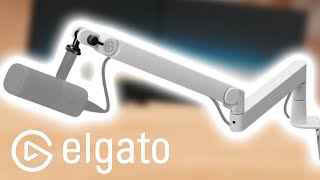

First Look at Elgato's New Mic Arm
45sUnboxing videos are highly engaging, especially for new gear, and this shows the product's packaging and initial impressions.
▶ Play Clip"Delivers what it promises: a straightforward review and setup guide, though with some filler content."
This video provides an unboxing, assembly guide, and initial impressions of the Elgato Wave Mic Arm Pro in white. The host demonstrates how to set up the arm using the desk clamp and attach a microphone, highlighting cable management features.
The package includes a manual, desk clamp, bottom arm section, top arm section with microphone attachment, and a small accessories bag.
The clamp is attached to the desk using a tightening knob. Note: the knob turns 'righty-loosey, lefty-tighty' contrary to typical screws.
The bottom and top arm pieces are connected. If fitting is difficult, loosening a screw on the joint helps. The joint should not be overtightened to allow movement.
Two adapter pieces are provided for different thread sizes. The host uses the appropriate one for their Elgato Wave DX microphone.
The Pro model allows the XLR cable to be routed underneath the arm, hidden inside the arm's channels, improving cable management over the standard version.
The arm can be positioned freely and tucked away when not in use. The host expresses satisfaction with the build quality and design.
The Elgato Wave Mic Arm Pro is a well-built, easy-to-assemble microphone arm with improved cable management for XLR microphones, suitable for streamers and content creators.
What is the correct tightening direction for the desk clamp knob on the Elgato Wave Mic Arm Pro?
Righty-loosey, lefty-tighty (opposite of standard).
00:59
What improvement does the Pro version offer over the standard Wave Mic Arm?
The Pro version allows the XLR cable to be routed underneath the arm for better cable management.
03:43
What is included in the accessories bag of the Wave Mic Arm Pro?
Two adapter pieces for different microphone thread sizes.
02:17
Built-in Cable Management for XLR
This feature addresses a common pain point for XLR microphone users, reducing cable clutter.
03:43Unconventional Clamp Tightening Direction
The reversed tightening direction may confuse first-time users, so it's a practical tip.
00:59[00:01] today we're going to take a look at the wave mic arm Pro the new microphone arm from Elgato thank you so much Elgato for sending me this one to test out see sending me this one to test out see where it
[00:18] opens so we put a lot of tape around this let's open it up what we have is a little manual we have the desk clam we have
[00:30] this little connection bit the bottom part of the arm the top part of the arm where you attach the microphone too and a little bag for accessories let's set it up I don't think I'm going to need the manual but you
[00:45] know before I do something wrong I kind of want to look through it anyway so of want to look through it anyway so first we grab the clam and we open it
[00:59] up ready tidy Lefty Loosey but then the opposite because I don't know why but it opposite because I don't know why but it is righty Loosey Lefty tidy and then we attach it to the side of our desk okay
[01:18] go and then we're tighten it don't do put it too tight just tight enough okay this little piece can go in then the next piece we need to put in is the next piece we need to put in is the bottom
[01:36] need to do is put this last piece in here it could be that you need to turn it a little bit it could also be that it's easier if you de attach this part if you can't get it in what you can do is loosen this screw a little
[01:56] bit and then it's easier to get it in boom in boom and then don't forget to tighten it back up and then not too tight because then it doesn't really want to turn
[02:17] perfectly we got this out of the little back if you wonder where I got this from in the little back we also have this piece and this piece we can put over piece and this piece we can put over here to attach your microphone
[02:31] and this piece for a different microphone so depends on what threat your microphone needs I'm going to put my microphone on here now to show you how it looks like my microphone is on the other elato microphone this is the
[02:44] microphone so if you like the high-profile ones better this is the one high-profile ones better this is the one that they sell at
[02:57] inside so that is an option as well just keep them inside then and screw them
[03:17] microphone that I have the wave DX talking this side of the microphone so talking this side of the microphone so like this and not the sides
[03:43] and with the new one with the pro the XLR cable can go underneath
[04:10] tucked in to the microphone arm I mean you can do it a little bit more nicely I think than I did but I'm bad at Cable Management so you know and we cut the arm and you can set this however you want of course we will
[04:26] be sitting the other way around to watch the PC Talk inside the top we can push the PC Talk inside the top we can push it away if we want to we can turn it off it away if we want to we can turn it off turn it away like this whatever we want
[04:39] great arm I like it like I said they also have this arm so if you would like it not to go over your desk they do have this option as well if you prefer that this arm they didn't not sponsor this video but they did send me this arm so I
[04:54] see some more elato equipment make sure to watch any of these videos and make sure to subscribe do not miss anything
⚡ Saved you 0h 05m reading this? Transcribe any YouTube video for free — no signup needed.