
Rename all files with one script!
45sShows a quick solution to a common tedious task, grabbing attention of anyone who has struggled with batch renaming.
▶ Play Clip"The title accurately describes the script's functionality; the video delivers exactly what it promises."
This video demonstrates a batch processing script that renames all files in a directory to a sequential pattern (e.g., image01, image02) for use with FFmpeg. The script is provided in the video description and can be modified to suit different naming patterns.
The video presents a batch processing script (rename.bat) that renames all files in a directory using a glob or pattern.
The script renames image files to a sequential pattern like image01, image02, etc., which is useful for FFmpeg processing.
Running the script automatically renames every file in the directory to the specified pattern.
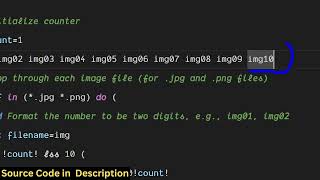
The script sets a counter, loops through files with extensions like JPG or PNG, and renames them to the pattern. Users can modify the pattern as needed.
After renaming, the script displays 'rename complete' and pauses.
The script provides a simple way to bulk rename files to a sequential pattern, which is particularly useful for FFmpeg workflows. The script is available in the video description.
What is the purpose of the batch script shown in the video?
To rename all files in a directory to a sequential pattern (e.g., image01, image02) for use with FFmpeg.
0:05
What file extensions does the script support?
JPG and PNG.
1:54
What is the initial value of the count variable in the script?
1.
1:50
What message does the script display after renaming?
'rename complete'.
2:13
Sequential renaming pattern
Demonstrates the exact output pattern (image01, image02) that is useful for FFmpeg.
0:28Script structure explanation
Provides insight into how the script works, allowing users to modify it.
1:40[00:00] Uh hello guys uh welcome to this video.
[00:02] So in this video I will show you uh a
[00:05] ffmpg batch processing script which will
[00:08] actually rename all
[00:11] your files with a glob or a pattern. So
[00:15] let's suppose I have this uh rename.bat
[00:18] file right here. So it's a batch
[00:20] processing script. It will basically
[00:22] rename all the files which are present
[00:24] in this directory right here. You will
[00:26] see with a pattern. So you will see we
[00:28] have all these image files which are
[00:30] present. So I just want to rename this
[00:32] to a simple glob or a pattern like this
[00:35] which is image 01 image
[00:40] 02. This pattern if you see this pattern
[00:44] image 01 02 03 04 so in many situations
[00:48] in FMPG you need these images in rename
[00:52] in this pattern. So I've given this
[00:55] script here in the description of this
[00:56] video. So once you execute the script uh
[01:00] let me just show you. So just need to
[01:04] open this file. So it will automatically
[01:07] rename every file in this directory. So
[01:10] as soon as you do this you will
[01:13] see the rename will complete here. You
[01:16] will
[01:18] see. So it has actually renamed every
[01:21] file with a glob or pattern. It's a very
[01:24] useful FMPPG batch processing script
[01:28] guys. I've given the script in the
[01:30] description of the video. So it will
[01:31] actually rename every file with this
[01:34] pattern. You will see
[01:40] that. So let me guide through the script
[01:44] here. It's a bat processing script. So
[01:46] first of all we do this and we set count
[01:50] is equal to one and then we loop through
[01:54] basically providing the extension it can
[01:56] be either JPG or PNG image and then we
[01:59] actually rename this to this
[02:02] pattern. You can change this pattern
[02:04] once you get the script you can modify
[02:06] this as well to whichever pattern or
[02:08] glob pattern that you want to rename
[02:10] your files. After that it displays the
[02:13] message rename complete and pause. So
[02:16] this is a simple image processing bat
[02:18] processing script which does this rename
[02:22] task uh bulk. Thank you very much for
[02:25] watching this video and also check out
[02:27] my website
[02:29] freemediattools.com which contains
[02:31] thousands of tools.
⚡ Saved you 0h 02m reading this? Transcribe any YouTube video for free — no signup needed.