
Smart Home Self-Healing!
44sThe concept of a smart home fixing itself is novel and intriguing, immediately capturing viewers' attention.
▶ Play Clip"Delivers on the promise of self-healing automations with clear, actionable examples, though some fluff and sponsor-style content pad the runtime."
The video demonstrates how to make a smart home self-heal using Home Assistant automations. The creator shows three key automations: rebooting offline LED light strips via a smart outlet, using a smart switch in smart bulb mode to reboot kitchen bulbs, and reloading integrations for devices like the Apple TV. The goal is to eliminate manual troubleshooting and keep devices always online.
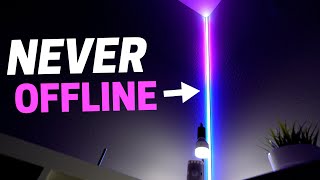
W LED light strips go offline about once a week, requiring manual unplugging and replugging. Solution: plug them into a smart outlet to control power remotely.
Home Assistant can detect when a device is offline and trigger an automation. Use the 'unavailable' status as a trigger, with a delay (e.g., 5 minutes) to avoid false positives.
The automation kills power to the smart outlet, waits a few seconds, then turns it back on. Add a condition to check if the lights should be on or off after reboot, based on another light's state.
For kitchen smart bulbs, use a smart switch in 'smart bulb mode' that keeps power always on. The switch's paddle becomes a smart button, and the hub can kill power to reboot the bulbs.
When turning off lights, run a script that checks if any bulbs are offline. If so, kill power from the switch, then turn off. When turning on, check if the switch is off, then restore power.
For devices like Apple TV, set an automation triggered when the device is unavailable. The action runs 'core integration reload config entry' to reload the integration, fixing the issue automatically.
Additionally, reload certain integrations on a daily basis to keep the smart home stable and prevent issues.
By implementing these self-healing automations, the smart home remains reliable and requires minimal manual intervention. The creator emphasizes that this approach makes the smart home 'rock solid' and always online.
What status trigger is used in Home Assistant to detect an offline device?
The 'unavailable' status.
01:18
What is the purpose of adding a delay (e.g., 5 minutes) to the offline trigger?
To avoid triggering the automation for brief offline blips that resolve quickly.
01:33
How does the smart switch in smart bulb mode help reboot smart bulbs?
It keeps power always on to the bulbs, and the hub can kill power to reboot them.
03:33
What action is used to reload an integration in Home Assistant?
Run 'core integration reload config entry' and select the integration.
05:42
What is the benefit of the self-healing automations described?
Devices stay online and the smart home requires less manual troubleshooting.
06:09
Detecting Offline Devices
Shows a clever use of the 'unavailable' status to trigger automations, a key concept for self-healing.
01:02Smart Bulb Mode
Explains a smart switch feature that enables remote power cycling for bulbs, solving a common smart home issue.
03:33Integration Reload
Demonstrates a simple yet powerful automation to reload integrations, fixing devices without manual intervention.
05:42[00:04] so why not have the smart home automatically fix itself that's right I have multiple automations that make my smart home self-heal when it breaks this is completely Next Level I'm going to show you how to do it starting first
[00:19] with these W LED light strips and I love these so much the fact that you can do multiple colors at once all the different animations and I cannot see the individual LED lights on them but I don't love how often they go
[00:33] offline it's about once a week and I have to move all this furniture down here unplug them and plug them back in So what I ended up doing is plugging these light strips into a smart outlet that way I don't have to manually unplug
[00:46] them and plug them back in and talk about Peak first world problems right I know I know I'm extremely lazy and you guys can roast me down in the comments problems I create and then solve but it gets better home assistant can detect
[01:02] when a device is offline and trigger an automation from it so that makes it possible for me to create an automation to automatically reboot these light you the automation so for this automation the trigger is when an entity
[01:18] status changes and normally you would have the status be on or off like the light strips turned on trigger something but you can actually choose unavailable as a status and that means that they're offline and you might not want it to
[01:33] immediately trigger right when it goes offline like what if it only went offline for like 5 seconds and then came back online so what you can do is right underneath it it says four and I put 5 minutes now you could do however long
[01:47] you want but if they've been offline for 5 minutes that will trigger this automation so for the actions they're pretty self-explanatory the smart outlet kills power to the light strips Waits a few seconds turns them back on but how
[02:01] do I know if the light strips should be off or on once they reboot well what you can do is add a condition in the actions to see if the light should be on or off
[02:13] and the way I know that is the light strips at my desk if they're on then all condition to check for that and if they're on then the light strips that are rebooting will stay on if the light strips of my desk are off then the light
[02:27] strips that just reboot should turn off pretty easy ever since I added this automation I never see these light strips offline anymore because they're just always working and it's awesome that my smart home just fixes itself but
[02:39] these light strips can be rebooted right away it doesn't bother anybody else but what about some smart light bulbs in the kitchen that needs to be handled differently so let's check that out this is amazing and basically solves all the
[02:53] smart light bulbs can be a little when you want them to that's why I normally go with smart light switches but this changes it this makes it so you can have your cake and eat it too we're
[03:08] talking Max spouse approval Factor I'll be honest I didn't come up with this myself I found out about this from Dave whose house I toured last year in Texas and if you haven't seen that video go check it out he made his own smart light
[03:20] switch but you can do this with an office shelf light switch like I have right here this smart light switch is from inavi and Zeus makes one with very similar features and what what this can do is turn on smart light bulb mode and
[03:33] that will always keep power to the smart light bulbs and makes it so you can't but the paddle switch basically turns into a smart button where you can control the smart light bulbs but here's
[03:46] the thing that makes this all work you can kill power to the smart light bulb from the smart home hub so you can physically turn this light switch on and off still and that will allow you to reboot the smart light bulbs all right
[03:59] so so here's how to make it so the smart light bulbs never go offline whenever you press the off button on the Smart Switch or turn off the lights in the dashboard instead of just running a scene to turn off the smart lights run a
[04:13] script and for this script it checks to see if any of the smart bulbs are offline if so it will kill power from the smart light switch and so that way the lights always turn off no matter what but if all the lights are online it
[04:29] scene then if you want to turn the lights back on you would just check to see if the smart light switch is turned off first if so turn the smart light switch back on to give power back to the smart bulbs and the bulbs should just
[04:44] turn on right away so from your family's perspective the lights are always online because they always turn off and turn back on when they're supposed to it's genius oh and I have this automation that has to do with lights fans or
[04:58] anything you turn on and off in your smart home and it's going to blow your mind on how cool it is I've never seen anybody post about this on YouTube subscribe button with bell notifications turned on cuz you're not going to want
[05:12] automate some device in your smart home like the Apple TV or robot vacuum and it wasn't working the fix was just to reload the integration and then magically it starts working again well what if I told you you never have to do
[05:27] that again you can set up a automation to do it for you here's how I have the automation it's triggered when the Apple TV is unavailable so if it's offline basically the same trigger as I showed in the first automation but then for the
[05:42] in the first automation but then for the action it runs a core integration reload config entry and I just select the Apple TV and that's it now it's fixed ever since I added this automation for devices like my Apple TV they're always
[05:56] online or at least they always appear to be online for me and is made my smart home essentially Rock Solid because everything always works I also set up an automation that reloads certain Integrations on a daily basis and I find
[06:09] that that can help as well but I love that my smart home can fix itself it makes it so much better if you have any questions let me know down in the comments thanks for watching H if I could only automate my
[06:23] family's IT issues wait I got [Music] it hey what's up my iPad isn't working turn the iPad off and on again hey it's working
[06:39] again hey it's working [Music]


⚡ Saved you 0h 06m reading this? Transcribe any YouTube video for free — no signup needed.