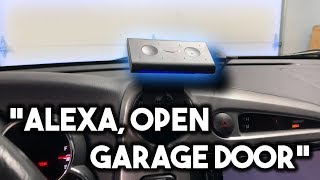

Why I'm Adding Alexa to My Car
42sIt addresses the common frustration of not being able to control Spotify through Apple CarPlay, which resonates with many drivers.
▶ Play Clip"Delivers exactly what the title promises: a hands-on experience adding Alexa to a car, despite some sponsor filler."
In this video, MK Smiles unboxes and tests the Amazon Echo Auto, a device that brings Alexa to the car. His main goals are controlling Spotify playback and triggering smart home actions like opening the garage door, all through voice commands.
MK Smiles introduces the goal of adding Amazon's voice assistant (referred to as 'Amazon's voice assistant' to avoid triggering home devices) to his car.
He wants to control Spotify songs by voice, since CarPlay with Siri doesn't allow this, and also use smart home commands like opening the garage door.
He purchased the Echo Auto during an invitation-only period for $25, noting it is now available to anyone.
The box includes the Echo Auto, a vent mount, a 12V-to-5V adapter, a 3.5mm audio cable, and a microUSB charging cable.
The device has eight microphones on the front and a magnetic back for attaching to the provided mount.
The vent mount is not compatible with his directional vents, but he managed to attach it to the clip anyway. He also powered it via the USB port on his radar detector instead of the included adapter.
He successfully asks Alexa to play 'Taki Taki' from Spotify, confirming the music control feature works as desired.
During a drive with music playing and road noise, the Echo Auto still heard voice commands clearly.
Upon arriving home, he commands Alexa to open the garage door, and it works successfully.
The Amazon Echo Auto delivers on its core promise: adding Alexa to a car for hands-free music control and smart home automation. After testing, MK Smiles is satisfied and plans to continue exploring the device's capabilities.
How many microphones does the Amazon Echo Auto have?
Eight microphones on the front.
03:53
What cables are included with the Echo Auto?
A 3.5mm male-to-male audio cable and a micro USB charging cable.
04:08
What was the price of the Echo Auto during the invitation-only period?
$25.
01:22
How did the creator power the Echo Auto in his car?
He plugged it into the USB port on his radar detector instead of using the included 12V-to-5V adapter.
05:46
What two main features did the creator want to test with Echo Auto?
Controlling Spotify playback and opening smart home garage doors.
00:41
Voice control gap in CarPlay
Explains a practical problem with Apple CarPlay and Siri: no Spotify song control, which Echo Auto solves.
00:41Improvised mounting solution
Shows that the vent mount can be adapted to non-compatible vents, useful for potential buyers.
05:21Spotify playback confirmed
Demonstrates the primary requested feature works correctly with a real command.
06:32Voice recognition under road noise
Proves the device's far-field microphones perform well in noisy car environments.
08:07Garage door automation success
Confirms smart home integration works, making the device useful beyond just music.
09:47[00:01] society met here from MK smiles calm and in this video we're gonna be adding in this video we're gonna be adding Alexa to our car so in this video we're
[00:27] voice assistant I don't want to say her name just so that way I don't trigger my own ones in my house as well as yours at home so we're just gonna call it amazon's voice assistant so we're gonna be adding this to our car so that way we
[00:41] personally the one that I'm looking most forward to is controlling music because I have the iPhone and I have car play in my car but Apple with Syria they don't let you control Spotify until what Spotify song so I'm hoping that I can
[00:56] control the Spotify selection from this device but that's not just the only feature you I'm also excited to use this with my smart homes that way when I pull I'll be able to tell it to open the garage doors we'll have to test that out
[01:09] later and see if that's true so I'm not I don't really know what to expect with this video I kind of just saw this on Amazon's website it said it was invitation only at the time I believe now anyone can purchase it but I was
[01:22] like oh that looks cool and at the time for the invitation it was $25 I don't know what the price is now so I picked this up and this is gonna be my video with my experience of it from start to finish I have no idea what to expect so
[01:34] we'll see how it goes but something that I do know what to expect when I receive an order from PCB why is high quality PCBs so PCB white is your one stop shop for PCB prototyping they do PCB assembly PCB prototype SMD stencil and a bunch
[01:52] times and their customer service is fantastic so you guys can use the code on the screen now to save $5 off your order and you too can have these high quality PCBs which I bet you if we opened up the
[02:07] Amazon echo Auto we'd find a piece of you in here to PCB way is the perfect all the electronics hobbyists out there as well as businesses - so head on over as well as businesses - so head on over to PCB Wacom and pick up a PCB today and
[02:22] I think PCB way for sponsoring this video all right let's go ahead and start opening all of this up so this is the actual Echo Auto here and then with invitation they also provided this like vent mount I don't know if I can use it
[02:37] in my car because my car has like these directional events but go ahead and open directional events but go ahead and open this up first huh oh here it is it's up this up first huh oh here it is it's up top here there we go Oh yep so this is
[03:00] the echo error mountain vent or the echo vent so this is the mount for the Echo vents we'll go ahead and test this out later
[03:13] later I'm Foster right now okay cool so I think it like magnetically attaches to the Echo Auto here and then you can use this rotate it and stick it into your vent we'll take a look at that later and
[03:26] let's get to the actual Echo Auto right here so there's a tab right here oh wow I didn't think they would include this but they actually include like the the
[03:39] adapter for 12 volts to 5 volts that's cool let's see here what else do we got cool let's see here what else do we got okay so you pull this out you have the okay so you pull this out you have the actual Echo Auto over a year open that
[03:53] normally people save this for last but we're starting with it right now okay so on the front you have your eight microphones and then on the back you magnetically attached it that's pretty cool I'll show you guys it in more
[04:08] cool I'll show you guys it in more detail when in a close-up but you also get a 3.5 millimeter cable so male-to-male and you get a micro USB
[04:21] male-to-male and you get a micro USB charging cable right there so yeah it has the echo air mount compatibility on the back and mine is
[04:36] this one right here so the vent won't work or the vent mount won't work my question is how do you attach this oh is there another area right here more stuff
[04:50] that's it huh so one thing that I don't like so far is that there's no way to attach this to the actual dash of your car I was expecting like them to include some type of adhesive or something but it didn't
[05:05] come with this so you I guess you have to figure that out on your own huh I guess we'll have to take a look all right well I'm gonna pull my car into the garage and go get this all set up alright so I got the Amazon echo Auto
[05:21] all mounted up so the instructions it said is not compatible with these types of events but I managed to get it to work I literally just stuck it on the clip and it works and see it magnetically sticks on and it's actually
[05:34] road and going over bumpy roads if it stays but I mean like this it stays and I also lifted this panel and then I ran the wire through here and then it goes
[05:46] here and then it plugs into the USB port on my radar detector I didn't end up on my radar detector I didn't end up using the one that comes with Echo Auto I just used USB port here since it was there and I wasn't using it and I also
[05:59] got the Echo auto all set up so let's go ahead and turn on the car should be our
[06:16] ahead and turn on the car should be our GPS connected which in theory be all GPS connected which in theory be all ready to go okay
[06:32] let's go ahead and try something out alexxa talkie-talkie featuring Selena Gomez Ozuna and cardi B by DJ's snake Selena Gomez ozuna cardi B from Spotify
[06:47] [Music] so my phone is actually connected to the car that's what I'm using in a record so the clip just cut out but basically it did start playing I don't know how far you guys got into it but it works for
[07:00] what I wanted to the main reason and that was to control Spotify so it's cool let's see here what else oh let's go ahead and tell it to open the garage door Alexa cool let's try something else I
[07:35] Alexa cool let's try something else I like so record a video to my to-do list I've put record a video on your to-do list
[07:55] what is the Sharks favorite sandwich peanut butter and jelly fish I like it
[08:07] so far I'm gonna take it for a test drive and see how it works Otto on a quick little test drive to just a nearby parking lot and I gotta
[08:23] say that even with the music practically all the way up it was still able to hear me and I also took it a little bit with other cars and some road noise and it it I didn't get a chance to show you guys around the actual Amazon echo so on this
[08:38] side I think this is either a speaker or a air vent here you have the new mute press it and it'll start listening your command and then on this side there is a
[08:51] command and then on this side there is a 3.5 millimeter and a microUSB port where you plug it in to charge and on the bottom there's nothing just some feet and on this side there's also really nothing let's hope that's not security
[09:04] nothing let's hope that's not security coming nope okay anyway so yeah overall I'm so far happy I mean time will tell if how useful it is or not but I'm excited to test it out overall it's been working pretty well it's doing
[09:18] everything that I originally wanted to when I bought it all I wanted it to do was control Spotify control my smart home and then it's cool so that way when you're driving you're thinking cuz I go on long drives you can like add a soft
[09:31] and stuff so that's gonna be really helpful there I'm gonna insert a clip of pulling up home and then opening the garage door right now alright so I just pulled up home let's go ahead and test out the opening the garage door Alexa
[09:47] out the opening the garage door Alexa second that works now I can go ahead and pull in alright so thank you guys for watching my video on the Amazon echo
[10:01] Auto I'm gonna be playing around with it and seeing what other cool things I can it I can't wait to keep testing it out do Otto I don't believe there you need an invitation anymore I'll leave a link to
[10:15] it in the description below alright thank you guys for watching you have any questions leave in the comment section below or head on over to em kiss - comm slash forum where you guys can ask it there if you're smart man thoose iasts
[10:27] button join the discord the discord link is below if you guys want any smart home kits hit up em kiss rusticana shop peace kits hit up em kiss rusticana shop peace [Music]
⚡ Saved you 0h 10m reading this? Transcribe any YouTube video for free — no signup needed.