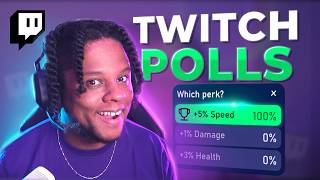

How to Use Twitch Polls with StreamerBot
60sThis segment offers a practical, step-by-step guide on using StreamerBot to create Twitch polls, appealing to streamers looking to boost chat interaction.
▶ Play Clip"Delivers on the promise with both beginner and advanced methods, though some parts are niche."
This video demonstrates how to set up and use Twitch polls effectively, covering both beginner-friendly methods and advanced customization techniques using Streamer.bot and OBS. The creator shares their personal workflow for integrating polls with gameplay, including visual overlays and CSS tweaks.
The video starts with the creator playing Sausage Survivors 2, a game where players choose between three perks, such as +20% max HP or +13% reload speed.
The creator explains the Twitch polling system and how they use it to let chat decide which perk to choose, enhancing viewer engagement.
They create an action called 'Poll Choice Sandbox Survivor' in Streamer.bot, which integrates with Twitch and OBS to launch polls with predefined choices and a 15-second timer.
The creator uses a Stream Deck button to trigger the poll action, though Streamer.bot supports other triggers like chat commands and keyboard shortcuts.
To make perks more visible, they use the Source Clone plugin to duplicate and crop the perk images, creating a 'Perk zoom' toggle action.
They show how to use Twitch's poll overlay URL (popout) and inspect it with F12 to hide unwanted elements via custom CSS, resulting in a clean, transparent overlay.
The creator adds 'display: none' to hide elements and uses hex codes with transparency for a semi-transparent background, adjusting resolution to 400x250.
They briefly mention using a hue rotation shader for fun effects, but note it's optional and not used in the final setup.
The creator acknowledges that this setup is advanced and not for beginners, but suggests that simply cropping the poll overlay is a simpler alternative without custom CSS.
The video provides a comprehensive guide to integrating Twitch polls with Streamer.bot and OBS, offering both simple and advanced methods. The key takeaway is that even complex setups can be simplified with basic cropping, making polls accessible to all streamers.
What is the purpose of using Twitch polls in this video?
To let chat decide which perk to choose in the game Sausage Survivors 2, increasing viewer engagement.
00:31
What tool is used to create and manage the poll action?
Streamer.bot
00:57
What is the default poll duration set by the creator?
15 seconds
01:10
How can you trigger the poll action besides a Stream Deck button?
Via chat command, keyboard shortcut, or other triggers supported by Streamer.bot.
01:24
What plugin is used to duplicate and crop perk images?
Source Clone plugin
02:18
What is the URL format for the Twitch poll overlay?
Pop out, slash your username slash poll.
02:57
What CSS property is used to hide elements in the overlay?
display: none
03:38
What is the recommended resolution for the overlay?
400 by 250
04:37
What is a simpler alternative to custom CSS for the overlay?
Simply cropping the overlay in OBS.
06:36
Streamer.bot Integration
Shows a practical way to automate Twitch polls with external software, enhancing interactivity.
00:57Custom CSS Overlay
Demonstrates how to use browser source and CSS to create a clean, branded poll overlay.
02:43Complexity Acknowledgment
Honest assessment that the setup is advanced, but offers a simpler alternative.
05:39[00:00] in this game without doing anything too fancy. within that game you can find many other games. in that the specific game I was playing is called Sausage Survivors two.
[00:16] get to choose in between three perks to help you out. For example, plus 20% max HP plus 13% reload speed. big advantage of playing this game solo
[00:31] now I had to come up with a method to get chats opinion. In case you don't know, the Twitch polling system is actually pretty simple.
[00:45] That simple. every time we want to launch a poll, especially since we're launching the exact Which perk one, 2 or And that's when streamer bot comes in handy.
[00:57] Twitch and OBS and all I created an action called Poll Choice Sandbox Survivor. If you go to add you go to Twitch you find polls you can create a poll.
[01:10] And then you can add the choices one by or just delete them. I have mine set to 15 seconds. You might notice that I do not have a trigger.
[01:24] Of course, if you don't have a stream deck, streamerbot actually. Supports many, many ways of triggering stuff a chat command, a keyboard shortcut, But in my case, I just used this from a bot plugin.
[01:37] Now I just have to press the Which I'm going to do right now. And then depending on the result, I choose the park in the
[01:52] just have the perks on the screen and Hope that people would be able So at first I was simply reading out the perks before launching the poll, giving people
[02:06] But then later on during the stream, I decided Make the perks And I did that using the source clone plugin.
[02:18] And then I cropped it. I made another action called Perk zoom. I set it to toggle.
[02:31] Which was the second button on my stream actual poll. a visual of the poll on screen.
[02:43] Here's a quick warning I'm going to show light mode on Twitch's website. So on the website it shows you that you can actually get an overlay Or a browser source for the poll,
[02:57] Pop out, slash your username slash poll. if we copy this. And make sure to replace the username with our username and press It's
[03:10] see a bunch of information that we wouldn't want to show on stream, So without going into too much detail, I pressed F12. And then I use the inspector tool here to basically break down each part.
[03:24] If I click once on the right here, it's Div class, whatever the thing that I need in order to get rid of basically when you add it in OBS under the custom CSS
[03:38] Or even in here you could basically inject something like display. And if we go back here we will see that this text disappeared. And then for that bottom and you're good to go.
[03:54] Actually you can see the final result here. You can see it actually supports a little bit of transparency too. This is one of them.
[04:08] names are probably randomly generated and probably won't work for You find it with your F12, you put display none. And then I also added this important thing so it can guarantee override
[04:22] whatever CSS they have in Once I got rid of everything I This is like Don't worry about all those numbers. So that's completely transparent. And then finally that semi-transparent part that you saw.
[04:37] I just added the appropriate hex code, which included transparency. the resolution was right for 400 by 250. we see what it would look So I can go ahead and modify this as much as I want.
[04:53] I don't think this is something that I'm actually going to use, but if you really must know, this is from the shader filter. Shader filter this specific shader is hue rotation shader.
[05:06] yeah, I can turn that off and just get the normal result thing. here is to basically tie in the visual of the pull appearing basically instrument would make it so that when I press to launch the pull,
[05:23] And when I press to hide the magnified perks, also hides the pull. But to be fair, I did not have the visual while I was live streaming, And then we can manage to kill the boss and win the game.
[05:39] For some people, this is actually super complicated And I can definitely understand that. This is not like a beginner. and you're already using some software to control OBS and Twitch.
[05:56] It was just one extra OBS source. Once you're about sub action to show the perks. Now for the more, more advanced people I know I'm going to get comments about,
[06:11] There are a gazillion ways to have much cooler polls that are compatible with more stuff. I've even gotten some pointers from Twitter that I'm going to try
[06:23] nothing is easier than launching a Twitch poll. and on top of that, you already get the visuals. the way, that reminds know I showed this and this seems super complicated
[06:36] Honestly, if you crop it, there you go. All you have to do is just crop it right. and then crop You don't even need to do the custom CSS stuff.
[06:52] I can laugh about, you know?
⚡ Saved you 0h 07m reading this? Transcribe any YouTube video for free — no signup needed.