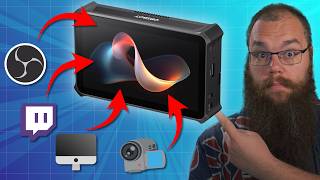

This Tiny Device Could Replace Your Streaming PC
43sThe opening hook challenges the need for a traditional streaming PC, sparking curiosity about the compact alternative.
▶ Play Clip"Title overhyped but device genuinely does replace a stream PC for many cases — here's the nuance."
The Opspot Talent is an all-in-one streaming device that aims to replace a traditional streaming PC with a compact, portable form factor. It combines a multi-input capture card, webcam controller, and built-in scene builder, making it ideal for streamers on the go.
The Opspot Talent is an all-in-one streaming device that can replace a streaming PC. It includes a multi-input capture card, video recording, webcam control, and a built-in scene builder.
The device has a 5.5-inch full HD AMOLED screen for control, two HDMI inputs for 1080p60, a USB 3.0 port for a webcam, mic/headphone jacks, USB-C out, SD card slot, and Ethernet.
The batteries are hot-swappable, so you can change them without interrupting the stream. The device can also run on AC power with included covers.
It integrates with up to three Opspot Tail Air cameras via NDI wirelessly, allowing multi-angle streams or podcasts.
The scene builder lets you add cameras, chat, widgets, and other sources. Recommended to use an overlay from Stream Elements for easier setup.
Recent updates enable multistreaming to Twitch and YouTube simultaneously. Vertical streaming is also supported for TikTok or YouTube Shorts.
Price is $1,999, but the reviewer argues it's cheaper than a full streaming PC setup with all the necessary accessories.
Three use cases: IRL streaming, moving between rooms in the house (cooking, VR), and console streamers upgrading from basic console streaming.
What resolution and frame rate do the HDMI inputs support?
1080p60
00:16
What size is the AMOLED screen?
5.5 inches
00:57
How does the device handle battery power?
It has hot-swappable batteries, so you can swap without interruption, and it can run on AC power.
02:04
How many Opspot Tail Airs can the Talent integrate with?
It can integrate with up to three Opspot Tail Air cameras via NDI.
02:42
What does the multistreaming feature allow?
It allows multistreaming to Twitch and YouTube simultaneously.
03:50
What is the price of the Opspot Talent?
$1,999
04:33
Comprehensive hardware tour
Details all ports and features, showing what you get for the price.
00:57Multistreaming is supported
A key differentiator that lets you reach multiple platforms at once.
03:50Three use cases identified
Provides practical scenarios where this device solves real problems.
04:59Price vs. PC setup comparison
Shows the value proposition by comparing to the cost of a full PC setup.
04:33[00:02] the streaming landscape and has the potential to change it forever. The Elgato Stream Deck, the Go XLR, and now this. This device does everything your streaming PC does in a much smaller
[00:16] packaging. It is a multi-input capture card, records video, a webcam controller, and even comes with its own lightweight scene builder, so you don't even need OBS, and it is completely mobile. But what problem does it solve?
[00:32] And who is it for? This is the Opspot Talent, an all-in-one streaming device. And yes, this video is sponsored by Opspot, who were so kind to send me this unit completely for free. If you are interested in checking this out more and
[00:45] perhaps get one for yourself, then make sure to check the link in the description below. This is an affiliate link, so by using it, you are helping the channel. Thank you and thanks Opbot for sponsoring this video. When you open
[00:57] the box, the first thing that greets you is a 5 1/2 in full HD AMOLED screen. This screen is how you control everything, and Opspot knew that, so they made sure to make it look crisp and feel easy to use. On the side, there are
[01:11] just connectors everywhere. Here, there are two high-speed HDMI connectors, so are two high-speed HDMI connectors, so you can send two, 1080p 60fps signals straight to the device. And on either side, you will also find a USB 3.0 port,
[01:25] which you can hook up to a webcam and get a great image as well, if you really wanted to. Here, have a look. If I take the Opspot Tail Air here and just plug it in, then you can see it appear almost instantaneously on the screen. On the
[01:37] other side, we have the on and off button. very important and two jack external microphone and one for your headset, giving you the capability to monitor your stream in real time. The last side, which is the bottom, gives
[01:51] you access to a USBC out, your SD card slot for internal recording, and your fixed Ethernet line, so you don't have to rely on Wi-Fi, although it can connect to that as well. On the back, we've got two big battery slots, which
[02:04] you can just slide into place with the little LED indicator. The batteries are also completely hot swappable, so if one of them runs dry, you can just switch it out without the device just shutting down. The batteries don't have to be
[02:17] connected if you're using it near a plug, though. You can just use these battery covers, which also give you a little foldable desk stand. One of the nice little features with this is that it integrates incredibly well with other
[02:29] OpSpot products. Press the PTZ button. Uh, there should be a PTZ button here. Ah, there. Press the PTZ button and you can control the PTZ of the camera directly from this device. And since the Opspot Talent can integrate with three
[02:42] different Opspot Tail Airs at the same time through NDI completely wirelessly, you can set up the perfect multi-angle stream or podcast and control it completely just from this device. Okay, enough of that. Now, the important
[02:57] questions for you as a streamer. Here at the bottom, you can see all your cameras, and that also counts as scenes. You can make a new one and add all the sources you would want on the scene and resize them just as you would on your
[03:10] PC, although your screen is probably a little smaller here. So, you can add your chat, your widgets, really anything you want. But because the screen is so small, I would suggest that you have an overlay set up in Stream Elements or
[03:23] need to use one browser source to import it all directly into the HubSpot talent and get it all set up at once without too much fiddling. Editing your overlay on such a small screen can become really, really finicky. When you want to
[03:37] stream directly from the HubSpot, you can just open the stream menu and log you've logged in, you can go live with one or two presses, and you will only get prompted to log in again if you haven't used it for like 30 days or
[03:50] something. A little hidden secret is that in one of the latest updates, Opsbot even allows you to multiream, so you can go live on Twitch and YouTube at the same time. Oh, and if you want to stream vertically instead for something
[04:03] like Tik Tok or YouTube shorts, then you can do that, too. I was surprised that that was even an option. This device really does everything. And contrary to many other devices that try to do everything, it actually does everything
[04:17] really well, which can only mean one thing. Opspot has actually done their best to put highquality components in this device, such as the screen. But that also leads to a problem, a whopping $1,99 price tag. But the thing is, if
[04:33] you had to buy a streaming PC with a multissource capture card, external camera monitor, and all the other things that the OpSpot talent can help you do, you'd be paying a whole lot more. So, if you can afford it and you can find a
[04:46] place for it in your content creation workflow, then I do think this is going to be worth it for you. But is there even any situation where you can use this and where it actually helps solve that problem? Well, I can see three
[04:59] places where this may provide a solution. And first and foremost, it's IRL stream. When you are traveling or you're at a convention, IRL streamers usually walk around with a giant backpack filled to the brim with gear.
[05:11] Computer, battery packs, modems, camera gear, microphones, the list goes on. This doesn't need any of that. You can get a small modem, stick it in your pocket, connect to it with a wire or wirelessly, and then get one of those
[05:24] small mounting feet with the quarterin screw in the bottom. That means you can just mount the Opspot talent on your camera and you are ready to stream. I TwitchCon EU in June and we'll be streaming on the Content Delta Twitch
[05:38] see that happening, then make sure to follow me on twitch.tv/content delta where we stream every Tuesday and Friday from 5:00 p.m. to 11:00 p.m. Central European time. Another solution that I can see is if
[05:52] you stream in different rooms of your house. cooking streams, VR streams in a different room, normal streams and podcasts in different areas, anything like that. For exactly the same reasons as with the IRL streams, you can now
[06:06] move your whole setup without the need to lug around a computer screens or anything like that. Lastly, and I've not heard this one mentioned before, but console streamers. If you are ready to upgrade from just streaming through the
[06:19] console to a higher quality camera, custom overlays, and you do not have the space for a whole PC setup, then this might be a good solution for you. Plug your camera and the console into the OPS spot. Use the USBC to connect it to your
[06:33] TV and you've got yourself an incredible setup that you can just store in your TV cabinet when you are done with it. So, the only question that remains is, is the Opspot Talent worth it? Well, you probably won't believe me when I say yes
[06:45] because this is a sponsored video, but I tried to be unbiased, so here goes. If you are a dedicated desk streamer who never moves your setup and only streams to one platform, this might be overkill. But if you're a content creator who
[07:00] values flexibility, the creator that wants to vlog, do cooking or gym streams, or take their streaming rig abroad without bringing a PC, then this would be a gamecher for you. For some people, this will be the missing piece
[07:15] that transforms their content creation process. For others, it might be a luxury upgrade down the road. But what do you think? Would you use this or is the comments below. And if you're more interested in the Opspot Tail Air, which
[07:29] desk for all eternity, then check out the video right here. And as always, the video right here. And as always, stream better, stream
⚡ Saved you 0h 07m reading this? Transcribe any YouTube video for free — no signup needed.