
FIFINE AM8 Unboxing: First Look at Dynamic Mic
44sUnboxings attract viewers with product reveal and first impressions.
▶ Play Clip"Title hypes the price-sound ratio, but the video delivers a fair, balanced review—neither groundbreaking nor misleading."
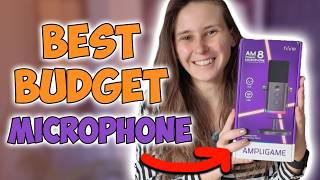
This video provides an unboxing and sound test of the FIFINE AM8 microphone, a dynamic microphone that supports both USB and XLR connections. The creator demonstrates the build quality, accessories, and audio performance of both connection types, offering a balanced assessment for potential buyers.
The FIFINE AM8 is introduced as a USB/XLR dynamic microphone. Unboxing reveals the user guide, stand, and the microphone itself with two knobs and a touch button.
The included cable is USB-C to USB-C with a USB-A adapter, allowing flexibility. Velcro strap aids cable management.
Testing the USB connection: microphone sits 2-6 inches away, talk into the top. The creator recommends a microphone arm for better positioning and reduced desk noise.
Switching to XLR, the audio comes in louder natively. The creator notes potential quality differences but encourages viewers to form their own opinion.
The creator states they are not influencing opinions, but merely showing the product for viewers to decide if it's worth the money.
The FIFINE AM8 offers solid audio quality for its price, with the flexibility of both USB and XLR connections. The creator suggests using a microphone arm for best results and leaves the final verdict to the viewer.
What types of connections does the FIFINE AM8 support?
USB and XLR.
00:01
What is the microphone type of the FIFINE AM8?
Dynamic microphone.
00:13
What is the recommended distance from the microphone when speaking?
2 to 6 inches away.
02:55
Which connection (USB or XLR) produced a louder native output in the test?
XLR connection.
04:36
What accessory does the creator recommend using with the microphone?
A microphone arm.
03:54
USB Audio Sample
Demonstrates the default USB sound quality, which is the primary use case for most buyers.
03:24XLR Volume Difference
Highlights the inherent volume difference between USB and XLR connections, an important technical consideration.
04:36Neutral Review Approach
The creator explicitly avoids influencing opinions, focusing on transparency and viewer autonomy.
05:05[00:01] look at the FIFINE AM8 microphone. This is a USB microphone and an XLR microphone. It's a dynamic microphone, if you're wondering what kind of XLR microphone it
[00:13] is. Let's start with unpacking it, and then we're going to test the audio microphone, so let's see what it can do for its price category. All right.
[00:26] That's actually pretty easy to open. Start out with the FIFINE AM8 user guide. It's a user guide, the manual. Then here we have the stand.
[00:47] Here it is. It has two knobs. a touch button, maybe. On the back there is microphone icon.
[00:59] And at the bottom we have the XLR input, a USB-C input, and a headphone input. The knobs are for microphone volume and headphone volume. On the side we have the logo of FIFINE and on the other side
[01:15] as well. And we have um wind filter / pop filter on top of the microphone, which [snorts] we can remove if we want to to replace it, probably. Which is nice if it gets dirty.
[01:29] Which you It It might It might become dirty if you talk into a a lot, you know. All [snorts] right. And the last thing that's in the box is a USB to USB-C. Oh, no, it's a USB-C to
[01:44] USB-C, actually. But it has this little adapter bit that makes it USB to USB-C. Uh so you can choose if you want to use Uh so you can choose if you want to use USB-C or USB into your PC.
[01:58] because everything is using USB-C nowadays, and my USB-C ports are getting >> [laughter] >> So it's nice to have the option to still >> So it's nice to have the option to still use the USB port as well as USB-C port.
[02:13] And nice for cable management, they have this wrap around um Velcro.
[02:27] >> [laughter] >> That's what's in the box. So I grabbed an XLR cable, so we can try the XLR version, and we can try the USB version. actually going to put this microphone on
[02:42] the microphone stand, which is actually rather simple, I'm guessing. It's just screwing this on. Yeah. Okay. >> It is simple. Simple enough. Um I'm going to test USB version first,
[02:55] because that seems logical. That is the one that comes with it. here, and I'm going to plug this one in my USB port. Nice little blue light sliding up on here now. All right, we need to sit 2 to 6 in away from the
[03:09] microphone. Um I would always do like this, and then it's about like this size. And we need to talk inside the top of All right, let me edit so you can actually hear it. So this is how the
[03:24] FIFINE microphone sounds like. It is on the USB setting right now. There are two knobs here. One of them you can adjust the USB sound, the volume uh of the output of the microphone, and you can also um change the volume of
[03:40] your headphone output. Um so this is how the USB's output Um so this is how the USB's output sounds like. I do recommend getting an microphone arm with it. You can order that with it as well.
[03:54] Uh because then when you game, it's not in the way. It's also closer to your it. Uh you need to talk into this side, by the way, the top side. Uh and also if you tap on the desk, you
[04:07] will hear that less through the microphone. So all these noises are caught less by the microphone than when it's on the table. All right. Let's grab this cable, the XLR cable. Let's plug that in and see
[04:22] the difference, or more like listen to the difference between the sounds. All righty, I included the XLR connection now. And as I can see, it comes in a lot louder than that the USB connection comes into.
[04:36] So this is how it sounds when it's connected with the XLR cable. I'm really curious what the difference is going to be between the XLR connection and the USB connection. I don't know if you're going to hear a difference, but that
[04:51] might be a difference. I mean, this one is clearly louder um natively when I didn't change any settings. Um so that is something to uh consider. I would assume that the XLR connection is going to be better, but
[05:05] I'm not 100% sure. I can't say that for sure I until I listen to it back. And you guys are going to listen to it back, and you form an opinion about it. And I'm not going to try and influence your opinion
[05:20] about it, because I want you guys to make your own opinion about this microphone and see if you think it is worth your money. Because I'm not here to tell you what to buy. I'm here to show you this product
[05:32] and see if you think it is worth your money. I'm just showing you what's out there, and you decide if you think it's nice or >> [laughter] >> That is That's my way of going about
[05:44] >> That is That's my way of going about things. And this is the FIFINE AM8 AM The XLR connection. If you want to get the FIFINE AM8 microphone, you can do that with the links down below in the description. If you want to see some
[05:58] more of my videos, I do have a playlist on more streamer gear up here. I also on more streamer gear up here. I also have a playlist on OBS tutorials, and I >> [laughter] >> I hope to see you in one of my other
[06:12] >> I hope to see you in one of my other videos.
⚡ Saved you 0h 06m reading this? Transcribe any YouTube video for free — no signup needed.