
AI Summary
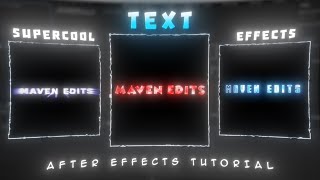
In this After Effects tutorial, the creator demonstrates three distinct text effects using built-in and third-party plugins, offering a quick guide to add visual flair to videos. The effects include fractal noise, BCC textured OBS, and S texture plasma, each with customizable settings.
Chapters
The video promises three cool text effects to make edits go viral, starting with basic text creation in After Effects.
Add fractal noise effect to text, choose fractal type (e.g., basic), hold Alt and click on evolution, paste expression, then add deep glow and drop shadow.
After adding deep glow and drop shadow, the first text effect is ready.
Add BCC textured OBS effect, adjust light source, copy effect settings, adjust ray settings, choose color presets. Optionally add deep glow.
The second text effect is ready after adjusting the BCC textured OBS settings.
Add S texture plasma, copy settings, change color, enable only borders on the first text layer, add drop shadow and deep glow, enable tint with same color and soft light blend mode.
The third text effect is ready. Creator mentions that text effects alone don't guarantee virality; good CC and 3D text are also needed, promoting their store.
The tutorial covers three quick text effects using fractal noise, BCC textured OBS, and S texture plasma, but also hints that additional premium assets from the creator's store can further enhance video edits.
Mentioned in this Video
Tutorial Checklist
Study Flashcards (8)
What is the first step to create the first text effect?
easy
Click to reveal answer
What is the first step to create the first text effect?
Write your text and add fractal noise effect.
00:02
What key do you press while clicking on evolution to paste an expression?
easy
Click to reveal answer
What key do you press while clicking on evolution to paste an expression?
Alt key.
01:03
What two effects are added to complete the first text effect?
easy
Click to reveal answer
What two effects are added to complete the first text effect?
Deep glow and drop shadow.
01:21
Which plugin effect is used for the second text effect?
medium
Click to reveal answer
Which plugin effect is used for the second text effect?
BCC textured OBS.
01:43
What settings are adjusted in BCC textured OBS?
medium
Click to reveal answer
What settings are adjusted in BCC textured OBS?
Light source and ray settings.
01:43
What effect is used for the third text effect?
medium
Click to reveal answer
What effect is used for the third text effect?
S texture plasma.
02:33
How do you ensure only borders are visible for the third effect?
hard
Click to reveal answer
How do you ensure only borders are visible for the third effect?
Enable only borders on the first text layer (the one with fractal noise).
02:46
What blend mode is used for the tint in deep glow for the third effect?
medium
Click to reveal answer
What blend mode is used for the tint in deep glow for the third effect?
Soft light.
03:01
💡 Key Takeaways
Three text effects promise
Sets clear expectation of three distinct effects.
00:02Expression for evolution
Automates noise animation for dynamic effect.
01:03BCC textured OBS usage
Leverages third-party plugin for unique texture.
01:43Store promotion
Indicates that premium assets are needed for full virality.
03:15Full Transcript
[00:02] Want these super cool text effects to make your edits go viral? create these text effects easily in After Effects. First, write your text.
[00:14] After Effects. First, write your text. Now, add the fractal noise effect.
[00:37] choice. You can choose any fractal type, but You can choose any fractal type, but I'll go with basic.
[01:03] Now press alt on your keyboard and click on evolution and paste this expression.
[01:21] Now add deep glow and drop shadow and your first text effect is ready. For the second effect, add BCC textured OBS.
[01:43] Adjust the light source and copy my effect settings.
[01:59] Adjust the ray settings according to your need. presets. Choose any color you like. There are plenty of presets available.
[02:14] And that's it. Your second text effect is ready. You can also add deep glow if you want. For the third text effect, add S texture For the third text effect, add S texture plasma.
[02:33] Copy my settings and change the color according to your liking.
[02:46] the effect from the first text layer. Enable only the borders on that text Enable only the borders on that text layer.
[03:01] drop shadow and deep glow. Enable the tint option in deep glow. Choose the tint option in deep glow. Choose the same color as your text and change the blend mode to soft light. And you're done. Your third text effect
[03:15] is ready. But text effects alone can't make your edits go viral. To truly go viral, you'll need good CC, 3D text, and more. But don't worry, you'll find all more. But don't worry, you'll find all the premium editing stuff in my store.
[03:33] Here you'll find all the editing stuff like CC, 3D text, text effects, and much more. I'll leave a link to my store in the description.